

upd
Update dependencies across a polyglot repository—locally, safely, and in one command.
Python · Node.js · Rust · Go · Ruby · .NET · Gradle · Docker · Terraform · Nix flakes · GitHub Actions · pre-commit · Mise



upd gives you one reviewable update plan across mixed stacks. It preserves
hand-written constraints, comments, and formatting; previews every proposed
change before it writes; and runs without a hosted service or repository
onboarding.
Try it now
From any directory inside a Git repository:
uvx upd
That first run is a dry run: it reports what would change and leaves every file
untouched. No repository onboarding or hosted account is required. Review the
plan, then apply it with uvx upd --apply.
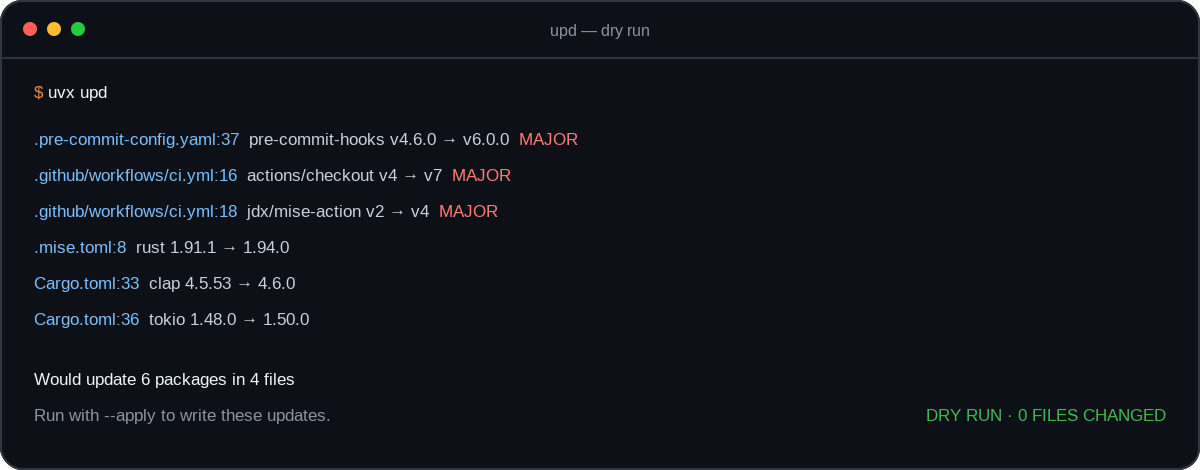
One preview across four file types. Nothing changes until you pass --apply.
Install another way · See every supported file · Compare dependency tools
Why upd
- One command for a mixed stack. Check application dependencies, tool versions, container images, GitHub Actions, pre-commit hooks, and Terraform modules in the same run instead of assembling a different updater for each file type.
- Safe on the first run. Dry-run is the default, constraints and formatting are preserved, and major updates are called out before you decide what to apply.
- Local first, automation ready. Start with an interactive terminal review, then use the same CLI, configuration, stable exit codes, JSON/SARIF output, and rolling PR or MR workflows in CI.
upd is a local checker and editor, not a package manager or a hosted update
bot. It can delegate lockfile refreshes to the package managers already in your
project and can run inside your own GitHub or GitLab automation. A refresh
writes the lockfile without installing packages or syncing an environment;
the exact command per ecosystem, and the one old bun release that is the
exception, are listed under Commands run by --lock. See the
decision guide and dated benchmarks
for an exact comparison with adjacent tools.
For uv projects, upd update --apply --lock runs exactly uv lock after
changing a manifest with an existing lockfile (at the workspace root when
applicable). It passes no flags and never runs uv sync; synchronize your
Python environment separately. Without --lock, a normal update refreshes
neither the lockfile nor the environment. upd audit --fix-audit --apply
refreshes applicable lockfiles by default; --no-lock opts out.
Where upd fits
Choose by the job rather than treating every dependency tool as interchangeable:
| If you need to… | Start with… |
|---|---|
| Preview and edit versions across a mixed-language repository from one local command | upd |
| Resolve, lock, install, and manage a Python environment | uv or PDM |
| Continuously create update branches and PRs across the broadest manager catalog | Renovate or Dependabot |
| Enforce immutable GitHub Actions references as a dedicated policy | pinact or ratchet |
Dated performance evidence
On the committed 18-reference fixture, the verified 2026-08-28 run recorded:
| Workload | upd mean | Same-workload cohort |
|---|---|---|
| Check 12 Python constraints | 134.7 ms | uppd: 269.7 ms |
| Update 12 Python constraints | 138.7 ms | uppd: 250.8 ms |
| Check 6 GitHub Actions | 758.7 ms | taze: 1,019.0 ms; ratchet: 1,029.1 ms |
| Update 6 GitHub Actions | 746.3 ms | taze: 566.3 ms; ratchet: 1,066.8 ms |
Lower is better. These are five-run live-network observations, not universal speed claims. Every timed update was first verified to change all intended references and leave a parseable result. See the full matrix, methodology, variance, commands, and raw JSON.
Features
- Multi-ecosystem: Python, Node.js (npm, pnpm, Yarn and Bun lockfiles), Deno, Rust, Go, Ruby, .NET, Gradle, Docker, Terraform, Nix flakes, GitHub Actions, pre-commit, Mise/asdf
- Dry-run by default: nothing is written without
--apply - Fast: parallel registry requests, with a 24-hour version cache
- Constraint-aware: respects
>=2.0,<3(Python),~> 7.1(Ruby), and^2.0.0/~2.0.0(npm, Cargo) - Format-preserving: keeps formatting, comments, and structure
- Update filters:
--only-bump,--max-bump,--package(exact names or quoted globs such as'shiny*'),--lang,--exclude-lang, or approve one by one with-i - Major warnings: breaking changes are flagged with
(MAJOR) - Pre-release aware: updates pre-releases to newer pre-releases
- Cooldown: hold back releases younger than N days, against supply-chain attacks
- Security auditing: OSV vulnerability scanning with auto-fix and SARIF output
- Check mode: exit 1 if updates are available (for CI and pre-commit)
- Gitignore-aware: honors
.gitignoreand prunes hidden directories, without missing the dotfiles it updates - Private registries: authentication for PyPI, npm, Cargo, Go, and GitHub
- Config file: include or exclude paths, ignore packages, and pin versions via
.updrc.toml
Installation
Homebrew
brew install rvben/tap/upd
From crates.io
cargo install upd

# or with cargo-binstall (faster, pre-built binary)
cargo binstall upd
From PyPI
pip install upd
# or with uv
uv pip install upd
If you installed an earlier release under the old distribution name, migrate
once with pip uninstall upd-cli && pip install upd. The upd-cli command
remains available as a compatibility alias.
From source
git clone https://github.com/rvben/upd
cd upd
cargo install --path .
Usage
# Preview changes without modifying files (default when no --apply)
upd

# Apply updates to files
upd --apply

# Limit to specific files or directories
upd --apply requirements.txt pyproject.toml

# Approve updates one by one
upd -i

# Only the packages you name
upd -p requests,flask

# Select a package family (quote globs so your shell passes them to upd)
upd --package 'shiny*'

# Cap the bump level (allow patch + minor, skip major). Updates above the
# ceiling are reported as held back, never as up to date, and do not
# change the exit code.
upd --max-bump minor

# Restrict to exactly one level (repeatable, comma-separated)
upd --only-bump major

# Write nothing but registry versions at that level: pins, flake revisions
# and other level-less writes are reported as held instead of written
upd --only-bump major --strict-bump

# One ecosystem at a time: python, node, rust, go, ruby, dot-net,
# docker, terraform, nix, actions, pre-commit, mise, annotated
upd --lang python

# Both pre-commit YAML and prek.toml, including supported hook dependencies
upd --lang prek

# Exit 1 if anything is outdated (for CI and pre-commit)
upd --check

# Also reject unsafe or unverifiable dependencies blocked by safety checks
upd --check --fail-on-blocked

# Regenerate lockfiles after writing; a failed refresh rolls its directory back
upd --apply --lock

# Print the effective configuration and exit
upd --show-config
--fail-on-blocked is supported only by upd update or the default upd
invocation. --check --fail-on-blocked exits 1 for safety refusals and 2 for
failed registry requests. Unsupported Docker digest pins and bare pre-commit
commit pins remain not-examined and do not fail this check. Pre-commit pins
with a # frozen: <tag> comment are verified and updated together with that
comment; a mismatch fails the strict check. The reusable workflow's
fail-on-blocked input additionally covers unfixable or skipped version floors
and blocked security relocks; see GitHub Actions.
upd --help lists every flag; Stability
documents the ones that are contractual, and upd schema emits the whole
interface as JSON.
--package accepts exact names and case-sensitive globs using *, ?, and
character classes such as [ab]. Wildcards can cross namespace separators, so
patterns such as '@scope/*' and 'github.com/org/*' work as expected. Quote
globs on the command line to prevent shell expansion. A glob that matches no
package produces a warning without changing the exit code; use repeated or
comma-separated values instead of brace alternation.
Dry-run by default:
updwithout--applyonly previews changes. Pass--applyto write updates.--check,--dry-run, and--interactivedo not require--apply.VCS-root scoping: When no path argument is given,
updscans from the nearest.gitancestor directory rather than the current working directory. This prevents accidental rewrites when CWD is a subdirectory inside a repository.
Commands
upd --version      # Print version
upd self-update    # Check for upd updates
upd clean-cache    # Clear the version cache
upd lock-refresh   # Refresh uv, npm, and Cargo locks within manifest constraints
upd align          # Align versions across files (--check exits 1 on misalignment)
upd audit          # Scan for known vulnerabilities (exit 6 if found)
upd schema         # Machine-readable interface description
For repositories replacing dependency bots, upd also provides separate
reusable GitHub workflows for policy-constrained freshness updates and
validated security-remediation pull requests. See
GitHub dependency pull requests.
Example Output
Six proposed updates across four files
.pre-commit-config.yaml:37: Would update pre-commit/pre-commit-hooks v4.6.0 → v6.0.0 (MAJOR)
.github/workflows/ci.yml:16: Would update actions/checkout v4 → v6 (MAJOR)
.github/workflows/ci.yml:18: Would update jdx/mise-action v2 → v4 (MAJOR)
.mise.toml:8: Would update rust 1.91.1 → 1.94.0
Cargo.toml:33: Would update clap 4.5.53 → 4.6.0
Cargo.toml:36: Would update tokio 1.48.0 → 1.50.0

Would update 6 package(s) (2 major, 3 minor, 1 patch) in 4 file(s), 8 up to date
Output includes clickable file:line: locations (recognized by VS Code, iTerm2,
and modern terminals).
Version Constraints
By default, upd preserves each constraint’s shape. For bounded ranges, it moves
the inclusive lower bound within the existing range and keeps its ceiling.
Exact pins can move to a newer release. To freeze
a package, use [pin] or ignore in .updrc.toml.
| Constraint | Behavior |
|---|---|
>=2.0,<3 |
Updates the lower bound within 2.x; keeps the <3 ceiling |
^2.0.0 |
A complete caret version keeps its caret ceiling |
~2.0.0 |
Keeps the existing tilde constraint’s ceiling |
==2.0.0 |
Updates the exact pin; an exact pin is not a freeze |
==2.0.* |
Checks and reports the series without rewriting it |
Full constraint behavior, including npm
range shapes, Python bump labels and opt-in specifier normalization. Partial npm ranges such as ^1.2 can move
to a new major while preserving the operator and number of components.
Bounds that are not floors
Exclusive lower bounds, upper bounds, exclusions, OR ranges and PEP 440 prefix matches have no single release floor to rewrite. They are still checked and reported: up to date, a warning when outgrown, or an error for unreadable specs. See outcomes and examples.
Annotated Version Pins
Update a version in an otherwise unrecognized file with an annotation:
shinyhub_version: "0.11.16" # upd: pypi shinyhub
Annotation reference: file discovery, Dockerfile rules, linked release checksums, validation and initialization tools.
Version Precision
By default, upd preserves the number of version components already written.
Use --full-precision to output full semver versions instead.
See precision examples.
Version Alignment
upd align --dry-run previews alignment to the highest version already found
across files in the same ecosystem. upd align applies it; upd align --check
exits with status 1 when versions differ. Upper-bound constraints are skipped,
and prerelease versions are ignored when selecting the highest version.
See alignment examples.
Pre-commit Integration
Add upd to your .pre-commit-config.yaml:
repos:
  - repo: https://github.com/rvben/upd-pre-commit
    rev: v0.0.24
    hooks:
      - id: upd-check
        # Optional: only check specific ecosystems
        # args: ['--lang', 'python']
Available hooks:
| Hook ID | Description |
|---|---|
upd-check |
Fail if any dependencies are outdated |
upd-check-major |
Fail only on major (breaking) updates |
Both hooks run on pre-push by default. Uses language: python which installs upd from PyPI automatically, so no manual installation is needed.
Documentation
Everything you look up rather than read lives in docs/.
Version behavior and annotations
Constraint semantics, annotated pins and checksums, version precision, and alignment across files. → docs/versions.md
Releases
Vership workflow, publication guarantees, automated integration pins, and safe retry procedures. → docs/releases.md
Supported files
Every file upd discovers, per ecosystem, plus annotated version pins in files
it does not otherwise understand.
→ docs/ecosystems.md
Comparison and benchmarks
A dated feature matrix for related dependency tools, plus workload-based, reproducible benchmarks that avoid ranking unlike operations. → docs/comparison.md
Security auditing
OSV vulnerability scanning, --fix-audit, SARIF output, and CI integration.
→ docs/audit.md
Security policy
Private vulnerability reporting, supported versions, trust boundaries, and release integrity. → SECURITY.md
Configuration file
.updrc.toml discovery order and every key it accepts.
→ docs/configuration.md
Cooldown (minimum release age)
Hold back versions published less than N days ago, per ecosystem or per language,
and keep --lock refreshes to the same cooldown.
→ docs/configuration.md#cooldown-minimum-release-age
Caching
Where the 24-hour version cache lives and how to clear or bypass it. → docs/configuration.md#caching
Environment variables
Every variable upd reads, in one table.
→ docs/configuration.md#environment-variables
Private repositories
Credential detection for PyPI, npm, Cargo, Go, and GitHub, including private
indexes declared in pyproject.toml.
→ docs/private-registries.md
GitHub pull requests
Run any supported dependency updates as one rolling GitHub PR, with immutable Action SHA verification, validation, artifact reporting, and opt-in auto-merge. → docs/github-actions.md
GitLab merge requests
Run scheduled dependency updates as one rolling GitLab MR, with validation, lease-protected branch updates, and explicitly opt-in GitLab-native auto-merge. → docs/gitlab.md
Stability
The stable CLI surface, exit codes, --lock commands, and output guarantees.
→ docs/stability.md
Development
# Build
make build

# Run tests
make test

# Lint
make lint

# Format
make fmt

# All checks
make check
License
MIT
1 maintainer

Metadata
1 maintainer
Release files for upd 0.18.7
For a detailed explanation of source distributions (sdists) and built distributions (wheels), please see the package formats documentation.
Source distribution (sdist)
| File | Size | Uploaded | Provenance | Actions |
|---|---|---|---|---|
| upd-0.18.7.tar.gz | 1.5 MB | Without provenance | Details for upd-0.18.7.tar.gz |
Built distributions (wheels)
| File | Actions Reset | |||
|---|---|---|---|---|
| upd-0.18.7-py3-none-win_amd64.whl | Python 3 | none | Windows x86-64 | Details for upd-0.18.7-py3-none-win_amd64.whl |
| upd-0.18.7-py3-none-musllinux_1_2_x86_64.whl | Python 3 | none | Linux musl 1.2+ x86-64 | Details for upd-0.18.7-py3-none-musllinux_1_2_x86_64.whl |
| upd-0.18.7-py3-none-manylinux_2_17_x86_64.manylinux2014_x86_64.whl | Python 3 | none | Linux glibc 2.17+ x86-64 | Details for upd-0.18.7-py3-none-manylinux_2_17_x86_64.manylinux2014_x86_64.whl |
| upd-0.18.7-py3-none-manylinux_2_17_aarch64.manylinux2014_aarch64.whl | Python 3 | none | Linux glibc 2.17+ ARM64 | Details for upd-0.18.7-py3-none-manylinux_2_17_aarch64.manylinux2014_aarch64.whl |
| upd-0.18.7-py3-none-macosx_11_0_arm64.whl | Python 3 | none | macOS 11.0+ ARM64 | Details for upd-0.18.7-py3-none-macosx_11_0_arm64.whl |
| upd-0.18.7-py3-none-macosx_10_12_x86_64.whl | Python 3 | none | macOS 10.12+ x86-64 | Details for upd-0.18.7-py3-none-macosx_10_12_x86_64.whl |
Total release size: 44.4 MB
Release files / upd-0.18.7.tar.gz
| Download URL | upd-0.18.7.tar.gz |
|---|---|
| Size | 1.5 MB |
| Tags | Source |
|
SHA-256 checksum How to use checksums |
05cee44e2e18392c47780ff8e2efa78803584ce2ebbfb7710e47e7031d200f2c
|
|
BLAKE2b-256 checksum How to use checksums |
c9ad7f94bac37d6bd8eb7b2d07a3e753579bb3362c2cd3df7b8fa048fa8d5802
|
| Upload date | |
|
Uploaded using Trusted Publishing? What is trusted publishing? |
No |
| Uploaded via |
twine/7.0.0 CPython/3.12.3
|
Release files / upd-0.18.7-py3-none-win_amd64.whl
| Download URL | upd-0.18.7-py3-none-win_amd64.whl |
|---|---|
| Size | 6.6 MB |
| Tags | Python 3 Windows x86-64 |
|
SHA-256 checksum How to use checksums |
66c9a982ff266948cf55285e9563cf496bb0e1048ca447b96cd9f8154731fcaf
|
|
BLAKE2b-256 checksum How to use checksums |
41b896af5f93ffd53dfada660bc7e6ddb9e3d1474f1841a18d19d770e6133f28
|
| Upload date | |
|
Uploaded using Trusted Publishing? What is trusted publishing? |
No |
| Uploaded via |
twine/7.0.0 CPython/3.12.3
|
Release files / upd-0.18.7-py3-none-musllinux_1_2_x86_64.whl
| Download URL | upd-0.18.7-py3-none-musllinux_1_2_x86_64.whl |
|---|---|
| Size | 8.2 MB |
| Tags | Linux musl 1.2+ x86-64 Python 3 |
|
SHA-256 checksum How to use checksums |
116eefc90338978634099d737c7ca07a0cc5ef5d7505534d80db6e501d8c0e04
|
|
BLAKE2b-256 checksum How to use checksums |
20ba03beb56a8d643ff3a50aa65bb8b8c01c8dbcfdfd23418136916621994226
|
| Upload date | |
|
Uploaded using Trusted Publishing? What is trusted publishing? |
No |
| Uploaded via |
twine/7.0.0 CPython/3.12.3
|
Release files / upd-0.18.7-py3-none-manylinux_2_17_x86_64.manylinux2014_x86_64.whl
| Download URL | upd-0.18.7-py3-none-manylinux_2_17_x86_64.manylinux2014_x86_64.whl |
|---|---|
| Size | 8.3 MB |
| Tags | Linux glibc 2.17+ x86-64 Python 3 |
|
SHA-256 checksum How to use checksums |
8e75d6893e2df414e8b82d29276843b97b4a1ecf164d6ea7c0a5e7eb20aa3789
|
|
BLAKE2b-256 checksum How to use checksums |
2aba8ae0cfa8b4a65f6b6725ad1c5f4c00a1d2d2eaa6b2c684fa17f9eba0ca21
|
| Upload date | |
|
Uploaded using Trusted Publishing? What is trusted publishing? |
No |
| Uploaded via |
twine/7.0.0 CPython/3.12.3
|
Release files / upd-0.18.7-py3-none-manylinux_2_17_aarch64.manylinux2014_aarch64.whl
| Download URL | upd-0.18.7-py3-none-manylinux_2_17_aarch64.manylinux2014_aarch64.whl |
|---|---|
| Size | 8.2 MB |
| Tags | Linux glibc 2.17+ ARM64 Python 3 |
|
SHA-256 checksum How to use checksums |
b61e4d4a1f71af871582c2a4505b15fda1a88b1620c29736d4c5f3144fa8e949
|
|
BLAKE2b-256 checksum How to use checksums |
c1cd663d66d2563aa133788bd36799f225808a2cb29f98e2cb0fe033c309ed79
|
| Upload date | |
|
Uploaded using Trusted Publishing? What is trusted publishing? |
No |
| Uploaded via |
twine/7.0.0 CPython/3.12.3
|
Release files / upd-0.18.7-py3-none-macosx_11_0_arm64.whl
| Download URL | upd-0.18.7-py3-none-macosx_11_0_arm64.whl |
|---|---|
| Size | 5.6 MB |
| Tags | Python 3 macOS 11.0+ ARM64 |
|
SHA-256 checksum How to use checksums |
204e2908582371ca81b76638421917a6e3926b085abc701edde9fc77c1071b83
|
|
BLAKE2b-256 checksum How to use checksums |
310c1c6c325643b7de6de259a6bc25570b63655e12d5c4a7a9cafaeed23e1009
|
| Upload date | |
|
Uploaded using Trusted Publishing? What is trusted publishing? |
No |
| Uploaded via |
twine/7.0.0 CPython/3.12.3
|
Release files / upd-0.18.7-py3-none-macosx_10_12_x86_64.whl
| Download URL | upd-0.18.7-py3-none-macosx_10_12_x86_64.whl |
|---|---|
| Size | 6.0 MB |
| Tags | Python 3 macOS 10.12+ x86-64 |
|
SHA-256 checksum How to use checksums |
472f795e3c5f5a00f4d15258de835c8294175e7f4f2d4b0471a6c60fed7cc34e
|
|
BLAKE2b-256 checksum How to use checksums |
79a4e329e49a7f651a77d5d718bc1631f7c9d9b87fe99f8fde23caf4e9717584
|
| Upload date | |
|
Uploaded using Trusted Publishing? What is trusted publishing? |
No |
| Uploaded via |
twine/7.0.0 CPython/3.12.3
|
Security for upd 0.18.7
Provenance
Provenance describes where a file came from. On PyPI, provenance is shared via attestations, which provide a verifiable record of the build or publishing details. View details, limitations and caveats.
No provenance found
None of the files in this release were uploaded with provenance metadata.
A note on package security
PyPI is a repository for distributing packages, not a service for auditing them. While third-party security researchers and our staff do their best to detect and remove malicious packages, PyPI cannot guarantee the quality, security or suitability of any given package.
To learn more about protecting yourself from malicious actors, visit our package security documentation.














