
An open-source NLP framework that offers high-level wrappers designed for effortless launch, enhanced reproducibility, superior control, and unmatched flexibility for your experiments.

Project description



UrarTU 🦁
Harness the power of UrarTU, a versatile ML framework meticulously designed to provide intuitive abstractions of familiar pipeline components. With a .yaml file-based configuration system, and the added convenience of seamless slurm job submission on clusters, UrarTU takes the complexity out of machine learning, so you can focus on what truly matters! 🚀
Installation
Getting Started with UrarTU is a Breeze! 🌀 Simply do
pip install urartu
Or follow these steps to install from the source:
- Clone the repository:
git clone git@github.com:tamohannes/urartu.git - Navigate to the project directory:
cd urartu - Execute the magic command:
pip install -e .
Adding a dash of convenience! ✨ Once you've executed the previous command, you'll also have an alias conjured, granting you easy access to UrarTU from any directory within your operating system:
urartu --help
The Structure
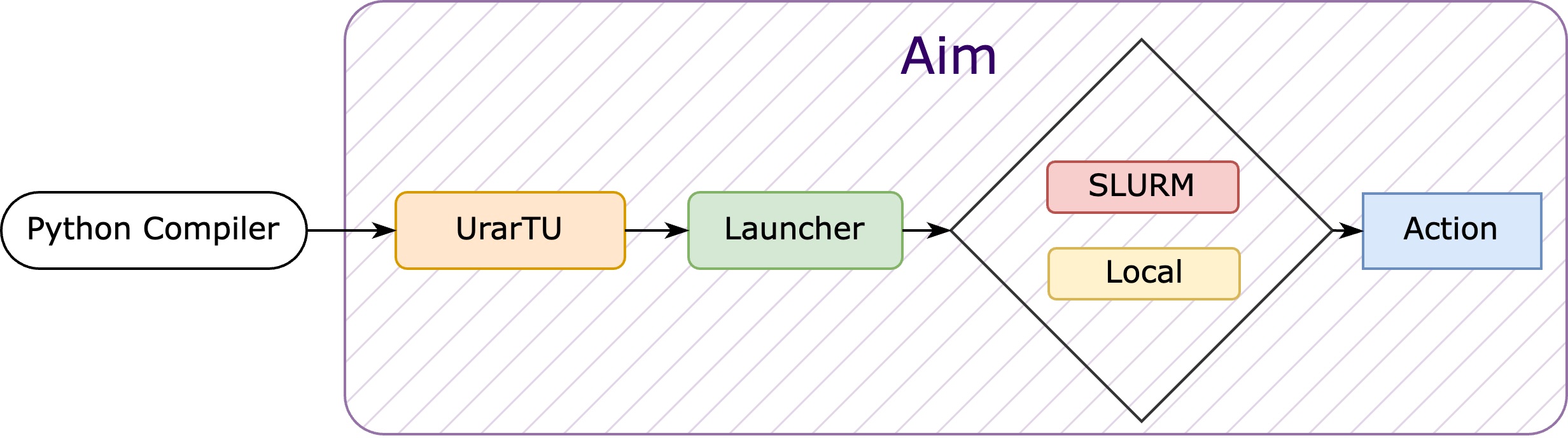
Think of UrarTU as a project insantiator. It simplifies project creation by offering high-level abstractions, yaml-based file configuration, and slurm job management. It also includes essential features for machine learning pipelines, such as dataset reading, model loading, device handling and more.
Urartu features a registry where you can manage your project (a Python module) and execute its actions using the urartu command.
To register a project simply run:
urartu register --name=example --path=PATH_TO_EXAMPLE_MODULE
Here, we register a module named example located at PATH_TO_EXAMPLE_MODULE.
To remove a module from the registry, simply run:
urartu unregister --name=example
To see the available modules, use the command urartu -h. Under the launch command, you’ll find a list of all registered modules.
Navigating the UrarTU Architecture
Within UrarTU lies a well-organized structure that simplifies your interaction with machine learning components.
Configs: Tailoring Your Setup
The default configs which shape the way of configs are defined under urartu/config directory:
urartu/config/main.yaml: This core configuration file sets the foundation for default settings, covering all available keys within the system.urartu/config/action_configDirectory: A designated space for specific action configurations.
Crafting Customizations
Tailoring configurations to your needs is a breeze with UrarTU. You have two flexible options:
-
Custom Config Files: To simplify configuration adjustments, UrarTU will read the content of your inherited module in
configsdirectory where you can store personalized configuration files. These files seamlessly integrate with Hydra's search path. The directory structure mirrors that ofurartu/config. You can define project-specific configurations in specially named files. For instance, anexample.yamlfile within theconfigsdirectory can house all the configurations specific to your 'example' project, with customized settings.- Personalized User Configs: To further tailor configurations for individual users, create a directory named
configs_{username}at the same level as theconfigsdirectory, where{username}represents your operating system username. The beauty of this approach is that there are no additional steps required. Your customizations will smoothly load and override the default configurations, ensuring a seamless and hassle-free experience. ✨
The order of precedence for configuration overrides is as follows:
urartu/config,configs,configs_{username}, giving priority to user-specific configurations. - Personalized User Configs: To further tailor configurations for individual users, create a directory named
-
CLI Approach: For those who prefer a command-line interface (CLI) approach, UrarTU offers a convenient method. You can enhance your commands with specific key-value pairs directly in the CLI. For example, modifying your working directory path is as simple as:
urartu action_config=example action_config.workdir=PATH_TO_WORKDIR
Choose the method that suits your workflow best and enjoy the flexibility UrarTU provides for crafting custom configurations.
Actions: Shaping Functionality
Central to UrarTU's architecture is the Action class. This foundational script governs all actions and their behavior. From loading CLI arguments to orchestrating the main function of a chosen action, the action_name parameter plays the pivotal role in this functionality.
Effortless Launch
With UrarTU, launching actions becomes a breeze, offering you two distinctive pathways. 🚀
- Local Marvel: The first route lets you run jobs on your local machine – the very platform where the script takes flight.
- Cluster Voyage: The second option invites you to embark on a journey to the slurm cluster. By setting the
slurm.use_slurmconfiguration inconfig/main.yamlwhich takes boolean values, you can toggle between these options effortlessly.
Experience the freedom to choose your launch adventure, tailored to your needs and aspirations!
And just like that, you're all set to embark on your machine learning journey with UrarTU! 🌟 If you run into any hiccups along the way or have any suggestions, don't hesitate to open an issue for assistance.
Example Project
For a sample project see Getting Started Guide
Exploring the Experiments
Unveiling Insights with Ease! 🔍 UrarTU, pairs up with Aim, a remarkable open-source AI metadata tracker designed to be both intuitive and potent. To dive into the wealth of metrics that Aim effortlessly captures, simply follow these steps:
- Navigate to the directory housing the .aim repository.
- Execute the command that sparks the magic:
aim up
Behold as your experiments come to life with clarity and depth! Aim brings your data to the forefront, and with it, the power to make informed decisions and chart new territories in the realm of machine learning. 📈
Release history Release notifications | RSS feed


Download files
Download the file for your platform. If you're not sure which to choose, learn more about installing packages.
Source Distribution
Built Distribution
Filter files by name, interpreter, ABI, and platform.
If you're not sure about the file name format, learn more about wheel file names.
Copy a direct link to the current filters
File details
Details for the file urartu-2.0.28.tar.gz.
File metadata
- Download URL: urartu-2.0.28.tar.gz
- Upload date:
- Size: 35.7 kB
- Tags: Source
- Uploaded using Trusted Publishing? No
- Uploaded via: twine/6.0.1 CPython/3.12.8
File hashes
| Algorithm | Hash digest | |
|---|---|---|
| SHA256 |
e28c613b6d6448bee2a53374e22ed9db85fdbb39c2cd794635f59b11f01255c9
|
|
| MD5 |
0c6288a4fbcfab4784d6af6183422cfa
|
|
| BLAKE2b-256 |
a5c3c5f4c79bc2742f62c3bdd275d89a3ca5f2d917da129f67241781ffd34890
|
File details
Details for the file urartu-2.0.28-py3-none-any.whl.
File metadata
- Download URL: urartu-2.0.28-py3-none-any.whl
- Upload date:
- Size: 42.0 kB
- Tags: Python 3
- Uploaded using Trusted Publishing? No
- Uploaded via: twine/6.0.1 CPython/3.12.8
File hashes
| Algorithm | Hash digest | |
|---|---|---|
| SHA256 |
455273512c4df9e2ed3972ba1f4bc8b5b5cd0ffe6a7553a83bcf23007f7f8b6e
|
|
| MD5 |
9c97a561ef80d6ad7a07e3fa22263972
|
|
| BLAKE2b-256 |
213de8f511a7c1f8ee56159e0c7278a3194c50187385180b5e7afb5328d4a025
|






