
An open-source NLP framework that offers high-level wrappers designed for effortless launch, enhanced reproducibility, superior control, and unmatched flexibility for your experiments.

Project description



🚀 New Release Available! We're excited to announce a new version of our project! 🎉 Our README.md is currently being updated to reflect all the fantastic changes. In the meantime, please explore the release notes and dive in. We'd love to hear your feedback! ❤️
UrarTU 🦁
Welcome to UrarTU, your go-to NLP framework designed to simplify your work. UrarTU provides easy-to-use abstractions for common pipeline components, making your machine learning journey smoother.
With a .yaml file-based configuration system and seamless slurm job submission capabilities on clusters, UrarTU removes the technical hassle so you can focus on making impactful NLP work! 🚀
Installation
Getting started with UrarTU is super easy! 🌀 Just run:
pip install urartu
Or, if you prefer to install directly from the source:
- Clone the repository:
git clone git@github.com:tamohannes/urartu.git`
- Navigate to the project directory:
cd urartu
- Execute the magic command:
pip install -e .
And just like that, you're all set! ✨ Use the following command anywhere in your system to access UrarTU:
urartu --help
Getting started
To jump right in with UrarTU, start with our starter_template. You can copy this to begin your project or check out the steps in our Starter Template Setup. Your setup will mirror what's found in this directory.
Think of UrarTU as the foundational framework for your projects, similar to an abstract class in object-oriented programming (OOP).
Your project acts as the concrete implementation, where UrarTU provides the foundational scaffolding.
It includes high-level abstractions, configuration through .yaml files powered by Hydra, and slurm job management utilizing the Submitit library.
This setup ensures your projects are both flexible and robust, making your machine learning workflow efficient and scalable.
It also includes key NLP features such as dataset readers, model loaders, and device handlers.
Here's how to get started:
- Extend UrarTU: Inherit the structure of UrarTU and customize it by writing your own actions and configurations, akin to implementing methods from an abstract class in OOP.
- Utilize Core Functionalities: Jumpstart your project with pre-defined functionalities:
- Datasets:
- Load a HF (Hugging Face) dataset from a dictionary, a file, or directly from the HF hub.
- Models:
- Use a HF model as a causal language model or integrate it into a pipeline.
- Incorporate the OpenAI API for advanced modeling.
- Datasets:
- Customize Further: Develop and place your own classes within the corresponding directories of your project to meet your specific needs.
By following these steps, you can efficiently set up and customize your machine learning projects with UrarTU.
Firing Up 🔥
Once you've cloned the starter_template, head over to that directory in your terminal:
cd starter_template
To launch a single run with predefined configurations, execute the following command:
urartu action_config=generate aim=aim slurm=slurm
If you're looking to perform multiple runs, simply use the --multirun flag. To configure multiple runs, add a sweeper at the end of your generate.yaml config file like this:
...

hydra:
  sweeper:
    params:
      action_config.task.model.generate.num_beams: 1,5,10
This setup initiates 3 separate runs, each utilizing different num_beams settings to adjust the model's behavior.
Then, start your multi-run session with the same command:
urartu action_config=generate aim=aim slurm=slurm
With these steps, you can effortlessly kickstart your machine learning experiments with UrarTU, whether for a single test or comprehensive multi-run analyses!
Navigating the UrarTU Architecture
Dive into the structured world of UrarTU, where managing NLP components becomes straightforward and intuitive.
Configs: Tailoring Your Setup
Set up your environment effortlessly with our configuration templates found in the urartu/config directory:
urartu/config/main.yaml: This primary configuration file lays the groundwork with default settings for all system keys.urartu/config/action_configThis space is dedicated to configurations specific to various actions.
Crafting Customizations
Configuring UrarTU to meet your specific needs is straightforward. You have two easy options:
-
Custom Config Files: Store your custom configuration files in the configs directory to adjust the settings. This directory aligns with
urartu/config, allowing you to maintain project-specific settings in files likegenerate.yamlfor yourstarter_templateproject.- Personalized User Configs: For an even more tailored experience, create a
configs_{username}directory at the same level as configs, replacing{username}with your system username. This setup automatically loads and overrides default settings without extra steps. ✨
- Personalized User Configs: For an even more tailored experience, create a
Configuration files are prioritized in the following order: urartu/config, starter_template/configs, starter_template/configs_{username}, ensuring your custom settings take precedence.
-
CLI Approach: If you prefer using the command-line interface (CLI), UrarTU supports enhancing commands with key-value pairs directly in the CLI, such as:
urartu action_config=example action_config.experiment_name=NAME_OF_EXPERIMENT
Select the approach that best fits your workflow and enjoy the customizability that UrarTU offers.
Actions: Shaping Functionality
At the heart of UrarTU is the Action class, which orchestrates all operations. This script manages everything from CLI arguments to the execution of the main function based on the action_name parameter.
Logging: Capture Every Detail
UrarTU is equipped with a comprehensive logging system to ensure no detail of your project’s execution is missed. Here’s how it works:
- Standard Runs: Every execution is meticulously logged and stored in a structured directory within your current working directory. The path format is:
.runs/${action_name}/${now:%Y-%m-%d}_${now:%H-%M-%S} - Debug Mode: If the debug flag is enabled, logs are saved under:
.runs/debug/${action_name}/${now:%Y-%m-%d}_${now:%H-%M-%S} - Multi-run Sessions: For runs involving multiple configurations or tests, logs are appended with a
.runs/debug/${action_name}/${now:%Y-%m-%d}_${now:%H-%M-%S}_multirunsuffix to differentiate them.
Each run directory is organized to contain essential files such as:
- output.log: Captures all output from the run.
- notes.md: Allows for manual annotations and observations.
- cfg.yaml: Stores the configuration used for the run.
Additional files may be included depending on the type of run, ensuring you have all the data you need at your fingertips.
Effortless Launch
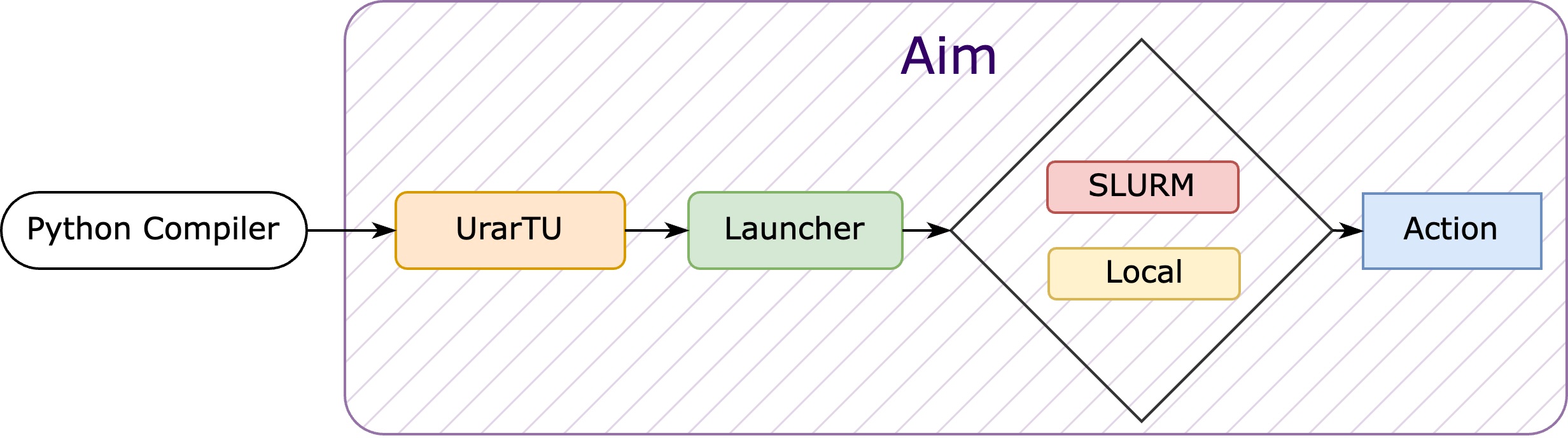
Launching with UrarTU is a breeze, offering you two launch options:
- Local Marvel: Execute jobs right on your local machine.
- Cluster Voyage: Set sail to the slurm cluster by toggling the
slurm.use_slurminconfig_{username}/slurm/slurm.yamlto switch between local and cluster executions.
Choose your adventure and launch your projects with ease! 🚀
Encountered any issues or have suggestions? Feel free to open an issue for support.
Exploring the Experiments
Unveil insights with ease using UrarTU in partnership with Aim, the intuitive and powerful open-source AI metadata tracker. To access a rich trove of metrics captured by Aim, simply:
- Navigate to the directory containing the .aim repository.
- Fire up the magic with:
aim up
Watch as Aim brings your experiments into sharp relief, providing the clarity needed to drive informed decisions and pioneering efforts in machine learning. 📈
Release history Release notifications | RSS feed


Download files
Download the file for your platform. If you're not sure which to choose, learn more about installing packages.
Source Distribution
Built Distribution
Filter files by name, interpreter, ABI, and platform.
If you're not sure about the file name format, learn more about wheel file names.
Copy a direct link to the current filters
File details
Details for the file urartu-3.1.11.tar.gz.
File metadata
- Download URL: urartu-3.1.11.tar.gz
- Upload date:
- Size: 30.0 kB
- Tags: Source
- Uploaded using Trusted Publishing? No
- Uploaded via: twine/6.1.0 CPython/3.13.3
File hashes
| Algorithm | Hash digest | |
|---|---|---|
| SHA256 |
897908a88780498bfb0ee612c0d8e0158c17c6dd74a6fff20fbd54dd79fe910e
|
|
| MD5 |
9918e10a6ea28f4841338b054db9797f
|
|
| BLAKE2b-256 |
b49236d8e684474f683355574fdd1a60e9e9fc7aed6ed6a388eedc228bfc8617
|
File details
Details for the file urartu-3.1.11-py3-none-any.whl.
File metadata
- Download URL: urartu-3.1.11-py3-none-any.whl
- Upload date:
- Size: 35.3 kB
- Tags: Python 3
- Uploaded using Trusted Publishing? No
- Uploaded via: twine/6.1.0 CPython/3.13.3
File hashes
| Algorithm | Hash digest | |
|---|---|---|
| SHA256 |
87d3bba59732d3206f8ecde863703f9992f595add7aa6b568e5b462d566df75b
|
|
| MD5 |
459e3d570eafa0e2150cb2720a409a3b
|
|
| BLAKE2b-256 |
d74bbb52be71fc8d0c798943c40497b5a12359925422d0ce86c3e111a1e765ad
|






