
An open-source NLP framework that offers high-level wrappers designed for effortless launch, enhanced reproducibility, superior control, and unmatched flexibility for your experiments.

Project description



🚀 Latest Enhancements - Performance & Memory Powerhouse! We're excited to share major performance and memory management improvements! 🎉
🆕 Revolutionary Features:
- 🔄 Pipeline System: The breakthrough feature - chain Actions into intelligent workflows
- 💾 Universal Action Caching: Every Action caches automatically - never recompute identical configurations
- 🔗 Explicit Dependencies: Clear, configurable data flow between Actions using
depends_on - 🏭 Batch Processing: 3-10x speedup with intelligent batch inference and parallelization
- 🧠 Smart Memory Management: Automatic OOM prevention and recovery for large models
- 📋 Device Inheritance: Pipeline-level device settings with Action-level overrides
- 🛡️ Fault Tolerance: Graceful degradation and automatic fallbacks
Ready to build next-generation ML pipelines? Let's dive in! ❤️
Urartu 🦁
The intelligent ML Pipeline Framework that chains actions into powerful workflows!
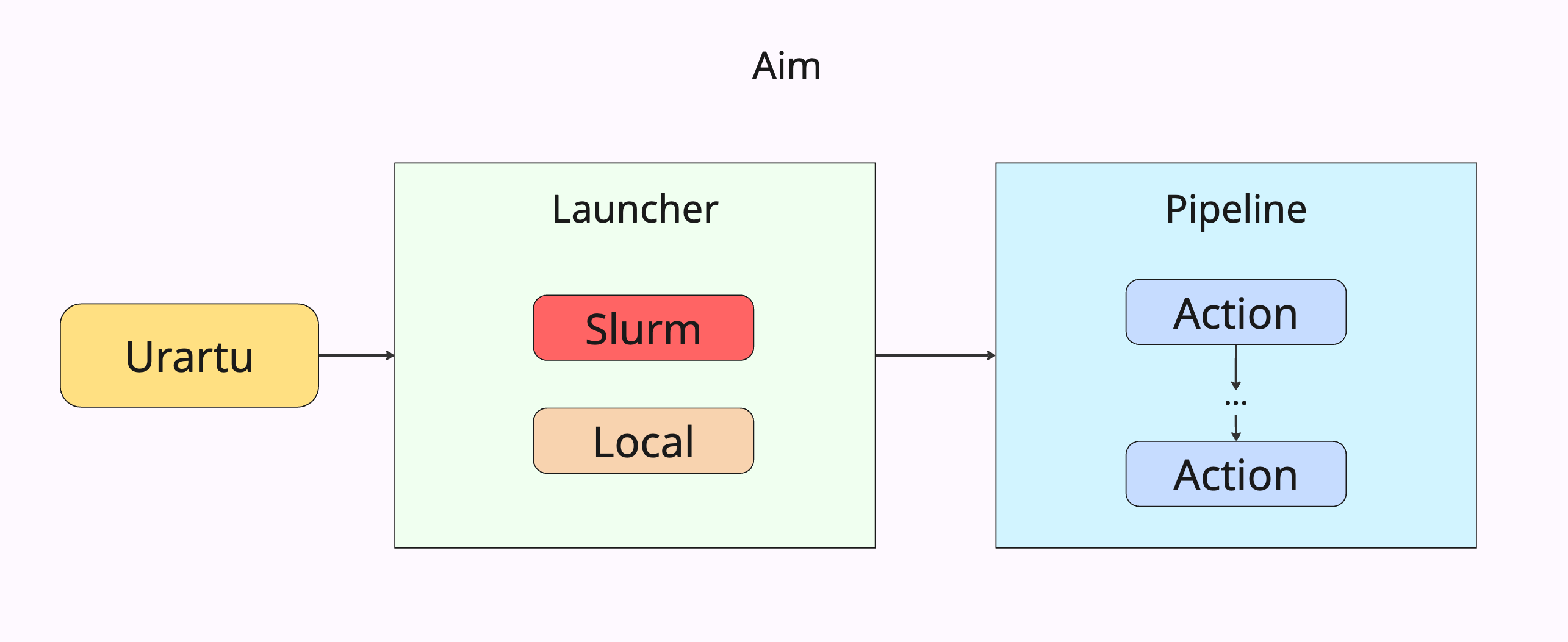
Welcome to Urartu, the revolutionary framework that transforms how you build machine learning workflows. At its core is the Pipeline System - a breakthrough approach that lets you chain individual Actions into sophisticated, automated workflows.
🎯 Core Improvements: Pipelines = Sequences of Actions
- Each Action is a self-contained, reusable component with built-in caching
- Pipelines orchestrate multiple Actions in sequence with automatic data flow
- Universal Caching ensures no computation ever repeats across your entire workflow
With a .yaml file-based configuration system and seamless slurm job submission capabilities on clusters, Urartu removes the technical hassle so you can focus on building impactful ML workflows! 🚀
Installation
Getting started with Urartu is super easy! 🌀 Just run:
pip install urartu
Or, if you prefer to install directly from the source:
- Clone the repository:
git clone git@github.com:tamohannes/urartu.git`
- Navigate to the project directory:
cd urartu
- Execute the magic command:
pip install -e .
And just like that, you're all set! ✨ Use the following command anywhere in your system to access Urartu:
urartu --help
🔄 The Pipeline System - Core Innovation
Urartu's breakthrough feature: Transform sequences of ML operations into intelligent, automated workflows!
What is a Pipeline?
A Pipeline is a sequence of Actions that automatically manage data flow, caching, and execution order. Each Action is a self-contained component with built-in caching that can be chained together to create sophisticated ML workflows.
┌─────────────┐    📄 outputs   ┌─────────────┐    📄 outputs    ┌─────────────┐
│   Action 1  │ ──────────────▶ │   Action 2  │ ──────────────▶ │   Action 3  │
│ Data Prep   │                 │ Model Train │                 │ Evaluation  │
│ 💾 cached   │                 │ 💾 cached   │                  │ 💾 cached   │
└─────────────┘                 └─────────────┘                 └─────────────┘
Key Concepts
🔗 Actions: Self-contained, reusable components that:
- Perform a specific ML task (data processing, training, evaluation, etc.)
- Provide built-in caching (never recompute the same configuration)
- Declare explicit outputs for consumption by subsequent actions
- Support intelligent memory management and fault tolerance
🔄 Pipelines: Orchestrators that:
- Chain multiple Actions in sequence
- Automatically manage data flow between Actions using explicit dependencies
- Inherit and propagate configuration across all Actions
- Are themselves Actions (enabling unlimited nesting and reusability!)
💾 Universal Caching: Every Action and Pipeline:
- Automatically caches results based on configuration
- Skips execution if cached results exist and are valid
- Provides persistent cache directories that survive across runs
- Enables rapid iteration and development cycles
Getting Started
To jump right in with Urartu's Pipeline System:
1. Quick Start with Starter Template
# Copy the starter template to begin your project
cp -r starter_template my_ml_project
cd my_ml_project
2. Understanding the Architecture
Think of Urartu as providing the foundational framework for your ML workflows:
- Actions: Individual tasks (data prep, training, evaluation) - like methods in OOP
- Pipelines: Workflow orchestrators that chain Actions - like classes that compose methods
- Configurations: YAML-based setup powered by Hydra
- Execution: Local or
slurmcluster deployment using Submitit
3. Core Functionalities Available
- Datasets: Load HF datasets from dictionaries, files, or HF hub
- Models: HF causal language models, pipeline integration, OpenAI API support
- Device Management: Intelligent CPU/GPU handling with automatic inheritance
- Memory Management: Automatic OOM prevention and recovery for large models
- Batch Processing: High-performance parallel execution with configurable batching
4. Creating Your First Pipeline
# config/action_config/my_pipeline.yaml
action_name: my_pipeline

pipeline_config:
  device: cuda
  actions:
    - action_name: data_preprocessing
      # ... data prep config ...

    - action_name: model_training
      depends_on:
        data_preprocessing:
          processed_data: dataset.data_files
      # ... training config ...
By following these steps, you can efficiently build powerful, automated ML workflows with Urartu's Pipeline System.
Firing Up 🔥
Once you've cloned the starter_template, head over to that directory in your terminal:
cd starter_template
To launch a single run with predefined configurations, execute the following command:
urartu action_config=generate aim=aim slurm=slurm
If you're looking to perform multiple runs, simply use the --multirun flag. To configure multiple runs, add a sweeper at the end of your generate.yaml config file like this:
...

hydra:
  sweeper:
    params:
      action_config.task.model.generate.num_beams: 1,5,10
This setup initiates 3 separate runs, each utilizing different num_beams settings to adjust the model's behavior.
Then, start your multi-run session with the same command:
urartu action_config=generate aim=aim slurm=slurm
With these steps, you can effortlessly kickstart your machine learning experiments with Urartu, whether for a single test or comprehensive multi-run analyses!
Navigating the Urartu Architecture
Dive into the structured world of Urartu, where managing NLP components becomes straightforward and intuitive.
Configs: Tailoring Your Setup
Set up your environment effortlessly with our configuration templates found in the urartu/config directory:
urartu/config/main.yaml: This primary configuration file lays the groundwork with default settings for all system keys.urartu/config/action_configThis space is dedicated to configurations specific to various actions.
Crafting Customizations
Configuring Urartu to meet your specific needs is straightforward. You have two easy options:
-
Custom Config Files: Store your custom configuration files in the configs directory to adjust the settings. This directory aligns with
urartu/config, allowing you to maintain project-specific settings in files likegenerate.yamlfor yourstarter_templateproject.- Personalized User Configs: For an even more tailored experience, create a
configs_{username}directory at the same level as configs, replacing{username}with your system username. This setup automatically loads and overrides default settings without extra steps. ✨
- Personalized User Configs: For an even more tailored experience, create a
Configuration files are prioritized in the following order: urartu/config, starter_template/configs, starter_template/configs_{username}, ensuring your custom settings take precedence.
-
CLI Approach: If you prefer using the command-line interface (CLI), Urartu supports enhancing commands with key-value pairs directly in the CLI, such as:
urartu action_config=example action_config.experiment_name=NAME_OF_EXPERIMENT
Select the approach that best fits your workflow and enjoy the customizability that Urartu offers.
🏗️ Building Blocks: Actions & Pipelines
Actions: The Foundation
At the heart of Urartu is the Action class - individual, self-contained components that:
- 🎯 Single Purpose: Each Action performs one specific ML task
- 💾 Built-in Caching: Every Action automatically caches its results based on configuration
- 📤 Explicit Outputs: Actions declare what they produce via
get_outputs()method - 🔧 Configurable: Fully customizable via YAML configuration files
- 🔄 Reusable: Use the same Action across different pipelines with different configs
Pipelines: The Orchestrators 🔄
The Pipeline System is Urartu's game-changing innovation that chains Actions into intelligent workflows:
- 📋 Sequential Execution: Actions run in defined order with automatic dependency management
- 🔗 Explicit Data Flow: Actions declare exactly what they need from previous Actions using
depends_on - 🎯 Full Composability: Pipelines ARE Actions - unlimited nesting and reuse possibilities
- 🚀 Universal Caching: ALL Actions (including Pipelines) cache automatically - never recompute with same config
- 📊 Configuration Inheritance: Pipeline-level settings (device, seed) flow to all Actions unless overridden
- 🧠 Memory Management: Automatic cleanup between Actions prevents resource exhaustion
- ♻️ Reusable Components: Build libraries of pipeline building blocks
Pipeline Architecture
Example ML Pipeline (completely flexible - chain any number of actions):
┌─────────────────┐    outputs    ┌─────────────────┐    outputs    ┌─────────────────┐
│ Data            │──────────────▶│ Model           │──────────────▶│ Evaluation      │
│ Preprocessing   │               │ Training        │               │ Metrics         │
└─────────────────┘               └─────────────────┘               └─────────────────┘
                                                                             │ outputs
                                                                             ▼
                                                                    ┌─────────────────┐
                                                                    │ Inference &     │
                                                                    │ Deployment      │
                                                                    └─────────────────┘
How the Pipeline + Caching System Works
🔄 Pipeline Execution Flow
- Action Definition: Each Action inherits from
urartu.common.Actionand implementsget_outputs()method - Cache Check: Before running, each Action checks if cached results exist for its configuration
- Smart Execution: Action either loads from cache (⚡ instant) or runs and saves to cache (💾)
- Output Declaration: Actions return outputs dictionary (model paths, metrics, processed data, etc.)
- Dependency Resolution: Next Actions declare what they need via
depends_onconfiguration - Automatic Injection: Pipeline injects previous Action outputs into dependent Action configs
- Inheritance: Pipeline-level configs (device, seed) inherited by all Actions unless overridden
🔗 Explicit Data Flow Example
# Action 1: Data Constructor (with caching)
- action_name: data_constructor
  seed: 42
  dataset:
    entity_types: [player, movie, city]
  # 💾 Caches outputs: {"data_files": "/path/to/data", "sample_count": 1000}

# Action 2: Model Trainer (with caching + dependencies)
- action_name: model_trainer
  device: cuda                    # Overrides pipeline device
  depends_on:
    data_constructor:
      data_files: dataset.data_files          # Map their output to my config
      sample_count: training.num_samples      # Flexible dot-notation paths
  # 💾 Caches outputs: {"model_path": "/path/to/model.pt", "accuracy": 0.95}
🎯 Behind the Scenes Magic
# What the Pipeline automatically does:

# 1. Check if data_constructor cached results exist
if cache_exists("data_constructor_config_hash"):
    outputs1 = load_from_cache()  # ⚡ Instant loading
else:
    outputs1 = data_constructor.run()  # 🔄 Run and cache
    save_to_cache(outputs1)

# 2. Inject outputs into next action's config
model_trainer.config.dataset.data_files = outputs1["data_files"]         # "/path/to/data"
model_trainer.config.training.num_samples = outputs1["sample_count"]     # 1000

# 3. Check if model_trainer cached results exist
if cache_exists("model_trainer_config_hash"):
    outputs2 = load_from_cache()  # ⚡ Instant loading
else:
    outputs2 = model_trainer.run()  # 🔄 Run and cache
    save_to_cache(outputs2)
💾 Caching Benefits for Each Action
- Development: Change one Action's config → only that Action reruns, others load from cache
- Experimentation: Try different hyperparameters → unchanged Actions skip execution
- Debugging: Focus on problematic Actions → working Actions remain cached
- Resource Efficiency: Never waste compute cycles on identical configurations
🎯 Ultimate Composability: Pipelines as Actions
The key innovation: Pipelines inherit from Action, making them fully composable building blocks!
Nested Pipelines
# Use pipelines inside other pipelines
pipeline_config:
  actions:
    - action_name: data_preprocessing
    - action_name: ml_training_pipeline      # This is a pipeline!
    - action_name: evaluation_pipeline       # This is also a pipeline!
    - action_name: deployment
Reusable Pipeline Components
# Create reusable pipeline building blocks
# data_processing_pipeline.yaml
action_name: data_processing_pipeline
pipeline_config:
  actions:
    - action_name: data_cleaning
    - action_name: feature_engineering
    - action_name: data_validation

# main_workflow.yaml - Reuse the data processing pipeline
action_name: main_workflow
pipeline_config:
  actions:
    - action_name: data_processing_pipeline  # Reuse!
    - action_name: model_training
    - action_name: evaluation_pipeline       # Another reusable component
Hierarchical Workflows
Build sophisticated multi-level architectures:
- Level 1: Atomic actions (individual tasks)
- Level 2: Component pipelines (logical groupings)
- Level 3: Master pipelines (complete workflows)
- Level N: Unlimited nesting depth!
Mix and Match Freely
pipeline_config:
  actions:
    - action_name: simple_action           # Regular action
    - action_name: data_pipeline          # Pipeline as action
    - action_name: another_simple_action  # Regular action
    - action_name: complex_pipeline       # Another pipeline
Creating Pipeline Actions
Every pipeline action must implement the get_outputs() method:
from urartu.common import Action

class DataPreprocessing(Action):
    def run(self):
        # Preprocess raw data
        self.processed_data_path = self.preprocess_dataset()
        self.feature_stats = self.compute_statistics()

    def get_outputs(self):
        """Return outputs for pipeline consumption."""
        return {
            "processed_data": str(self.processed_data_path),
            "feature_statistics": self.feature_stats,
            "num_samples": len(self.dataset)
        }

class ModelTraining(Action):
    def run(self):
        # Train model using preprocessed data
        self.model_path = self.train_model()
        self.training_metrics = self.evaluate_training()

    def get_outputs(self):
        """Return outputs for pipeline consumption."""
        return {
            "model_checkpoint": str(self.model_path),
            "training_accuracy": self.training_metrics["accuracy"],
            "loss_history": self.training_metrics["loss_history"]
        }
Pipeline Configuration
Configure pipelines using YAML files that define the action sequence and dependencies:
# config/action_config/ml_pipeline.yaml
action_name: ml_pipeline

pipeline_config:
  experiment_name: "Complete ML Pipeline"
  device: cuda  # Inherited by all actions unless overridden
  seed: 42

  # Pipeline caching configuration
  cache_enabled: true
  force_rerun: false
  cache_max_age_hours: 24

  # Memory management (NEW!)
  memory_management:
    auto_cleanup: true              # Clean up after each action
    force_cpu_offload: true         # Move models to CPU when not in use
    aggressive_gc: true             # Force garbage collection

  # Define the pipeline workflow
  actions:
    # Step 1: Data Preprocessing
    - action_name: data_preprocessing
      dataset:
        source: "raw_data.csv"
        validation_split: 0.2
        normalize: true
      preprocessing:
        remove_outliers: true
        feature_scaling: "standard"
      model:
        batch_size: 16              # Parallelization support

    # Step 2: Model Training (NEW: Explicit dependencies!)
    - action_name: model_training
      device: cuda                  # Override pipeline device if needed
      # NEW: Explicit dependency declaration
      depends_on:
        data_preprocessing:
          processed_data: dataset.data_path    # Map outputs to config paths
          feature_stats: model.feature_stats   # Can map multiple outputs
      model:
        architecture: "transformer"
        hidden_size: 768
        num_layers: 12
        batch_size: 32              # Batch processing optimization
      training:
        epochs: 10
        learning_rate: 1e-4
      # NEW: Action-specific memory management
      memory_management:
        offload_to_cpu: true
        clear_cache_after_batch: true
        max_feature_cache_size: 100

    # Step 3: Evaluation
    - action_name: model_evaluation
      depends_on:
        model_training:
          model_checkpoint: model.path
          training_accuracy: validation.baseline
        data_preprocessing:
          processed_data: dataset.test_data
      metrics: ["accuracy", "f1_score", "auc"]

    # Step 4: Deployment
    - action_name: model_deployment
      depends_on:
        model_training:
          model_checkpoint: deployment.model_path
        model_evaluation:
          accuracy: deployment.performance_score
      deployment:
        performance_threshold: 0.85
        target: "production"
Running Pipelines
Execute pipelines just like individual actions:
# Run the complete ML pipeline
urartu action_name=ml_pipeline

# Force rerun without cache
urartu action_name=ml_pipeline +pipeline_config.force_rerun=true

# Override specific configurations
urartu action_name=ml_pipeline ++pipeline_config.actions[1].training.epochs=20

# Run with multirun for hyperparameter sweeps
urartu --multirun action_config=ml_pipeline pipeline_config.actions[1].training.learning_rate=1e-3,1e-4,1e-5
Advanced Pipeline Features
🔗 Dynamic Dependency System (NEW!):
# Explicitly declare what each action needs from previous actions
- action_name: model_training
  depends_on:
    data_preprocessing:
      processed_data: dataset.data_path        # Map any output to any config path
      feature_stats: model.feature_stats       # Multiple mappings supported
      sample_count: training.num_samples       # Flexible dot-notation paths
🏭 Batch Processing & Parallelization (NEW!):
# Enable high-performance batch processing
model:
  batch_size: 32                    # Process multiple samples simultaneously
  use_parallel: true                # Parallel entity processing
  max_workers: 4                    # Number of parallel workers
  use_parallel_templates: true      # Parallel template construction
🧠 Intelligent Memory Management (NEW!):
# Automatic memory management for large models
memory_management:
  auto_cleanup: true                # Clean up after each action
  force_cpu_offload: true          # Move models to CPU when not in use
  aggressive_gc: true              # Force garbage collection
  # Action-specific settings:
  offload_to_cpu: true            # Offload features to CPU
  clear_cache_after_batch: true   # Clear cache frequently
  layer_by_layer_processing: true # Fallback for OOM situations
  max_feature_cache_size: 100     # Limit cache growth
📊 Device Configuration Inheritance:
pipeline_config:
  device: auto                      # Default for all actions
  actions:
    - action_name: data_prep        # Inherits device: auto
    - action_name: gpu_training
      device: cuda                  # Overrides to use GPU
    - action_name: cpu_postprocess
      device: cpu                   # Overrides to use CPU
Smart Caching:
- Cache keys are generated based on action configuration and input dependencies
- Automatically invalidates when configurations change
- Persistent cache directories survive across runs
- Configurable cache age limits
- Force rerun options for fresh execution
Configuration Inheritance:
# Import base configurations and extend them
defaults:
  - /action_config/base_model@pipeline.model
  - /action_config/datasets/image_classification@pipeline.dataset

# Then override specific fields as needed
pipeline_config:
  dataset:
    batch_size: 64  # Override just the batch size
Pipeline Benefits
- 🔄 Automation: Eliminate manual output management between stages
- 🎯 Ultimate Composability: Pipelines are actions - unlimited nesting and reuse possibilities
- 📊 Reproducibility: Consistent data flow and deterministic execution
- ⚡ Performance: Universal caching system - no action runs twice with same configuration
- 🏭 Parallelization: Batch processing and parallel execution for significant speedups (3-10x)
- 🧠 Memory Management: Automatic memory cleanup prevents OOM errors in large model pipelines
- 🔗 Explicit Dependencies: Clear, configurable data flow between actions via
depends_on - 📋 Device Inheritance: Intelligent device configuration with action-level overrides
- ♻️ Reusability: Build once, use everywhere - create libraries of pipeline components
- 🏗️ Modular Architecture: Compose complex workflows from simple, testable building blocks
- 🔧 Maintainability: Configuration reuse and clear dependencies
- 📈 Scalability: Easy to extend pipelines with new actions or sub-pipelines
- 🧪 Experimentation: Perfect for hyperparameter sweeps and A/B testing
- 🛡️ Fault Tolerance: Graceful degradation and automatic fallbacks for resource constraints
Common Pipeline Patterns
Data Science Workflow:
Data Collection → Cleaning → Feature Engineering → Model Training → Evaluation → Deployment
NLP Pipeline:
Text Preprocessing → Tokenization → Model Training → Fine-tuning → Inference → Analysis
Computer Vision Pipeline:
Image Augmentation → Model Training → Validation → Test Evaluation → Model Optimization
Research Pipeline:
Experiment Setup → Multiple Model Training → Comparative Analysis → Visualization → Report Generation
The Pipeline System transforms Urartu from a single-action executor into a comprehensive workflow orchestration platform, perfect for end-to-end machine learning projects! 🚀
💾 Action-Level Caching: Never Compute Twice
Every Action in Urartu automatically provides intelligent caching - the foundation of efficient ML workflows!
How Action Caching Works
Each Action automatically:
- 🔍 Checks Cache: Before running, generates cache key from configuration
- ⚡ Loads if Available: If cached results exist and are valid, loads instantly
- 🔄 Runs if Needed: If cache miss, executes Action and saves results
- 💾 Saves Automatically: Stores outputs to persistent cache directories
# Example: What happens when you run an Action
@cached_action  # Automatic - no extra code needed!
class ModelTraining(Action):
    def run(self):
        # Your expensive ML training code
        self.model = train_large_model()  # Takes 2 hours

    def get_outputs(self):
        return {"model_path": str(self.model_path)}

# First run: Takes 2 hours, saves to cache
# Second run with same config: Loads in 0.1 seconds! ⚡
Caching Configuration
# Individual Action caching
action_config:
  cache_enabled: true          # Enable/disable caching (default: true)
  force_rerun: false          # Force rerun even if cached (default: false)
  cache_max_age_hours: 24     # Cache validity in hours (default: no expiry)

# Pipeline-level caching
pipeline_config:
  cache_enabled: true          # Enable pipeline-level caching
  force_rerun: false          # Force rerun entire pipeline
  cache_max_age_hours: 24     # Pipeline cache validity
Cache Intelligence
- Configuration-Based Keys: Cache keys automatically generated from Action configuration
- Intelligent Invalidation: Cache automatically expires when configuration changes
- Persistent Storage: Cache directories (
.runs/action_cache/,.runs/pipeline_cache/) survive across runs - Dual-Layer Caching: Actions cache individually + Pipelines cache their orchestration
- Human-Readable Metadata:
.jsonfiles alongside.pklcache files for easy inspection
Development Workflow Magic
# First run: All Actions execute and cache
urartu action=ml_pipeline  # Takes 3 hours

# Change only training hyperparameters
# Second run: Only model_training reruns, data preprocessing loads from cache!
urartu action=ml_pipeline  # Takes 1 hour (2 hours saved!)

# Force rerun specific action
urartu action=ml_pipeline ++pipeline_config.force_rerun=true
Cache Management Commands
# Force rerun a single action (ignores cache)
urartu action=my_action ++action.force_rerun=true

# Force rerun entire pipeline (ignores cache)
urartu action=my_pipeline ++pipeline.force_rerun=true

# Clear cache manually (nuclear option)
rm -rf .runs/action_cache .runs/pipeline_cache
🎯 Result: Never waste compute cycles on identical configurations - focus on what's actually changing!
🚀 Performance & Memory Management
Urartu includes state-of-the-art performance optimizations and memory management features designed for large-scale ML workloads.
Batch Processing & Parallelization
Automatic Batch Inference:
- Process multiple samples simultaneously for 3-8x speedup
- Configurable batch sizes with automatic fallbacks
- Support for both CPU and GPU batch processing
Parallel Entity Processing:
- Process different entity types in parallel using ThreadPoolExecutor
- Configurable number of workers
- Automatic fallback to sequential processing on errors
Configuration Example:
action_config:
  model:
    batch_size: 16                    # Batch size for inference
    use_parallel: true                # Enable parallelization
    max_workers: 4                    # Number of parallel workers
  use_parallel_templates: true        # Parallel template construction
  template_max_workers: 4             # Workers for template construction
🧠 Advanced Memory Management
Intelligent OOM Prevention:
# Comprehensive memory management configuration
memory_management:
  auto_cleanup: true                  # Automatic cleanup after each action
  force_cpu_offload: true            # Move models to CPU when not in use
  aggressive_gc: true                # Force garbage collection

  # Action-specific memory management
  offload_to_cpu: true              # Offload features to CPU to save GPU memory
  clear_cache_after_batch: true     # Clear cache after each batch
  layer_by_layer_processing: true   # Process layers individually on OOM
  max_feature_cache_size: 100       # Limit feature cache growth
Multi-Level OOM Protection:
- Pre-emptive Detection: Monitors GPU memory and adjusts strategy accordingly
- Dynamic Batch Reduction: Automatically reduces batch size when OOM occurs
- Layer-by-Layer Fallback: Processes model layers individually if needed
- Recursive Sample Processing: Handles large batches by intelligent splitting
- Immediate Cleanup: Cleans GPU cache after every operation
Expected Performance Gains:
- Small datasets: 2-4x overall speedup
- Large datasets: 5-10x overall speedup
- GPU workloads: Even higher due to better batch utilization
- Memory efficiency: Handle models up to available GPU memory limits
🛡️ Fault Tolerance Features
Graceful Degradation:
- Automatic fallback from parallel to sequential processing
- Dynamic batch size reduction to prevent crashes
- Layer-by-layer processing for memory-constrained environments
- Comprehensive error handling with detailed logging
Resource Monitoring:
- Real-time GPU memory monitoring
- Automatic strategy adjustment based on available resources
- Warning system for low memory conditions
- Performance tracking and optimization suggestions
Logging: Capture Every Detail
Urartu is equipped with a comprehensive logging system to ensure no detail of your project's execution is missed. Here's how it works:
- Standard Runs: Every execution is meticulously logged and stored in a structured directory within your current working directory. The path format is:
.runs/${action_name}/${now:%Y-%m-%d}_${now:%H-%M-%S} - Debug Mode: If the debug flag is enabled, logs are saved under:
.runs/debug/${action_name}/${now:%Y-%m-%d}_${now:%H-%M-%S} - Multi-run Sessions: For runs involving multiple configurations or tests, logs are appended with a
.runs/debug/${action_name}/${now:%Y-%m-%d}_${now:%H-%M-%S}_multirunsuffix to differentiate them.
Each run directory is organized to contain essential files such as:
- output.log: Captures all output from the run.
- notes.md: Allows for manual annotations and observations.
- cfg.yaml: Stores the configuration used for the run.
Additional files may be included depending on the type of run, ensuring you have all the data you need at your fingertips.
Effortless Launch
Launching with Urartu is a breeze, offering you two launch options:
- Local Marvel: Execute jobs right on your local machine.
- Cluster Voyage: Set sail to the slurm cluster by toggling the
slurm.use_slurminconfig_{username}/slurm/slurm.yamlto switch between local and cluster executions.
Choose your adventure and launch your projects with ease! 🚀
Encountered any issues or have suggestions? Feel free to open an issue for support.
Exploring the Experiments
Unveil insights with ease using Urartu in partnership with Aim, the intuitive and powerful open-source AI metadata tracker. To access a rich trove of metrics captured by Aim, simply:
- Navigate to the directory containing the .aim repository.
- Fire up the magic with:
aim up
Watch as Aim brings your experiments into sharp relief, providing the clarity needed to drive informed decisions and pioneering efforts in machine learning. 📈
Release history Release notifications | RSS feed


Download files
Download the file for your platform. If you're not sure which to choose, learn more about installing packages.
Source Distribution
Built Distribution
Filter files by name, interpreter, ABI, and platform.
If you're not sure about the file name format, learn more about wheel file names.
Copy a direct link to the current filters
File details
Details for the file urartu-4.0.4.tar.gz.
File metadata
- Download URL: urartu-4.0.4.tar.gz
- Upload date:
- Size: 68.8 kB
- Tags: Source
- Uploaded using Trusted Publishing? No
- Uploaded via: twine/6.2.0 CPython/3.13.7
File hashes
| Algorithm | Hash digest | |
|---|---|---|
| SHA256 |
81c6a266836796f741e55ab71a45902785e3f7ac79a3e058f615a03523b39bb7
|
|
| MD5 |
4f97d1749cb705b9beaa05f675dd049a
|
|
| BLAKE2b-256 |
84bcd483dfd3921d43027fe5e805e23147018a830529e39a74832f32f8de5668
|
File details
Details for the file urartu-4.0.4-py3-none-any.whl.
File metadata
- Download URL: urartu-4.0.4-py3-none-any.whl
- Upload date:
- Size: 59.4 kB
- Tags: Python 3
- Uploaded using Trusted Publishing? No
- Uploaded via: twine/6.2.0 CPython/3.13.7
File hashes
| Algorithm | Hash digest | |
|---|---|---|
| SHA256 |
5b4eb6d366c506cee613cd83df8d9493900cf73f9b52abffcdd8fed7ce5905e7
|
|
| MD5 |
2d907299f98ac0e7c9e1a4b4f2529d0f
|
|
| BLAKE2b-256 |
36075b829c3d2f8c5132e5c07109d9400b2f665e646fa7b19156134b3936daa0
|






