
Check username availability across multiple popular platforms

Project description
User Scanner







A powerful Email OSINT tool that checks if a specific email is registered on various sites, combined with username scanning for branding or OSINT — 2-in-1 tool.
Perfect for fast, accurate and lightweight email OSINT
Perfect for finding a unique username across GitHub, Twitter, Reddit, Instagram, and more, all in a single command.
Features
- ✅ Email & username OSINT: check email registrations and username availability across social, developer, creator, and other platforms
- ✅ Dual-mode usage: works as an email scanner, username scanner, or username-only tool
- ✅ Clear results:
Registered/Not Registeredfor emails andAvailable/Taken/Errorfor usernames with precise failure reasons - ✅ Fully modular architecture for easy addition of new platform modules
- ✅ Bulk scanning support for usernames and emails via input files
- ✅ Wildcard-based username permutations with automatic variation generation
- ✅ Multiple output formats: console, JSON, and CSV, with file export support
- ✅ Proxy support with rotation and pre-scan proxy validation
- ✅ Smart auto-update system with interactive upgrade prompts via PyPI
Virtual Environment (optional but recommended)
# create venv
python -m venv .venv
Activate venv
# Linux / macOS
source .venv/bin/activate

# Windows (PowerShell)
.venv\Scripts\Activate.ps1
Installation
# upgrade pip
python -m pip install --upgrade pip

# install
pip install user-scanner
Important Flags
See Important flags here and use the tool powerfully
Usage
Basic username/email scan
Scan a single email or username across all available modules/platforms:
user-scanner -e john_doe@gmail.com   # single email scanning
user-scanner -u john_doe             # single username scanning
Selective scanning
Scan only specific categories or single modules:
user-scanner -u john_doe -c dev # developer platforms only
user-scanner -u john_doe -m github # only GitHub
Bulk email/username scanning
Scan multiple emails/usernames from a file (one email/username per line):
- Can also be combined with categories or modules using
-c,-mand other flags
user-scanner -ef emails.txt     # bulk email scan
user-scanner -uf usernames.txt  # bulk username scan
Library mode for email_scan
Only available for user-scanner>=1.2.0
See full usage (eg. category checks, full scan) guide library usage
- Email scan example (single module):
import asyncio
from user_scanner.core import engine
from user_scanner.email_scan.dev import github

async def main():
    # Engine detects 'email_scan' path -> returns "Registered" status
    result = await engine.check(github, "test@gmail.com")
    json_data = result.to_json() # returns JSON output
    csv_data = result.to_csv()   # returns CSV output
    print(json_data)             # prints the json data

asyncio.run(main())
Output:
{
        "email": "test@gmail.com",
        "category": "Dev",
        "site_name": "Github",
        "status": "Registered",
        "reason": ""
}
Using Proxies
Validate proxies before scanning (tests each proxy against google.com):
user-scanner -u john_doe -P proxies.txt --validate-proxies # recommended
This will:
- Filter out non-working proxies
- Save working proxies to
validated_proxies.txt - Use only validated proxies for scanning
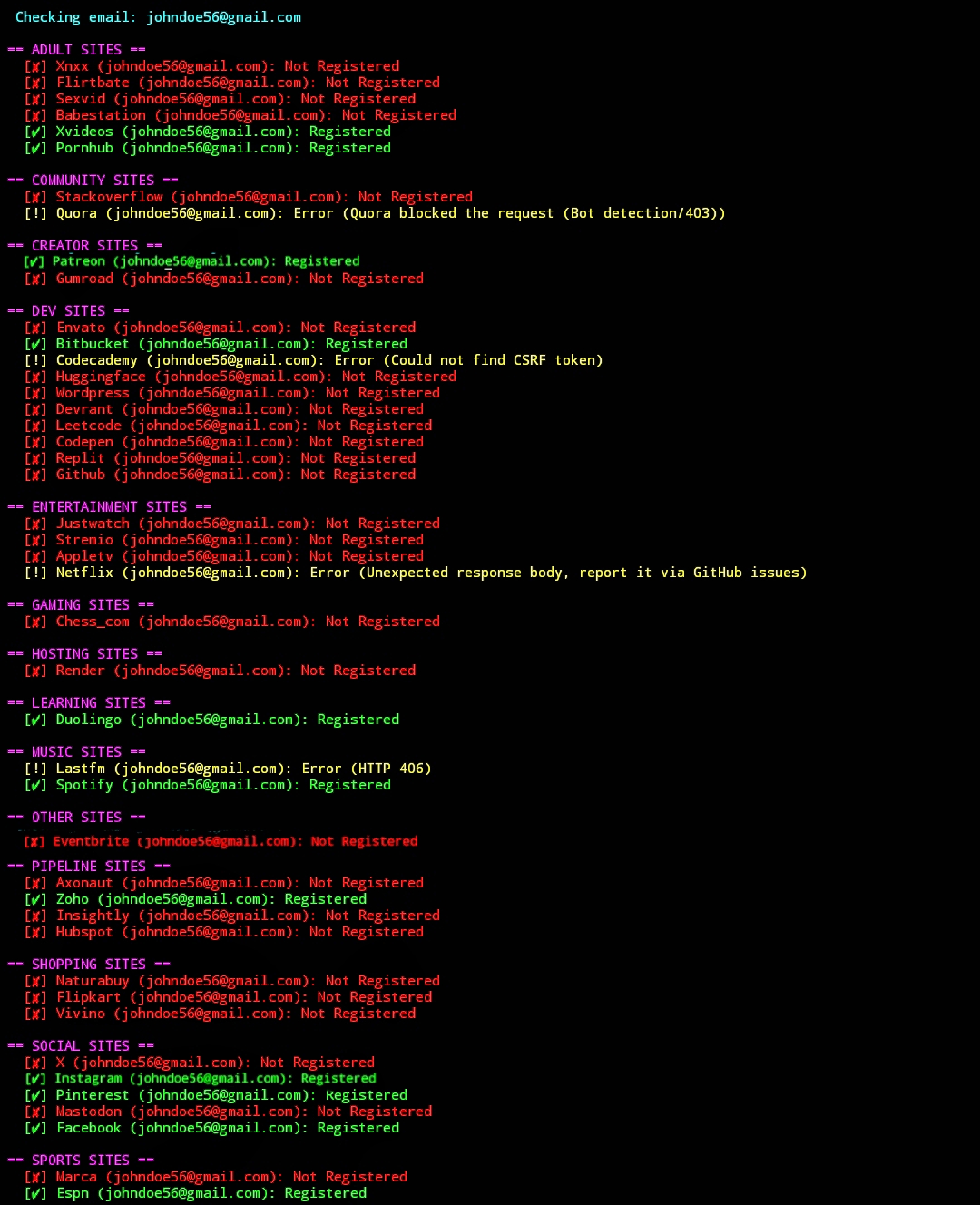
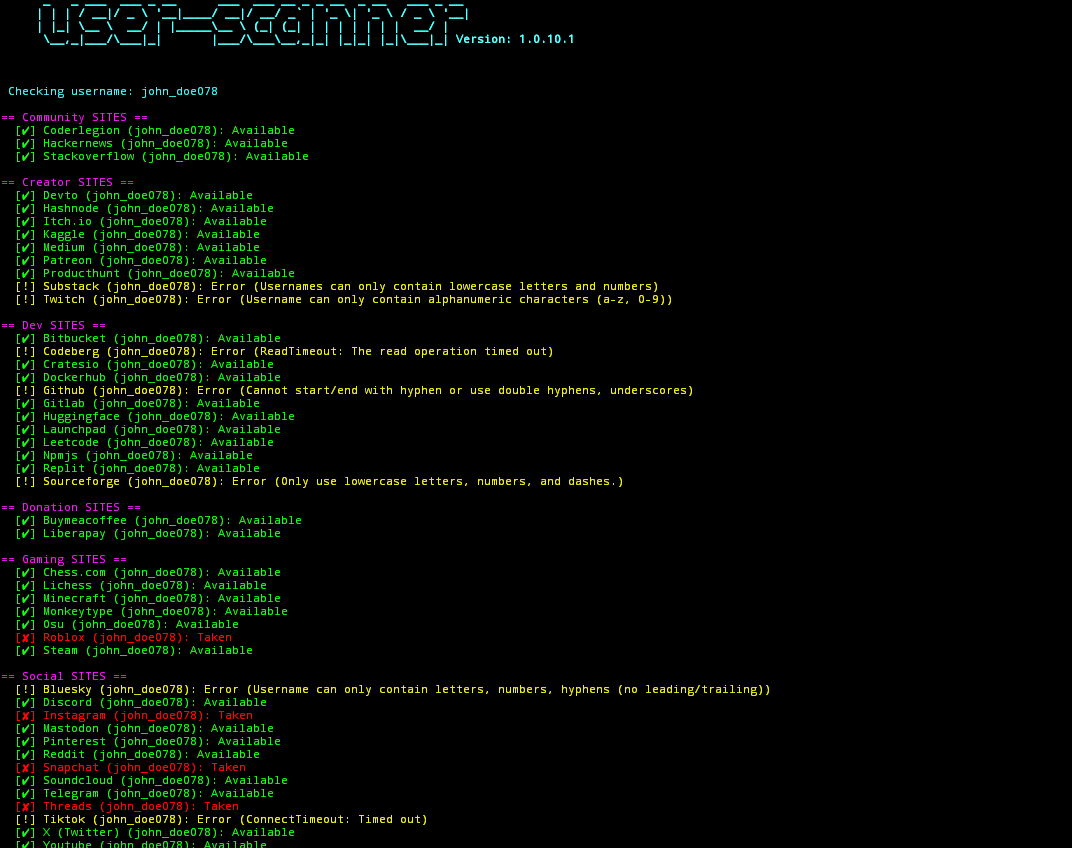
Screenshots:
- Note*: New modules are constantly getting added so screenshots might show only limited, outdated output:
❤️ Support the project
If this project helps you, consider supporting its development:
BTC (SegWit): bc1q0dzkuav8lq9lwu7gc457vwlda4utfcr5hpv7ka
Contributing
Modules are organized under user_scanner/:
user_scanner/
├── email_scan/       # Currently in development
│   ├── social/       # Social email scan modules (Instagram, Mastodon, X, etc.)
|   ├── adult/        # Adult sites
|    ...               # New sites to be added soon
├── user_scan/
│   ├── dev/          # Developer platforms (GitHub, GitLab, npm, etc.)
│   ├── social/       # Social platforms (Twitter/X, Reddit, Instagram, Discord, etc.)
│   ├── creator/      # Creator platforms (Hashnode, Dev.to, Medium, Patreon, etc.)
│   ├── community/    # Community platforms (forums, StackOverflow, HackerNews, etc.)
│   ├── gaming/       # Gaming sites (chess.com, Lichess, Roblox, Minecraft, etc.)
    ...
See detailed Contributing guidelines
Dependencies:
License
This project is licensed under the MIT License. See LICENSE for details.
⚠️ Disclaimer
This tool is provided for educational purposes and authorized security research only.
- User Responsibility: Users are solely responsible for ensuring their usage complies with all applicable laws and the Terms of Service (ToS) of any third-party providers.
- Methodology: The tool interacts only with publicly accessible, unauthenticated web endpoints. It does not bypass authentication, security controls, or access private user data.
- No Profiling: This software performs only basic yes/no availability checks. It does not collect, store, aggregate, or analyze user data, behavior, or identities.
- Limitation of Liability: The software is provided “as is”, without warranty of any kind. The developers assume no liability for misuse or any resulting damage or legal consequences.
🛠️ Troubleshooting
Some sites may return 403 Forbidden or connection timeout errors, especially if they are blocked in your region (this is common with some adult sites).
- If a site is blocked in your region, use a VPN and select a region where you know the site is accessible.
- Then run the tool again.
These issues are caused by regional or network restrictions, not by the tool itself. If it still fails, report the error by opening an issue.
Release history Release notifications | RSS feed


Download files
Download the file for your platform. If you're not sure which to choose, learn more about installing packages.
Source Distribution
Built Distribution
Filter files by name, interpreter, ABI, and platform.
If you're not sure about the file name format, learn more about wheel file names.
Copy a direct link to the current filters
File details
Details for the file user_scanner-1.2.0.6.tar.gz.
File metadata
- Download URL: user_scanner-1.2.0.6.tar.gz
- Upload date:
- Size: 50.8 kB
- Tags: Source
- Uploaded using Trusted Publishing? No
- Uploaded via: python-requests/2.31.0
File hashes
| Algorithm | Hash digest | |
|---|---|---|
| SHA256 |
1cf3832e8d4214dacee551514d03af15a605a8b61e93955ad12f4d081f5313c6
|
|
| MD5 |
a8ebd57eae9aa2c23669b760abf66b89
|
|
| BLAKE2b-256 |
8a3b014e980ac3f8048648740295e3668ac8789c823d8beae4f7c266e85e1a98
|
File details
Details for the file user_scanner-1.2.0.6-py3-none-any.whl.
File metadata
- Download URL: user_scanner-1.2.0.6-py3-none-any.whl
- Upload date:
- Size: 124.3 kB
- Tags: Python 3
- Uploaded using Trusted Publishing? No
- Uploaded via: python-requests/2.31.0
File hashes
| Algorithm | Hash digest | |
|---|---|---|
| SHA256 |
257207ab3797fda43710a9f20c67151a813acc70ce3ddb3268c11b0c5a7bc92b
|
|
| MD5 |
364d8fbd8e1f0c90223c3cd5150f0531
|
|
| BLAKE2b-256 |
51d2b2e20c359ee2b105f70413408126fa17316074d5ac5f1ff93bfaed177b13
|






