
Check username availability across multiple popular platforms

Project description
User Scanner








A powerful 2-in-1 OSINT suite engineered for deep Email and Username Intelligence.
With 295+ total scan vectors—including 110+ email-integrated sites and 185+ username platforms—you can map digital footprints, analyze target behavior, uncover interests, and verify account registrations in seconds.
The ultimate reconnaissance tool for hunting down targets using just an email or username—now fully integrated with Hudson Rock for instant data breach intelligence.
Features
- ✅ Deep Email & Username OSINT: Look up email registrations and perform advanced username profiling across 295+ platforms.
- ✅ Profile Data Extraction: Goes beyond basic availability checks to scrape and extract rich metadata, account details, and digital footprints from target profiles.
- ✅ Dual-Mode Engine: Run targeted email campaigns, massive username sweeps, or simultaneous dual-identifier scans.
- ✅ Granular Status Reporting: Get crystal-clear results (
Registered/Availablefor emails;Found/Not Found/Errorfor usernames) backed by precise exception handling. - ✅ Modular & Extensible: Built on a highly decoupled, modular architecture, adding new platform modules takes just a few lines of code.
- ✅ Mass Bulk Scanning: High-throughput processing for bulk lists of usernames and emails via structured input files.
- ✅ Permutation Generator: Wildcard-based username variation generation to catch typosquatting or alternative aliases.
- ✅ Multi-Format Export: Clean console output paired with structured, automated exports to JSON and CSV for easy pipeline integration.
- ✅ Advanced Proxy Rotation: Built-in proxy pivoting with automated rotation and pre-scan health checks to bypass strict rate-limiting.
- ✅ Smart Auto-Update System: Keeps your signatures and modules fresh with interactive, seamless PyPI update prompts.
Virtual Environment (optional but recommended)
# create venv
python3 -m venv .venv
Activate venv
# Linux / macOS
source .venv/bin/activate

# Windows (PowerShell)
.venv\Scripts\Activate.ps1
Installation
🐍 Via PyPI (Standard Python Setup)
# Upgrade pip to the latest version
python3 -m pip install --upgrade pip

# Install the package globally or in your virtual environment
pip install user-scanner
❄️ Via Nix (Linux & macOS)
# Run the scanner instantly without installing anything permanently
nix run github:kaifcodec/user-scanner/main -- --help

# Drop into a temporary shell where the 'user-scanner' command is active
nix shell github:kaifcodec/user-scanner/main

# (For Developers) Clone the repo and drop into an isolated workspace
nix develop .
Important Flags
See Important flags here and use the tool powerfully
Usage
Basic username/email scan
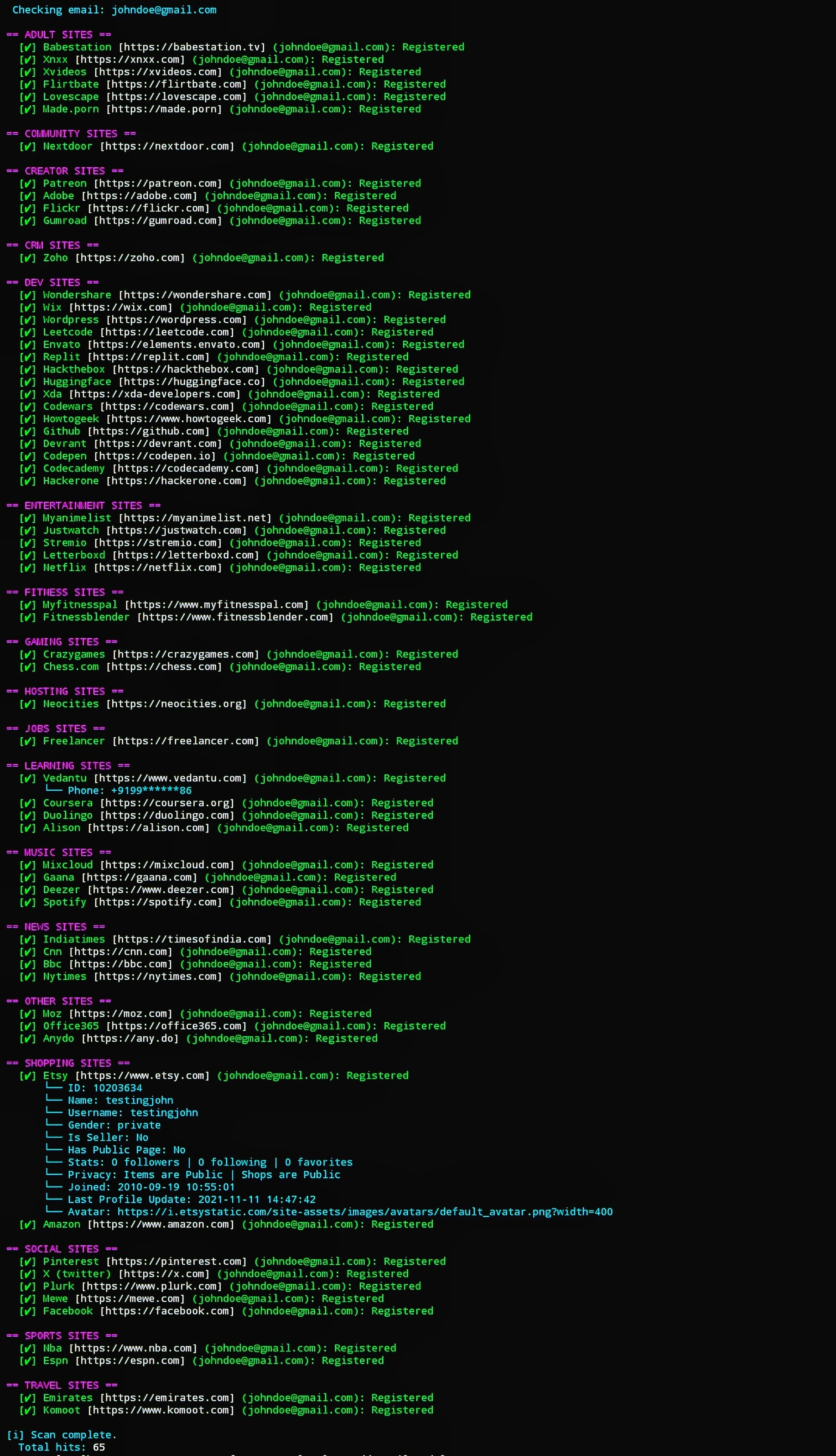
Scan a single email or username across all available modules/platforms:
user-scanner -e johndoe@gmail.com   # single email scanning
user-scanner -u johndoe             # single username scanning
Verbose mode
Use -v flag to show the url of the sites being checked
user-scanner -v -e johndoe@gmail.com -c dev
Output:
  ...
  [✔] Huggingface [https://huggingface.co] (johndoe@gmail.com): Registered
  [✔] Envato [https://account.envato.com] (johndoe@gmail.com): Registered
  [✔] Replit [https://replit.com] (johndoe@gmail.com): Registered
  [✔] Xda [https://xda-developers.com] (johndoe@gmail.com): Registered
  ...
Selective scanning
Scan only specific categories or single modules:
user-scanner -u johndoe -c dev                # developer platforms only
user-scanner -e johndoe@gmail.com -m github   # only GitHub
Bulk email/username scanning
Scan multiple emails/usernames from a file (one email/username per line):
- Can also be combined with categories or modules using
-c,-mand other flags
user-scanner -ef emails.txt     # bulk email scan
user-scanner -uf usernames.txt  # bulk username scan
Pattern generation
See Pattern Syntax for more details
Library mode for email_scan
Only available for user-scanner>=1.2.0
See full usage (eg. category checks, full scan) guide library usage
- Email scan example (single module):
import asyncio
from user_scanner.core import engine
from user_scanner.email_scan.shopping import etsy

async def main():
    # Engine detects 'email_scan' path -> returns "Registered" status
    result = await engine.check(etsy, "test@gmail.com")
    json_data = result.to_json() # returns JSON output
    csv_data = result.to_csv()   # returns CSV output
    print(json_data)             # prints the json data

asyncio.run(main())
Output:
{
  "email": "test@gmail.com",
  "category": "Shopping",
  "site_name": "Etsy",
  "status": "Registered",
  "url": "https://www.etsy.com",
  "extra": {
    "id": 98832,
    "name": "test123",
    "username": "test123",
    "gender": "private",
    "is_seller": "No",
    "has_public_page": "No",
    "stats": "0 followers | 0 following | 0 favorites",
    "privacy": "Items are Public | Shops are Public",
    "joined": "2010-09-19 05:04:06",
    "last_profile_update": "2020-07-31 01:40:24",
    "avatar": "https://i.etsystatic.com/site-assets/images/avatars/default_avatar.png?width=400"
  },
  "reason": ""
}
Using Proxies
Validate proxies before scanning (tests each proxy against google.com):
user-scanner -u johndoe -P proxies.txt --validate-proxies # recommended
This will:
- Filter out non-working proxies
- Save working proxies to
validated_proxies.txt - Use only validated proxies for scanning
Support the project
If this project helps you, consider supporting its development: GitHub Sponsor
Sponsors
Huge thanks to our amazing sponsors who support the development of user-scanner!

@soxoj |
Screenshots:
Note: Screenshots might be outdated
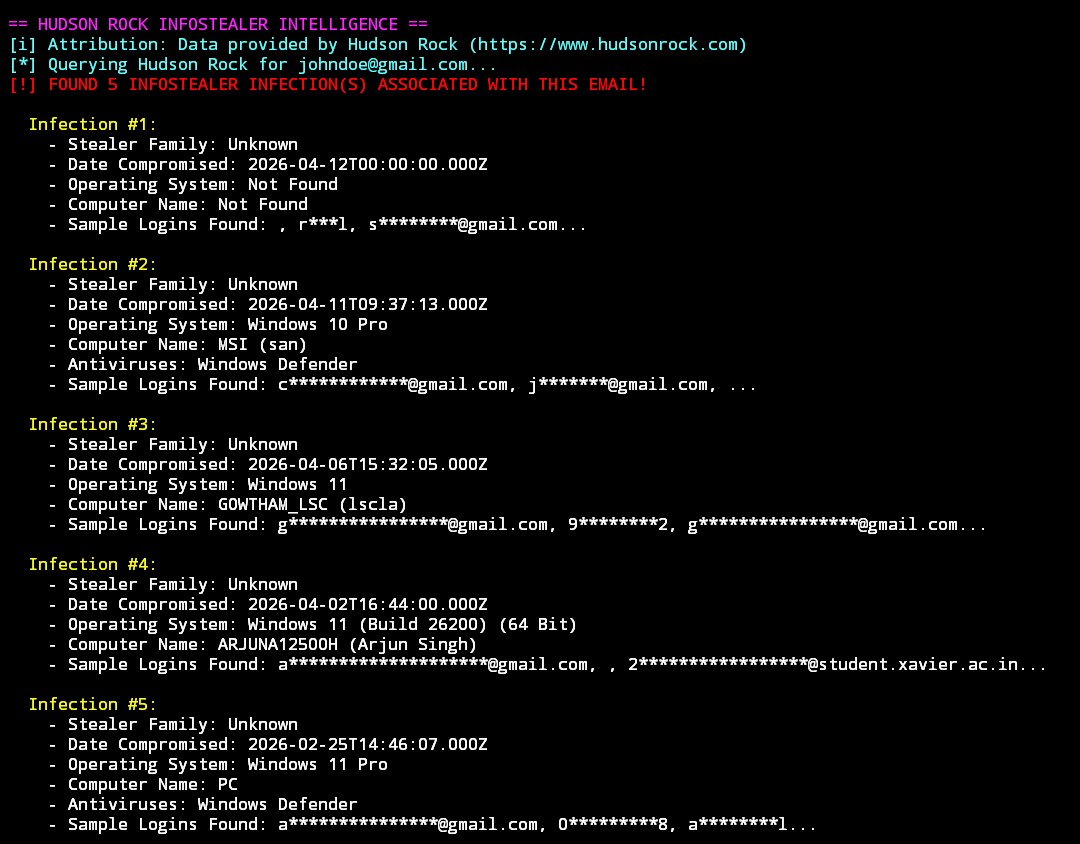
- Use the
--hudsonflag to check if a username or email has been exposed in infostealer malware logs.
user-scanner -e johndoe@gmail.com --hudson   # for email check
user-scanner -u johndoe --hudson             # for username check
Contributing
See detailed Contributing guidelines
⚠️ Disclaimer
This tool is provided strictly for educational purposes, authorized security research, and defensive OSINT investigations.
- User Responsibility: The user assumes all responsibility for ensuring that their deployment and use of this software complies with all applicable local, national, and international laws, as well as the Terms of Service (ToS) of any scanned platforms.
- Data Source & Methodology: This tool acts exclusively as an aggregator of publicly accessible information and legitimate third-party threat intelligence APIs. It does not bypass authentication mechanisms, exploit security vulnerabilities, or access non-public private data.
- Information Aggregation: While this software extracts public metadata and references external breach intelligence feeds (e.g., Hudson Rock), the developers do not host, store, or maintain any underlying personal data. All data is processed locally on the user's machine in real-time.
- Limitation of Liability: This software is provided "as is", without warranty of any kind, express or implied. The developers accept no liability and are not responsible for any misuse, unintended consequences, damage, or legal actions resulting from the use of this tool.
🛠️ Troubleshooting
Some sites may return 403 Forbidden or connection timeout errors, especially if they are blocked in your region (this is common with some adult sites).
- If a site is blocked in your region, use a VPN and select a region where you know the site is accessible.
- Then run the tool again.
These issues are caused by regional or network restrictions, not by the tool itself. If it still fails, report the error by opening an issue.
Release history Release notifications | RSS feed


Download files
Download the file for your platform. If you're not sure which to choose, learn more about installing packages.
Source Distribution
Built Distribution
Filter files by name, interpreter, ABI, and platform.
If you're not sure about the file name format, learn more about wheel file names.
Copy a direct link to the current filters
File details
Details for the file user_scanner-1.4.1.2.tar.gz.
File metadata
- Download URL: user_scanner-1.4.1.2.tar.gz
- Upload date:
- Size: 133.0 kB
- Tags: Source
- Uploaded using Trusted Publishing? No
- Uploaded via: python-requests/2.33.1
File hashes
| Algorithm | Hash digest | |
|---|---|---|
| SHA256 |
d52b2c86a68b206fd482bcfc4393d903c3d90c662d2a51ccc86ecd7e5dc0cdfa
|
|
| MD5 |
2f9d5888014341168af5aff9e36fd7b6
|
|
| BLAKE2b-256 |
46dee1796c21b15d844f4b65bdc1b6ee833d1bef8fb336c43cc75cf0b5703486
|
File details
Details for the file user_scanner-1.4.1.2-py3-none-any.whl.
File metadata
- Download URL: user_scanner-1.4.1.2-py3-none-any.whl
- Upload date:
- Size: 318.2 kB
- Tags: Python 3
- Uploaded using Trusted Publishing? No
- Uploaded via: python-requests/2.33.1
File hashes
| Algorithm | Hash digest | |
|---|---|---|
| SHA256 |
d4f0d2dbc5d29cbb4d70d6a43205dba660107fbe36af241f36125d73ed4abad4
|
|
| MD5 |
15468e6472457ec8331a5e17b6eff5e7
|
|
| BLAKE2b-256 |
fa1f940d70752cf346625c387cb40a02d4011b40b72938f05050e7fc598ed29b
|






