
videosdk-teleop
Drive a robot arm over the internet, and know exactly what the operator was looking at when they moved it.
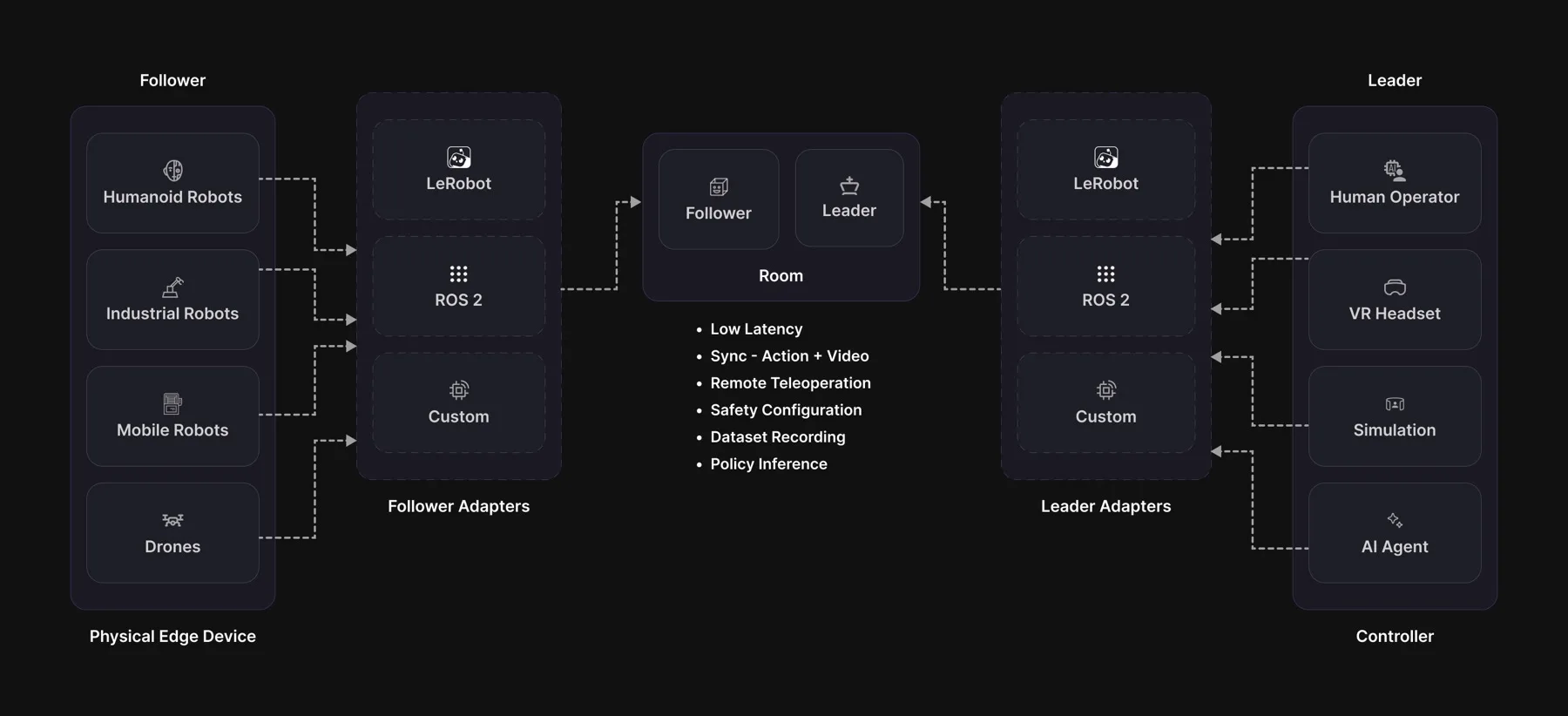
A WebRTC transport for robot teleoperation, with frame-accurate observation/action correlation, a safety envelope that cannot be bypassed, and a recorder that turns every session into training data.
Install
pip install videosdk-teleop               # transport + cameras, ready to run
pip install "videosdk-teleop[lerobot]"    # + the lerobot adapters (Python 3.12+)
pip install "videosdk-teleop[ros2]"       # + the ROS 2 nodes
That is the whole install. There is nothing to install first. The wheel
carries its own copy of everything the native library needs — the VP8 codec,
Opus and the TLS stack — so no apt or brew package is required, on macOS or
on any Linux distribution. Python 3.10 or newer; numpy is the only Python
dependency and pip brings it.
One exception, and it belongs to the extra rather than to the package:
[lerobot] needs Python 3.12 or newer. It pins lerobot[feetech]==0.6.1,
whose own floor is 3.12. Everything else here runs on 3.10.
On 3.10 or 3.11, ask for it with a version floor:
pip install "videosdk-teleop[lerobot]>=0.1.10" # fails, and says why
Without the floor it does not fail. pip cannot satisfy the extra on 3.11, so it
walks backwards through older releases until it finds one it can — which is
0.1.6, whose lerobot extra was empty. A bare
pip install "videosdk-teleop[lerobot]" on Python 3.11 therefore installs
videosdk-teleop 0.1.6 and no lerobot at all, in silence. Use Python 3.12, or
pin the floor so the refusal is visible.
Your robot, in three methods
Everything else is inherited: lease negotiation, clamping, the watchdog, the e-stop latch, correlation, recording.
from videosdk_teleop import Follower, SafetyConfig, single_group_descriptor

class MyArm(Follower):
    def descriptor(self):            return single_group_descriptor(...)
    def read_joints(self):           return {"shoulder": 12.4, "elbow": -3.1}
    def write_joints(self, joints):  ...        # RAISE on failure

MyArm("abcd-efgh-ijkl", safety=SafetyConfig(slew=0.75)).run(hz=200)
Already on lerobot? Wrap the device instead of subclassing:
from videosdk_teleop.adapters.lerobot import (SO101FollowerAdapter,
                                              SO101LeaderAdapter)

follower = SO101FollowerAdapter("abcd-efgh-ijkl", robot=arm, token=TOKEN)
Run it locally, no robot needed
Runnable examples live in videosdk-teleops-examples:
git clone https://github.com/videosdk-live/videosdk-teleops-examples
cd videosdk-teleops-examples

python quickstart/remote_teleop.py --ticks 100   # full chain, in-process
python quickstart/my_arm.py                      # port your own arm
python quickstart/protocol_demo.py               # the correlation model, live
remote_teleop.py runs a real follower against a real leader: real gates,
real clamps, real correlation. Only the network is swapped for a loopback.
Safety
SafetyConfig(
    slew=0.75,                          # max change per joint per TICK:
                                        # at the default 200 Hz that is
                                        # 150 units/s, a full sweep in ~1.3 s
    watchdog_timeout_s=0.5,             # silence for this long -> failsafe
    max_staleness_ms=100.0,             # older commands are dropped
    require_deadman=True,
    on_starvation=FailsafeAction.HOLD,
    resume_requires_reclaim=False)
follower.estop()          # unauthenticated by design: anyone can stop an arm
follower.clear_estop()    # latched: only a human on the follower host resumes
Every command is checked before it reaches the motors: who sent it, whether it arrived too late, and how far it moves the arm. If the operator stops sending, the arm holds where it is.
Recording
follower.start_recording("./sessions")
follower.start_episode("pick up the cube")
...                                          # your loop runs
follower.end_episode(success=True)
follower.stop_recording()
On the follower this captures pixels before an encoder or a network touched them. Episodes open and close on the deadman by default.
VideoSDK can also record the session in the cloud:
follower = MyArm("abcd-efgh-ijkl", cloud_recording=True)

follower.cloud_recording_state    # idle / requested / starting / ready / failed
If the cloud recorder never comes up, recording carries on locally and the state says so.
Documentation
Full documentation at docs.videosdk.live.
Apache-2.0 · docs.videosdk.live · examples
1 maintainer

Release files for videosdk-teleop 0.1.10
For a detailed explanation of source distributions (sdists) and built distributions (wheels), please see the package formats documentation.
Built distributions (wheels)
| File | Interpreter | ABI | Platform | Reset |
|---|---|---|---|---|
| videosdk_teleop-0.1.10-py3-none-manylinux_2_34_x86_64.whl | Python 3 | none | Linux glibc 2.34+ x86-64 | Details |
| videosdk_teleop-0.1.10-py3-none-manylinux_2_34_aarch64.whl | Python 3 | none | Linux glibc 2.34+ ARM64 | Details |
| videosdk_teleop-0.1.10-py3-none-macosx_11_0_arm64.whl | Python 3 | none | macOS 11.0+ ARM64 | Details |
Total release size: 24.9 MB
Release files / videosdk_teleop-0.1.10-py3-none-manylinux_2_34_x86_64.whl
| Download URL | videosdk_teleop-0.1.10-py3-none-manylinux_2_34_x86_64.whl |
|---|---|
| Size | 9.7 MB |
| Tags | Linux glibc 2.34+ x86-64 Python 3 |
|
SHA-256 checksum How to use checksums |
ac4871a5311beb66985690f8405324376c5eb81905a7c3c3c515600a45ed0f02
|
|
BLAKE2b-256 checksum How to use checksums |
7860d64679c138b961b162274467409cec136fdec3a7a4454cb4ccfe2780919b
|
| Upload date | |
|
Uploaded using Trusted Publishing? What is trusted publishing? |
No |
| Uploaded via |
twine/7.0.0 CPython/3.12.12
|
Release files / videosdk_teleop-0.1.10-py3-none-manylinux_2_34_aarch64.whl
| Download URL | videosdk_teleop-0.1.10-py3-none-manylinux_2_34_aarch64.whl |
|---|---|
| Size | 9.4 MB |
| Tags | Linux glibc 2.34+ ARM64 Python 3 |
|
SHA-256 checksum How to use checksums |
f551cb4b99883b292be3afcb56466580fb2d3bbb98d4bea588d77a026f346e29
|
|
BLAKE2b-256 checksum How to use checksums |
4677f7ccc1ab9f837c4177c5ba1b4bed9afe58153596fa49d5e7b6cd45483239
|
| Upload date | |
|
Uploaded using Trusted Publishing? What is trusted publishing? |
No |
| Uploaded via |
twine/7.0.0 CPython/3.12.12
|
Release files / videosdk_teleop-0.1.10-py3-none-macosx_11_0_arm64.whl
| Download URL | videosdk_teleop-0.1.10-py3-none-macosx_11_0_arm64.whl |
|---|---|
| Size | 5.8 MB |
| Tags | Python 3 macOS 11.0+ ARM64 |
|
SHA-256 checksum How to use checksums |
bce9fe7978c41b70baea241d73d2b958900a0ec0810468d0864e570e41d91c84
|
|
BLAKE2b-256 checksum How to use checksums |
b3035349e587ba3a3bbc9c66dff4251c0244da4cf7c5d22ccc5444810611df0b
|
| Upload date | |
|
Uploaded using Trusted Publishing? What is trusted publishing? |
No |
| Uploaded via |
twine/7.0.0 CPython/3.12.12
|














