
videosdk-teleop
Drive a robot arm over the internet, and know exactly what the operator was looking at when they moved it.
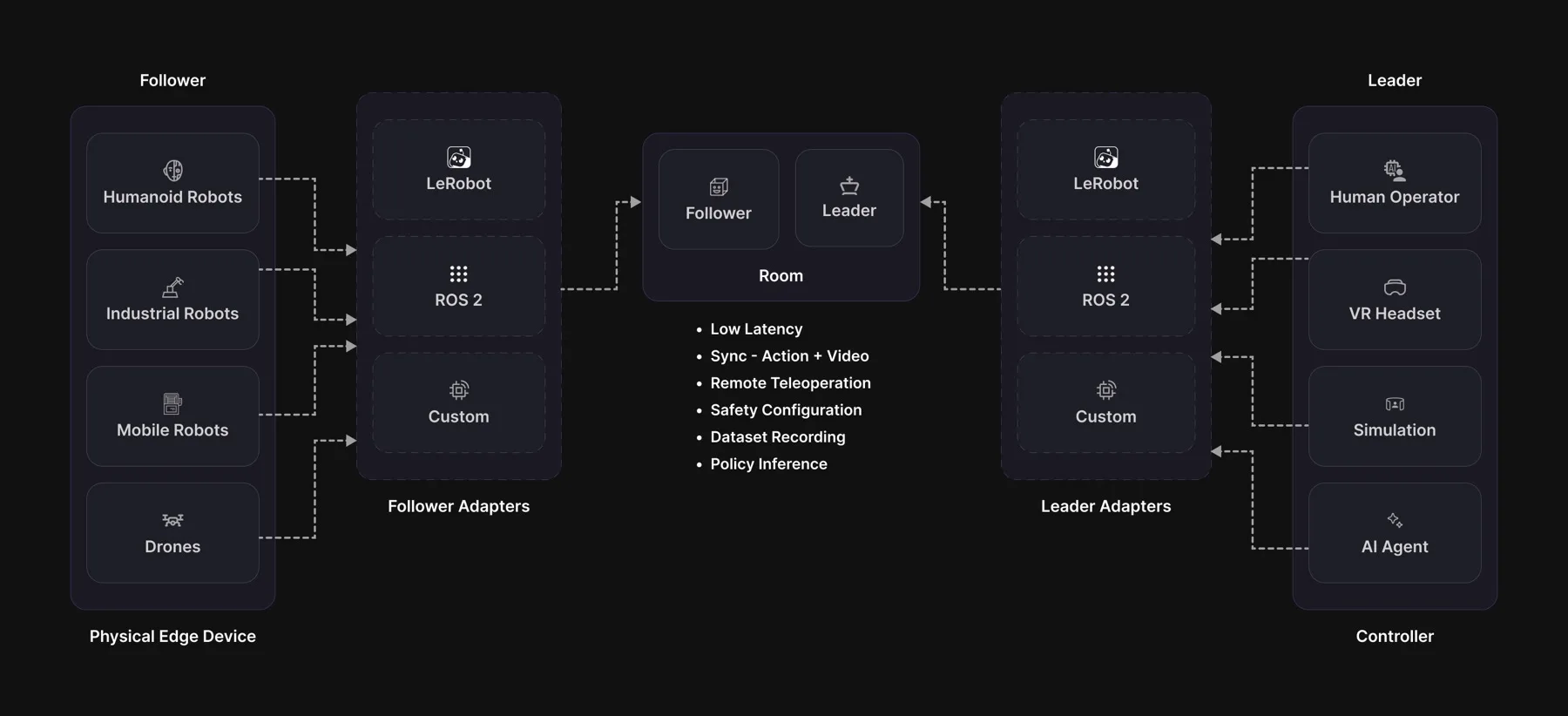
A WebRTC transport for robot teleoperation, with frame-accurate observation/action correlation, a safety envelope that cannot be bypassed, and a recorder that turns every session into training data.
Install
pip install videosdk-teleop               # transport + cameras, ready to run
pip install "videosdk-teleop[lerobot]"    # + the lerobot adapters
pip install "videosdk-teleop[ros2]"       # + the ROS 2 nodes
Python 3.10-3.13. The first line is enough to teleoperate: the WebRTC transport and the camera stack are core dependencies, not extras.
lerobot
The adapters need lerobot 0.6.1 or newer, which requires Python 3.12+. Install it yourself, in the same interpreter:
pip install "lerobot[feetech]==0.6.1"
Nothing to reconcile any more: as of 0.1.6 the transport, cameras, codecs and
recording live in a Rust shared library that ships in the wheel, so videosdk,
vsaiortc and av are gone from the install and numpy is the only hard
dependency left. The requests<2.32 pin that used to break every lerobot
install went with them.
On Python 3.10 or 3.11, pip install lerobot silently gives you 0.3.3 —
0.6.x requires 3.12, so pip resolves backwards instead of failing. 0.3.3
predates lerobot renaming so101_follower to so_follower and
so101_leader to so_leader, so nothing SO-101 imports. Check python -V
first; videosdk_teleop.adapters.lerobot refuses to import against it and
says so.
Building from source
The wheel carries a Rust shared library (videosdk_teleop/_ffi/) built from
videosdk-rust-sdk/crates/videosdk-teleop-ffi. pip install videosdk-teleop
never needs a toolchain; building the package does.
Prerequisites — Rust 1.87+ (stable), a C compiler, and libvpx with its
pkg-config file, which is what the VP8 encoder links against:
# macOS
brew install pkg-config libvpx
# Debian / Ubuntu / JetPack
sudo apt install -y pkg-config libvpx-dev build-essential libssl-dev
Every command below is run from the directory that holds both checkouts, side by side:
git clone https://github.com/videosdk-live/videosdk-rust-sdk
git clone https://github.com/videosdk-live/videosdk-teleops
Build the library and the bindings, then install the package over them:
videosdk-rust-sdk/scripts/build_teleop_python.sh release   # or: debug
uv venv -p 3.12 .venv && uv pip install -e videosdk-teleops
That script does two things and puts both in videosdk_teleop/_ffi/: it runs
cargo build -p videosdk-teleop-ffi and copies out the cdylib, then generates
the Python module from the metadata inside that cdylib (UniFFI library
mode — there is no .udl file to keep in step). They must stay next to each
other; the generated module locates the library relative to its own file.
A wheel for the platform you are on:
uv build --wheel videosdk-teleops # or: python -m build --wheel videosdk-teleops
The wheel is deliberately not py3-none-any. It carries a native library, so
hatch_build.py forces the real platform tag — otherwise a Jetson would
happily install a macOS build and fail at the first import. On macOS the tag
is pinned to the minimum supported OS (macosx_11_0_arm64) rather than the
building machine's version, so a wheel built on a new macOS still installs on
an older one.
linux/aarch64 (Jetson)
Build on the device. It is a JetPack image with a full toolchain already;
apt has libvpx, and cargo builds natively:
curl --proto '=https' --tlsv1.2 -sSf https://sh.rustup.rs | sh
sudo apt install -y pkg-config libvpx-dev build-essential libssl-dev
videosdk-rust-sdk/scripts/build_teleop_python.sh release
uv build --wheel videosdk-teleops              # -> ...-py3-none-manylinux_*_aarch64.whl
Expect 15-30 minutes for a cold release build on an Orin Nano. Do it once and
keep the wheel — the resulting .whl installs in seconds on every other Jetson
running the same JetPack and Python.
Or cross-compile from an x86_64 Linux host. cargo build --target aarch64-unknown-linux-gnu needs the matching linker
(gcc-aarch64-linux-gnu) and an aarch64 sysroot carrying libvpx and OpenSSL,
because the build links both. The reliable way to get that sysroot is a
container:
docker run --rm --platform linux/arm64 -v "$PWD:/src" -w /src \
    rust:1.94-bookworm bash -c \
    "apt update && apt install -y pkg-config libvpx-dev python3-pip &&
     videosdk-rust-sdk/scripts/build_teleop_python.sh release"
Under emulation this is slow but needs no cross toolchain. Set
CARGO_TARGET_DIR to a path outside the mount to keep artefacts off the host.
Your robot, in three methods
Everything else is inherited: lease negotiation, clamping, the watchdog, the e-stop latch, correlation, recording.
from videosdk_teleop import Follower, SafetyConfig, single_group_descriptor

class MyArm(Follower):
    def descriptor(self):            return single_group_descriptor(...)
    def read_joints(self):           return {"shoulder": 12.4, "elbow": -3.1}
    def write_joints(self, joints):  ...        # RAISE on failure

MyArm("abcd-efgh-ijkl", safety=SafetyConfig(slew=0.75)).run(hz=200)
Already on lerobot? Wrap the device instead of subclassing:
from videosdk_teleop.adapters.lerobot import (SO101FollowerAdapter,
                                              SO101LeaderAdapter)

follower = SO101FollowerAdapter("abcd-efgh-ijkl", robot=arm, token=TOKEN)
On ROS 2, teleop_bridge_node does the same against your driver topics.
Meeting ids come from the VideoSDK API, or videosdk_teleop.rooms.create_room().
Run it locally, no robot needed
Runnable examples live in videosdk-teleops-examples:
git clone https://github.com/videosdk-live/videosdk-teleops-examples
cd videosdk-teleops-examples

python quickstart/remote_teleop.py --ticks 100   # full chain, in-process
python quickstart/my_arm.py                      # port your own arm
python quickstart/protocol_demo.py               # the correlation model, live
remote_teleop.py runs a real follower against a real leader: real gates,
real clamps, real correlation. Only the network is swapped for a loopback.
You own the loop
leader.tick()                 # one control period, never blocks
leader.run(hz=200)            # or let it pace the loop for you
for _ in leader.ticks(hz=200):
    obs = leader.observation()          # joints + pixels, same instant
    print(obs.observation_id, obs.joints, obs.images)

    frame = leader.peek_synced()        # watch only: does not arm the echo
Safety
SafetyConfig(
    slew=0.75,                          # max change per joint per TICK:
                                        # at the default 200 Hz that is
                                        # 150 units/s, a full sweep in ~1.3 s
    watchdog_timeout_s=0.5,             # silence for this long -> failsafe
    max_staleness_ms=100.0,             # older commands are dropped
    require_deadman=True,
    on_starvation=FailsafeAction.HOLD,
    resume_requires_reclaim=False)
follower.estop()          # unauthenticated by design: anyone can stop an arm
follower.clear_estop()    # latched: only a human on the follower host resumes
Every command is checked before it reaches the motors: who sent it, whether it arrived too late, and how far it moves the arm. If the operator stops sending, the arm holds where it is.
Knowing what the operator saw
Every action is tagged with the exact camera frame the operator was looking at when they sent it. The tag travels with the command, so the two machines never need their clocks in sync.
Recording
follower.start_recording("./sessions")
follower.start_episode("pick up the cube")
...                                          # your loop runs
follower.end_episode(success=True)
follower.stop_recording()
On the follower this captures pixels before an encoder or a network touched them. Episodes open and close on the deadman by default.
VideoSDK can also record the session in the cloud:
follower = MyArm("abcd-efgh-ijkl", cloud_recording=True)

follower.cloud_recording_state    # idle / requested / starting / ready / failed
If the cloud recorder never comes up, recording carries on locally and the state says so.
The recorder pod
A passive third peer that joins the room, writes the same
teleop-staging/3 dataset, and uploads each episode as it closes -- the cloud
side of cloud_recording=True, and usable directly:
from videosdk_teleop import CloudRecorder

rec = CloudRecorder(meeting_id="abcd-efgh-ijkl", token=TOKEN,
                    root="/data/sessions", recording_id="rec-123",
                    on_status=lambda state, stats: ...,
                    on_episode_closed=lambda ep_dir, meta: upload(ep_dir, meta))
rec.start()
while running:
    rec.pump()          # drains the room; both callbacks fire on THIS thread
rec.close("closed")
The VideoSDK API
Rooms, cloud recordings and dataset conversions are REST calls, separate from
the SFU the session runs on. One Rust client makes them
(videosdk-teleop/src/api.rs), reached through the same FFI as everything
else, so Python and C++ send the same request to the same route:
from videosdk_teleop import rooms, recordings

room = rooms.create_room()                      # POST /v2/rooms
rec  = recordings.start(room)                   # ask for a recorder pod
recordings.stop(room)                           # room-scoped release
recordings.conversions(rec)                     # its trainable datasets
recordings.convert(rec, {"format": ["lerobot"], "media": "images"})
#include <videosdk/teleop.hpp>
std::string room = teleop::api::createRoom();
std::string rec  = teleop::api::startCloudRecording(room);
teleop::api::endCloudRecording(room);
- Token: your VideoSDK API-key token, sent raw in
Authorization(noBearer). Pass it, or leave it empty and setVIDEOSDK_TOKEN. - Base URL:
https://api.videosdk.live, overridden by thebase=argument, elseVIDEOSDK_API_BASE. Both are read per call, so a script that loads its.envafter importing still points where you meant. Use it: these are REST calls SEPARATE from signalling, and without it a session signalling against dev opens its recording on prod. - Errors: every failure raises
RoomError(RecordingErrorfor the recording routes, which is aRoomError) in Python and throwsteleop::Errorin C++, carrying the route, the HTTP status and the server's own message. An expired or invalid token arrives as HTTP 400 with bodycode4001/4002, not 401 — the message says so in words. - Blocking, 15 s by default (
timeout=), and that is the deadline for the whole call -- the one retry rides inside it. Call them from setup and teardown, never from inside your control loop. - Only
conversions()is a GET.start/stop/convertchange state and cost money: nothing retries them, ever.
Follower(cloud_recording=True) calls recordings.start/stop for you;
follower.cloud_start / .cloud_stop stay assignable for a platform that
launches recorders out of band.
Watching a session
follower.stats() / leader.get_stats() return getStats-shaped blocks -- a
flat list of {type, id, timestamp, ...} dicts a collector scrapes the same
way it scrapes WebRTC stats. stats_hz= publishes them into the room, so a
peer already in the meeting picks them up with no extra scrape path. The
control-plane web app reads the same blocks.
Multi-operator, action chunks and RPC
Three things a policy-driven rig needs and a single-human one never asks for. All three are opt-in and none of them change how one operator drives one arm.
# Who is entitled to the lease. Any peer may point it, including a supervisor
# holding nothing; the robot re-grants, resets seq, and tells the whole room.
leader.set_active_operator(leader.peer_id)
follower.active_operator            # who has the right to drive
leader.on_active_operator_changed(lambda who: ...)

# A horizon, not a step: one reliable frame the follower runs as a target per
# control period, interpolated between rows, with the clamp still per tick.
# Any newer command or chunk supersedes it, so a human can always take over.
oid = leader.observation().observation_id
leader.send_action_chunk(rows, row_dt_s=0.1, in_reply_to=oid)

# Request/reply on the control topic. The handler runs on the thread that
# calls tick(), never on a transport worker.
follower.register_rpc("home", lambda payload: go_home(**payload))
leader.perform_rpc(leader.robot_peer, "home", {"speed": 0.2}, timeout=10.0)
Reserved RPC methods: home, calibrate, set_task, set_active_operator
(the last is answered by the robot's own runtime unless you register a handler).
On ROS 2
One node, teleop_bridge_node, one role per host. It never talks to your
motors directly: it reads your driver's joint-state topic and writes to your
driver's joint-command topic, exactly like any other ROS node.
ros2 launch videosdk_teleop_ros bridge.launch.py \
    role:=follower_side robot_id:=my_arm cameras:=cam_a,cam_b labels:=wrist,front

ros2 service call /videosdk_bridge/enable std_srvs/srv/SetBool "{data: true}"
The bridge sits idle until enable is called, so launching it moves nothing.
Install into the same Python that ROS 2 uses, not whatever python3 your shell
resolves to:
/usr/bin/python3 -m pip install --user videosdk-teleop
Logging
The SDK is quiet. It prints only what an operator can act on -- a camera that stopped answering, a lease that was lost, a recording that could not be saved -- as one plain sentence:
[videosdk] warning: camera "wrist" stopped responding (read timed out after 3 failed reads); reopening it -- check the cable if this repeats
[videosdk] error: cloud recording failed (pod never reported running); this session is being recorded on this machine only
Everything else -- the transport, the codecs, ICE, DTLS, RTCP -- is off. A failure you have to handle is raised as an exception, not left in the console.
Set VIDEOSDK_LOG to get the developer view back, with timestamps and module
paths:
VIDEOSDK_LOG |
what you get |
|---|---|
| unset | the plain lines above, nothing else |
debug (or 1 / on / true / yes) |
this SDK at debug, everything else at warn |
trace / all |
everything, including the network stack |
videosdk_teleop::camera=trace,webrtc_ice=info |
any tracing filter, passed through as written |
off |
install no logging at all, for a host with its own |
VIDEOSDK_LOG=debug python follower.py 2> follower.log
Documentation
Full documentation at docs.videosdk.live.
Apache-2.0 · docs.videosdk.live · examples
1 maintainer

Release files for videosdk-teleop 0.1.6
For a detailed explanation of source distributions (sdists) and built distributions (wheels), please see the package formats documentation.
Built distributions (wheels)
| File | Interpreter | ABI | Platform | Reset |
|---|---|---|---|---|
| videosdk_teleop-0.1.6-py3-none-manylinux_2_35_x86_64.whl | Python 3 | none | Linux glibc 2.35+ x86-64 | Details |
| videosdk_teleop-0.1.6-py3-none-manylinux_2_35_aarch64.whl | Python 3 | none | Linux glibc 2.35+ ARM64 | Details |
| videosdk_teleop-0.1.6-py3-none-macosx_11_0_arm64.whl | Python 3 | none | macOS 11.0+ ARM64 | Details |
Total release size: 17.9 MB
Release files / videosdk_teleop-0.1.6-py3-none-manylinux_2_35_x86_64.whl
| Download URL | videosdk_teleop-0.1.6-py3-none-manylinux_2_35_x86_64.whl |
|---|---|
| Size | 6.3 MB |
| Tags | Linux glibc 2.35+ x86-64 Python 3 |
|
SHA-256 checksum How to use checksums |
fb3f1c79f648cd94a8067305717559ef96078648fc7f1ec47e9e622b0658d45b
|
|
BLAKE2b-256 checksum How to use checksums |
da9fd3fecff81263df94f6bbfd2f9c8a16a642a030dc44950444aa28473fb934
|
| Upload date | |
|
Uploaded using Trusted Publishing? What is trusted publishing? |
No |
| Uploaded via |
twine/7.0.0 CPython/3.12.12
|
Release files / videosdk_teleop-0.1.6-py3-none-manylinux_2_35_aarch64.whl
| Download URL | videosdk_teleop-0.1.6-py3-none-manylinux_2_35_aarch64.whl |
|---|---|
| Size | 6.1 MB |
| Tags | Linux glibc 2.35+ ARM64 Python 3 |
|
SHA-256 checksum How to use checksums |
35213a05299504759b28fabd6863c45c86e3f2fa4ec7761c17457d2fbd16fbe3
|
|
BLAKE2b-256 checksum How to use checksums |
49d563cb08be6b9d6196f5feeb3f7b22cb84b43e07c8e50ac1f065a3de6bea13
|
| Upload date | |
|
Uploaded using Trusted Publishing? What is trusted publishing? |
No |
| Uploaded via |
twine/7.0.0 CPython/3.12.12
|
Release files / videosdk_teleop-0.1.6-py3-none-macosx_11_0_arm64.whl
| Download URL | videosdk_teleop-0.1.6-py3-none-macosx_11_0_arm64.whl |
|---|---|
| Size | 5.6 MB |
| Tags | Python 3 macOS 11.0+ ARM64 |
|
SHA-256 checksum How to use checksums |
5439798247e30cac7723ac15fd2176e62fb58058ab6bb4c58ff0bd4fb5007259
|
|
BLAKE2b-256 checksum How to use checksums |
4a403e63dfd25b36221c3e8ca7875e51fd884fbb38167fbd347aeebd990a122d
|
| Upload date | |
|
Uploaded using Trusted Publishing? What is trusted publishing? |
No |
| Uploaded via |
twine/7.0.0 CPython/3.12.12
|














