



















Vocalinux turns speech into typed text in whatever app has focus. It is a free, AGPL-3.0-licensed desktop app for X11 and Wayland. After you download a model, local engines (whisper.cpp by default, plus OpenAI Whisper, Faster Whisper, VOSK, and Parakeet) run speech-to-text on your machine. An optional remote HTTP API is off unless you configure it.
No Voca account is required. Models download once. After that, speech-to-text stays on your machine.
Current release: v0.18.6. Patch: Ctrl no longer stays held after a paste on Sway and other wlroots compositors, Quit from the dock or taskbar closes Vocalinux on GNOME, the Wayland fallback overlay no longer opens as a large empty window, the .deb, .rpm and Flatpak ship gtk-layer-shell, and the Settings layout readout follows layout switches. Details: docs/UPDATE.md.
Features
- On-device after model download: Local engines; speech-to-text stays on your machine
- X11 and Wayland: Text injection via xdotool, IBus, wtype, ydotool, or clipboard fallback
- Several engines: whisper.cpp (default), OpenAI Whisper, Faster Whisper, VOSK, Parakeet, plus optional remote HTTP API or local VocaGateway from Settings (not on-device)
- GPU acceleration: Vulkan for AMD, Intel, and NVIDIA with whisper.cpp
- Toggle or push-to-talk: New installs default to hold Right Alt; existing configs keep their shortcut
- System tray + settings: Searchable sidebar, Speech Model simple setup with Advanced as an island, status icons, audio feedback
- Start on login: XDG autostart (desktop session, not a systemd service)
- Packaging: install script,
.deb/.rpm, AppImage, AUR, PyPI, Snap (--edge), Flatpak (release bundles and local build; not on Flathub), Nix flake
Screenshots
Vocalinux in action. Full gallery on the website screenshots page.
Product
 Real-time voice-to-text transcription |
 System tray with listening indicator |
 About & Updates in Settings |
 Log viewer for debugging |
Settings
 Speech Engine |
 Recognition |
 Audio |
 Performance |
 General |
 Advanced |
 Floating overlay while listening (green) |
 Floating overlay while processing (amber) |
Install
Recommended (interactive installer)
curl -fsSL https://raw.githubusercontent.com/VocaHQ/vocalinux/main/install.sh -o /tmp/vl.sh
bash /tmp/vl.sh
Prefer to review the script first: open /tmp/vl.sh before running it, or clone the repo and run ./install.sh locally.
The installer detects hardware, recommends an engine, downloads a default model (~74MB for whisper.cpp tiny), installs neural VAD when ONNX Runtime is available, and sets up desktop integration. Typical install time with whisper.cpp is about 1-2 minutes.
| Engine | When to use |
|---|---|
| whisper.cpp (default) | Best default; Vulkan GPU on AMD, Intel, and NVIDIA |
| Whisper (OpenAI) | PyTorch path; NVIDIA/CUDA |
| Faster Whisper | CPU-friendly Whisper via CTranslate2 / INT8 |
| VOSK | Low RAM / minimal footprint |
| Parakeet | CPU; NVIDIA NeMo ASR via sherpa-onnx; 25 European languages |
| Remote API | Offload to a server you configure |
Non-interactive options:
bash /tmp/vl.sh --auto                              # whisper.cpp defaults
bash /tmp/vl.sh --auto --engine=whisper             # OpenAI Whisper
bash /tmp/vl.sh --auto --engine=faster_whisper      # Faster Whisper (CPU)
bash /tmp/vl.sh --auto --engine=vosk                # VOSK only
bash /tmp/vl.sh --auto --engine=parakeet            # Parakeet (CPU)
For a specific release tag, see GitHub Releases or ./install.sh --tag=v0.18.6.
Arch Linux (AUR)
yay -S vocalinux
See docs/AUR.md.
AppImage
Download the x86_64 or aarch64 AppImage from Releases, mark it executable, and run it. Built against glibc 2.35 (Debian 12+, Ubuntu 22.04+, Fedora 36+, Arch, Tumbleweed). Host text-injection tools (xdotool on X11; wtype / ydotool / clipboard tools on Wayland) are still required. Current AppImages rebuild whisper.cpp with Vulkan and use the host GPU driver. Prefer the installer when you want system deps, a CUDA build, and models set up automatically.
Distro packages (.deb / .rpm)
Download the .deb (Debian 12+, Ubuntu 24.04+) or .rpm (Fedora) matching your CPU from Releases and install with sudo apt install ./vocalinux_*.deb or sudo dnf install ./vocalinux-*.rpm. Thin packages: Python and GTK come from the distro. No auto-update; CPU whisper.cpp. Details in docs/INSTALL.md.
Flatpak (any distro)
Install and auto-update via the self-hosted VocaHQ remote (flatpak update picks up each release):
flatpak install https://vocahq.github.io/vocalinux-flatpak/com.vocalinux.Vocalinux.flatpakref
The .flatpakref adds the vocahq remote and resolves the GNOME runtime through Flathub. Manually instead:
flatpak remote-add --if-not-exists flathub https://dl.flathub.org/repo/flathub.flatpakrepo
flatpak remote-add --if-not-exists vocahq https://vocahq.github.io/vocalinux-flatpak/vocahq.flatpakrepo
flatpak install vocahq com.vocalinux.Vocalinux
Or sideload a GitHub Release bundle (Vocalinux-<version>-x86_64.flatpak or -aarch64.flatpak) after the Flathub GNOME runtime is present — bundles do not auto-update:
flatpak install --user ./Vocalinux-<version>-x86_64.flatpak
Local build:
flatpak install flathub org.gnome.Platform//50 org.gnome.Sdk//50
flatpak-builder --user --install --force-clean build-dir \
  packaging/flatpak/com.vocalinux.Vocalinux.yml
flatpak run com.vocalinux.Vocalinux
Ships whisper.cpp with Vulkan. It is not on Flathub (submission flathub#9368 closed 2026-07-23 on policy grounds). Details: packaging/flatpak/README.md.
Snap (Ubuntu Snap Store)
Listing: snapcraft.io/vocalinux. stable is promoted from candidate after QA. Tagged releases also attach vocalinux_<version>_amd64.snap on GitHub.
sudo snap install vocalinux --edge
sudo snap connect vocalinux:audio-record   # if mic is not auto-connected
sudo snap connect vocalinux:raw-input      # global keyboard shortcuts (evdev)
sudo snap connect vocalinux:hardware-observe  # list keyboards (/proc/bus/input/devices)
Native Wayland typing uses the RemoteDesktop portal: the compositor asks once on first dictation, nothing to connect. The recipe ships no uinput plug and no ydotool; the Store denied the super-privileged grant, which held the 0.17.0+ revisions and left v0.16.2 (rev 7) on edge. On KDE Plasma, KWin's portal can mistype letter case (KDE bug 489021); set Virtual Keyboard to "IBus Wayland" so dictation types correctly.
GitHub .snap files through v0.18.2 declare uinput, so KDE users who want ydotool can sideload that build and connect the plug manually:
sudo snap install --dangerous ./vocalinux_0.18.2_amd64.snap
sudo snap connect vocalinux:uinput   # only in the v0.18.x sideload; the recipe no longer ships it
Nix / NixOS (flake)
nix run github:VocaHQ/vocalinux          # try it
nix profile install github:VocaHQ/vocalinux
The flake also ships nixosModules.vocalinux and homeManagerModules.vocalinux for declarative installs (programs.vocalinux.enable = true). The bundled pywhispercpp builds with Vulkan GPU inference. Details: packaging/nix/README.md.
From source
git clone https://github.com/VocaHQ/vocalinux.git
cd vocalinux
./install.sh
# or pick the engine up front
./install.sh --engine=whisper_cpp
./install.sh --engine=vosk
./install.sh --engine=parakeet --auto
After installation
vocalinux                 # if ~/.local/bin is on PATH
# or
~/.local/share/vocalinux/venv/bin/vocalinux
You can also launch Vocalinux from your application menu.
Nightly builds
Daily builds from main appear on Releases. Use the latest stable or beta release for production; nightlies are untested.
Requirements
| OS | Linux (Ubuntu 24.04+, Debian 12+, Fedora 42+, Arch, openSUSE Tumbleweed) |
| Python | 3.11 or newer |
| Display | X11 or Wayland |
| Hardware | Microphone; GPU optional (Vulkan) |
The distro must ship Python 3.11+ because Vocalinux uses distro PyGObject (python3-gi). Ubuntu 22.04 (Python 3.10) and Debian 11 (3.9) are below that floor. Distribution notes: docs/DISTRO_COMPATIBILITY.md.
Usage
Dictation
- Push-to-talk (default on new installs): hold Right Alt (Option on Mac-layout keyboards) and speak
- Speak into the microphone
- Release to stop, or switch to Toggle mode in Settings (double-tap a key to start/stop)
Existing configs keep their saved shortcut.
Voice commands
English phrases always work. With a non-English recognition language, matching punctuation / line-break phrases in that language are also recognized (Italian virgola / punto, French virgule / point, etc.).
| Command | Action |
|---|---|
| "new line" | Line break |
| "period" / "full stop" / "dot" | . |
| "comma" | , |
| "question mark" | ? |
| "exclamation mark" | ! |
| "delete that" | Delete last sentence |
| "capitalize" | Capitalize next word |
CLI
vocalinux --help
vocalinux --version
vocalinux --debug
vocalinux --engine whisper_cpp    # default
vocalinux --engine whisper
vocalinux --engine faster_whisper
vocalinux --engine vosk
vocalinux --engine parakeet
vocalinux --engine remote_api
vocalinux --model medium
vocalinux --model medium.en-q5_0  # exact whisper.cpp variant
vocalinux --model large-v3-turbo
vocalinux --wayland
vocalinux --start-minimized
Autostart
Start on Login creates an XDG autostart desktop entry (~/.config/autostart/). It does not install a systemd unit. Enable from the first-run dialog, tray menu, or Settings.
Configuration
Stored at ~/.config/vocalinux/config.json. Prefer the Settings dialog for day-to-day changes. Settings → Speech Model starts with a simple setup; expand Advanced for engine, size, and specialization. Set post_processing.script_path to an executable to transform each transcription result (stdin → stdout) before it is injected; leave empty to disable.
Neural VAD (Silero) is used when onnxruntime is available; install via pip install "vocalinux[vad]" for manual/PyPI installs. The installer attempts this automatically.
Documentation
| Document | Description |
|---|---|
| Installation | Installer, AppImage, AUR, Flatpak, Snap, Nix flake, running |
| Manual / PyPI install | Package lists and pip workflows |
| Troubleshooting | Common failures |
| User guide | Dictation, engines, models, tips |
| Update guide | Upgrade steps and release notes |
| Changelog | Release history pointers |
| Support | Where to get help |
| Distribution compatibility | Distro matrix and session notes |
| Remote HTTP API | Offload transcription to a server |
| Local VocaGateway (optional) | Start a local gateway from Settings; not on-device |
| Contributing | Dev setup, style, PR process |
| Security | Supported versions and vulnerability reporting |
| Docs index | Full documentation map |
Privacy and security
- Local engines process audio on-device after you download a model; no Voca account required
- Optional remote API is off by default and only used when you configure a server
- Model downloads are checked against pinned checksums
Report vulnerabilities privately per SECURITY.md.
Development
git clone https://github.com/VocaHQ/vocalinux.git
cd vocalinux
./install.sh --dev
source venv/bin/activate
pytest
python -m vocalinux.main --debug
See CONTRIBUTING.md for the two-venv layout, just recipes, and PR guidelines.
Roadmap
Shipped: graphical settings, multi-language support, whisper.cpp default, Vulkan GPU, Wayland/IBus, Flatpak packaging, AppImage, .deb / .rpm packages, in-app update checker, Parakeet and Faster Whisper engines, Snap recipe.
Planned:
- Application-specific voice commands
- User-customizable voice command map
- Flathub publication (not currently listed; see #167)
Voca ecosystem
Vocalinux is part of VocaHQ. On-device speech-to-text first, one app per platform. Optional VocaGateway is self-hosted and not on-device.
| Platform | Project | Website | GitHub |
|---|---|---|---|
| Linux | VocaLinux | vocalinux.com | VocaHQ/vocalinux |
| macOS | VocaMac | vocamac.com | VocaHQ/vocamac |
| Windows | VocaWin | vocawin.com | VocaHQ/vocawin |
| Phone | VocaPhone | vocaphone.vocahq.com | VocaHQ/vocaphone |
| Gateway | VocaGateway | vocagateway.vocahq.com | VocaHQ/vocagateway |
Talk to us: Discord · X @vocahq · hello@vocahq.com
Contributing
Bug reports, docs, and code are welcome. Start with CONTRIBUTING.md and good first issues.
Contributors
Thanks to everyone who has contributed code, docs, or fixes:

Repository mirrors
GitHub is the primary forge for issues, PRs, CI, and releases.
| Role | URL |
|---|---|
| Primary | https://github.com/VocaHQ/vocalinux |
| Read-only mirror (Codeberg) | https://codeberg.org/jatinkrmalik/vocalinux |
Open issues and pull requests on GitHub only.
License
This project is licensed under the GNU Affero General Public License v3.0 (AGPL-3.0), aligning with the other VocaHQ distribution projects.
You may use, study, modify, and redistribute the software under AGPL-3.0. If you run a modified version as a network service, AGPL also requires that you make the corresponding source available.
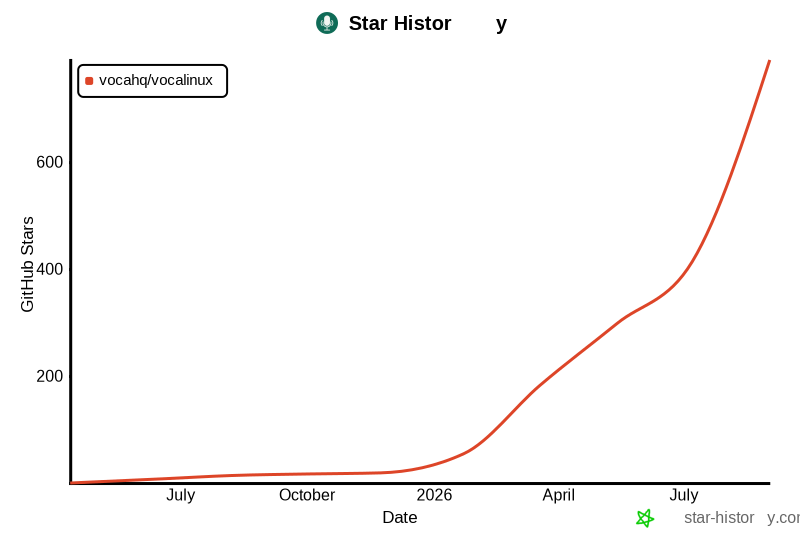
Star Chart
Optional Orukeet model
With the Parakeet engine installed, Settings → Speech Model → Parakeet also
offers orukeet-v0.1.0. It uses the existing local sherpa-onnx recognizer for
25 European languages; the recommended Parakeet model and default whisper.cpp
engine stay unchanged.
The download comes from a pinned revision of oruk/orukeet on Hugging Face. Vocalinux checks every file against its bundled SHA-256 pins and checks the publisher's release manifest against those same pins. The manifest download participates in Hugging Face's normal model-download accounting. Cached recognition works offline and does not send audio or usage events. The model occupies about 641 MiB; its CC BY-SA 4.0 weights license and NVIDIA attribution are included.
Optional Underdog Bark 3.0 models
Settings → Speech Model → Parakeet also offers two builds of
Underdog Bark 3.0, an
English fine-tune of Parakeet TDT 0.6B v3 (CC BY 4.0): bark-3.0 (int8, 653 MiB)
and bark-3.0-int4 (4-bit, 379 MiB, about half the memory, slower). Both come
from a pinned revision of
velddev/Underdog-Bark-3.0-sherpa-onnx,
an unofficial sherpa-onnx conversion not made or endorsed by Conway Research.
They run on the existing sherpa-onnx recognizer, every file is checked against
its bundled SHA-256 pin, and the downloads include the license and attribution
notice.
Choose one for English dictation of conversational speech, bark-3.0-int4 when
memory is tight; for read or multilingual speech keep v3-european.
2 maintainers


Metadata
2 maintainers
Release files for vocalinux 0.18.6
For a detailed explanation of source distributions (sdists) and built distributions (wheels), please see the package formats documentation.
Source distribution (sdist)
| File | Size | Uploaded | Provenance | Actions |
|---|---|---|---|---|
| vocalinux-0.18.6.tar.gz | 4.2 MB | With provenance | Details for vocalinux-0.18.6.tar.gz |
Built distribution (wheel)
| File | Interpreter | ABI | Platform | Actions Reset |
|---|---|---|---|---|
| vocalinux-0.18.6-py3-none-any.whl | Python 3 | none | any | Details for vocalinux-0.18.6-py3-none-any.whl |
Total release size: 7.3 MB
Release files / vocalinux-0.18.6.tar.gz
| Download URL | vocalinux-0.18.6.tar.gz |
|---|---|
| Size | 4.2 MB |
| Tags | Source |
|
SHA-256 checksum How to use checksums |
8f87b5280af924df6ce699a4cca6c7d0e6e39f666c77766d7792aaa27d93a8e0
|
|
BLAKE2b-256 checksum How to use checksums |
ff0796d8d0d205bc2e452da9426a73b37f845f8f63063397bb48dfc0e3e705f6
|
| Upload date | |
|
Uploaded using Trusted Publishing? What is trusted publishing? |
Yes |
| Uploaded via |
twine/7.0.0 CPython/3.13.16
|
Provenance
Provenance describes where a file came from. On PyPI, provenance is shared via attestations, which provide a verifiable record of the build or publishing details. View details, limitations and caveats.


PyPI Publish Attestation
PyPI verified that this artifact, at this checksum, originated from the publisher listed below.
Signed by GitHub Actions, verified by PyPI on Nov 8, 2026.
Transparency logRelease files / vocalinux-0.18.6-py3-none-any.whl
| Download URL | vocalinux-0.18.6-py3-none-any.whl |
|---|---|
| Size | 3.1 MB |
| Tags | Python 3 |
|
SHA-256 checksum How to use checksums |
9e00eb573482ef7f4834a339a938486ec2475091d79aebea8aea8a7fbfb4666d
|
|
BLAKE2b-256 checksum How to use checksums |
7fea912b93c173dc58f6f64e3c98bc5af23a24d9ce316a4515cf31b20ce86b8d
|
| Upload date | |
|
Uploaded using Trusted Publishing? What is trusted publishing? |
Yes |
| Uploaded via |
twine/7.0.0 CPython/3.13.16
|
Provenance
Provenance describes where a file came from. On PyPI, provenance is shared via attestations, which provide a verifiable record of the build or publishing details. View details, limitations and caveats.
PyPI Publish Attestation
PyPI verified that this artifact, at this checksum, originated from the publisher listed below.
Signed by GitHub Actions, verified by PyPI on Nov 8, 2026.
Transparency logSecurity for vocalinux 0.18.6
Provenance
Provenance describes where a file came from. On PyPI, provenance is shared via attestations, which provide a verifiable record of the build or publishing details. View details, limitations and caveats.
Full provenance
Both files in this release have been uploaded with provenance metadata.
Attestation for vocalinux-0.18.6.tar.gz
PyPI Publish Attestation
PyPI verified that this artifact, at this checksum, originated from the publisher listed below.
Signed by GitHub Actions, verified by PyPI on Nov 8, 2026.
Transparency logA note on package security
PyPI is a repository for distributing packages, not a service for auditing them. While third-party security researchers and our staff do their best to detect and remove malicious packages, PyPI cannot guarantee the quality, security or suitability of any given package.
To learn more about protecting yourself from malicious actors, visit our package security documentation.














