
VTK Prompt




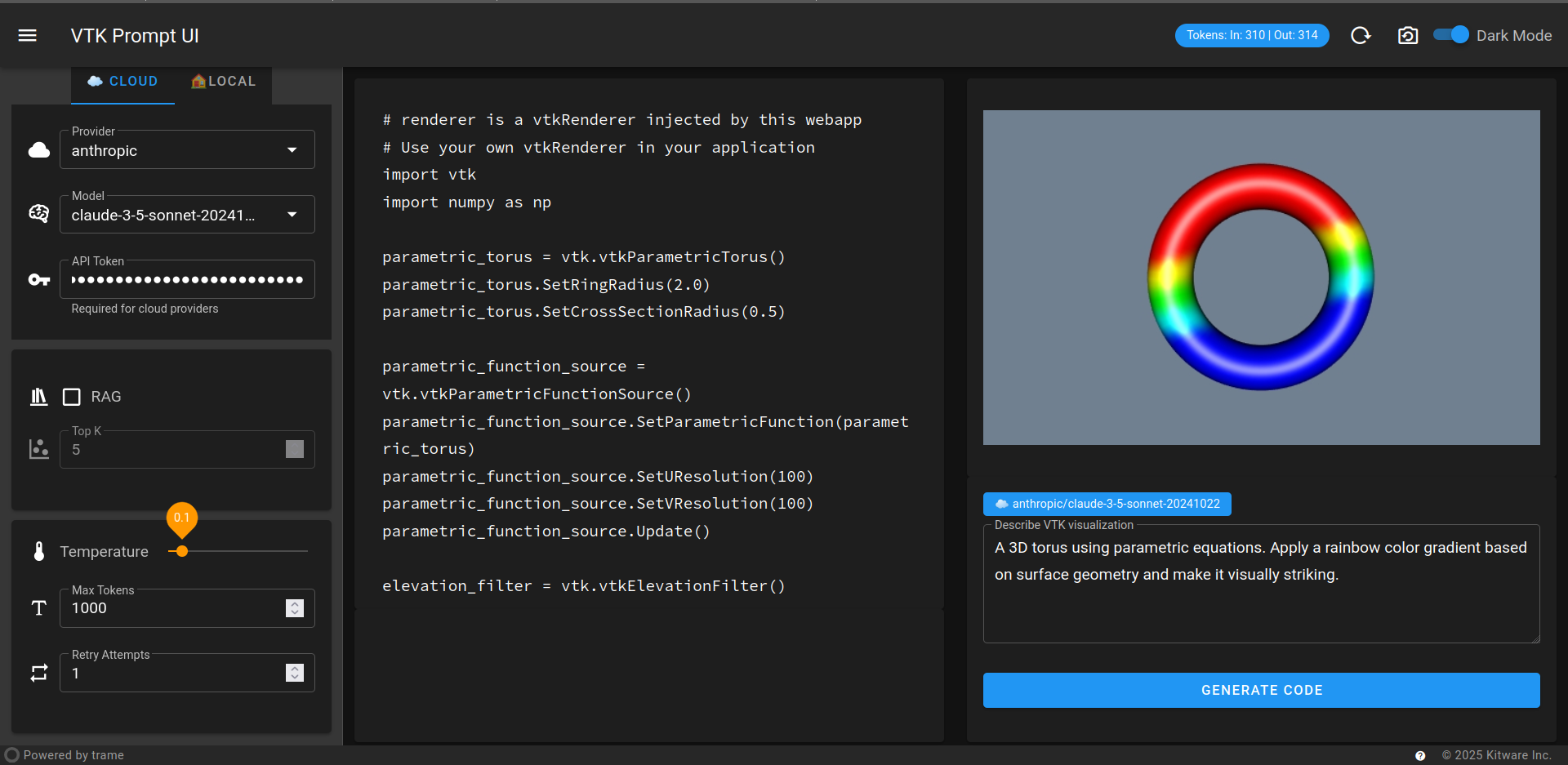
A command-line interface and web-based UI for generating VTK visualization code using Large Language Models (Anthropic Claude, OpenAI GPT, NVIDIA NIM, and local models).
Features
- Multiple LLM providers: Anthropic Claude, OpenAI GPT, NVIDIA NIM, and local models
- Interactive web UI with live VTK rendering
- Context-enhanced generation via vtk-mcp: semantic search over VTK examples and docs, class API lookup, and full code validation
- Real-time visualization of generated code
- Token usage tracking and cost monitoring
- CLI and Python API for integration
Deploy with Docker
The compose files run the web UI (port 8080) together with a bundled vtk-mcp server, which gives the LLM VTK docs, examples and code validation. From the repo root:
cp .env.example .env   # set ANTHROPIC_API_KEY or OPENAI_API_KEY
docker compose up -d
Open http://localhost:8080. Stop with docker compose down.
With Google sign-in
Add docker-compose.auth.yml to require a Google login. Each user gets a private folder (settings and conversations) and their own UI process.
docker compose -f docker-compose.yml -f docker-compose.auth.yml up -d
Set these in .env:
GOOGLE_CLIENT_IDandGOOGLE_CLIENT_SECRET: in the Google Cloud Console, configure the OAuth consent screen (External, or Internal to restrict to your Workspace organization), then create an OAuth client ID of type "Web application" with the redirect URI<public url>/auth/callback.VTK_PROMPT_SECRET_KEY: signs the login cookie; generate withopenssl rand -hex 32.VTK_PROMPT_BASE_URL: the public URL, only if nothttp://localhost:8080.
Google only accepts http://localhost or an https:// domain name as redirect URI. For other users, serve the UI behind an HTTPS proxy (for example https://prompt.example.com) and register that URL.
With your own vtk-mcp
Add docker-compose.external-mcp.yml, set VTK_PROMPT_MCP_URL in .env, and start only the UI. The URL is shown read-only in the settings dialog.
docker compose -f docker-compose.yml -f docker-compose.external-mcp.yml up -d --no-deps vtk-prompt
The auth file can be combined with this one. Images are published as ghcr.io/kitware/vtk-prompt/vtk-prompt (latest for releases, latest-master for master).
Installation
# pip
pip install vtk-prompt

# uv (recommended)
uv pip install vtk-prompt
Quick Start
1. Set up API keys
export ANTHROPIC_API_KEY="your-anthropic-key"
export OPENAI_API_KEY="your-openai-key"  # Optional
2. Launch Web UI (Recommended)
vtk-prompt-ui
Access the UI at http://localhost:8080
3. Or use CLI
# Generate VTK code
vtk-prompt "Create a red sphere" -t $ANTHROPIC_API_KEY

# With vtk-mcp for context-enhanced generation
vtk-prompt "Create a sphere with custom resolution" --mcp-url http://localhost:8000 -t $API_KEY

# Different providers
vtk-prompt "Create a blue cube" --provider openai -t $OPENAI_API_KEY
vtk-prompt "Create a cone" --provider nim --token YOUR_NIM_TOKEN
Usage
Web UI Features
The web interface provides:
- Model selection: Choose between Claude models (Haiku, Sonnet 4) and other providers
- Token control: Adjust maximum tokens for responses
- Usage tracking: Real-time display of input/output tokens and costs
- vtk-mcp integration: Enter a vtk-mcp server URL to enable context retrieval and code validation
- Live preview: See VTK visualizations rendered in real-time
- Code export: View, edit, and copy generated VTK code
- Local & cloud support: Both cloud APIs and local model endpoints
Command Line Interface
# Basic usage
vtk-prompt "Create a red sphere" -t $API_KEY

# Advanced options
vtk-prompt "Create a textured cone with 32 resolution" \
  --provider anthropic \
  --model claude-opus-5 \
  --max-tokens 4000 \
  --mcp-url http://localhost:8000 \
  --verbose \
  -t $API_KEY

# Using different providers
vtk-prompt "Create a blue cube" --provider openai --model gpt-4.1 -t $OPENAI_API_KEY
vtk-prompt "Create a cylinder" --provider nim --model meta/llama-3.3-70b-instruct -t $NIM_KEY
vtk-mcp Integration
Context-enhanced generation is powered by vtk-mcp, a local MCP server that exposes VTK knowledge tools to the LLM.
- Start vtk-mcp (see its README for setup):
docker compose up # or: uvicorn vtk_mcp.transport.http:app --port 8000
- Use with vtk-prompt:
vtk-prompt "Create a vtkSphereSource with texture mapping" --mcp-url http://localhost:8000 -t $API_KEY
When --mcp-url is set the LLM has access to all vtk-mcp tools during generation
(class lookup, method signatures, import validation, semantic search) and the generated code
is validated against the VTK API with validate_vtk_code before being returned.
Python API
from vtk_prompt import VTKPromptClient

client = VTKPromptClient()
code = client.generate_code("Create a red sphere")
print(code)
Model Configuration
Model configuration with YAML prompt files:
# Model and parameter configuration
model: anthropic/claude-opus-5
modelParameters:
  temperature: 0.2
  max_tokens: 6000
Using custom prompt files:
# CLI: Use your custom prompt file
vtk-prompt "Create a sphere" --prompt-file custom_vtk_prompt.yml

# CLI: Or with additional CLI overrides
vtk-prompt "Create a complex scene" --prompt-file custom_vtk_prompt.yml --retry-attempts 3

# UI: Use your custom prompt file
vtk-prompt-ui --server --prompt-file custom_vtk_prompt.yml
Model Parameters Guide
Temperature Settings:
0.1-0.3: More focused, deterministic code generation0.4-0.7: Balanced creativity and consistency (recommended)0.8-1.0: More creative but potentially less reliable
Token Limits: Token usage can vary significantly between models and providers. These are general guidelines:
1000-2000: Simple visualizations and basic VTK objects3000-4000: Complex scenes with multiple objects5000+: Detailed implementations with extensive documentation
Note: Different models have different token limits and costs. Check your provider's documentation for specific model capabilities.
Configuration
Environment Variables
ANTHROPIC_API_KEY- Anthropic Claude API keyOPENAI_API_KEY- OpenAI API key (also used for NVIDIA NIM)
Supported Providers & Models
| Provider | Default Model | Base URL |
|---|---|---|
| anthropic | claude-sonnet-5 | https://api.anthropic.com/v1 |
| openai | gpt-4.1 | https://api.openai.com/v1 |
| gemini | gemini-2.5-pro | https://generativelanguage.googleapis.com/v1beta |
| nim | meta/llama-3.3-70b-instruct | https://integrate.api.nvidia.com/v1 |
| custom | User-defined | User-defined (for local models) |
Custom/Local Models
You can use local models via OpenAI-compatible APIs:
# Using Ollama
vtk-prompt "Create a sphere" \
  --provider custom \
  --base-url http://localhost:11434/v1 \
  --model llama2

# Using LM Studio
vtk-prompt "Create a cube" \
  --provider custom \
  --base-url http://localhost:1234/v1 \
  --model local-model
CLI Reference
Usage: vtk-prompt [OPTIONS] INPUT_STRING

  Generate and execute VTK code using LLMs.

Options:
  --provider [openai|anthropic|gemini|nim]
                                  LLM provider to use
  -m, --model TEXT                Model name to use
  -k, --max-tokens INTEGER        Max # of tokens to generate
  --temperature FLOAT             Temperature for generation (0.0-2.0)
  -t, --token TEXT                API token for the selected provider [required]
  --base-url TEXT                 Base URL for API (auto-detected or custom)
  -v, --verbose                   Show generated source code
  --mcp-url TEXT                  vtk-mcp server URL (enables context retrieval and code validation)
  --top-k INTEGER                 Number of examples to retrieve from vtk-mcp
  --retry-attempts INTEGER        Number of times to retry if validation fails
  --conversation TEXT             Path to conversation file for chat history
  --prompt-file TEXT              Path to custom YAML prompt file
  --help                          Show this message and exit.
Available Commands
vtk-prompt- Main CLI for code generationvtk-prompt-ui- Launch web interfacegen-vtk-file- Generate VTK XML files
Contributing
Contributions are welcome! Please feel free to submit a Pull Request.
For detailed development instructions, see DEVELOPMENT.md which covers:
- Setting up the development environment
- Running tests and linting
- Developer mode for the web UI
- Code formatting and type checking
- Pre-commit hooks
- Fork the repository
- Create your feature branch (
git checkout -b feature/amazing-feature) - Commit your changes using Conventional Commits:
feat: add a new feature (MINOR release)fix: fix a bug (PATCH release)docs: documentation changes onlystyle: formatting or whitespace changesrefactor: code change that neither fixes a bug nor adds a featureperf: performance improvementstest: adding or updating testsbuild: changes to the build system or dependenciesci: changes to CI configurationchore: other changes that don't modify src or test files- Adding
BREAKING CHANGE:to the footer triggers a MAJOR release
- Push to the branch (
git push origin feature/amazing-feature) - Open a Pull Request
Semantic Versioning
This project follows Semantic Versioning. Releases are created automatically when commits are merged to the release branch, based on the commit messages: fix: triggers a PATCH release (1.0.x), feat: a MINOR release (1.x.0), and BREAKING CHANGE: in the footer a MAJOR release (x.0.0).
License
This project is licensed under the MIT License - see the LICENSE file for details.
Architecture
- Core: Python package with CLI and API
- UI: Trame-based web interface with VTK rendering
- vtk-mcp: External MCP server providing VTK knowledge, semantic search, and code validation
- Providers: Unified interface for multiple LLM APIs
Links
Made with care for the VTK and scientific visualization community.
1 maintainer

Metadata
1 maintainer
Release files for vtk-prompt 0.3.2
For a detailed explanation of source distributions (sdists) and built distributions (wheels), please see the package formats documentation.
Source distribution (sdist)
| File | Size | Uploaded | Provenance | Actions |
|---|---|---|---|---|
| vtk_prompt-0.3.2.tar.gz | 165.6 kB | With provenance | Details for vtk_prompt-0.3.2.tar.gz |
Built distribution (wheel)
| File | Interpreter | ABI | Platform | Actions Reset |
|---|---|---|---|---|
| vtk_prompt-0.3.2-py3-none-any.whl | Python 3 | none | any | Details for vtk_prompt-0.3.2-py3-none-any.whl |
Total release size: 320.5 kB
Release files / vtk_prompt-0.3.2.tar.gz
| Download URL | vtk_prompt-0.3.2.tar.gz |
|---|---|
| Size | 165.6 kB |
| Tags | Source |
|
SHA-256 checksum How to use checksums |
20d5d0d9ee314c64482ccffa15e3e9aab94163b2ac5527a5be0c625139229767
|
|
BLAKE2b-256 checksum How to use checksums |
1f3a3558f1b26e60cae95f1318cad5cfeb40b6e2f9d862f96f37dff78a7ce040
|
| Upload date | |
|
Uploaded using Trusted Publishing? What is trusted publishing? |
Yes |
| Uploaded via |
twine/7.0.0 CPython/3.13.16
|
Provenance
Provenance describes where a file came from. On PyPI, provenance is shared via attestations, which provide a verifiable record of the build or publishing details. View details, limitations and caveats.


PyPI Publish Attestation
PyPI verified that this artifact, at this checksum, originated from the publisher listed below.
Signed by GitHub Actions, verified by PyPI on Nov 13, 2026.
Transparency logRelease files / vtk_prompt-0.3.2-py3-none-any.whl
| Download URL | vtk_prompt-0.3.2-py3-none-any.whl |
|---|---|
| Size | 154.9 kB |
| Tags | Python 3 |
|
SHA-256 checksum How to use checksums |
2aab4598d38b2f6649740a6888e7272d5cc5a9db83d4e8e2d94e831e752ffb7f
|
|
BLAKE2b-256 checksum How to use checksums |
e93eeeb6c6e03b78eb4ee0388f9877b7efad7fd03943511c4aeaa5eaf951d6ac
|
| Upload date | |
|
Uploaded using Trusted Publishing? What is trusted publishing? |
Yes |
| Uploaded via |
twine/7.0.0 CPython/3.13.16
|
Provenance
Provenance describes where a file came from. On PyPI, provenance is shared via attestations, which provide a verifiable record of the build or publishing details. View details, limitations and caveats.
PyPI Publish Attestation
PyPI verified that this artifact, at this checksum, originated from the publisher listed below.
Signed by GitHub Actions, verified by PyPI on Nov 13, 2026.
Transparency logSecurity for vtk-prompt 0.3.2
Provenance
Provenance describes where a file came from. On PyPI, provenance is shared via attestations, which provide a verifiable record of the build or publishing details. View details, limitations and caveats.
Full provenance
Both files in this release have been uploaded with provenance metadata.
Attestation for vtk_prompt-0.3.2.tar.gz
PyPI Publish Attestation
PyPI verified that this artifact, at this checksum, originated from the publisher listed below.
Signed by GitHub Actions, verified by PyPI on Nov 13, 2026.
Transparency logA note on package security
PyPI is a repository for distributing packages, not a service for auditing them. While third-party security researchers and our staff do their best to detect and remove malicious packages, PyPI cannot guarantee the quality, security or suitability of any given package.
To learn more about protecting yourself from malicious actors, visit our package security documentation.














