
This release is a pre-release and may not be stable for production use.
wandelbots-nova (Python SDK)




📚 New to the SDK? Explore the DeepWiki documentation for architecture guides and tutorials. You can also chat with it to get code examples, detailed explanations, and answers to your questions.
This library provides an SDK for the Wandelbots NOVA API.
The SDK will help you to build your own apps and services using Python on top of Wandelbots NOVA and makes programming a robot as easy as possible.
417768496-f6157e4b-eea8-4b96-b302-1f3864ae44a9.webm
Table of Contents
- wandelbots-nova (Python SDK)
Overview
Wandelbots NOVA OS is a robot-agnostic operating system that enables developers to plan, program, control, and operate fleets of six-axis industrial robots through a unified API, across all major robot brands. It integrates modern development tools like Python and JavaScript APIs with AI-based control and motion planning, allowing developers to build automation tasks such as gluing, grinding, welding, and palletizing without needing to account for hardware differences. The software offers a powerful set of tools that support the creation of custom automation solutions throughout the entire automation lifecycle.
Prerequisites
- A running NOVA instance (Get a Wandelbots NOVA account on wandelbots.com)
- Valid NOVA API credentials
- Python >=3.11
Quickstart
- Install the SDK using
pipor set up a localuvproject with extras for visualization. Refer to the Installation section for both options. - Copy
.env.templateto.envand fill in the base URL and access token for your NOVA deployment. Details are covered in Configure environment variables. - Run an example to validate the setup, e.g.
uv run python examples/start_here.py. Install the rerun extras and executeuv run download-modelsif you want interactive 3D visualization out of the box.
Installation
Install with pip
Install the library using pip:
pip install wandelbots-nova
Install with uv and rerun visualization
Install uv on your system.
Initialize a new uv project with the following command.
uv init
Install the library with the nova-rerun-bridge extra to use the visualization tool rerun.
See extension README.md for further details.
uv add wandelbots-nova --extra nova-rerun-bridge
Download the robot models to visualize them in the rerun viewer.
uv run download-models
Configure Environment Variables
Copy the provided .env.template file and rename it to .env:
cp .env.template .env
Open the .env file in a text editor and fill in the values. Here's what each variable does:
| Variable | Description | Required | Default | Example |
|---|---|---|---|---|
NOVA_API |
Base URL or hostname of the Wandelbots NOVA server instance | Yes | None | https://nova.example.com or http://172.0.0.1 |
NOVA_ACCESS_TOKEN |
Pre-obtained access token for Wandelbots NOVA (cloud or self-hosted deployments) | Yes* | None | eyJhbGciOi... |
Note:
NOVA_APIis mandatory in every deployment. Always point it to the NOVA base URL you are targeting.NOVA_ACCESS_TOKENis the supported authentication mechanism. It is mandatory for the Wandelbots Cloud environment; for self-hosted deployments generate and supply a token with the required permissions.- Username/password authentication (
NOVA_USERNAME/NOVA_PASSWORD) is deprecated and no longer supported.
Using the SDK
API essentials
Import the library in your code to get started.
from nova import Nova
You can access the automatically generated NOVA API client using the api module.
from nova import api
Example gallery
Curated examples in this repository showcase typical SDK workflows:
- Basic usage: start_here.py
- Robot movement and I/O control: plan_and_execute.py
- Collision-free movement: collision_setup.py

- Multiple robot coordination: move_multiple_robots.py
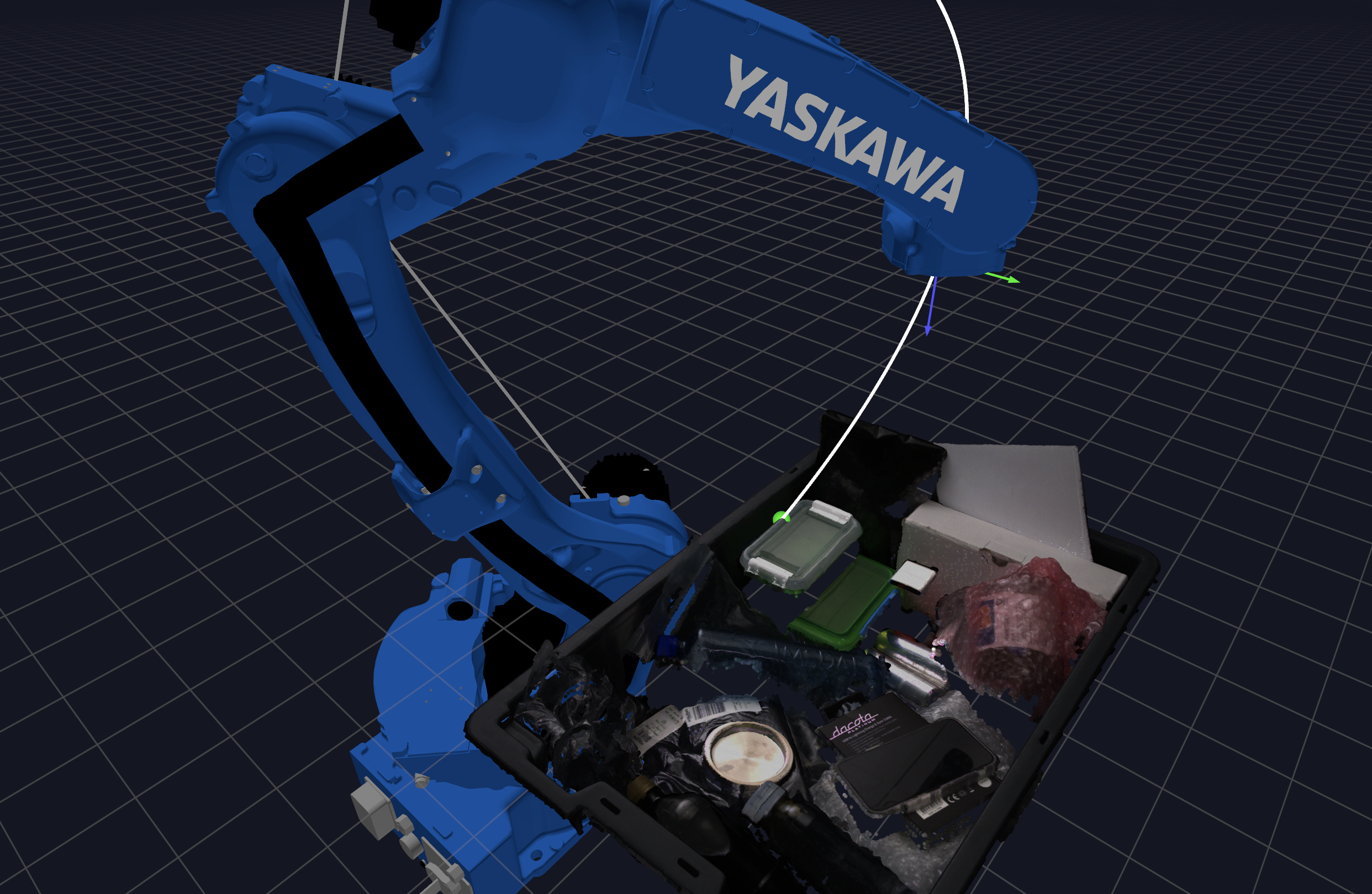
- 3D visualization with rerun: welding.py
Note: Install rerun extras to enable visualization
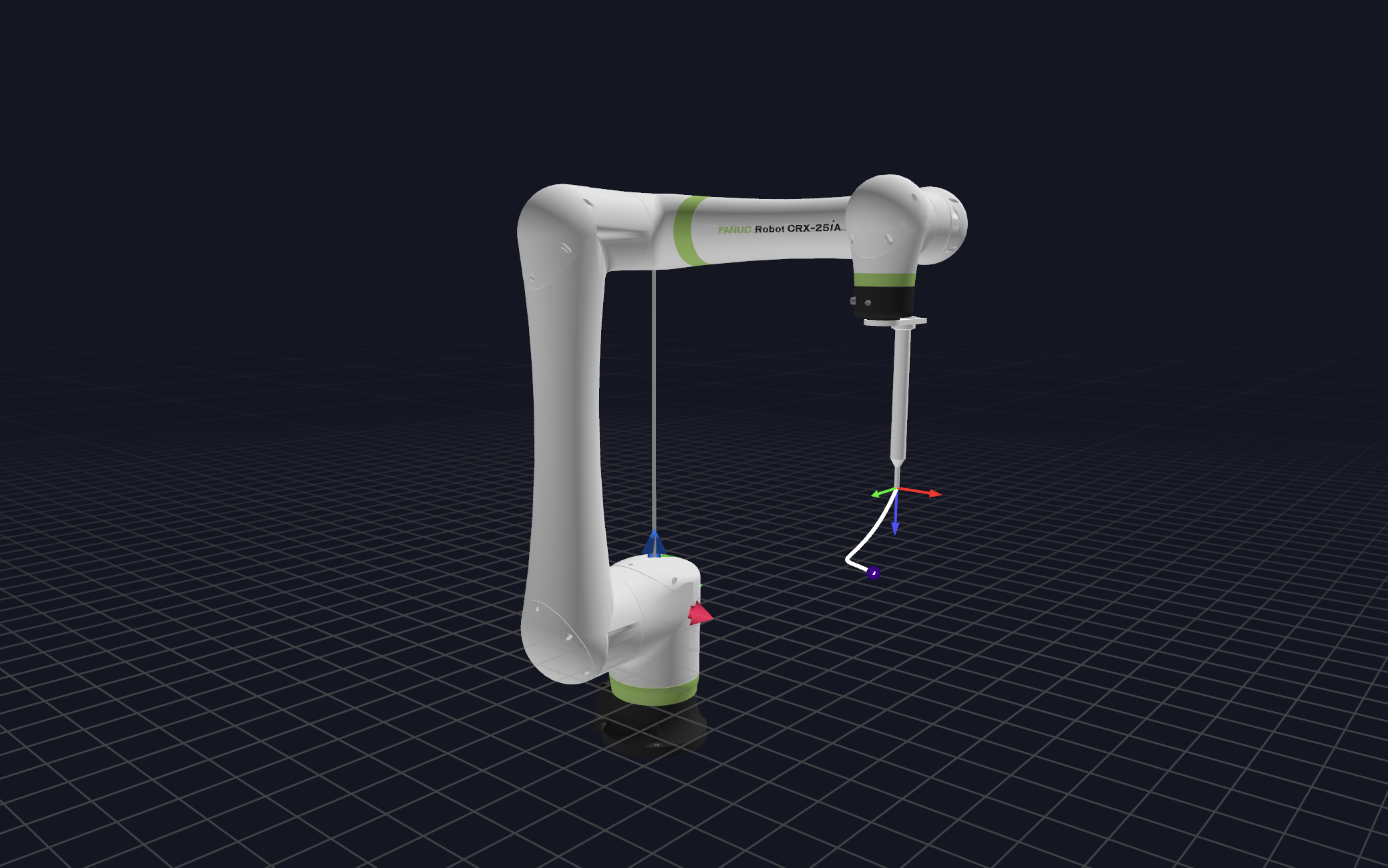
- Custom TCPs (Tool Center Points): visualize_tool.py
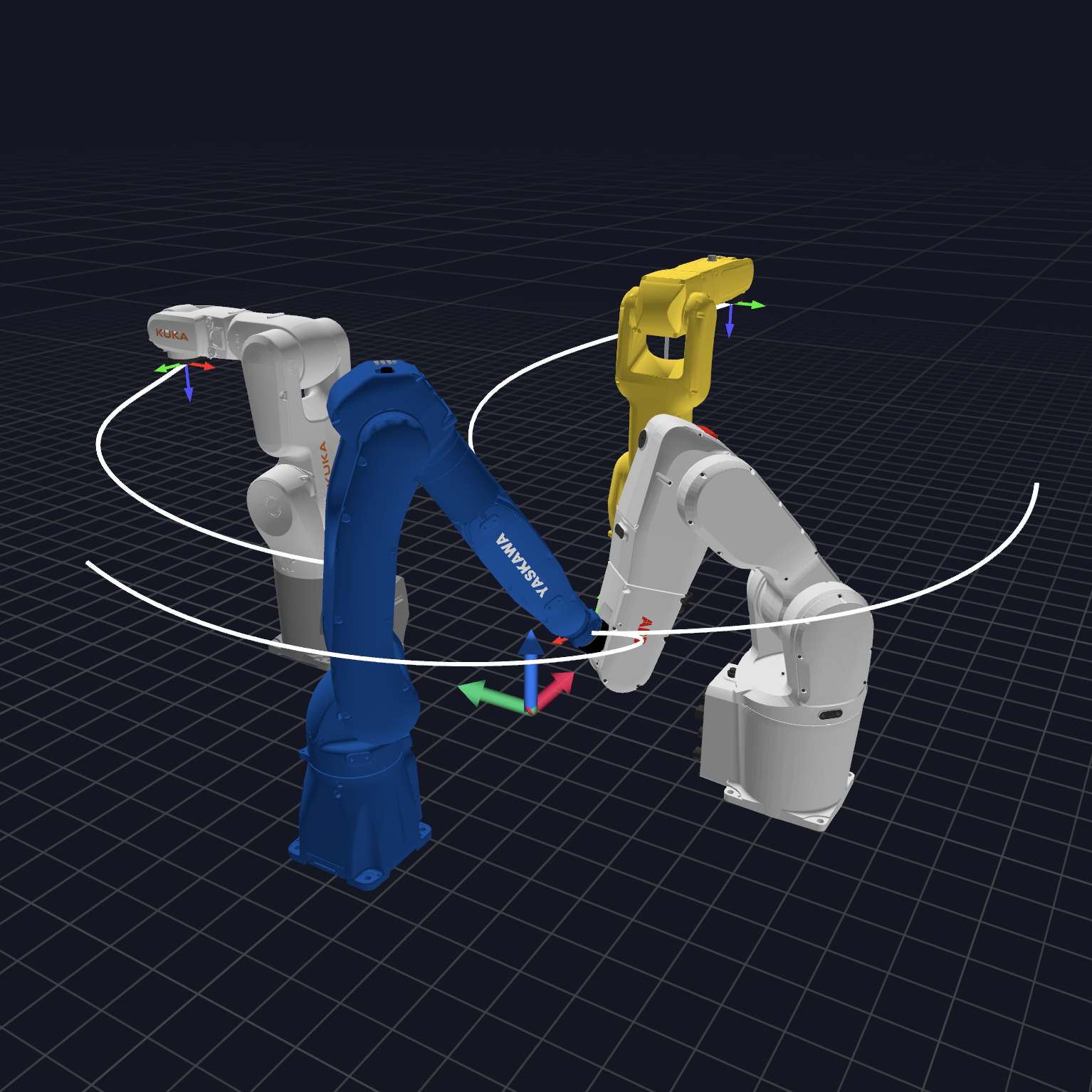
- Custom mounting with multiple robots: robocore.py
-
Merge trajectories with blending: merge_trajectories.py
-
Kinematic configuration: kinematic_configuration.py
NOVAx
NOVAx is an app framework for building server applications on top of Wandelbots NOVA. It provides common core concepts like the handling of programs and their execution.
You can create a new NOVAx app using the NOVA CLI generator:
nova app create "your-nova-app" -g python_app
For more information on using NOVAx see the README. Explore this example to use the NOVAx entry point.
Important: A
@nova.programfunction is registered once the module that defines it is imported. NOVAx handles this for you when you enable directory scanning viaprograms_dir— see Registering programs below.
Registering programs
Programs register themselves with a global registry when decorated with @nova.program, so NOVAx just needs the modules that define them to be imported. There are three ways to get them registered, and they can be combined:
-
Directory scanning: when you pass
programs_dir, NOVAx scans that directory and imports every.pyfile under it (recursively), so dropping a new file in is enough — no manual import needed. Files whose name starts with_(e.g.__init__.py) are skipped, and a missing directory is ignored. It is off by default; configure it via the constructor:from nova import Novax Novax(app) # no scanning (default) Novax(app, programs_dir="my_pkg/robot_programs") # scan a directory Novax(app, programs_dir=None) # explicit: no scanning
-
Plain import: any program imported elsewhere (inside or outside
programs/) is still registered.import my_pkg.special_program # noqa: F401 (registers on import)
-
Explicit:
novax.register_module("my_pkg.programs")imports a module/file and registers its programs on demand.
For local development you can serve everything from a short script without any FastAPI boilerplate:
from nova import Novax

Novax(programs_dir="programs").serve(port=3000)  # scan ./programs and serve
Development
To install development dependencies, run
uv sync --extra "nova-rerun-bridge"
Formatting
uv run ruff format
uv run ruff check --select I --fix
Yaml linting
docker run --rm -it -v $(pwd):/data cytopia/yamllint -d .yamllint .
Branch versions for testing
When working with feature branches or forks, it can be helpful to test the library as a dependency in other projects before merging. You can specify custom sources in your pyproject.toml to pull the library from a specific branch:
Using PEP 621-style table syntax:
wandelbots-nova = { git = "https://github.com/wandelbotsgmbh/wandelbots-nova.git", branch = "fix/http-prefix" }
Using PEP 508 direct URL syntax:
wandelbots-nova @ git+https://github.com/wandelbotsgmbh/wandelbots-nova.git@fix/http-prefix
Release process
Branch behaviour overview
| Branch | Purpose | Published to | Example version |
|---|---|---|---|
main |
Stable releases (semantic versioning vX.Y.Z) | PyPI (pip install wandelbots-nova) |
v1.13.0 |
release/* |
LTS-releases, pre-releases or hotfixes for older lines | PyPI (labeled with release suffix) | v1.8.7-release-1.x |
| any other | Development builds | GitHub actions (not published to PyPI) | e4c8af0647839... |
Stable releases from main
Releases are managed by release-please:
- On every push to
main, release-please opens/updates a release PR that bumps the version (derived from Conventional Commits) and updates the changelog. - Merging that release PR tags the release, then a source distribution and wheel are built and uploaded to PyPI.
- A GitHub release is created with the release assets.
LTS releases from release/\*
If you're on older major versions or under a special LTS contract:
- Use (or create) a branch like
release/1.x,release/customer-foo, etc. - Every commit to these branches triggers the release-branch build workflow, which publishes an alpha build to PyPI.
- Versions include a date/commit suffix to prevent collisions, e.g.
v1.8.7.a2026072803
Create a dev build (manual)
Need a temporary test build? Use GitHub actions:
-
Go to the actions tab.
-
Find Nova SDK: Build dev wheel and click
Run workflow. -
Select a branch and trigger the job.
-
After completion, open the Installation step to copy the ready-to-use
pip installcommand:pip install "wandelbots-nova @ git+https://github.com/wandelbotsgmbh/wandelbots-nova.git@<commit>"
Alternatively, trigger the same workflow from your terminal and wait for the
install string. This requires the authenticated GitHub CLI
(gh auth login) and a pushed feature branch (not main or release/*):
uv run dev-wheel
It dispatches the workflow for the current branch, watches the run to
completion, and prints the ready-to-use pip install command pinned to the
built commit.
Additional resources
- Examples covering basic to advanced SDK scenarios
- Technical wiki with architecture notes and troubleshooting tips
- Official documentation for platform concepts and API guides
- Code documentation generated from the latest SDK build
1 maintainer

Metadata
1 maintainer
Release files for wandelbots-nova 5.11.0a2026081400
For a detailed explanation of source distributions (sdists) and built distributions (wheels), please see the package formats documentation.
Built distribution (wheel)
| File | Interpreter | ABI | Platform | Reset |
|---|---|---|---|---|
| wandelbots_nova-5.11.0a2026081400-py3-none-any.whl | Python 3 | none | any | Details |
Release files / wandelbots_nova-5.11.0a2026081400-py3-none-any.whl
| Download URL | wandelbots_nova-5.11.0a2026081400-py3-none-any.whl |
|---|---|
| Size | 13.1 MB |
| Tags | Python 3 |
|
SHA-256 checksum How to use checksums |
4b305de90353e9d2521141839104099d700b5702d63d326285b0503e93461ee4
|
|
BLAKE2b-256 checksum How to use checksums |
c918d13604f7c0869c06a6172fd3ed0e00d0daf4e1487becb82529da460749de
|
| Upload date | |
|
Uploaded using Trusted Publishing? What is trusted publishing? |
No |
| Uploaded via |
twine/7.0.0 CPython/3.13.14
|














