
whoisport


Find out what is listening on a TCP or UDP port, and optionally kill it.
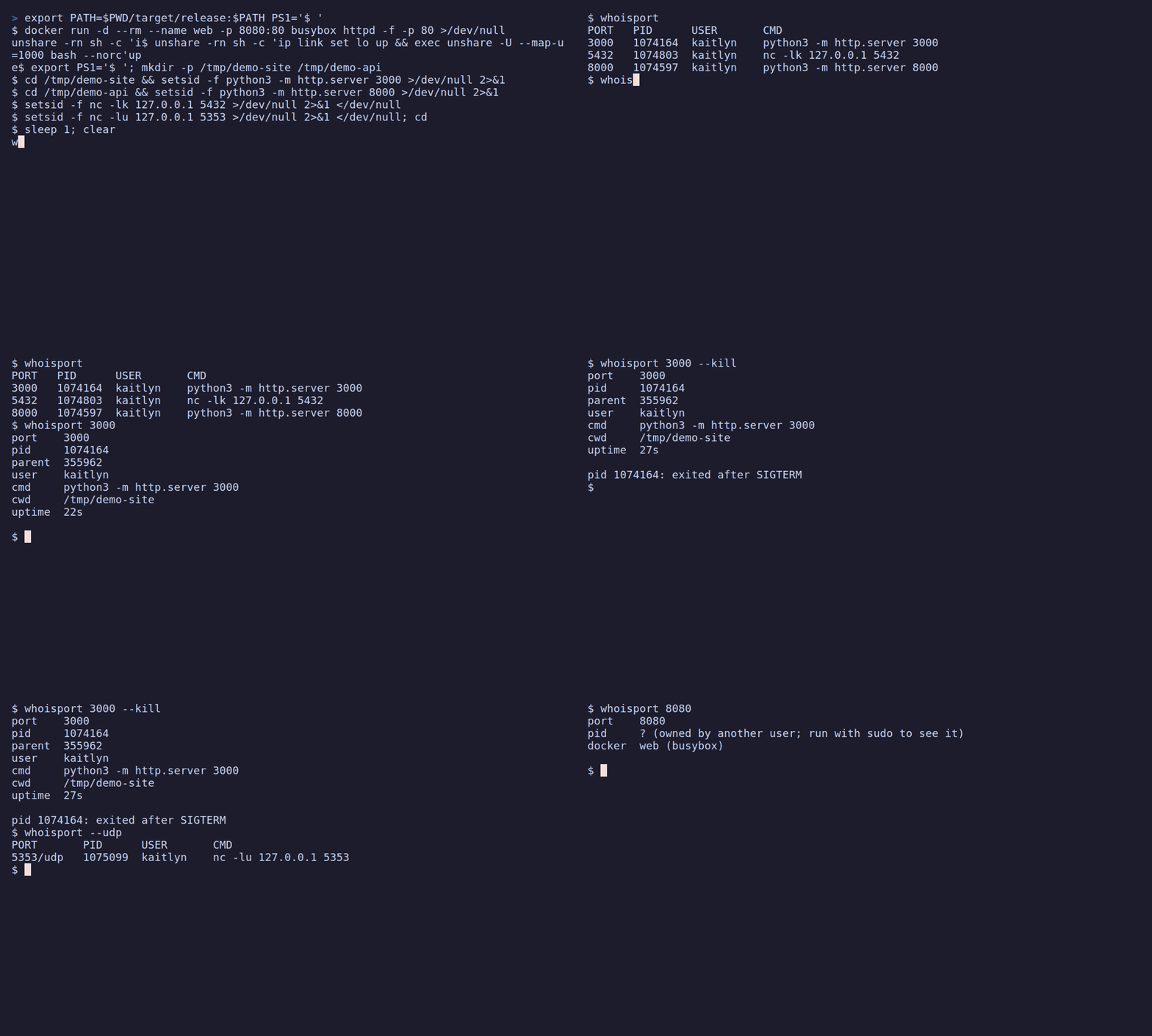
$ whoisport 3000
port    3000
pid     373232
parent  373230
user    kaitlyn
cmd     node node_modules/.bin/vite --port 3000
cwd     /home/kaitlyn/site
uptime  4m 12s

$ whoisport 3000 --kill
...
pid 373232: exited after SIGTERM

$ whoisport
PORT   PID      USER       CMD
3000   373232   kaitlyn    node node_modules/.bin/vite --port 3000
5432   ?        ?          ?
8080   41120    kaitlyn    python3 -m http.server 8080
ports marked ? are owned by another user; run with sudo to see it
lsof -i :3000 gives you a PID and a wall of columns. whoisport gives you the
command line, the directory it was started from, who owns it and how long it has
been running, which is usually what you need to decide whether to kill it.
Install
cargo binstall whoisport   # prebuilt binary, no compiling
cargo install whoisport    # build from source
pipx install whoisport     # or: uvx whoisport, pip install whoisport
macOS or Linux, with Homebrew:
brew install dpologdvinity/tap/whoisport
Debian/Ubuntu or Fedora/RHEL: download the .deb or .rpm for your architecture
from the Releases page, then
sudo apt install ./whoisport_*.deb     # Debian, Ubuntu
sudo dnf install ./whoisport-*.rpm     # Fedora, RHEL
Windows, with Scoop:
scoop bucket add whoisport https://github.com/dpologdvinity/whoisport
scoop install whoisport
Or download a binary from the Releases page: Linux (static, x86_64 and aarch64), macOS (Apple Silicon and Intel) and Windows (x86_64).
Works on Linux (reads /proc directly, no runtime dependencies), macOS
(uses the built-in lsof) and Windows 10/11.
Usage
whoisport                          # list every listening port
whoisport <PORT>...                # details for one or more ports
whoisport <PORT>... --kill [--force]
whoisport [<PORT>...] --json       # machine-readable output
whoisport [<PORT>...] --udp        # UDP instead of TCP
| Flag | Effect |
|---|---|
--kill |
Ask the process to exit and wait up to 3 seconds. |
--force |
With --kill: forcibly terminate it if asking did not work. |
--json |
Print a JSON array with port, proto, pid, ppid, user, cmd, cwd, uptime_secs, container, image. |
--udp |
Look at UDP sockets instead of TCP. UDP has no listening state, so any bound socket without a remote peer counts. Windows doesn't report UDP peers, so there every bound UDP socket is listed, including short-lived client ones. |
Docker: when a port is published by a container, whoisport shows the container
name and image (docker web (nginx:alpine)), even when the docker-proxy
process itself is owned by root. It asks docker ps only in that case.
--kill always needs explicit ports; it never kills everything. When several
processes hold one socket, it signals only the innermost ones: service managers
(systemd, launchd, svchost.exe) and parents of another holder are never
signalled, because stopping them can take down far more than the port. If any
holder was skipped, whoisport says which one still holds the port and exits 3.
How --kill asks, per platform:
| Platform | --kill |
--force |
|---|---|---|
| Linux, macOS | SIGTERM |
SIGKILL |
| Windows | Ctrl+C in the process's console, and WM_CLOSE to its windows |
TerminateProcess |
On Windows, Ctrl+C reaches every program attached to a console, so whoisport only
sends it when the target's console holds nothing but the target, its child
processes and a shell. Otherwise it says so and leaves the choice of --force to you.
Exit codes: 0 success, 1 a requested port had nothing listening (or nothing
is listening at all), 2 invalid arguments, 3 a kill failed or a holder was skipped, so the port may still be in use.
Checks IPv4 and IPv6 TCP sockets in the LISTEN state. On Linux, processes owned
by other users can't be inspected without sudo; they show up as ?. On
Windows, details of system services need an elevated terminal. On macOS,
other users' listeners only appear when run with sudo.
License
MIT
1 maintainer

Metadata
1 maintainer
Release files for whoisport 0.5.4
For a detailed explanation of source distributions (sdists) and built distributions (wheels), please see the package formats documentation.
Source distribution (sdist)
| File | Size | Uploaded | Provenance | |
|---|---|---|---|---|
| whoisport-0.5.4.tar.gz | 23.3 kB | With provenance | Details |
Built distributions (wheels)
| File | Reset | |||
|---|---|---|---|---|
| whoisport-0.5.4-py3-none-win_amd64.whl | Python 3 | none | Windows x86-64 | Details |
| whoisport-0.5.4-py3-none-manylinux_2_17_x86_64.manylinux2014_x86_64.whl | Python 3 | none | Linux glibc 2.17+ x86-64 | Details |
| whoisport-0.5.4-py3-none-manylinux_2_17_aarch64.manylinux2014_aarch64.whl | Python 3 | none | Linux glibc 2.17+ ARM64 | Details |
| whoisport-0.5.4-py3-none-macosx_11_0_arm64.whl | Python 3 | none | macOS 11.0+ ARM64 | Details |
| whoisport-0.5.4-py3-none-macosx_10_12_x86_64.whl | Python 3 | none | macOS 10.12+ x86-64 | Details |
Total release size: 1.9 MB
Release files / whoisport-0.5.4.tar.gz
| Download URL | whoisport-0.5.4.tar.gz |
|---|---|
| Size | 23.3 kB |
| Tags | Source |
|
SHA-256 checksum How to use checksums |
e35b175cc1228376af0d6c5ac1afa3e73ddd0ba21c83a35884ad4c2077e2bc5a
|
|
BLAKE2b-256 checksum How to use checksums |
dae4dc2954d99d0d10480fd3b8e997bac1ad56929ebababc8c9ad7454e090e7d
|
| Upload date | |
|
Uploaded using Trusted Publishing? What is trusted publishing? |
Yes |
| Uploaded via |
twine/7.0.0 CPython/3.13.16
|
Provenance
Provenance describes where a file came from. On PyPI, provenance is shared via attestations, which provide a verifiable record of the build or publishing details. View details, limitations and caveats.


PyPI Publish Attestation
PyPI verified that this artifact, at this checksum, originated from the publisher listed below.
Signed by GitHub Actions, verified by PyPI on Oct 24, 2026.
Transparency logRelease files / whoisport-0.5.4-py3-none-win_amd64.whl
| Download URL | whoisport-0.5.4-py3-none-win_amd64.whl |
|---|---|
| Size | 390.1 kB |
| Tags | Python 3 Windows x86-64 |
|
SHA-256 checksum How to use checksums |
d38e559a2f7f91a19344204bb873ae8fb94c818cb49bc563163ea266b7d42236
|
|
BLAKE2b-256 checksum How to use checksums |
b9fe00a8f85e7df16d8f369103d85d8cf3b458ca5453103e1025fd0150015888
|
| Upload date | |
|
Uploaded using Trusted Publishing? What is trusted publishing? |
Yes |
| Uploaded via |
twine/7.0.0 CPython/3.13.16
|
Provenance
Provenance describes where a file came from. On PyPI, provenance is shared via attestations, which provide a verifiable record of the build or publishing details. View details, limitations and caveats.
PyPI Publish Attestation
PyPI verified that this artifact, at this checksum, originated from the publisher listed below.
Signed by GitHub Actions, verified by PyPI on Oct 24, 2026.
Transparency logRelease files / whoisport-0.5.4-py3-none-manylinux_2_17_x86_64.manylinux2014_x86_64.whl
| Download URL | whoisport-0.5.4-py3-none-manylinux_2_17_x86_64.manylinux2014_x86_64.whl |
|---|---|
| Size | 398.1 kB |
| Tags | Linux glibc 2.17+ x86-64 Python 3 |
|
SHA-256 checksum How to use checksums |
964d8d52058542aba3fccdd442dbef63e79867ed743f5618e9838db47772f81a
|
|
BLAKE2b-256 checksum How to use checksums |
7db7b219282d8c3ecb49167ec01b17c444f9fdadb2881545f62d771152f6abce
|
| Upload date | |
|
Uploaded using Trusted Publishing? What is trusted publishing? |
Yes |
| Uploaded via |
twine/7.0.0 CPython/3.13.16
|
Provenance
Provenance describes where a file came from. On PyPI, provenance is shared via attestations, which provide a verifiable record of the build or publishing details. View details, limitations and caveats.
PyPI Publish Attestation
PyPI verified that this artifact, at this checksum, originated from the publisher listed below.
Signed by GitHub Actions, verified by PyPI on Oct 24, 2026.
Transparency logRelease files / whoisport-0.5.4-py3-none-manylinux_2_17_aarch64.manylinux2014_aarch64.whl
| Download URL | whoisport-0.5.4-py3-none-manylinux_2_17_aarch64.manylinux2014_aarch64.whl |
|---|---|
| Size | 379.7 kB |
| Tags | Linux glibc 2.17+ ARM64 Python 3 |
|
SHA-256 checksum How to use checksums |
88ae730be7bb92aa07f11d3bb6c73fe8ead1912f88b807315c2e8b67735c9fb9
|
|
BLAKE2b-256 checksum How to use checksums |
dddc9aae359c6f6d2cb8e6a3913d23f716ac992d3b0a6123860759578e82b35f
|
| Upload date | |
|
Uploaded using Trusted Publishing? What is trusted publishing? |
Yes |
| Uploaded via |
twine/7.0.0 CPython/3.13.16
|
Provenance
Provenance describes where a file came from. On PyPI, provenance is shared via attestations, which provide a verifiable record of the build or publishing details. View details, limitations and caveats.
PyPI Publish Attestation
PyPI verified that this artifact, at this checksum, originated from the publisher listed below.
Signed by GitHub Actions, verified by PyPI on Oct 24, 2026.
Transparency logRelease files / whoisport-0.5.4-py3-none-macosx_11_0_arm64.whl
| Download URL | whoisport-0.5.4-py3-none-macosx_11_0_arm64.whl |
|---|---|
| Size | 352.9 kB |
| Tags | Python 3 macOS 11.0+ ARM64 |
|
SHA-256 checksum How to use checksums |
ed1ac919e33db77995d0098f2ea75a907c0a7b871fb90705b3bfc63f70f53d34
|
|
BLAKE2b-256 checksum How to use checksums |
af14ef224dfcaa4624e7298b501eff65bf94bf9ee62b350a6a9d059fc2fbfdf5
|
| Upload date | |
|
Uploaded using Trusted Publishing? What is trusted publishing? |
Yes |
| Uploaded via |
twine/7.0.0 CPython/3.13.16
|
Provenance
Provenance describes where a file came from. On PyPI, provenance is shared via attestations, which provide a verifiable record of the build or publishing details. View details, limitations and caveats.
PyPI Publish Attestation
PyPI verified that this artifact, at this checksum, originated from the publisher listed below.
Signed by GitHub Actions, verified by PyPI on Oct 24, 2026.
Transparency logRelease files / whoisport-0.5.4-py3-none-macosx_10_12_x86_64.whl
| Download URL | whoisport-0.5.4-py3-none-macosx_10_12_x86_64.whl |
|---|---|
| Size | 379.2 kB |
| Tags | Python 3 macOS 10.12+ x86-64 |
|
SHA-256 checksum How to use checksums |
9efdb7387a06f8c3d9de07722773104931d43dc0f80a84ab54abaa6a0f99275d
|
|
BLAKE2b-256 checksum How to use checksums |
fd9fcf41da09c73eeda9c805870f464b7f69711b03e2eb590240507a1e487c7b
|
| Upload date | |
|
Uploaded using Trusted Publishing? What is trusted publishing? |
Yes |
| Uploaded via |
twine/7.0.0 CPython/3.13.16
|
Provenance
Provenance describes where a file came from. On PyPI, provenance is shared via attestations, which provide a verifiable record of the build or publishing details. View details, limitations and caveats.
PyPI Publish Attestation
PyPI verified that this artifact, at this checksum, originated from the publisher listed below.
Signed by GitHub Actions, verified by PyPI on Oct 24, 2026.
Transparency logSecurity for whoisport 0.5.4
Provenance
Provenance describes where a file came from. On PyPI, provenance is shared via attestations, which provide a verifiable record of the build or publishing details. View details, limitations and caveats.
Full provenance
All 6 files in this release have been uploaded with provenance metadata.
Attestation for whoisport-0.5.4.tar.gz
PyPI Publish Attestation
PyPI verified that this artifact, at this checksum, originated from the publisher listed below.
Signed by GitHub Actions, verified by PyPI on Oct 24, 2026.
Transparency logA note on package security
PyPI is a repository for distributing packages, not a service for auditing them. While third-party security researchers and our staff do their best to detect and remove malicious packages, PyPI cannot guarantee the quality, security or suitability of any given package.
To learn more about protecting yourself from malicious actors, visit our package security documentation.














