
whoisport



Find out what is listening on a port, who started it, and stop it safely. Works on Linux, macOS and Windows. One small binary, no runtime dependencies.
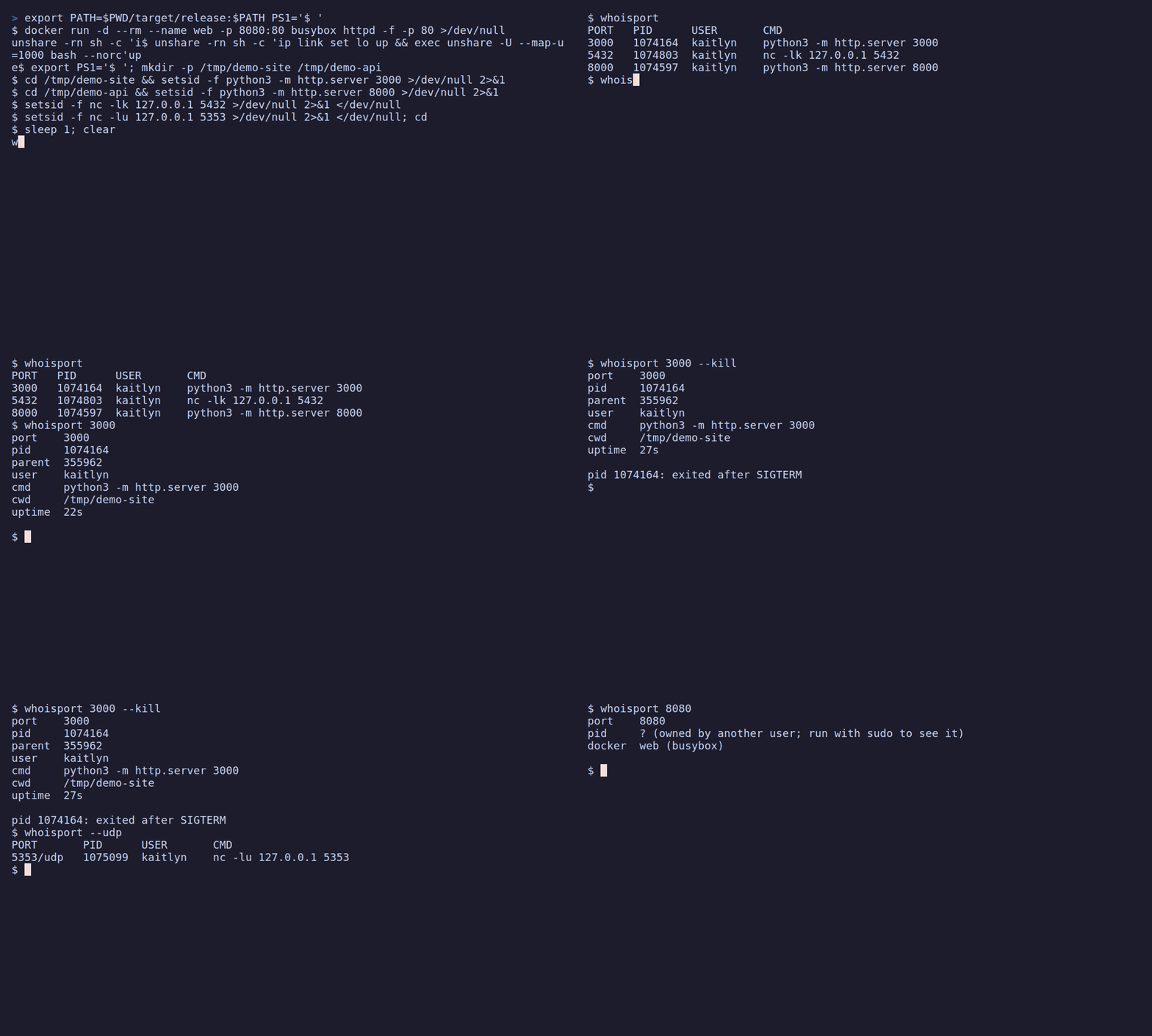
lsof -i :3000 gives you a PID and a wall of columns. whoisport gives you the command
line, the directory it was started from, who owns it and how long it has been running,
which is usually what you need to decide whether to kill it. And when you do kill it,
whoisport makes sure it only stops the process you were looking at.
Quickstart
whoisport              # what is listening on this machine?
whoisport 3000         # what is on port 3000, and who started it?
whoisport 3000 --kill  # ask it to exit (add --force if it refuses)
$ whoisport 3000
port    3000
pid     373232
parent  373230
user    kaitlyn
cmd     node node_modules/.bin/vite --port 3000
cwd     /home/kaitlyn/site
uptime  4m 12s

$ whoisport 3000 --kill
...
pid 373232: exited after SIGTERM

$ whoisport
PORT   PID      USER       CMD
3000   373232   kaitlyn    node node_modules/.bin/vite --port 3000
5432   ?        ?          ?
8080   41120    kaitlyn    python3 -m http.server 8080
ports marked ? are owned by another user; run with sudo to see it
Install
| Platform | Command |
|---|---|
| Any, with Rust | cargo binstall whoisport (prebuilt) or cargo install whoisport (builds from source) |
| Any, with Python | pipx install whoisport or uvx whoisport |
| macOS, Linux | brew install dpologdvinity/tap/whoisport |
| Windows | scoop bucket add whoisport https://github.com/dpologdvinity/whoisport then scoop install whoisport |
| Debian, Ubuntu | download the .deb from Releases, then sudo apt install ./whoisport_*.deb |
| Fedora, RHEL | download the .rpm from Releases, then sudo dnf install ./whoisport-*.rpm |
Or download a binary from the Releases page: Linux (static, x86_64 and aarch64), macOS (Apple silicon and Intel) and Windows (x86_64).
Supported systems: Linux (reads /proc, no other tools needed), macOS (uses the
built-in lsof), Windows 10 and 11.
Usage
whoisport [PORTS]... [--kill [--force]] [--json] [--udp]
| You type | You get |
|---|---|
whoisport |
A table of every listening port |
whoisport 3000 8080 |
Details of what is on each port (repeated ports are shown once) |
whoisport 3000 --kill |
The details, then the process is asked to exit and given 3 seconds |
whoisport 3000 --kill --force |
Same, but forcibly ended if it does not exit |
whoisport --json |
The same data as a JSON array, for scripts |
whoisport --udp |
UDP sockets instead of TCP |
--kill always needs explicit ports; it never means "kill everything". --json cannot
be combined with --kill.
JSON output
--json prints an array with one object per listener. Every object has the same keys;
what is unknown (for example the owner of a process you may not inspect) is null:
[
  {
    "port": 3000, "proto": "tcp", "pid": 373232, "ppid": 373230, "user": "kaitlyn",
    "cmd": "node node_modules/.bin/vite --port 3000", "cwd": "/home/kaitlyn/site",
    "uptime_secs": 252, "container": null, "image": null
  }
]
Exit codes
| Code | Meaning |
|---|---|
0 |
Success: everything asked for was found (and killed, if asked) |
1 |
A requested port has nothing listening, or nothing is listening at all |
2 |
Invalid arguments |
3 |
A kill failed, or a process holding the port was deliberately not killed (see below), so the port may still be in use |
Reading ?
On Linux, a process owned by another user cannot be inspected without sudo, so its row
shows ?. On macOS lsof only lists your own processes without sudo, so other
users' listeners are missing. On Windows, details of system services need an elevated
terminal.
Stopping processes safely
--kill is built so that it cannot take down more than you meant to:
- The process you saw is the process that is signalled. Each target is identified by its pid and its start time. If it exits and the system hands its pid to something else, that something else is left alone.
- Service managers and parents are never signalled. When several processes share a
socket (a supervisor and its workers, or
systemdsocket activation), stopping the supervisor takes down far more than one port.systemd,launchdandsvchost.exe, and any process that is a parent of another holder, are skipped. whoisport then says which one still holds the port and exits3. - It asks first. Each target is asked to exit; it is forced only with
--force.
| Platform | --kill asks by |
--force |
|---|---|---|
| Linux, macOS | SIGTERM |
SIGKILL |
| Windows | Ctrl+C in the process's console, and WM_CLOSE to its windows |
TerminateProcess |
On Windows, Ctrl+C reaches every program attached to a console, so whoisport only sends
it when the target's console holds nothing but the target, its child processes and a
shell. Otherwise it says so and leaves the choice of --force to you.
Text from other processes (command lines, paths) is printed with control characters, bidirectional-text overrides and zero-width characters escaped, so a hostile process cannot rewrite your terminal or disguise what it is.
Docker
When a port is published by a container, whoisport shows the container name and image
(docker web (nginx:alpine)), even though the docker-proxy process behind it is owned
by root. Docker is consulted only when a listener looks like Docker's forwarder or its
owner cannot be read, only for a local daemon (not an ssh:// or remote DOCKER_HOST),
and each Docker call is cut off after 2 seconds, so a stuck daemon never hangs
whoisport: the names are simply left out. --kill on such a port prints the matching
docker stop <name> command, because killing the forwarder only breaks the port mapping.
UDP
UDP has no listening state, so --udp lists bound sockets that have no remote peer.
Windows does not report UDP peers, so there every bound UDP socket is listed, including
short-lived client ones.
How it works
A short version (the long one is in ARCHITECTURE.md): whoisport asks
the operating system which sockets are listening and which process owns each one, looks
up details of those processes, and prints them. Each platform has its own small backend
for that (/proc on Linux, lsof on macOS, the IP Helper API on Windows); everything
else is shared.
cli ─► scan ─► output     (list, details, JSON)
         │
         └───► kill       (identity, safety rules, ask-then-force)
         ▲
   proc backend per OS · docker names
Development
cargo test                 # unit and end-to-end tests
cargo clippy --all-targets -- -D warnings
See CONTRIBUTING.md for the full workflow (formatting, coverage, checking the other platforms, commit style) and ARCHITECTURE.md for how the code is organised.
License
1 maintainer

Metadata
1 maintainer
Release files for whoisport 0.5.5
For a detailed explanation of source distributions (sdists) and built distributions (wheels), please see the package formats documentation.
Source distribution (sdist)
| File | Size | Uploaded | Provenance | |
|---|---|---|---|---|
| whoisport-0.5.5.tar.gz | 52.4 kB | With provenance | Details |
Built distributions (wheels)
| File | Reset | |||
|---|---|---|---|---|
| whoisport-0.5.5-py3-none-win_amd64.whl | Python 3 | none | Windows x86-64 | Details |
| whoisport-0.5.5-py3-none-manylinux_2_17_x86_64.manylinux2014_x86_64.whl | Python 3 | none | Linux glibc 2.17+ x86-64 | Details |
| whoisport-0.5.5-py3-none-manylinux_2_17_aarch64.manylinux2014_aarch64.whl | Python 3 | none | Linux glibc 2.17+ ARM64 | Details |
| whoisport-0.5.5-py3-none-macosx_11_0_arm64.whl | Python 3 | none | macOS 11.0+ ARM64 | Details |
| whoisport-0.5.5-py3-none-macosx_10_12_x86_64.whl | Python 3 | none | macOS 10.12+ x86-64 | Details |
Total release size: 2.0 MB
Release files / whoisport-0.5.5.tar.gz
| Download URL | whoisport-0.5.5.tar.gz |
|---|---|
| Size | 52.4 kB |
| Tags | Source |
|
SHA-256 checksum How to use checksums |
07ad37da8a95004f5bc1b573394009e169a1848e2bea8d9c937576e2223f516a
|
|
BLAKE2b-256 checksum How to use checksums |
dd89ee66a43b9f759c756a1ca904d17809c542b3754b7e604c356f4da4e8c2cb
|
| Upload date | |
|
Uploaded using Trusted Publishing? What is trusted publishing? |
Yes |
| Uploaded via |
twine/7.0.0 CPython/3.13.16
|
Provenance
Provenance describes where a file came from. On PyPI, provenance is shared via attestations, which provide a verifiable record of the build or publishing details. View details, limitations and caveats.


PyPI Publish Attestation
PyPI verified that this artifact, at this checksum, originated from the publisher listed below.
Signed by GitHub Actions, verified by PyPI on Oct 24, 2026.
Transparency logRelease files / whoisport-0.5.5-py3-none-win_amd64.whl
| Download URL | whoisport-0.5.5-py3-none-win_amd64.whl |
|---|---|
| Size | 396.1 kB |
| Tags | Python 3 Windows x86-64 |
|
SHA-256 checksum How to use checksums |
407613fa74fde68a061544d6a4e19a08f16c20264e5e905e8f053d5db778fb7e
|
|
BLAKE2b-256 checksum How to use checksums |
4b5677185686104129aa1a32d9ae61edca6a7d9ecad829f121158b126e1fe3a4
|
| Upload date | |
|
Uploaded using Trusted Publishing? What is trusted publishing? |
Yes |
| Uploaded via |
twine/7.0.0 CPython/3.13.16
|
Provenance
Provenance describes where a file came from. On PyPI, provenance is shared via attestations, which provide a verifiable record of the build or publishing details. View details, limitations and caveats.
PyPI Publish Attestation
PyPI verified that this artifact, at this checksum, originated from the publisher listed below.
Signed by GitHub Actions, verified by PyPI on Oct 24, 2026.
Transparency logRelease files / whoisport-0.5.5-py3-none-manylinux_2_17_x86_64.manylinux2014_x86_64.whl
| Download URL | whoisport-0.5.5-py3-none-manylinux_2_17_x86_64.manylinux2014_x86_64.whl |
|---|---|
| Size | 414.2 kB |
| Tags | Linux glibc 2.17+ x86-64 Python 3 |
|
SHA-256 checksum How to use checksums |
a94a057f15e6380cd44da726cd2003a38ab4a60384d99cd0c152d90e3a10ea4f
|
|
BLAKE2b-256 checksum How to use checksums |
a89072384bbbbe853e739c746b311dc523e145226a6b5c9cd2faaa6285473d7b
|
| Upload date | |
|
Uploaded using Trusted Publishing? What is trusted publishing? |
Yes |
| Uploaded via |
twine/7.0.0 CPython/3.13.16
|
Provenance
Provenance describes where a file came from. On PyPI, provenance is shared via attestations, which provide a verifiable record of the build or publishing details. View details, limitations and caveats.
PyPI Publish Attestation
PyPI verified that this artifact, at this checksum, originated from the publisher listed below.
Signed by GitHub Actions, verified by PyPI on Oct 24, 2026.
Transparency logRelease files / whoisport-0.5.5-py3-none-manylinux_2_17_aarch64.manylinux2014_aarch64.whl
| Download URL | whoisport-0.5.5-py3-none-manylinux_2_17_aarch64.manylinux2014_aarch64.whl |
|---|---|
| Size | 394.0 kB |
| Tags | Linux glibc 2.17+ ARM64 Python 3 |
|
SHA-256 checksum How to use checksums |
553464e93c4ab05eda3fe97d750f25a80f2142f42af52fd8bef72244d318cbc4
|
|
BLAKE2b-256 checksum How to use checksums |
2aea7bd4f17d80f4a2b3b6f8342b516de37d9e5b010205d6dd7efc775b4bcc84
|
| Upload date | |
|
Uploaded using Trusted Publishing? What is trusted publishing? |
Yes |
| Uploaded via |
twine/7.0.0 CPython/3.13.16
|
Provenance
Provenance describes where a file came from. On PyPI, provenance is shared via attestations, which provide a verifiable record of the build or publishing details. View details, limitations and caveats.
PyPI Publish Attestation
PyPI verified that this artifact, at this checksum, originated from the publisher listed below.
Signed by GitHub Actions, verified by PyPI on Oct 24, 2026.
Transparency logRelease files / whoisport-0.5.5-py3-none-macosx_11_0_arm64.whl
| Download URL | whoisport-0.5.5-py3-none-macosx_11_0_arm64.whl |
|---|---|
| Size | 365.5 kB |
| Tags | Python 3 macOS 11.0+ ARM64 |
|
SHA-256 checksum How to use checksums |
0128bab4c9709918df400ff1b8d320385608314c6c4557abd61beaca46fbbfe8
|
|
BLAKE2b-256 checksum How to use checksums |
f1bec260fd6340eda0e2ec3d55a455a8f219d3ccf037071bbc199f6acf598521
|
| Upload date | |
|
Uploaded using Trusted Publishing? What is trusted publishing? |
Yes |
| Uploaded via |
twine/7.0.0 CPython/3.13.16
|
Provenance
Provenance describes where a file came from. On PyPI, provenance is shared via attestations, which provide a verifiable record of the build or publishing details. View details, limitations and caveats.
PyPI Publish Attestation
PyPI verified that this artifact, at this checksum, originated from the publisher listed below.
Signed by GitHub Actions, verified by PyPI on Oct 24, 2026.
Transparency logRelease files / whoisport-0.5.5-py3-none-macosx_10_12_x86_64.whl
| Download URL | whoisport-0.5.5-py3-none-macosx_10_12_x86_64.whl |
|---|---|
| Size | 393.5 kB |
| Tags | Python 3 macOS 10.12+ x86-64 |
|
SHA-256 checksum How to use checksums |
d533f5b314b235639dec5393fa0e0f622b08b0ae1f55d332e15b6172d60aa441
|
|
BLAKE2b-256 checksum How to use checksums |
3d3fcbe7c8880f07edf438965ebe1111c811afef60916d7ee7c4232b67e398db
|
| Upload date | |
|
Uploaded using Trusted Publishing? What is trusted publishing? |
Yes |
| Uploaded via |
twine/7.0.0 CPython/3.13.16
|
Provenance
Provenance describes where a file came from. On PyPI, provenance is shared via attestations, which provide a verifiable record of the build or publishing details. View details, limitations and caveats.
PyPI Publish Attestation
PyPI verified that this artifact, at this checksum, originated from the publisher listed below.
Signed by GitHub Actions, verified by PyPI on Oct 24, 2026.
Transparency logSecurity for whoisport 0.5.5
Provenance
Provenance describes where a file came from. On PyPI, provenance is shared via attestations, which provide a verifiable record of the build or publishing details. View details, limitations and caveats.
Full provenance
All 6 files in this release have been uploaded with provenance metadata.
Attestation for whoisport-0.5.5.tar.gz
PyPI Publish Attestation
PyPI verified that this artifact, at this checksum, originated from the publisher listed below.
Signed by GitHub Actions, verified by PyPI on Oct 24, 2026.
Transparency logA note on package security
PyPI is a repository for distributing packages, not a service for auditing them. While third-party security researchers and our staff do their best to detect and remove malicious packages, PyPI cannot guarantee the quality, security or suitability of any given package.
To learn more about protecting yourself from malicious actors, visit our package security documentation.














