
WizardFlow Python SDK
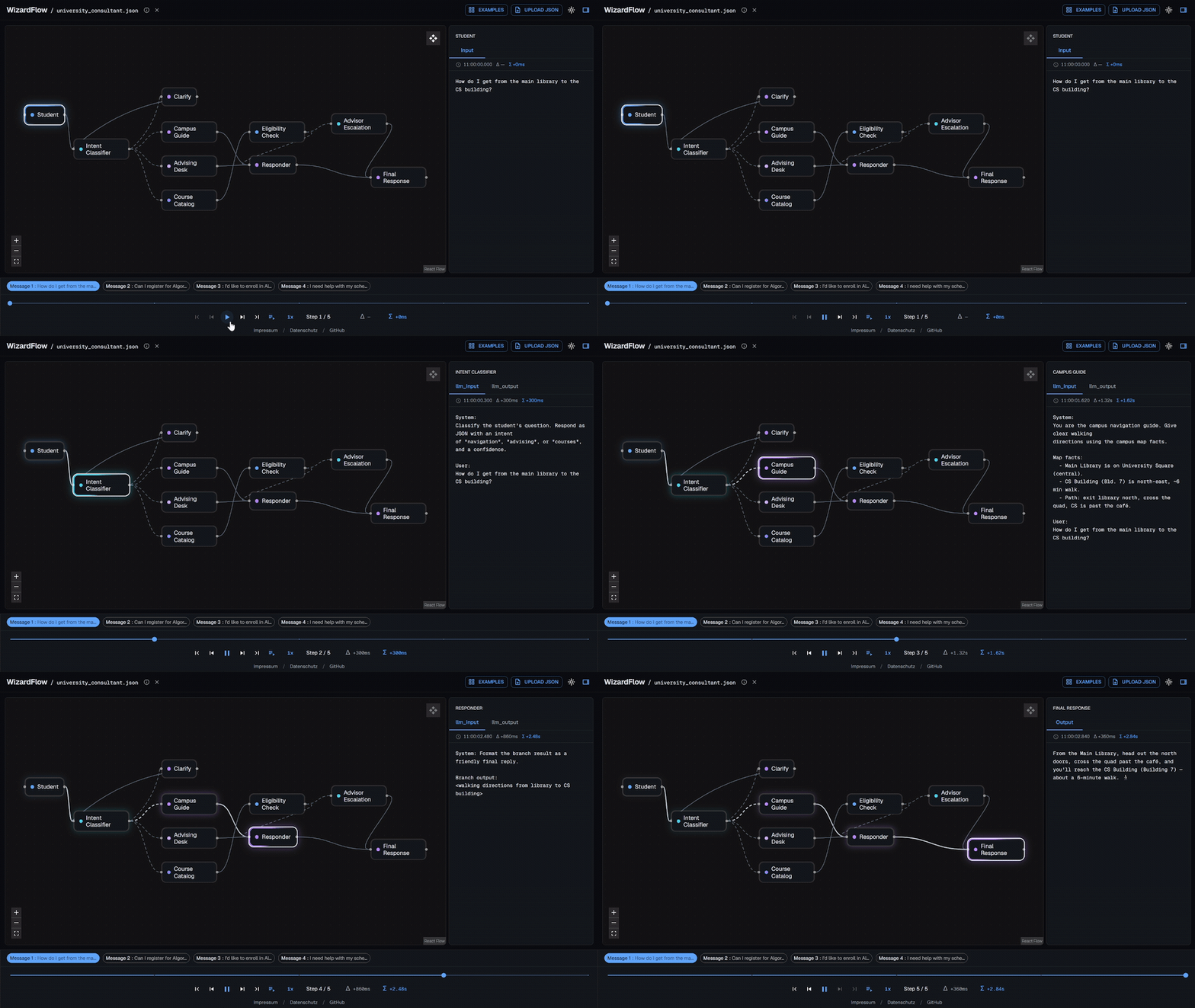
A lightweight recorder for Python agents. WizardFlow turns an agent run into a portable WizardFlow JSONL file that you can replay as an interactive graph, inspect with ordinary tools, or attach to a bug report.
Drop the file into getwizardflow.com and it is
processed entirely in the browser—nothing is uploaded. You can also replay it
locally with wizardflow ui.
Why WizardFlow?
- The trace is a file. Commit, diff, grep, archive, or share it without an observability account.
- Replay it anywhere. Use the bundled local viewer or the fully client-side hosted viewer.
- Zero runtime dependencies. The base SDK is pure Python and requires no daemon or framework.
- Explicit by design. Your code chooses which node executions and values enter the trace.
- OpenTelemetry is optional. The same node executions can also be projected to OTLP-compatible observability backends.
Install
pip install wizardflow
Quickstart
import uuid

import wizardflow

trace = wizardflow.init(
    output_dir="traces",
    file_prefix="run",
    nodes=["generator"],
)

message_id = str(uuid.uuid4())
input_value = ...

with trace.node(message_id, "generator") as node:
    node.log_input(input_value)
    output_value = ...
    node.log_output(output_value)

trace_path = trace.end_message(message_id)
print(trace_path)
trace.node(...) records the node's execution interval. log_input() and
log_output() preserve their JSON-compatible values in the trace, and
end_message() appends the completed message to JSONL. There is no separate
save() call.
Drop trace_path into getwizardflow.com, or open
it locally:
wizardflow ui traces/run__<timestamp>.jsonl
The module-level style remains available for applications that use one default trace:
wizardflow.init(nodes=["generator"])

with wizardflow.node("msg-1", "generator") as node:
    node.log_input(input_value)
    node.log_output(output_value)

wizardflow.end_message("msg-1")
Optional OpenTelemetry export
Install the optional OTel packages directly:
pip install opentelemetry-api opentelemetry-sdk opentelemetry-exporter-otlp-proto-http
Then enable OTLP trace export while retaining JSONL as the portable source of truth:
trace = wizardflow.init(
    nodes=["generator"],
    name="my-agent",
    otel=True,
    otel_endpoint="http://localhost:4318/v1/traces",
    otel_workflow_name="answer",
)

with trace.workflow() as run:               # one workflow = one OTel trace
    run.set_info(otel_attributes={"session.id": chat_id})
    with run.node("generator", kind="llm") as node:
        node.log_input(input_value)
        node.log_output(output_value)

trace.close_otel()
otel_attributes sets exact keys on the workflow's root span — e.g.
session.id groups traces into Phoenix sessions, langfuse.session.id into
Langfuse sessions.
Generic logs can optionally choose an exact application-owned span attribute without changing their JSONL/UI label:
node.log("quality", 0.92, otel_attribute="app.response.quality")
Content export is enabled by default when OTel export is enabled, with
otel_include_content=False and CLI --no-include-content available when the
receiver should only get metadata. See the
OpenTelemetry guide
for provider ownership, GenAI mappings, content controls, graph events, and
independent JSONL/OTel lifecycles. Existing artifacts can be exported later:
wizardflow otel export run.jsonl --endpoint http://localhost:4318/v1/traces
LangGraph topology
WizardFlow can read nodes and edges from a compiled LangGraph application without importing LangGraph itself:
trace = wizardflow.init_from_langgraph(
    compiled_app,
    output_dir="traces",
    file_prefix="run",
)
Runtime recording then uses the same trace.node(...) API. Extraction is
duck-typed through app.get_graph().
Documentation
- Recording agent runs — messages, node scopes, semantic records, generic logs, kinds, output selection, multiple clients, and reinitialization.
- OpenTelemetry export — OTLP setup, provider ownership, GenAI mappings, privacy controls, graph events, offline JSONL export, and cleanup.
- WizardFlow JSONL format — record shapes, semantic fields, compatibility, and rotation.
- CLI and local viewer — live local replay and Markdown, HTML, and JSON export.
CLI at a glance
wizardflow ui run.jsonl              # interactive local replay
wizardflow ui --latest traces/       # newest trace in a directory
wizardflow md run.jsonl -o run.md    # Markdown export
wizardflow html run.jsonl -o run.html
wizardflow json run.jsonl -o run.json
All commands read both WizardFlow JSONL and the single-document JSON form. See the CLI guide for flags, live-trace behavior, and rotated-part navigation.
Examples
Runnable examples live in
examples/:
quickstart.pyrecords a small linear flow.multibranch.pyrecords two messages that take different graph branches.
Development
See CONTRIBUTING.md for local tests and maintainer workflows.
1 maintainer

Metadata
1 maintainer
Release files for wizardflow 0.8.0
For a detailed explanation of source distributions (sdists) and built distributions (wheels), please see the package formats documentation.
Source distribution (sdist)
| File | Size | Uploaded | Provenance | Actions |
|---|---|---|---|---|
| wizardflow-0.8.0.tar.gz | 1.6 MB | With provenance | Details for wizardflow-0.8.0.tar.gz |
Built distribution (wheel)
| File | Interpreter | ABI | Platform | Actions Reset |
|---|---|---|---|---|
| wizardflow-0.8.0-py3-none-any.whl | Python 3 | none | any | Details for wizardflow-0.8.0-py3-none-any.whl |
Total release size: 2.3 MB
Release files / wizardflow-0.8.0.tar.gz
| Download URL | wizardflow-0.8.0.tar.gz |
|---|---|
| Size | 1.6 MB |
| Tags | Source |
|
SHA-256 checksum How to use checksums |
04e37bdd463ed32bdab88e60cbd962fa43835bd799a4ed9c76b83a007e9caf8e
|
|
BLAKE2b-256 checksum How to use checksums |
605fa8f3e2aca4419a09539089fcf6be887796be2b1cfc5b1b8e0a92ff47007b
|
| Upload date | |
|
Uploaded using Trusted Publishing? What is trusted publishing? |
Yes |
| Uploaded via |
twine/7.0.0 CPython/3.13.16
|
Provenance
Provenance describes where a file came from. On PyPI, provenance is shared via attestations, which provide a verifiable record of the build or publishing details. View details, limitations and caveats.


PyPI Publish Attestation
PyPI verified that this artifact, at this checksum, originated from the publisher listed below.
Signed by GitHub Actions, verified by PyPI on Oct 25, 2026.
Transparency logRelease files / wizardflow-0.8.0-py3-none-any.whl
| Download URL | wizardflow-0.8.0-py3-none-any.whl |
|---|---|
| Size | 779.8 kB |
| Tags | Python 3 |
|
SHA-256 checksum How to use checksums |
7556608931f192f3651d4a294f9969662a51abc2df99909cff287b60e9960366
|
|
BLAKE2b-256 checksum How to use checksums |
ac147b1ed635d310241065a3b14accb706acfb0141a88a1d1e719cd052004d12
|
| Upload date | |
|
Uploaded using Trusted Publishing? What is trusted publishing? |
Yes |
| Uploaded via |
twine/7.0.0 CPython/3.13.16
|
Provenance
Provenance describes where a file came from. On PyPI, provenance is shared via attestations, which provide a verifiable record of the build or publishing details. View details, limitations and caveats.
PyPI Publish Attestation
PyPI verified that this artifact, at this checksum, originated from the publisher listed below.
Signed by GitHub Actions, verified by PyPI on Oct 25, 2026.
Transparency logSecurity for wizardflow 0.8.0
Provenance
Provenance describes where a file came from. On PyPI, provenance is shared via attestations, which provide a verifiable record of the build or publishing details. View details, limitations and caveats.
Full provenance
All 2 files in this release have been uploaded with provenance metadata.
Attestation for wizardflow-0.8.0.tar.gz
PyPI Publish Attestation
PyPI verified that this artifact, at this checksum, originated from the publisher listed below.
Signed by GitHub Actions, verified by PyPI on Oct 25, 2026.
Transparency logA note on package security
PyPI is a repository for distributing packages, not a service for auditing them. While third-party security researchers and our staff do their best to detect and remove malicious packages, PyPI cannot guarantee the quality, security or suitability of any given package.
To learn more about protecting yourself from malicious actors, visit our package security documentation.














