
wizolt

A terminal coding agent I use, maintain, and customize, shipped as a self-contained Python package.
Safety
Use at your own risk. wizolt can edit files and run shell commands in the environment where it starts. It does not provide sandbox isolation; use a container or VM when needed.
What it is
wizolt does not introduce a new kind of coding agent. It combines familiar features — reading and editing files, running commands, follow-ups, sessions, diffs, MCP, and skills — into a tool I use personally.
It works on real repositories, including its own: I use wizolt to build and maintain wizolt. Everything ships in one self-contained Python package, so I can change the behavior directly whenever I want the workflow to work differently.
Wizolt is the former minacode, which began as the single-file nanocode. The implementation outgrew both earlier names; the project history remains continuous.
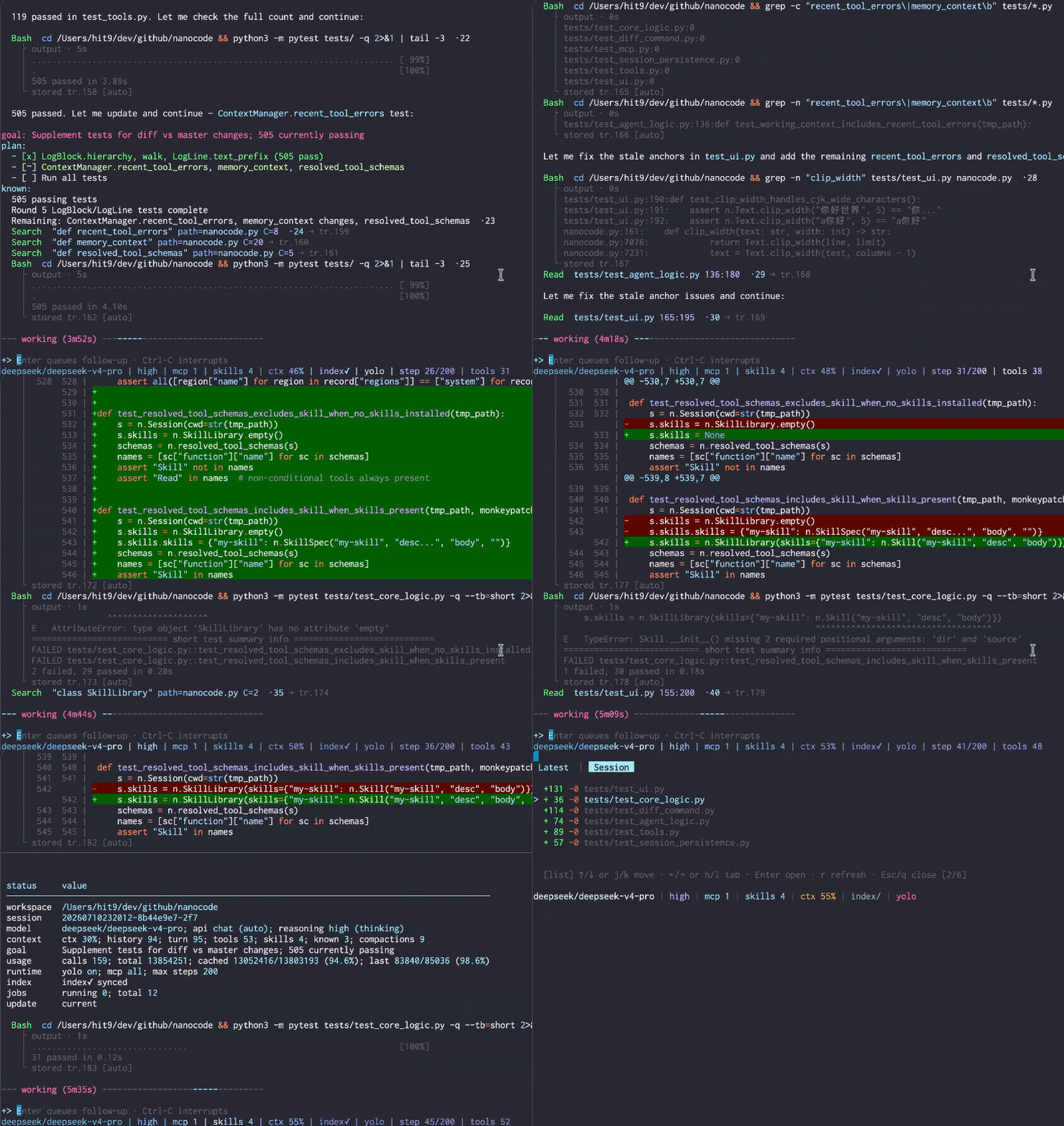
Resuming a saved session with its conversation and tool history.
Highlights
- Worker delegation: hand a bounded task to a second in-process session on its own provider with
/worker; theDelegatetool keeps worker context across delegations until reset. - Forced reply language:
/languageor[runtime] languagepins the reply language for the session. - Smarter retries: exponential backoff with jitter and provider
Retry-After, shown as a liveretryingphase with a countdown. - Prompt-cache aware: stable request prefixes let supported providers reuse work and can reach 90–99% cache hit rates;
/statusshows the reported result. - Code navigation: jump to definitions, callers, and implementations with a searchable code index.
- Live follow-ups: type while the agent works;
Enterqueues a message for the next model step, whileCtrl-Cdiscards a draft or interrupts the task once the input is empty. - Anchored edits: structured edits use
line:hashanchors and reject stale file content. - Resumable sessions: conversation, tool calls, diffs, and working memory survive
-cor--resume. - Built-in diff viewer:
/diffshows the latest round and the net session result. - MCP and skills: connect Model Context Protocol servers and load Markdown instruction packs on demand.
- Provider-side web search: opt in to a provider's own search tool (OpenAI, Qwen, Anthropic, Z.AI) and see each search and its sources in the transcript.
- Provider compatibility: OpenAI-compatible APIs and Anthropic.
Install
Requires macOS or Linux, Python 3.11+, and uv.
uv tool install wizolt
wizolt --init-config
Add your provider to ~/.wizolt/config.toml:
[provider]
active = "default"

[provider.default]
url = "https://api.deepseek.com"
key = "sk-..."
model = "deepseek-v4-flash"
Then run:
wizolt
Upgrade with uv tool upgrade wizolt.
Links
- Documentation — full usage guide and reference.
- Blog post — why and how it was built.
- code-symbol-index — the code index library wizolt uses.
1 maintainer

Metadata
1 maintainer
Release files for wizolt 0.37.1
For a detailed explanation of source distributions (sdists) and built distributions (wheels), please see the package formats documentation.
Source distribution (sdist)
| File | Size | Uploaded | |
|---|---|---|---|
| wizolt-0.37.1.tar.gz | 375.7 kB | Details |
Built distribution (wheel)
| File | Interpreter | ABI | Platform | Reset |
|---|---|---|---|---|
| wizolt-0.37.1-py3-none-any.whl | Python 3 | none | any | Details |
Total release size: 786.3 kB
Release files / wizolt-0.37.1.tar.gz
| Download URL | wizolt-0.37.1.tar.gz |
|---|---|
| Size | 375.7 kB |
| Tags | Source |
|
SHA-256 checksum How to use checksums |
c903c8e7e5cd8d1326ec62b0914c637e1699795a949d391bb039e06b1f3ee17c
|
|
BLAKE2b-256 checksum How to use checksums |
b4bb8c5f140275e0b70668183c25c8cd35238284c0d2a5286a73b96bc61010e4
|
| Upload date | |
|
Uploaded using Trusted Publishing? What is trusted publishing? |
No |
| Uploaded via |
uv/0.11.7 {"installer":{"name":"uv","version":"0.11.7","subcommand":["publish"]},"python":null,"implementation":{"name":null,"version":null},"distro":{"name":"Ubuntu","version":"24.04","id":"noble","libc":null},"system":{"name":null,"release":null},"cpu":null,"openssl_version":null,"setuptools_version":null,"rustc_version":null,"ci":null}
|
Release files / wizolt-0.37.1-py3-none-any.whl
| Download URL | wizolt-0.37.1-py3-none-any.whl |
|---|---|
| Size | 410.6 kB |
| Tags | Python 3 |
|
SHA-256 checksum How to use checksums |
ab4a98138629acd9e02311ebdac99060d48d5dd774ec7e4487f6797fbbc0a290
|
|
BLAKE2b-256 checksum How to use checksums |
7b2074184833c7e204a23d1c2466af3c46bce2876e97e4e19e521b0d1bbc7aa9
|
| Upload date | |
|
Uploaded using Trusted Publishing? What is trusted publishing? |
No |
| Uploaded via |
uv/0.11.7 {"installer":{"name":"uv","version":"0.11.7","subcommand":["publish"]},"python":null,"implementation":{"name":null,"version":null},"distro":{"name":"Ubuntu","version":"24.04","id":"noble","libc":null},"system":{"name":null,"release":null},"cpu":null,"openssl_version":null,"setuptools_version":null,"rustc_version":null,"ci":null}
|














