Intuitive Bloomberg data API
Verified details
These details have been verified by PyPIProject links
GitHub Statistics
Maintainers

Project description
xbbg: An intuitive Bloomberg API for Python





Quick Links: Discord • Documentation • Installation • Quickstart • Examples • Contributing • Changelog
Latest release: xbbg==0.12.0 (release: notes)
Table of Contents
- Overview
- Why Choose xbbg?
- Supported Functionality
- Requirements
- Installation
- Quickstart
- Examples
- Data Storage
- Troubleshooting
- Development
- Contributing
- Getting Help
- Links
- License
Overview
xbbg is a comprehensive Bloomberg API wrapper for Python, providing a clean, Pythonic interface to Bloomberg's data services. Designed for quantitative researchers, portfolio managers, and financial engineers, xbbg simplifies data access while maintaining full API functionality.
Key Features
|
Complete API Coverage
|
Production-Grade Features
|
|
Excel Compatibility
|
Developer Experience
|
Quick Example
from xbbg import blp

# Reference data
prices = blp.bdp(['AAPL US Equity', 'MSFT US Equity'], 'PX_LAST')

# Historical data
hist = blp.bdh('SPX Index', 'PX_LAST', '2024-01-01', '2024-12-31')

# Intraday bars with sub-minute precision
intraday = blp.bdib('TSLA US Equity', dt='2024-01-15', interval=10, intervalHasSeconds=True)
See examples/xbbg_jupyter_examples.ipynb for comprehensive tutorials and examples.
Why Choose xbbg?
xbbg is the most complete and production-ready Bloomberg API wrapper for Python, trusted by quantitative researchers and financial engineers worldwide. Here's what sets it apart:
🎯 Unmatched Feature Coverage
xbbg is the only Python library that provides:
- Complete Bloomberg API access: All major services (Reference, Historical, Intraday, Real-time, BQL, BEQS, BSRCH)
- Sub-second precision: Down to 10-second intraday bars (unique to xbbg)
- Real-time streaming: Live market data with async support
- Advanced utilities: Futures/CDX contract resolution, currency conversion, market hours
📊 Production-Grade Features
- Intraday caching: Automatic Parquet storage for
bdib()bar data - Async/await support: Non-blocking operations for modern Python applications
- Exchange-aware sessions: Precise market hour handling for 50+ global exchanges
- Type safety: Full type hints for IDE autocomplete and static analysis
- Comprehensive error handling: Clear, actionable error messages
💡 Developer Experience
- Excel-compatible: Use familiar Bloomberg Excel syntax - zero learning curve
- Pythonic API: Consistent, intuitive function names (
bdp,bdh,bdib) - Rich documentation: 100+ examples, Jupyter notebooks, comprehensive guides
- Active community: Discord support, regular updates, responsive maintainers
🚀 Performance & Reliability
- Battle-tested: Used in production by hedge funds, asset managers, and research teams
- Modern Python: Supports Python 3.10-3.14 with latest language features
- CI/CD pipeline: Automated testing across multiple Python versions and platforms
- Semantic versioning: Predictable releases with clear upgrade paths
Comparison with Alternatives
| Feature | xbbg | pdblp | blp | polars-bloomberg |
|---|---|---|---|---|
| Data Services | ||||
| Reference Data (BDP/BDS) | ✅ | ✅ | ✅ | ✅ |
| Historical Data (BDH) | ✅ | ✅ | ✅ | ✅ |
| Intraday Bars (BDIB) | ✅ | ❌ | ❌ | ✅ |
| Tick-by-Tick Data | ✅ | ❌ | ❌ | ❌ |
| Real-time Subscriptions | ✅ | ❌ | ❌ | ❌ |
| Advanced Features | ||||
| Equity Screening (BEQS) | ✅ | ❌ | ❌ | ❌ |
| Query Language (BQL) | ✅ | ❌ | ❌ | ✅ |
| Quote Request (BQR) | ✅ | ❌ | ❌ | ❌ |
| Search (BSRCH) | ✅ | ❌ | ❌ | ✅ |
| Technical Analysis (BTA) | ✅ | ❌ | ❌ | ❌ |
| Yield & Spread Analysis (YAS) | ✅ | ❌ | ❌ | ❌ |
| Developer Features | ||||
| Excel-compatible syntax | ✅ | ❌ | ❌ | ❌ |
| Sub-minute intervals (10s bars) | ✅ | ❌ | ❌ | ❌ |
| Async/await support | ✅ | ❌ | ❌ | ❌ |
| Intraday bar caching (Parquet) | ✅ | ❌ | ❌ | ❌ |
| Multi-backend output | ✅ | ❌ | ❌ | ❌ |
| Utilities | ||||
| Currency conversion | ✅ | ❌ | ❌ | ❌ |
| Futures contract resolution | ✅ | ❌ | ❌ | ❌ |
| CDX index resolution | ✅ | ❌ | ❌ | ❌ |
| Exchange market hours | ✅ | ❌ | ❌ | ❌ |
| Project Health | ||||
| Active development | ✅ | ❌[^1] | ✅ | ✅ |
| Python version support | 3.10-3.14 | 3.8+ | 3.8+ | 3.12+ |
| DataFrame library | Multi-backend | pandas | pandas | Polars |
| Type hints | ✅ Full | ❌ | Partial | ✅ Full |
| CI/CD testing | ✅ | ❌ | ✅ | ✅ |
[^1]: pdblp has been superseded by blp and is no longer under active development.
Bottom line: If you need comprehensive Bloomberg API access with production-grade features, xbbg is the clear choice.
Complete API Reference
Reference Data - Point-in-Time Snapshots
| Function | Description | Key Features |
|---|---|---|
bdp() |
Get current/reference data | Multiple tickers & fields Excel-style overrides ISIN/CUSIP/SEDOL support |
bds() |
Bulk/multi-row data | Portfolio holdings Fixed income cash flows Corporate actions |
abdp() |
Async reference data | Non-blocking operations Concurrent requests Web application friendly |
abds() |
Async bulk data | Parallel bulk queries Same API as bds() |
fieldInfo() |
Field metadata lookup | Data types & descriptions Discover available fields |
fieldSearch() |
Search Bloomberg fields | Find fields by keyword Explore data catalog |
lookupSecurity() |
Find tickers by name | Company name search Asset class filtering |
getPortfolio() |
Portfolio data queries | Dedicated portfolio API Holdings & weights |
Fixed Income Analytics
| Function | Description | Key Features |
|---|---|---|
yas() |
Yield & Spread Analysis | YAS calculator wrapper YTM/YTC yield types Price↔yield conversion Spread calculations |
Bond Analytics (via xbbg.ext)
| Function | Description | Key Features |
|---|---|---|
bond_info() |
Bond reference metadata | Ratings, maturity, coupon |
bond_risk() |
Duration and risk metrics | Modified/Macaulay duration, convexity, DV01 |
bond_spreads() |
Spread analytics | OAS, Z-spread, I-spread, ASW |
bond_cashflows() |
Cash flow schedule | Coupon and principal payments |
bond_key_rates() |
Key rate durations | Key rate DV01s and risks |
bond_curve() |
Relative value comparison | Multi-bond analytics |
Options Analytics (via xbbg.ext)
| Function | Description | Key Features |
|---|---|---|
option_info() |
Contract metadata | Strike, expiry, exercise type |
option_greeks() |
Greeks and implied vol | Delta, gamma, theta, vega, IV |
option_pricing() |
Value decomposition | Intrinsic/time value, activity |
option_chain() |
Chain via overrides | CHAIN_TICKERS with filtering |
option_chain_bql() |
Chain via BQL | Rich filtering, expiry/strike ranges |
option_screen() |
Multi-option comparison | Side-by-side analytics |
CDX Analytics (via xbbg.ext)
| Function | Description | Key Features |
|---|---|---|
cdx_info() |
CDX reference metadata | Series, version, constituents |
cdx_defaults() |
Default history | Settled defaults in index |
cdx_pricing() |
Market pricing | Spread, price, recovery rate |
cdx_risk() |
Risk metrics | DV01, duration, spread sensitivity |
cdx_basis() |
Basis analytics | CDX vs intrinsics spread |
cdx_default_prob() |
Default probability | Implied default rates |
cdx_cashflows() |
Cash flow schedule | Premium and protection legs |
cdx_curve() |
Term structure | Multi-tenor curve analytics |
Historical Data - Time Series Analysis
| Function | Description | Key Features |
|---|---|---|
bdh() |
End-of-day historical data | Flexible date ranges Multiple frequencies Dividend/split adjustments |
abdh() |
Async historical data | Non-blocking time series Batch historical queries |
dividend() |
Dividend & split history | All dividend types Projected dividends Date range filtering |
earning() |
Corporate earnings | Geographic breakdowns Product segments Fiscal period analysis |
turnover() |
Trading volume & turnover | Multi-currency support Automatic FX conversion |
Intraday Data - High-Frequency Analysis
| Function | Description | Key Features |
|---|---|---|
bdib() |
Intraday bar data | Sub-minute bars (10s intervals) Session filtering (open/close) Exchange-aware timing Timezone control ( tz parameter) |
bdtick() |
Tick-by-tick data | Trade & quote events Condition codes Exchange/broker details |
exchange_tz() |
Exchange timezone lookup | Returns IANA timezone string for any ticker |
Screening & Advanced Queries
| Function | Description | Key Features |
|---|---|---|
beqs() |
Bloomberg Equity Screening | Custom screening criteria Private & public screens |
bql() |
Bloomberg Query Language | SQL-like syntax Complex transformations Options chain analysis |
bqr() |
Bloomberg Quote Request | Tick-level dealer quotes Broker attribution codes Date offset support (-2d, -1w) |
bsrch() |
SRCH (Search) queries | Fixed income searches Commodity screens Weather data |
bta() |
Technical Analysis | 50+ technical indicators Custom studies |
etf_holdings() |
ETF holdings via BQL | Complete holdings list Weights & positions |
Real-Time - Live Market Data
| Function | Description | Key Features |
|---|---|---|
live() |
Real-time streaming | Async context manager Auto-reconnection Field-level updates |
subscribe() |
Real-time subscriptions | Event callbacks Custom intervals Multiple tickers |
stream() |
Async streaming | Modern async/await Non-blocking updates |
Utilities
| Function | Description | Key Features |
|---|---|---|
adjust_ccy() |
Currency conversion | Multi-currency DataFrames Historical FX rates Automatic alignment |
fut_ticker() |
Futures contract resolution | Generic to specific mapping Date-aware selection |
active_futures() |
Active futures selection | Volume-based logic Roll date handling |
cdx_ticker() |
CDX index resolution | Series mapping Index family support |
active_cdx() |
Active CDX selection | On-the-run detection Lookback windows |
Additional Features
- Intraday Caching: Automatic Parquet storage for
bdib()bar data - Timezone Support: Exchange-aware market hours for 50+ global exchanges;
bdib()andbdtick()return data in exchange local time by default (configurable viatzparameter) - Configurable Logging: Debug mode for troubleshooting
- Batch Processing: Efficient multi-ticker queries
- Standardized Output: Consistent DataFrame column naming
Requirements
-
Bloomberg C++ SDK version 3.12.1 or higher:
- Visit Bloomberg API Library and download C++ Supported Release
- In the
binfolder of downloaded zip file, copyblpapi3_32.dllandblpapi3_64.dllto BloombergBLPAPI_ROOTfolder (usuallyblp/DAPI)
-
Bloomberg official Python API:
pip install blpapi --index-url=https://blpapi.bloomberg.com/repository/releases/python/simple/
-
Python dependencies:
narwhals>=2.14.0,pyarrow>=22.0.0(core);tomli>=2.0.1for Python < 3.11 (automatically installed) -
Optional backends (install separately if needed):
pandas- For pandas DataFrame output (pip install xbbg[pandas])polars- For Polars DataFrame outputduckdb- For DuckDB relation output
Installation
pip install xbbg
Supported Python versions: 3.10 – 3.14 (universal wheel).
Quickstart
Basic Usage
from xbbg import blp

# Get current stock prices
prices = blp.bdp(['AAPL US Equity', 'MSFT US Equity'], 'PX_LAST')
print(prices)
Common Workflows
📊 Get Reference Data (Current Snapshot)
# Single ticker, multiple fields
info = blp.bdp('NVDA US Equity', ['Security_Name', 'GICS_Sector_Name', 'PX_LAST'])

# Multiple tickers, single field
prices = blp.bdp(['AAPL US Equity', 'MSFT US Equity', 'GOOGL US Equity'], 'PX_LAST')

# With overrides (e.g., VWAP for specific date)
vwap = blp.bdp('AAPL US Equity', 'Eqy_Weighted_Avg_Px', VWAP_Dt='20240115')
📈 Get Historical Data (Time Series)
# Simple historical query
hist = blp.bdh('SPX Index', 'PX_LAST', '2024-01-01', '2024-12-31')

# Multiple fields
ohlc = blp.bdh('AAPL US Equity', ['open', 'high', 'low', 'close'], '2024-01-01', '2024-01-31')

# With dividend/split adjustments
adjusted = blp.bdh('AAPL US Equity', 'px_last', '2024-01-01', '2024-12-31', adjust='all')

# Weekly data with forward fill
weekly = blp.bdh('SPX Index', 'PX_LAST', '2024-01-01', '2024-12-31', Per='W', Fill='P')
⏱️ Get Intraday Data (High Frequency)
# 5-minute bars
bars_5m = blp.bdib('SPY US Equity', dt='2024-01-15', interval=5)

# 1-minute bars (default)
bars_1m = blp.bdib('TSLA US Equity', dt='2024-01-15')

# Sub-minute bars (10-second intervals) - UNIQUE TO XBBG!
bars_10s = blp.bdib('AAPL US Equity', dt='2024-01-15', interval=10, intervalHasSeconds=True)

# Session filtering (e.g., first 30 minutes)
opening = blp.bdib('SPY US Equity', dt='2024-01-15', session='day_open_30')

# Get data in UTC instead of exchange local time
bars_utc = blp.bdib('SPY US Equity', dt='2024-01-15', tz='UTC')

# Look up exchange timezone for a ticker
tz = blp.exchange_tz('AAPL US Equity')  # → 'America/New_York'
🔍 Advanced Queries (BQL, Screening)
# Bloomberg Query Language
result = blp.bql("get(px_last) for('AAPL US Equity')")

# Equity screening
screen_results = blp.beqs(screen='MyScreen', asof='2024-01-01')

# ETF holdings
holdings = blp.etf_holdings('SPY US Equity')

# Search queries
bonds = blp.bsrch("FI:MYSEARCH")

# Dealer quotes with broker codes (BQR)
quotes = blp.bqr("XYZ 4.5 01/15/30@MSG1 Corp", date_offset="-2d")
🔧 Utilities (Futures, Currency, etc.)
# Resolve futures contract
contract = blp.fut_ticker('ES1 Index', '2024-01-15', freq='ME')  # → 'ESH24 Index'

# Get active futures
active = blp.active_futures('ESA Index', '2024-01-15')

# Currency conversion
hist_usd = blp.bdh('BMW GR Equity', 'PX_LAST', '2024-01-01', '2024-01-31')
hist_eur = blp.adjust_ccy(hist_usd, ccy='EUR')

# Dividend history
divs = blp.dividend('AAPL US Equity', start_date='2024-01-01', end_date='2024-12-31')
Fixed Income Analytics (Bond, CDX)
from xbbg.ext import bond_info, bond_risk, bond_spreads, cdx_info, cdx_pricing

# Bond reference data
info = bond_info('T 4.5 05/15/38 Govt')

# Bond risk metrics (duration, convexity, DV01)
risk = bond_risk('T 4.5 05/15/38 Govt')

# Bond spreads (OAS, Z-spread, ASW)
spreads = bond_spreads('T 4.5 05/15/38 Govt')

# CDX index info
cdx = cdx_info('CDX IG CDSI GEN 5Y Corp')

# CDX pricing
px = cdx_pricing('CDX IG CDSI GEN 5Y Corp')
Options Analytics
from xbbg.ext import option_info, option_greeks, option_chain_bql

# Option contract metadata
info = option_info('AAPL US 01/17/25 C200 Equity')

# Greeks and implied volatility
greeks = option_greeks('AAPL US 01/17/25 C200 Equity')

# Option chain via BQL (rich filtering)
chain = option_chain_bql('AAPL US Equity', expiry='2025-01-17')
Best Practices
- Excel users: Use the same field names and date formats as Bloomberg Excel
- Performance:
bdib()caches intraday bars as Parquet files automatically (see Data Storage) - Async operations: Use
abdp(),abdh(),abds()for non-blocking requests - Debugging: Set
logging.getLogger('xbbg').setLevel(logging.DEBUG)for detailed logs
Connection Options
By default, xbbg connects to localhost on port 8194. To connect to a remote Bloomberg server, use the server and port parameters:
from xbbg import blp

# Connect to a remote Bloomberg server
kwargs = {'server': '192.168.1.100', 'port': 18194}
blp.bdp(tickers='NVDA US Equity', flds=['Security_Name'], **kwargs)
The server parameter (or server_host) can be passed through any function that accepts kwargs, just like the port parameter.
Async Functions
Every sync function has an async counterpart prefixed with a — for example bdp() → abdp(), bdh() → abdh(), bdib() → abdib(). The async versions are the real implementations; the sync functions are thin wrappers. Since v0.12.0, the async functions are the canonical source of truth — all sync functions delegate via _run_sync().
In scripts (no existing event loop)
import asyncio
from xbbg import blp

async def get_data():
    df = await blp.abdp(tickers='AAPL US Equity', flds=['PX_LAST', 'VOLUME'])
    return df

async def get_multiple():
    # Concurrent requests — runs in parallel on a single thread
    results = await asyncio.gather(
        blp.abdp(tickers='AAPL US Equity', flds=['PX_LAST']),
        blp.abdp(tickers='MSFT US Equity', flds=['PX_LAST']),
        blp.abdh(tickers='GOOGL US Equity', start_date='2024-01-01'),
    )
    return results

data = asyncio.run(get_data())
multiple = asyncio.run(get_multiple())
In Jupyter notebooks
Jupyter already runs an event loop, so asyncio.run() will raise RuntimeError: asyncio.run() cannot be called from a running event loop. Use await directly in notebook cells instead:
from xbbg import blp

# Just await directly — Jupyter cells are already async
df = await blp.abdp(tickers='AAPL US Equity', flds=['PX_LAST', 'VOLUME'])

# Concurrent requests work the same way
import asyncio
results = await asyncio.gather(
    blp.abdp(tickers='AAPL US Equity', flds=['PX_LAST']),
    blp.abdp(tickers='MSFT US Equity', flds=['PX_LAST']),
)
Tip: If you don't need async, the sync functions (
bdp,bdh,bdib, etc.) work everywhere — scripts, notebooks, and async contexts — without any special handling.
Benefits:
- Non-blocking: doesn't block the event loop
- Concurrent: use
asyncio.gather()for parallel requests - Compatible: works with async web frameworks, Jupyter, and async codebases
- Same API: identical parameters to sync versions (
bdp,bds,bdh)
Multi-Backend Support
Starting with v0.11.0, xbbg is DataFrame-library agnostic. You can get output in your preferred format:
Supported Backends
| Backend | Type | Output | Best For |
|---|---|---|---|
| Eager Backends | |||
pandas |
Eager | pd.DataFrame |
Traditional workflows, compatibility |
polars |
Eager | pl.DataFrame |
High performance, large datasets |
pyarrow |
Eager | pa.Table |
Zero-copy interop, memory efficiency |
narwhals |
Eager | Narwhals DataFrame | Library-agnostic code |
modin |
Eager | Modin DataFrame | Pandas API with parallel execution |
cudf |
Eager | cuDF DataFrame | GPU-accelerated processing (NVIDIA) |
| Lazy Backends | |||
polars_lazy |
Lazy | pl.LazyFrame |
Deferred execution, query optimization |
narwhals_lazy |
Lazy | Narwhals LazyFrame | Library-agnostic lazy evaluation |
duckdb |
Lazy | DuckDB relation | SQL analytics, OLAP queries |
dask |
Lazy | Dask DataFrame | Out-of-core and distributed computing |
ibis |
Lazy | Ibis Table | Unified interface to many backends |
pyspark |
Lazy | Spark DataFrame | Big data processing (requires Java) |
sqlframe |
Lazy | SQLFrame DataFrame | SQL-first DataFrame operations |
Note: Lazy backends only support LONG, SEMI_LONG, LONG_TYPED, and LONG_WITH_METADATA output formats (not WIDE).
Check Backend Availability
from xbbg import get_available_backends, print_backend_status, is_backend_available

# List installed backends
print(get_available_backends())  # ['pandas', 'polars', 'pyarrow', ...]

# Check if a specific backend is available
if is_backend_available('polars'):
    print("Polars is installed!")

# Print detailed status of all backends
print_backend_status()
Usage
from xbbg import blp, Backend, Format

# Get data as Polars DataFrame
df_polars = blp.bdp('AAPL US Equity', 'PX_LAST', backend=Backend.POLARS)

# Get data as PyArrow Table
table = blp.bdh('SPX Index', 'PX_LAST', '2024-01-01', '2024-12-31', backend=Backend.PYARROW)

# Get data as pandas (default)
df_pandas = blp.bdp('MSFT US Equity', 'PX_LAST', backend=Backend.PANDAS)
Output Formats
Control the shape of your data with the format parameter:
| Format | Description | Use Case |
|---|---|---|
long |
Tidy format with ticker, field, value columns | Analysis, joins, aggregations |
long_typed |
Typed value columns per data type | Type-safe analysis, no casting needed |
long_metadata |
String values with dtype column | Serialization, debugging, data catalogs |
semi_long |
One row per ticker, fields as columns | Quick inspection |
wide |
Tickers as columns (pandas only) | Time series alignment, Excel-like |
from xbbg import blp, Format

# Long format (tidy data)
df_long = blp.bdp(['AAPL US Equity', 'MSFT US Equity'], ['PX_LAST', 'VOLUME'], format=Format.LONG)

# Wide format (Excel-like)
df_wide = blp.bdh('SPX Index', 'PX_LAST', '2024-01-01', '2024-12-31', format=Format.WIDE)
Global Configuration
Set defaults for your entire session:
from xbbg import set_backend, set_format, Backend, Format

# Set Polars as default backend
set_backend(Backend.POLARS)

# Set long format as default
set_format(Format.LONG)

# Use new typed output format
set_format(Format.LONG_TYPED)

# All subsequent calls use these defaults
df = blp.bdp('AAPL US Equity', 'PX_LAST')  # Returns Polars DataFrame in long format
Why Multi-Backend?
- Performance: Polars and PyArrow can be 10-100x faster for large datasets
- Memory: Arrow-based backends use zero-copy and columnar storage
- Interoperability: Direct integration with DuckDB, Spark, and other Arrow-compatible tools
- Future-proof: Write library-agnostic code with narwhals backend
Examples
📊 Reference Data
Equity and Index Securities
from xbbg import blp

# Single point-in-time data (BDP)
blp.bdp(tickers='NVDA US Equity', flds=['Security_Name', 'GICS_Sector_Name'])
Out[2]:
               security_name        gics_sector_name
NVDA US Equity   NVIDIA Corp  Information Technology
# With field overrides
blp.bdp('AAPL US Equity', 'Eqy_Weighted_Avg_Px', VWAP_Dt='20181224')
Out[3]:
                eqy_weighted_avg_px
AAPL US Equity               148.75
# Multiple tickers and fields
blp.bdp(
    tickers=['AAPL US Equity', 'MSFT US Equity', 'GOOGL US Equity'],
    flds=['Security_Name', 'GICS_Sector_Name', 'PX_LAST']
)
Out[3a]:
                  security_name        gics_sector_name px_last
AAPL US Equity        Company A  Information Technology  150.25
GOOGL US Equity    Company B  Communication Services  165.30
MSFT US Equity   Company C  Information Technology  180.45
# Bulk/block data (BDS) - multi-row per ticker
blp.bds('AAPL US Equity', 'DVD_Hist_All', DVD_Start_Dt='20180101', DVD_End_Dt='20180531')
Out[8]:
               declared_date     ex_date record_date payable_date  dividend_amount dividend_frequency dividend_type
AAPL US Equity    2018-05-01  2018-05-11  2018-05-14   2018-05-17             0.73            Quarter  Regular Cash
AAPL US Equity    2018-02-01  2018-02-09  2018-02-12   2018-02-15             0.63            Quarter  Regular Cash
Fixed Income Securities
xbbg supports fixed income securities using standard security identifiers (ISIN, CUSIP, SEDOL). Use the /isin/{isin}, /cusip/{cusip}, or /sedol/{sedol} format as the ticker:
# Reference data using ISIN
blp.bdp(tickers='/isin/US1234567890', flds=['SECURITY_NAME', 'MATURITY', 'COUPON', 'PX_LAST'])
Out[9]:
                       security_name    maturity coupon    px_last
/isin/US1234567890  US Treasury Note  2035-05-15   4.25  101.25
# Cash flow schedule using ISIN
blp.bds(tickers='/isin/US1234567890', flds='DES_CASH_FLOW')
Out[10]:
                   payment_date  coupon_amount  principal_amount
/isin/US1234567890   2026-05-15        21250.0               0.0
/isin/US1234567890   2026-11-15        21250.0               0.0
/isin/US1234567890   2027-05-15        21250.0               0.0
Note: Fixed income securities work with bdp(), bds(), and bdh() functions. The identifier format (/isin/, /cusip/, /sedol/) is automatically passed to blpapi.
Yield & Spread Analysis (YAS)
The yas() function provides a convenient wrapper for Bloomberg's YAS calculator:
from xbbg import blp
from xbbg.api.fixed_income import YieldType

# Get yield to maturity
blp.yas('T 4.5 05/15/38 Govt')
Out[11]:
                     YAS_BOND_YLD
ticker
T 4.5 05/15/38 Govt         4.348
# Calculate yield from price
blp.yas('T 4.5 05/15/38 Govt', price=95.0)
Out[12]:
                     YAS_BOND_YLD
ticker
T 4.5 05/15/38 Govt          5.05
# Calculate price from yield
blp.yas('T 4.5 05/15/38 Govt', flds='YAS_BOND_PX', yield_=4.8)
Out[13]:
                     YAS_BOND_PX
ticker
T 4.5 05/15/38 Govt    97.229553
# Yield to call for callable bonds
blp.yas('AAPL 2.65 05/11/50 Corp', yield_type=YieldType.YTC)
Out[14]:
                          YAS_BOND_YLD
ticker
AAPL 2.65 05/11/50 Corp          5.431
# Multiple YAS analytics
blp.yas('T 4.5 05/15/38 Govt', ['YAS_BOND_YLD', 'YAS_MOD_DUR', 'YAS_ASW_SPREAD'])
Out[15]:
                     YAS_ASW_SPREAD  YAS_BOND_YLD  YAS_MOD_DUR
ticker
T 4.5 05/15/38 Govt       33.093531         4.348     9.324928
Available parameters:
settle_dt: Settlement date (YYYYMMDD or datetime)yield_type:YieldType.YTM(default) orYieldType.YTCprice: Input price to calculate yieldyield_: Input yield to calculate pricespread: Spread to benchmark in basis pointsbenchmark: Benchmark bond ticker for spread calculations
Field Information and Search
# Get metadata about fields
blp.fieldInfo(['PX_LAST', 'VOLUME'])
# Search for fields by name or description
blp.fieldSearch('vwap')
Security Lookup
# Look up securities by company name
blp.lookupSecurity('IBM', max_results=10)
# Lookup with asset class filter
blp.lookupSecurity('Apple', yellowkey='eqty', max_results=20)
Portfolio Data
# Get portfolio data (dedicated function)
blp.getPortfolio('PORTFOLIO_NAME', 'PORTFOLIO_MWEIGHT')
📈 Historical Data
# End-of-day historical data (BDH)
blp.bdh(
    tickers='SPX Index', flds=['high', 'low', 'last_price'],
    start_date='2018-10-10', end_date='2018-10-20',
)
Out[4]:
           SPX Index
                high      low last_price
2018-10-10  2,874.02 2,784.86   2,785.68
2018-10-11  2,795.14 2,710.51   2,728.37
2018-10-12  2,775.77 2,729.44   2,767.13
2018-10-15  2,775.99 2,749.03   2,750.79
2018-10-16  2,813.46 2,766.91   2,809.92
2018-10-17  2,816.94 2,781.81   2,809.21
2018-10-18  2,806.04 2,755.18   2,768.78
2018-10-19  2,797.77 2,760.27   2,767.78
# Multiple tickers and fields
blp.bdh(
    tickers=['AAPL US Equity', 'MSFT US Equity'],
    flds=['px_last', 'volume'],
    start_date='2024-01-01', end_date='2024-01-10',
)
Out[4a]:
           AAPL US Equity             MSFT US Equity
                  px_last      volume        px_last      volume
2024-01-02         150.25  45000000.0         180.45  25000000.0
2024-01-03         151.30  42000000.0         181.20  23000000.0
2024-01-04         149.80  48000000.0         179.90  24000000.0
2024-01-05         150.10  44000000.0         180.15  22000000.0
2024-01-08         151.50  46000000.0         181.80  26000000.0
# Excel-compatible inputs with periodicity
blp.bdh(
    tickers='SHCOMP Index', flds=['high', 'low', 'last_price'],
    start_date='2018-09-26', end_date='2018-10-20',
    Per='W', Fill='P', Days='A',
)
Out[5]:
           SHCOMP Index
                   high      low last_price
2018-09-28     2,827.34 2,771.16   2,821.35
2018-10-05     2,827.34 2,771.16   2,821.35
2018-10-12     2,771.94 2,536.66   2,606.91
2018-10-19     2,611.97 2,449.20   2,550.47
# Dividend/split adjustments
blp.bdh('AAPL US Equity', 'px_last', '20140606', '20140609', adjust='all')
Out[15]:
           AAPL US Equity
                  px_last
2014-06-06          85.22
2014-06-09          86.58
# Dividend history
blp.dividend(['C US Equity', 'MS US Equity'], start_date='2018-01-01', end_date='2018-05-01')
Out[13]:
                dec_date     ex_date    rec_date    pay_date  dvd_amt dvd_freq      dvd_type
C US Equity   2018-01-18  2018-02-02  2018-02-05  2018-02-23     0.32  Quarter  Regular Cash
MS US Equity  2018-04-18  2018-04-27  2018-04-30  2018-05-15     0.25  Quarter  Regular Cash
MS US Equity  2018-01-18  2018-01-30  2018-01-31  2018-02-15     0.25  Quarter  Regular Cash
# Earnings breakdowns
blp.earning('AMD US Equity', by='Geo', Eqy_Fund_Year=2017, Number_Of_Periods=1)
Out[12]:
                 level    fy2017  fy2017_pct
Asia-Pacific      1.00  3,540.00       66.43
    China         2.00  1,747.00       49.35
    Japan         2.00  1,242.00       35.08
    Singapore     2.00    551.00       15.56
United States     1.00  1,364.00       25.60
Europe            1.00    263.00        4.94
Other Countries   1.00    162.00        3.04
⏱️ Intraday Data
# Intraday bars (1-minute default)
blp.bdib(ticker='BHP AU Equity', dt='2018-10-17').tail()
Out[9]:
                          BHP AU Equity
                                   open  high   low close   volume num_trds
2018-10-17 15:56:00+11:00         33.62 33.65 33.62 33.64    16660      126
2018-10-17 15:57:00+11:00         33.65 33.65 33.63 33.64    13875      156
2018-10-17 15:58:00+11:00         33.64 33.65 33.62 33.63    16244      159
2018-10-17 15:59:00+11:00         33.63 33.63 33.61 33.62    16507      167
2018-10-17 16:10:00+11:00         33.66 33.66 33.66 33.66  1115523      216
Selecting bar intervals:
- Minute-based intervals (default): Use the
intervalparameter to specify minutes. By default,interval=1(1-minute bars). Common intervals:interval=5→ 5-minute barsinterval=15→ 15-minute barsinterval=30→ 30-minute barsinterval=60→ 1-hour bars
# 5-minute bars
blp.bdib(ticker='AAPL US Equity', dt='2025-11-12', interval=5).head()

# 15-minute bars
blp.bdib(ticker='AAPL US Equity', dt='2025-11-12', interval=15).head()
- Sub-minute intervals (seconds): Set
intervalHasSeconds=Trueand specify seconds:
# 10-second bars
blp.bdib(ticker='AAPL US Equity', dt='2025-11-12', interval=10, intervalHasSeconds=True).head()
Out[9a]:
                          AAPL US Equity
                                   open    high     low   close volume num_trds
2025-11-12 09:31:00-05:00        150.25  150.35  150.20  150.30  25000      150
2025-11-12 09:31:10-05:00        150.30  150.40  150.25  150.35  18000      120
2025-11-12 09:31:20-05:00        150.35  150.45  150.30  150.40  22000      135
Note: By default, interval is interpreted as minutes. Set intervalHasSeconds=True to use seconds-based intervals.
# Market session filtering
blp.bdib(ticker='7974 JT Equity', dt='2018-10-17', session='am_open_30').tail()
Out[11]:
                          7974 JT Equity
                                    open      high       low     close volume num_trds
2018-10-17 09:27:00+09:00      39,970.00 40,020.00 39,970.00 39,990.00  10800       44
2018-10-17 09:28:00+09:00      39,990.00 40,020.00 39,980.00 39,980.00   6300       33
2018-10-17 09:29:00+09:00      39,970.00 40,000.00 39,960.00 39,970.00   3300       21
2018-10-17 09:30:00+09:00      39,960.00 40,010.00 39,950.00 40,000.00   3100       19
2018-10-17 09:31:00+09:00      39,990.00 40,000.00 39,980.00 39,990.00   2000       15
How the session parameter works
The session parameter is resolved by xbbg.core.config.intervals.get_interval()
and xbbg.core.process.time_range() using exchange metadata from
xbbg/markets/config/exch.yml:
-
Base sessions (no underscores) map directly to session windows defined for the ticker's exchange in
exch.yml:allday- Full trading day including pre/post market (e.g.,[400, 2000]for US equities)day- Regular trading hours (e.g.,[0930, 1600]for US equities)am- Morning session (e.g.,[901, 1130]for Japanese equities)pm- Afternoon session (e.g.,[1230, 1458]for Japanese equities)pre- Pre-market session (e.g.,[400, 0930]for US equities)post- Post-market session (e.g.,[1601, 2000]for US equities)night- Night trading session (e.g.,[1710, 700]for Australian futures)
Not all exchanges define all sessions. For example,
GBP CurncyusesCurrencyGenericwhich definesalldayanddayonly. -
Compound sessions (with underscores) allow finer control by combining a base session with modifiers (
open,close,normal,exact):- Open windows (first N minutes of a session):
day_open_30→ first 30 minutes of thedaysessionam_open_30→ first 30 minutes of theamsession- Note:
openis not a base session; useday_open_30, notopen_30
- Close windows (last N minutes of a session):
day_close_20→ last 20 minutes of thedaysessionam_close_30→ last 30 minutes of theamsession- Note:
closeis not a base session; useday_close_20, notclose_20
- Normal windows (skip open/close buffers):
day_normal_30_20→ skips first 30 min and last 20 min ofdayam_normal_30_30→ skips first 30 min and last 30 min ofam
- Exact clock times (exchange-local HHMM format):
day_exact_2130_2230→ [21:30, 22:30] local time (marker session)allday_exact_2130_2230→ [21:30, 22:30] local time (actual window)allday_exact_2130_0230→ [21:30, 02:30 next day] local time
- Open windows (first N minutes of a session):
-
Resolution order and fallbacks:
blp.bdib/blp.bdtickcalltime_range(), which:- Uses
exch.yml+get_interval()andconst.exch_info()to resolve local session times and exchange timezone. - Converts that window to UTC and then to your requested
tzargument (e.g.,'UTC','NY','Europe/London'). - If exchange metadata is missing for
sessionand the asset, it may fall back to pandas‑market‑calendars (PMC) for simple sessions ('day'/'allday'), based on the exchange code.
- Uses
-
Errors and diagnostics:
- If a
sessionname is not defined for the ticker's exchange,get_interval()raises aValueErrorlisting the available sessions for that exchange and points toxbbg/markets/exch.yml. - For compound sessions whose base session doesn't exist (e.g. mis-typed
am_open_30for an exchange that has noamsection),get_interval()returnsSessNAandtime_range()will then try the PMC fallback or ultimately raise a clearValueError.
- If a
In practice:
- Use simple names like
session='day'orsession='allday'when you just want the main trading hours. - Use compound names like
session='day_open_30'orsession='am_normal_30_30'when you need to focus on opening/closing auctions or to exclude "micro" windows (e.g. the first X minutes). - If you add or customize sessions, update
exch.ymland rely onget_interval()to pick them up automatically.
# Using reference exchange for market hours
blp.bdib(ticker='ESM0 Index', dt='2020-03-20', ref='ES1 Index').tail()
out[10]:
                          ESM0 Index
                                open     high      low    close volume num_trds        value
2020-03-20 16:55:00-04:00   2,260.75 2,262.25 2,260.50 2,262.00    412      157   931,767.00
2020-03-20 16:56:00-04:00   2,262.25 2,267.00 2,261.50 2,266.75    812      209 1,838,823.50
2020-03-20 16:57:00-04:00   2,266.75 2,270.00 2,264.50 2,269.00   1136      340 2,576,590.25
2020-03-20 16:58:00-04:00   2,269.25 2,269.50 2,261.25 2,265.75   1077      408 2,439,276.00
2020-03-20 16:59:00-04:00   2,265.25 2,272.00 2,265.00 2,266.50   1271      378 2,882,978.25
# Tick-by-tick data with event types and condition codes
blp.bdtick(ticker='XYZ US Equity', dt='2024-10-15', session='day', types=['TRADE']).head()
Out[12]:
                          XYZ US Equity
                                   volume    typ   cond exch            trd_time
2024-10-15 09:30:15-04:00           1500  TRADE     @  NYSE  2024-10-15 09:30:15
2024-10-15 09:30:23-04:00            800  TRADE     @  NYSE  2024-10-15 09:30:23
2024-10-15 09:30:31-04:00           2200  TRADE     @  NYSE  2024-10-15 09:30:31
# Tick data with timeout (useful for large requests)
blp.bdtick(ticker='XYZ US Equity', dt='2024-10-15', session='day', timeout=1000)
Note: bdtick requests can take longer to respond. Use timeout parameter (in milliseconds) if you encounter empty DataFrames due to timeout.
Timezone handling
By default, bdib() and bdtick() return timestamps in the exchange's local timezone (e.g., America/New_York for US equities, Asia/Tokyo for Japanese equities, Australia/Sydney for Australian equities). Bloomberg sends intraday data in UTC; xbbg converts it automatically using exchange metadata.
Use the tz parameter to control the output timezone:
# Default: exchange local time (America/New_York for US equities)
bars = blp.bdib('SPY US Equity', dt='2024-01-15')
# Index: 2024-01-15 09:31:00-05:00, 2024-01-15 09:32:00-05:00, ...

# Keep timestamps in UTC (skip conversion)
bars_utc = blp.bdib('SPY US Equity', dt='2024-01-15', tz='UTC')
# Index: 2024-01-15 14:31:00+00:00, 2024-01-15 14:32:00+00:00, ...

# Convert to a specific timezone
bars_london = blp.bdib('SPY US Equity', dt='2024-01-15', tz='Europe/London')
# Index: 2024-01-15 14:31:00+00:00, 2024-01-15 14:32:00+00:00, ...
To look up the exchange timezone for any ticker, use exchange_tz():
blp.exchange_tz('AAPL US Equity')   # → 'America/New_York'
blp.exchange_tz('7974 JT Equity')   # → 'Asia/Tokyo'
blp.exchange_tz('BHP AU Equity')    # → 'Australia/Sydney'
# Trading volume & turnover (currency-adjusted, in millions)
blp.turnover(['ABC US Equity', 'DEF US Equity'], start_date='2024-01-01', end_date='2024-01-10', ccy='USD')
Out[13]:
            ABC US Equity  DEF US Equity
2024-01-02        15,304        8,920
2024-01-03        18,450       12,340
2024-01-04        14,890        9,560
2024-01-05        16,720       11,230
2024-01-08        10,905        7,890
# Currency conversion for historical data
hist = blp.bdh(['GHI US Equity'], ['px_last'], '2024-01-01', '2024-01-10')
blp.adjust_ccy(hist, ccy='EUR')
Out[14]:
            GHI US Equity
2024-01-02        169.66
2024-01-03        171.23
2024-01-04        170.45
2024-01-05        172.10
2024-01-08        169.46
🔍 Screening & Queries
# Bloomberg Query Language (BQL)
# IMPORTANT: The 'for' clause must be OUTSIDE get(), not inside
# Correct: get(px_last) for('AAPL US Equity')
# Incorrect: get(px_last for('AAPL US Equity'))
# blp.bql("get(px_last) for('AAPL US Equity')")  # doctest: +SKIP

# BQL Options query example - sum open interest
# blp.bql("get(sum(group(open_int))) for(filter(options('SPX Index'), expire_dt=='2025-11-21'))")  # doctest: +SKIP

# BQL Options metadata - get available expiries
# blp.bql("get(expire_dt) for(options('INDEX Ticker'))")  # doctest: +SKIP

# BQL Options metadata - get option tickers for an underlying
# blp.bql("get(id) for(options('INDEX Ticker'))")  # doctest: +SKIP

# BQL Options metadata - get option chain (expiry, strike, put/call)
# blp.bql("get(id, expire_dt, strike_px, PUT_CALL) for(filter(options('INDEX Ticker'), expire_dt=='YYYY-MM-DD'))")  # doctest: +SKIP

# ETF Holdings (BQL)
# blp.etf_holdings('SPY US Equity')  # doctest: +SKIP
# Returns:
#               holding       id_isin SOURCE POSITION_TYPE  weights  position
# 0     MSFT US Equity  US5949181045    ETF             L   0.0725   123456.0
# 1     AAPL US Equity  US0378331005    ETF             L   0.0685   112233.0
# 2     NVDA US Equity  US67066G1040    ETF             L   0.0450    88776.0

# Bloomberg Equity Screening (BEQS)
# blp.beqs(screen='MyScreen', asof='2023-01-01')  # doctest: +SKIP

# SRCH (Search) - Fixed Income example
# blp.bsrch("FI:YOURSRCH")  # doctest: +SKIP
Out[16]:
              id
0  !!ABC123 Mtge
1  !!DEF456 Mtge
2  !!GHI789 Mtge
3  !!JKL012 Mtge
4  !!MNO345 Mtge
# SRCH - Weather data with parameters
blp.bsrch(  # doctest: +SKIP
    "comdty:weather",
    overrides={
        "provider": "wsi",
        "location": "US_XX",
        "model": "ACTUALS",
        "frequency": "DAILY",
        "target_start_date": "2021-01-01",
        "target_end_date": "2021-01-05",
        "location_time": "false",
        "fields": "WIND_SPEED|TEMPERATURE|HDD_65F|CDD_65F|HDD_18C|CDD_18C|PRECIPITATION_24HR|CLOUD_COVER|FEELS_LIKE_TEMPERATURE|MSL_PRESSURE|TEMPERATURE_MAX_24HR|TEMPERATURE_MIN_24HR"
    }
)
Out[17]:
              Reported Time  Wind Speed (m/s)  Temperature (°C)  Heating Degree Days (°F)  Cooling Degree Days (°F)
0 2021-01-01 06:00:00+00:00              3.45              -2.15                   38.25                     0.0
1 2021-01-02 06:00:00+00:00              2.10              -1.85                   36.50                     0.0
2 2021-01-03 06:00:00+00:00              1.95              -2.30                   37.80                     0.0
3 2021-01-04 06:00:00+00:00              2.40              -2.65                   38.10                     0.0
4 2021-01-05 06:00:00+00:00              2.15              -1.20                   35.75                     0.0
Note: The bsrch() function uses the blpapi Excel service (//blp/exrsvc) and supports user-defined SRCH screens, commodity screens, and blpapi example screens. For weather data and other specialized searches, use the overrides parameter to pass search-specific parameters.
# Bloomberg Quote Request (BQR) - Dealer quotes with broker codes
# Emulates Excel =BQR() function for fixed income dealer quotes

# Get quotes from last 2 days with broker attribution
# blp.bqr("XYZ 4.5 01/15/30@MSG1 Corp", date_offset="-2d")  # doctest: +SKIP

# Using ISIN with MSG1 pricing source
# blp.bqr("/isin/US123456789@MSG1", date_offset="-2d")  # doctest: +SKIP

# With explicit date range
# blp.bqr("XYZ 4.5 01/15/30@MSG1 Corp", start_date="2024-01-15", end_date="2024-01-17")  # doctest: +SKIP

# Get only trade events
# blp.bqr("XYZ 4.5 01/15/30@MSG1 Corp", date_offset="-1d", event_types=["TRADE"])  # doctest: +SKIP
Out[18]:
                              ticker                 time event_type   price   size broker_buy broker_sell
0  XYZ 4.5 01/15/30@MSG1 Corp  2024-01-15 10:30:00        BID   98.75  10000       DLRA         NaN
1  XYZ 4.5 01/15/30@MSG1 Corp  2024-01-15 10:30:05        ASK   99.00   5000        NaN        DLRB
2  XYZ 4.5 01/15/30@MSG1 Corp  2024-01-15 11:45:00      TRADE   98.85   2500       DLRC        DLRC
Note: The bqr() function emulates Bloomberg Excel's =BQR() formula. Use the @MSG1 pricing source suffix to get dealer-level quote attribution. The broker_buy and broker_sell columns identify the contributing dealers (4-character codes).
📡 Real-time
# Real-time market data streaming
# with blp.live(['AAPL US Equity'], ['LAST_PRICE']) as stream:  # doctest: +SKIP
#     for update in stream:  # doctest: +SKIP
#         print(update)  # doctest: +SKIP

# Real-time subscriptions
# blp.subscribe(['AAPL US Equity'], ['LAST_PRICE'], callback=my_handler)  # doctest: +SKIP

# Subscribe with 10-second update interval
# blp.subscribe(['AAPL US Equity'], interval=10)  # doctest: +SKIP
🔧 Utilities
# Futures ticker resolution (generic to specific contract)
blp.fut_ticker('ES1 Index', '2024-01-15', freq='ME')
Out[15]:
'ESH24 Index'
# Active futures contract selection (volume-based)
blp.active_futures('ESA Index', '2024-01-15')
Out[16]:
'ESH24 Index'
# CDX index ticker resolution (series mapping)
blp.cdx_ticker('CDX IG CDSI GEN 5Y Corp', '2024-01-15')
Out[17]:
'CDX IG CDSI S45 5Y Corp'
# Active CDX contract selection
blp.active_cdx('CDX IG CDSI GEN 5Y Corp', '2024-01-15', lookback_days=10)
Out[18]:
'CDX IG CDSI S45 5Y Corp'
Data Storage
What gets cached
Currently, only bdib() intraday bar data is cached as local Parquet files. Other functions (bdp, bds, bdh, bql, beqs, bsrch, bta, bqr) always make live Bloomberg API calls — they are not cached.
When bdib() fetches intraday bars, it will:
- Check the cache first — if a Parquet file exists for that ticker/date/interval, return it instead of calling Bloomberg.
- Save results to cache — after a successful Bloomberg fetch, save the bars as a Parquet file (only once the trading session has ended, to avoid saving incomplete data).
Exchange metadata (timezone, session hours) is also cached locally to avoid repeated lookups.
Cache location
By default, xbbg uses a platform-specific cache directory:
| Platform | Default location |
|---|---|
| Windows | %APPDATA%\xbbg |
| Linux/macOS | ~/.cache/xbbg or ~/.xbbg |
To use a custom location, set BBG_ROOT before importing xbbg:
import os
os.environ['BBG_ROOT'] = '/path/to/your/cache/directory'
Cache structure
Intraday bar files are organized as:
{BBG_ROOT}/{asset_class}/{ticker}/{event_type}/{interval}/{date}.parq
For example, 1-minute TRADE bars for AAPL on 2024-01-15:
/path/to/cache/Equity/AAPL US Equity/TRADE/1m/2024-01-15.parq
Controlling cache behavior
# Disable cache for a specific call (always fetch from Bloomberg)
blp.bdib('AAPL US Equity', dt='2024-01-15', cache=False)

# Force reload (fetch from Bloomberg even if cached, then overwrite cache)
blp.bdib('AAPL US Equity', dt='2024-01-15', reload=True)
Bloomberg data license compliance
Local data usage must be compliant with the Bloomberg Datafeed Addendum (see DAPI<GO>):
To access Bloomberg data via the API (and use that data in Microsoft Excel), your company must sign the 'Datafeed Addendum' to the Bloomberg Agreement. This legally binding contract describes the terms and conditions of your use of the data and information available via the API (the "Data"). The most fundamental requirement regarding your use of Data is that it cannot leave the local PC you use to access the BLOOMBERG PROFESSIONAL service.
🔧 Troubleshooting
❌ Empty DataFrame Returned
Possible causes:
- ✅ Bloomberg Terminal not running → Start Bloomberg Terminal
- ✅ Wrong ticker format → Use
'AAPL US Equity'not'AAPL' - ✅ Data not available for date/time → Check Bloomberg Terminal
- ✅ Timeout too short → Increase:
blp.bdtick(..., timeout=1000)
Quick fix:
# Verify ticker exists
blp.lookupSecurity('Apple', yellowkey='eqty')

# Check field availability
blp.fieldSearch('price')
🔌 Connection Errors
Checklist:
- ✅ Bloomberg Terminal is running and logged in
- ✅ Default connection is
localhost:8194 - ✅ For remote:
blp.bdp(..., server='192.168.1.100', port=18194) - ✅ Bloomberg API (blpapi) is installed
Test connection:
from xbbg import blp
blp.bdp('AAPL US Equity', 'PX_LAST')  # Should return data
⏱️ Timeout Errors
Solutions:
# Increase timeout (milliseconds)
blp.bdtick('AAPL US Equity', dt='2024-01-15', timeout=5000)

# Break large requests into chunks
dates = pd.date_range('2024-01-01', '2024-12-31', freq='MS')
chunks = [blp.bdh('SPX Index', 'PX_LAST', start, end) for start, end in zip(dates[:-1], dates[1:])]
result = pd.concat(chunks)
🔍 Field Not Found
Find the right field:
# Search for fields
blp.fieldSearch('vwap')  # Find VWAP-related fields

# Get field info
blp.fieldInfo(['PX_LAST', 'VOLUME'])  # See data types & descriptions

# Check in Bloomberg Terminal
# Type FLDS<GO> to browse all fields
🐛 Still Stuck?
Get help fast:
- 💬 Discord: Join our community - Usually get answers within hours
- 🐛 GitHub Issues: Report bugs - Include error messages & code
- 📚 Documentation: ReadTheDocs - Comprehensive guides
- 📓 Examples:
xbbg_jupyter_examples.ipynb- 100+ working examples
When reporting issues, include:
- xbbg version:
import xbbg; print(xbbg.__version__) - Python version:
python --version - Error message (full traceback)
- Minimal code to reproduce
Development
Setup
Create venv and install dependencies:
uv venv .venv
.\.venv\Scripts\Activate.ps1
uv sync --locked --extra dev --extra test
Adding Dependencies
uv add <package>
Running Tests and Linting
uv run ruff check xbbg
uv run pytest --doctest-modules --cov -v xbbg
Building
uv run python -m build
Publishing is handled via GitHub Actions using PyPI Trusted Publishing (OIDC).
Documentation
uv sync --locked --extra docs
uv run sphinx-build -b html docs docs/_build/html
Contributing
We welcome contributions! Please see CONTRIBUTING.md for detailed guidelines on:
- Setting up your development environment
- Code style and standards
- Testing requirements
- Pull request process
- Community guidelines
Quick start for contributors:
# Fork and clone the repository
git clone https://github.com/YOUR-USERNAME/xbbg.git
cd xbbg

# Set up development environment
uv venv .venv
.\.venv\Scripts\Activate.ps1
uv sync --locked --extra dev --extra test

# Run tests and linting
uv run ruff check xbbg
uv run pytest --doctest-modules -q
Getting Help
Community Support
- Discord: Join our community for discussions, questions, and help
- GitHub Issues: Report bugs or request features
- GitHub Discussions: Share ideas and ask questions
Resources
- Documentation: ReadTheDocs
- Examples:
examples/xbbg_jupyter_examples.ipynb - Changelog: CHANGELOG.md
- Security: SECURITY.md
Links
- PyPI Package
- Documentation
- Source Code
- Issue Tracker
- Discord Community
- Changelog
- Contributing Guidelines
- Code of Conduct
- Security Policy
License
This project is licensed under the Apache License 2.0 - see the LICENSE file for details.
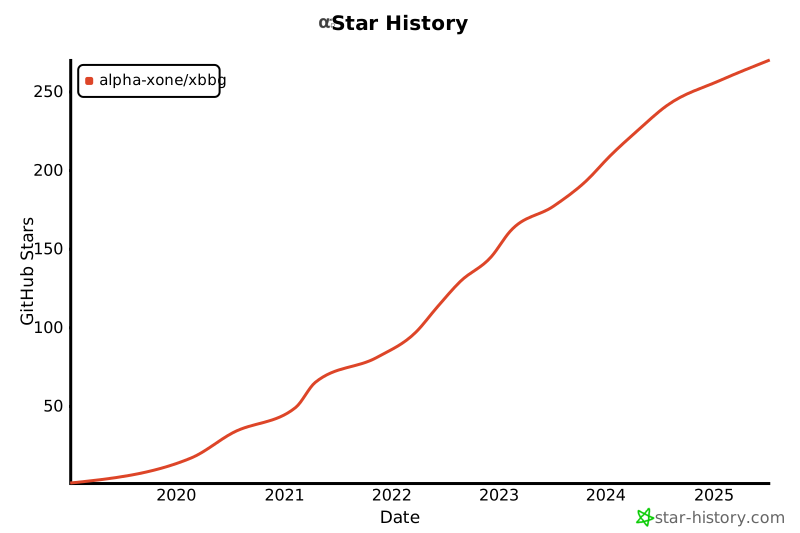
Star History
Project Status
| Category | Badge |
|---|---|
| Docs |  |
| Build |  |
| Coverage |  |
| Quality |  |
 |
|
| License |  |
For detailed release history, see CHANGELOG.md.
Project details
Verified details
These details have been verified by PyPIProject links
GitHub Statistics
Maintainers
Release history Release notifications | RSS feed


Download files
Download the file for your platform. If you're not sure which to choose, learn more about installing packages.
Source Distribution
Built Distribution
Filter files by name, interpreter, ABI, and platform.
If you're not sure about the file name format, learn more about wheel file names.
Copy a direct link to the current filters
File details
Details for the file xbbg-0.12.2.tar.gz.
File metadata
- Download URL: xbbg-0.12.2.tar.gz
- Upload date:
- Size: 1.5 MB
- Tags: Source
- Uploaded using Trusted Publishing? Yes
- Uploaded via: twine/6.1.0 CPython/3.13.7
File hashes
| Algorithm | Hash digest | |
|---|---|---|
| SHA256 |
dc6082d00fbd8aa31242657cb8dec1e9c3d1b8a6c4e382bb0cfc133ff071c6f1
|
|
| MD5 |
8ee28eff669f39c4e0de896dec23b1b6
|
|
| BLAKE2b-256 |
6dbe2f3fbfa28703d9a73949ce4274af03878e60721fb4e63d82f9d48b83a362
|
Provenance
The following attestation bundles were made for xbbg-0.12.2.tar.gz:
Publisher:
pypi_upload.yml on alpha-xone/xbbg
-
Statement:
-
Statement type:
https://in-toto.io/Statement/v1 -
Predicate type:
https://docs.pypi.org/attestations/publish/v1 -
Subject name:
xbbg-0.12.2.tar.gz -
Subject digest:
dc6082d00fbd8aa31242657cb8dec1e9c3d1b8a6c4e382bb0cfc133ff071c6f1 - Sigstore transparency entry: 1118930404
- Sigstore integration time:
-
Permalink:
alpha-xone/xbbg@620061d86460110afd05d844f8c7a919b91e3b07 -
Branch / Tag:
refs/tags/v0.12.2 - Owner: https://github.com/alpha-xone
-
Access:
public
-
Token Issuer:
https://token.actions.githubusercontent.com -
Runner Environment:
github-hosted -
Publication workflow:
pypi_upload.yml@620061d86460110afd05d844f8c7a919b91e3b07 -
Trigger Event:
workflow_dispatch
-
Statement type:
File details
Details for the file xbbg-0.12.2-py3-none-any.whl.
File metadata
- Download URL: xbbg-0.12.2-py3-none-any.whl
- Upload date:
- Size: 210.5 kB
- Tags: Python 3
- Uploaded using Trusted Publishing? Yes
- Uploaded via: twine/6.1.0 CPython/3.13.7
File hashes
| Algorithm | Hash digest | |
|---|---|---|
| SHA256 |
386b5e388d14f117a9491fb001afdd4ab32fedd421dad7abc37e19edb261350e
|
|
| MD5 |
43ad38b343eeb78ccbd8fc01392eeb55
|
|
| BLAKE2b-256 |
c56483650aa7049ca787526cb8f2d7e8c8792b16d725fb7a042a5fd2df249ba9
|
Provenance
The following attestation bundles were made for xbbg-0.12.2-py3-none-any.whl:
Publisher:
pypi_upload.yml on alpha-xone/xbbg
-
Statement:
-
Statement type:
https://in-toto.io/Statement/v1 -
Predicate type:
https://docs.pypi.org/attestations/publish/v1 -
Subject name:
xbbg-0.12.2-py3-none-any.whl -
Subject digest:
386b5e388d14f117a9491fb001afdd4ab32fedd421dad7abc37e19edb261350e - Sigstore transparency entry: 1118930435
- Sigstore integration time:
-
Permalink:
alpha-xone/xbbg@620061d86460110afd05d844f8c7a919b91e3b07 -
Branch / Tag:
refs/tags/v0.12.2 - Owner: https://github.com/alpha-xone
-
Access:
public
-
Token Issuer:
https://token.actions.githubusercontent.com -
Runner Environment:
github-hosted -
Publication workflow:
pypi_upload.yml@620061d86460110afd05d844f8c7a919b91e3b07 -
Trigger Event:
workflow_dispatch
-
Statement type: