
XMind2Cases
高效测试用例设计解决方案




✨ 核心亮点


🎯 双格式解析支持
XMind2Cases 同时支持 XMind 8 和 XMind 2026 两种格式的测试用例转换:
- ✅ XMind 8 及更早版本 - 解析 XML 格式 (.xmind)
- ✅ XMind 2026 最新版本 - 解析 JSON 格式 (.xmind)
自动识别文件格式并使用对应的解析器,无需手动切换!
🔄 多格式输出
解析后的测试用例可导出为多种格式:
- 📋 TestLink XML - 导入 TestLink 测试管理系统
- 📊 禅道 CSV - 导入禅道项目管理平台
- 📦 JSON - 通用数据格式,便于二次开发
功能特性 • 快速开始 • 使用指南 • API 文档 • 致谢 • 更新日志
🚀 快速开始
一键启动
macOS/Linux 用户:
# 1. 克隆项目
git clone https://github.com/koco-co/xmind2cases.git
cd xmind2cases

# 2. 一键启动(自动安装 uv、配置依赖并启动 Web 工具)
./init.sh              # 发布模式:快速启动(推荐用户)
./init.sh --dev        # 开发模式:完整开发环境(推荐开发者)
Windows 用户:
# 方式 1: 双击运行(推荐)
# 双击 init.bat 文件即可

# 方式 2: 命令行运行
init.bat
✨ 脚本会自动:
- ✅ 检测并安装 uv(极速 Python 包管理器)
- ✅ 同步项目依赖
- ✅ 检测端口占用并提供交互式选项
- ✅ 启动 Web 工具(http://localhost:5002)
运行模式说明:
- 发布模式(默认): 只安装核心依赖,快速启动,适合最终用户
- 开发模式(--dev): 安装所有依赖,运行测试,适合开发者
前置要求:
- 操作系统: macOS、Linux 或 Windows
- 无需预装 Python: uv 会自动安装 Python 3.12+
- 无需预装 uv: 脚本会提示自动安装
手动安装
如果你更喜欢手动安装:
# 安装 uv
curl -LsSf https://astral.sh/uv/install.sh | sh  # macOS/Linux
# 或
powershell -c "irm https://astral.sh/uv/install.ps1 | iex"  # Windows

# 同步依赖
uv sync

# 启动 Web 工具
uv run python webtool/application.py  # Flask Web 工具
发布流程
# 完整发布流程(自动测试、构建、发布到 GitHub 和 PyPI)
./init.sh --release
📖 背景
软件测试过程中,最重要、最核心的工作就是测试用例的设计,也是测试团队日常投入最多时间的内容之一。
痛点分析
传统的测试用例设计过程存在诸多痛点:
| 方式 | 优点 | 缺点 |
|---|---|---|
| Excel 表格 | 成本低 | 版本管理麻烦、维护更新耗时、评审繁琐、统计困难 |
| TestLink/TestCenter | 管理、执行、统计方便 | 编写效率不高、思维不够发散、快速迭代中耗时 |
| 自研测试管理工具 | 高度定制 | 研发维护成本高、技术要求高 |
解决方案
越来越多的敏捷开发团队选择使用思维导图进行测试用例设计,因为:
- ✅ 发散性思维 - 思维导图的结构与测试用例设计思维高度吻合
- ✅ 图形化展示 - 直观清晰,便于评审和讨论
- ✅ 提升效率 - 大幅提高测试用例设计效率
但同时也带来了新的问题:
- ❌ 测试用例难以量化管理
- ❌ 执行情况难以统计
- ❌ 与 BUG 管理系统难以打通
- ❌ 团队成员风格各异,沟通成本高
XMind2Cases 的价值
XMind2Cases 将 XMind 设计测试用例的便利性 与 测试用例系统的高效管理 完美结合:
XMind 思维导图 → 通用模板解析 → 多格式输出 → TestLink/禅道/JSON
✨ 功能特性
🔥 核心功能
- 🆕 双格式解析 - 同时支持 XMind 8 (XML) 和 XMind 2026 (JSON) 格式
- 🔄 自动识别 - 智能识别 XMind 文件格式,自动选择对应解析器
- 📋 多格式输出 - 支持 TestLink XML、禅道 CSV、JSON 格式导出
- 🎨 可视化设计 - 使用 XMind 进行直观的测试用例设计
🛠️ 实用工具
- 🌐 Web 工具 - 提供便捷的 Web 转换界面
- 💻 命令行工具 - 支持 CLI 批量转换
- 🔧 Python API - 便于集成到其他系统
- 📊 执行统计 - 支持测试用例执行结果标识和统计
🌍 其他特性
- 🤖 自动/手动 - 支持通过标签设置用例类型
- 🇨🇳 中文支持 - 导出文件完全支持中文显示
- 🔍 智能检测 - 端口占用自动检测并提供交互式解决方案
- 🎨 现代化 UI - 图标化操作、紧凑布局、长文件名智能截断
- 🪟 跨平台支持 - 提供 Windows、macOS、Linux 一键启动脚本
📸 使用示例
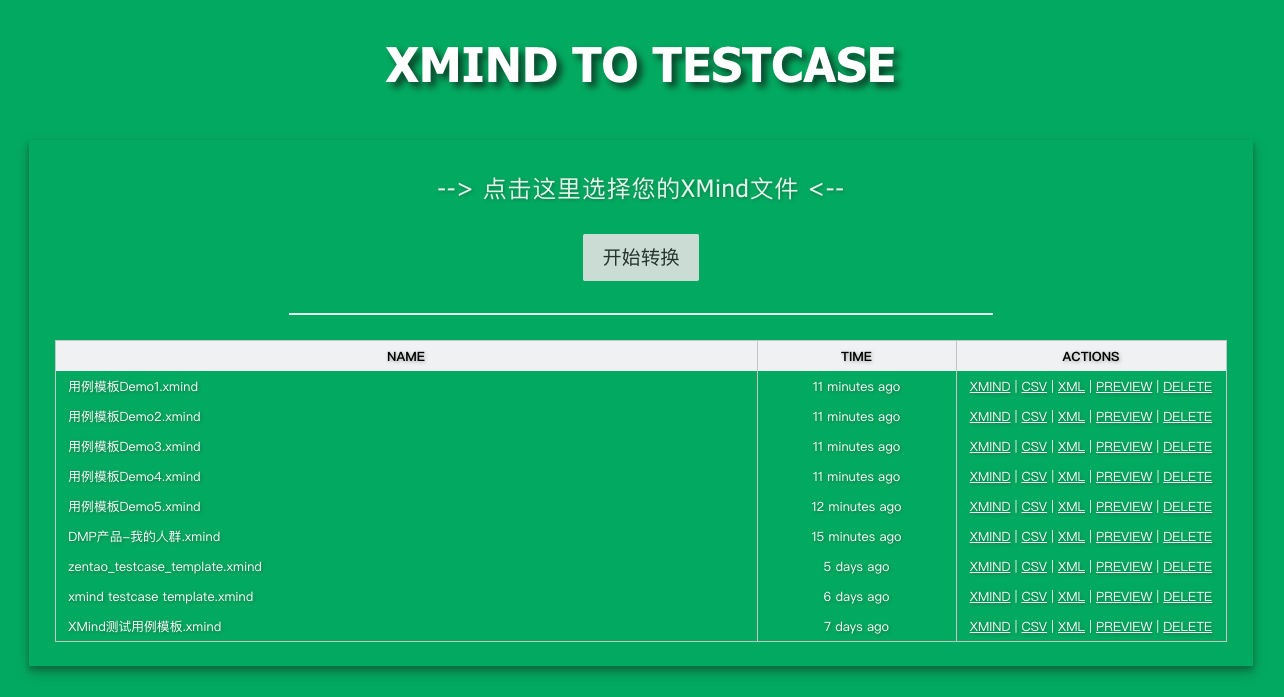
Web 工具界面
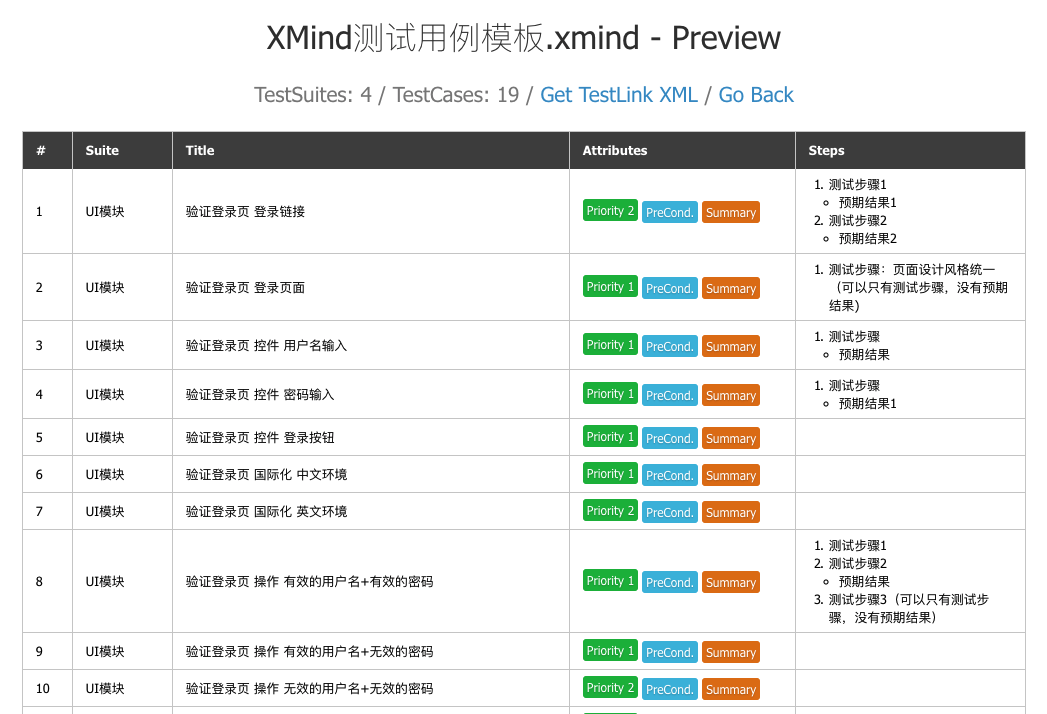
转换结果预览
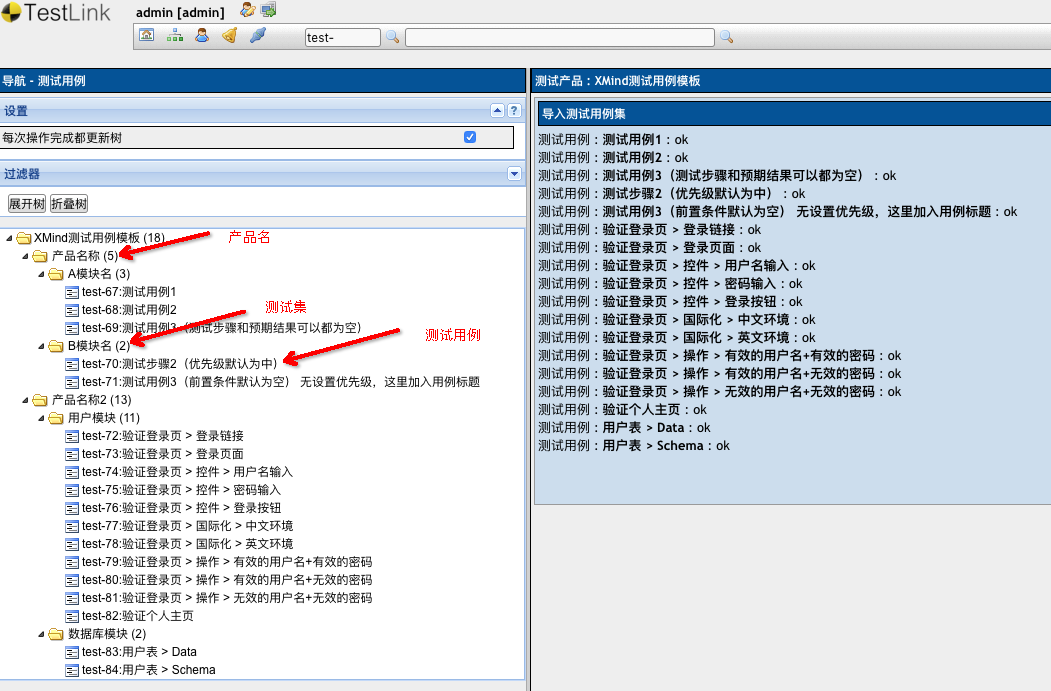
TestLink 导入结果
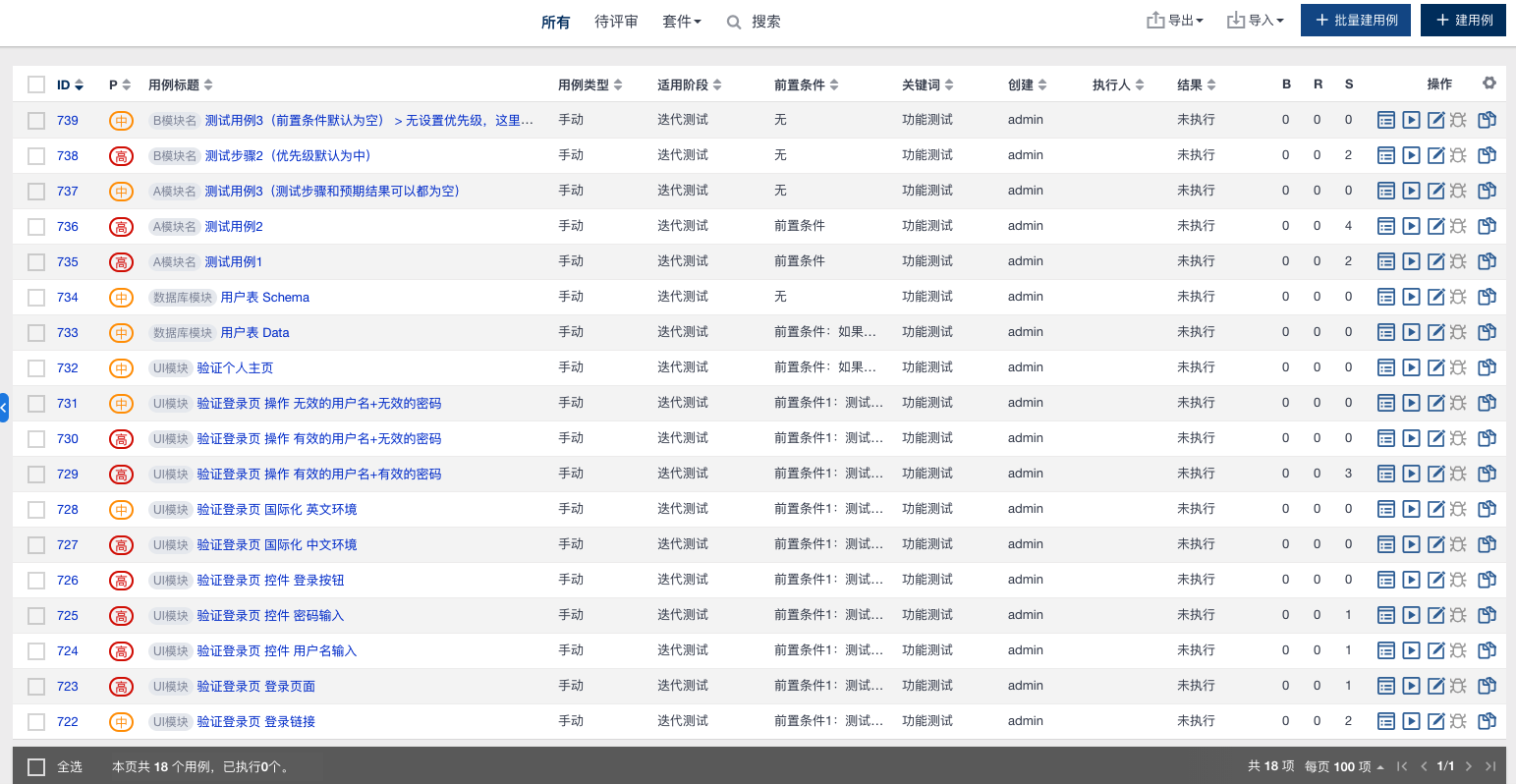
禅道导入结果
💡 使用指南
1️⃣ 命令行调用
基本用法
# 转换为所有格式(CSV、XML、JSON)
xmind2cases /path/to/testcase.xmind

# 只转换为 CSV 格式(禅道)
xmind2cases /path/to/testcase.xmind -csv

# 只转换为 XML 格式(TestLink)
xmind2cases /path/to/testcase.xmind -xml

# 只转换为 JSON 格式
xmind2cases /path/to/testcase.xmind -json
输出文件
执行后会生成以下文件:
testcase.csv- 禅道导入格式testcase.xml- TestLink 导入格式testcase.json- 通用 JSON 格式
2️⃣ Web 界面
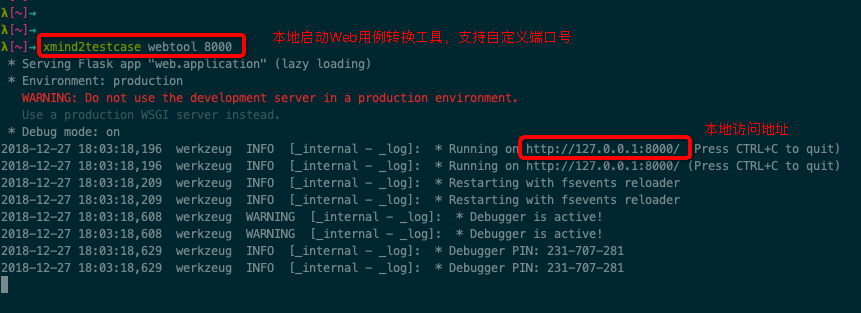
启动 Web 工具
# 默认端口 5002
xmind2cases webtool

# 自定义端口
xmind2cases webtool 8000
在浏览器中访问:http://127.0.0.1:5002
3️⃣ Python API
基本用法
import json
import xmind
from xmind2cases.zentao import xmind_to_zentao_csv_file
from xmind2cases.testlink import xmind_to_testlink_xml_file
from xmind2cases.utils import (
    xmind_testcase_to_json_file,
    xmind_testsuite_to_json_file,
    get_xmind_testcase_list,
    get_xmind_testsuite_list
)


def main():
    xmind_file = 'docs/test.xmind'
    print(f'Start to convert XMind file: {xmind_file}')

    # 转换为禅道 CSV
    zentao_csv_file = xmind_to_zentao_csv_file(xmind_file)
    print(f'Zentao CSV: {zentao_csv_file}')

    # 转换为 TestLink XML
    testlink_xml_file = xmind_to_testlink_xml_file(xmind_file)
    print(f'TestLink XML: {testlink_xml_file}')

    # 转换为 JSON 文件
    testsuite_json_file = xmind_testsuite_to_json_file(xmind_file)
    print(f'TestSuite JSON: {testsuite_json_file}')

    testcase_json_file = xmind_testcase_to_json_file(xmind_file)
    print(f'TestCase JSON: {testcase_json_file}')

    # 获取测试集数据
    testsuites = get_xmind_testsuite_list(xmind_file)
    print(f'TestSuites:\n{json.dumps(testsuites, indent=2, ensure_ascii=False)}')

    # 获取测试用例数据
    testcases = get_xmind_testcase_list(xmind_file)
    print(f'TestCases:\n{json.dumps(testcases, indent=2, ensure_ascii=False)}')

    # 获取原始 XMind 数据
    workbook = xmind.load(xmind_file)
    print(f'XMind Data:\n{json.dumps(workbook.getData(), indent=2, ensure_ascii=False)}')

    print('Finished conversion!')


if __name__ == '__main__':
    main()
📚 API 文档
数据结构
TestCase JSON 格式
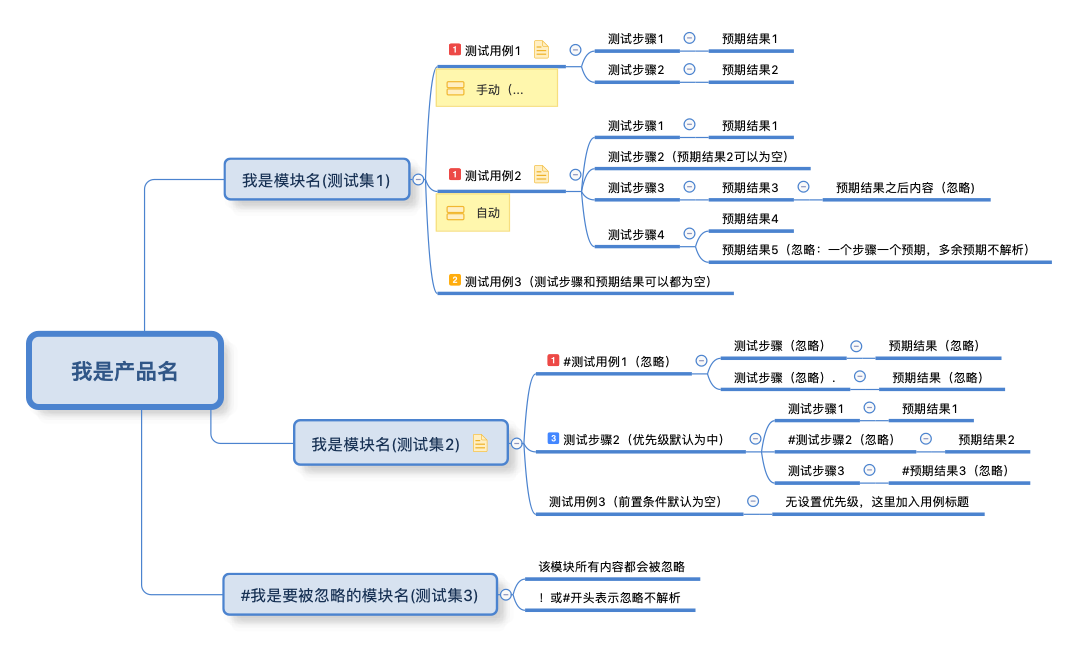
from xmind2cases.utils import get_xmind_testcase_list

xmind_file = 'docs/test.xmind'
testcases = get_xmind_testcase_list(xmind_file)
输出结构:
[
  {
    "name": "测试用例1",
    "version": 1,
    "summary": "测试用例1",
    "preconditions": "前置条件",
    "execution_type": 1,
    "importance": 1,
    "estimated_exec_duration": 3,
    "status": 7,
    "steps": [
      {
        "step_number": 1,
        "actions": "测试步骤1",
        "expectedresults": "预期结果1",
        "execution_type": 1
      }
    ],
    "product": "我是产品名",
    "suite": "我是模块名(测试集1)"
  }
]
字段说明:
| 字段 | 类型 | 说明 |
|---|---|---|
name |
string | 用例标题 |
version |
int | 用例版本 |
summary |
string | 用例摘要 |
preconditions |
string | 前置条件 |
execution_type |
int | 执行类型(1: 手动, 2: 自动) |
importance |
int | 优先级(1: 高, 2: 中, 3: 低) |
estimated_exec_duration |
int | 预计执行时间(分钟) |
status |
int | 状态(1: 草稿, 2: 待评审, ..., 7: 终稿) |
steps |
array | 测试步骤列表 |
product |
string | 产品名称 |
suite |
string | 测试集名称 |
执行结果字段:

详细使用指南请参考:使用指南
示例文件:testcase json
TestSuite JSON 格式
from xmind2cases.utils import get_xmind_testsuite_list

xmind_file = 'docs/test.xmind'
testsuites = get_xmind_testsuite_list(xmind_file)
输出结构:
[
  {
    "name": "我是产品名",
    "details": null,
    "testcase_list": [],
    "sub_suites": [
      {
        "name": "我是模块名(测试集1)",
        "details": null,
        "testcase_list": [
          {
            "name": "测试用例1",
            "version": 1,
            "summary": "测试用例1",
            "preconditions": "前置条件",
            "execution_type": 1,
            "importance": 1,
            "estimated_exec_duration": 3,
            "status": 7,
            "steps": [
              {
                "step_number": 1,
                "actions": "测试步骤1",
                "expectedresults": "预期结果1",
                "execution_type": 1
              }
            ]
          }
        ],
        "sub_suites": []
      }
    ]
  }
]
执行结果统计字段:

示例文件:testsuite json
原始 XMind JSON 格式
基于 XMind 库解析:
import xmind

xmind_file = 'docs/test.xmind'
workbook = xmind.load(xmind_file)
data = workbook.getData()
输出结构:
[
  {
    "id": "7hmnj6ahp0lonp4k2hodfok24f",
    "title": "画布 1",
    "topic": {
      "id": "7c8av5gt8qfbac641lth4g1p67",
      "link": null,
      "title": "我是产品名",
      "note": null,
      "label": null,
      "comment": null,
      "markers": [],
      "topics": [
        {
          "id": "2rj4ek3nn4sk0lc4pje3gvgv9k",
          "title": "我是模块名(测试集1)",
          "topics": [
            {
              "id": "3hjj43s7rv66uncr1srl3qsboi",
              "title": "测试用例1",
              "note": "前置条件\n",
              "label": "手动(执行方式默认为手动)",
              "markers": ["priority-1"],
              "topics": [
                {
                  "id": "3djn37j1fdc6081de319slf035",
                  "title": "测试步骤1",
                  "topics": [
                    {
                      "id": "7v0f1152popou38ndaaamt49l5",
                      "title": "预期结果1"
                    }
                  ]
                }
              ]
            }
          ]
        }
      ]
    }
  }
]
参考示例:查看项目源码中的实际测试数据
📦 发布到 PyPI
使用 uv 进行构建和发布:
# 构建项目
uv build

# 发布到 PyPI
uv publish
🔄 最近更新
1.7.2 (开发中)
- ✨ 重构初始化脚本为模块化架构
- 🔍 智能检测 uv 的多种安装来源
- 📦 支持 6 种安装方式(homebrew/npm/pip/cargo/curl/scoop)
- 🛡️ 增强错误处理和诊断
- 🌐 网络重试机制
- 📊 状态持久化,支持断点续传
1.7.1 (2025-01-XX)
- 🐛 修复 curl 下载执行时重复提示安装 uv 的问题
- 📝 更新项目配置
查看完整更新日志:CHANGELOG.md
🙏 致谢
本项目基于以下优秀的开源项目,特此感谢:
核心参考
-
- 作者: zhuifengshen
- 本项目的设计理念和功能架构深受该项目启发
- 提供了测试用例转换的基础思路和实现方案
-
- 作者: tobyqin
- 优秀的 XMind 文件解析库
- 本项目使用该库进行 XMind 文件格式解析
相关技术
贡献者
感谢所有为本项目提交 Issue、PR 和建议的贡献者!

📄 许可证
MIT License
Copyright (c) 2026 Poco
Made with ❤️ by Poco and contributors
1 maintainer

Metadata
1 maintainer
Release files for xmind2cases 1.7.3
For a detailed explanation of source distributions (sdists) and built distributions (wheels), please see the package formats documentation.
Source distribution (sdist)
| File | Size | Uploaded | |
|---|---|---|---|
| xmind2cases-1.7.3.tar.gz | 5.8 MB | Details |
Built distribution (wheel)
| File | Interpreter | ABI | Platform | Reset |
|---|---|---|---|---|
| xmind2cases-1.7.3-py3-none-any.whl | Python 3 | none | any | Details |
Total release size: 17.5 MB
Release files / xmind2cases-1.7.3.tar.gz
| Download URL | xmind2cases-1.7.3.tar.gz |
|---|---|
| Size | 5.8 MB |
| Tags | Source |
|
SHA-256 checksum How to use checksums |
42bc2e013894fe82b81608cb4cff49c860b9099d2013469e578209f28415952d
|
|
BLAKE2b-256 checksum How to use checksums |
7e347b7ee3283b98c17b50478304e1ac9237f7c356e2fa5e4855ff24e8fa9d10
|
| Upload date | |
|
Uploaded using Trusted Publishing? What is trusted publishing? |
No |
| Uploaded via |
uv/0.10.0 {"installer":{"name":"uv","version":"0.10.0","subcommand":["publish"]},"python":null,"implementation":{"name":null,"version":null},"distro":{"name":"macOS","version":null,"id":null,"libc":null},"system":{"name":null,"release":null},"cpu":null,"openssl_version":null,"setuptools_version":null,"rustc_version":null,"ci":null}
|
Release files / xmind2cases-1.7.3-py3-none-any.whl
| Download URL | xmind2cases-1.7.3-py3-none-any.whl |
|---|---|
| Size | 11.7 MB |
| Tags | Python 3 |
|
SHA-256 checksum How to use checksums |
5dbc4f037bdfc2cb2e9dab048d221688b648ffd34afa71de16da5b6515711f21
|
|
BLAKE2b-256 checksum How to use checksums |
6bd8f1c38b55f360642900a0f917754ae8b2f79ce2bf57a104aa1b23869bbd1e
|
| Upload date | |
|
Uploaded using Trusted Publishing? What is trusted publishing? |
No |
| Uploaded via |
uv/0.10.0 {"installer":{"name":"uv","version":"0.10.0","subcommand":["publish"]},"python":null,"implementation":{"name":null,"version":null},"distro":{"name":"macOS","version":null,"id":null,"libc":null},"system":{"name":null,"release":null},"cpu":null,"openssl_version":null,"setuptools_version":null,"rustc_version":null,"ci":null}
|














