
XMind2Cases基于Python实现,提供了一个高效测试用例设计的解决方案!

Project description
XMind2Cases
高效测试用例设计解决方案




✨ 核心亮点


🎯 双格式解析支持
XMind2Cases 同时支持 XMind 8 和 XMind 2026 两种格式的测试用例转换:
- ✅ XMind 8 及更早版本 - 解析 XML 格式 (.xmind)
- ✅ XMind 2026 最新版本 - 解析 JSON 格式 (.xmind)
自动识别文件格式并使用对应的解析器,无需手动切换!
🔄 多格式输出
解析后的测试用例可导出为多种格式:
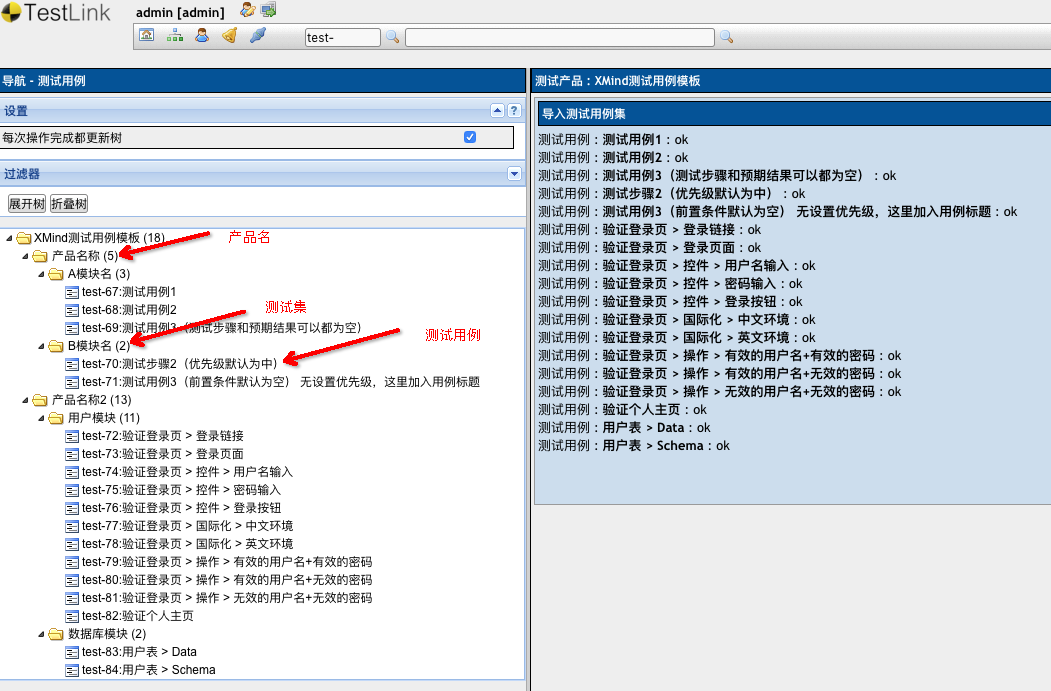
- 📋 TestLink XML - 导入 TestLink 测试管理系统
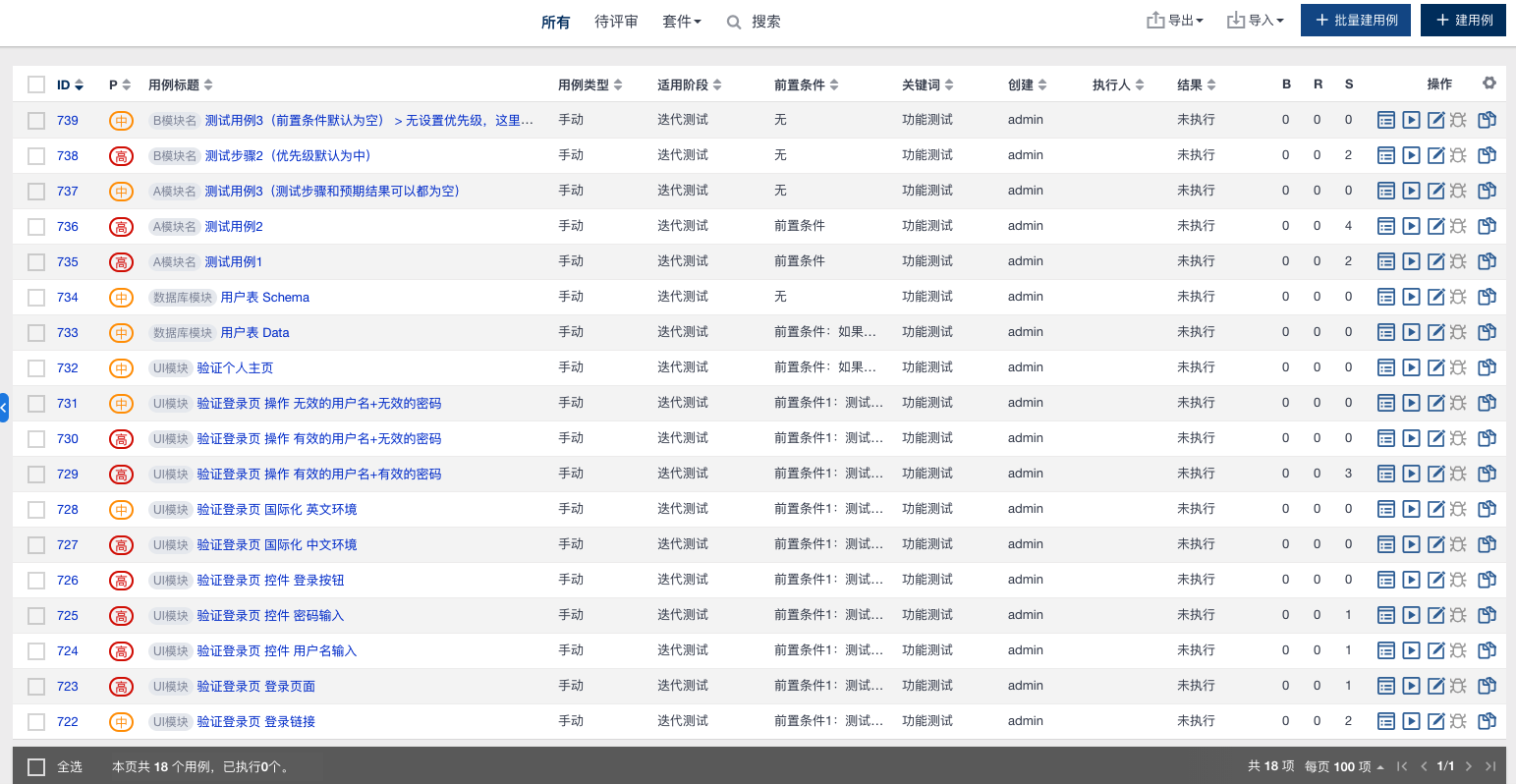
- 📊 禅道 CSV - 导入禅道项目管理平台
- 📦 JSON - 通用数据格式,便于二次开发
功能特性 • 快速开始 • 使用指南 • API 文档 • 致谢 • 更新日志
🚀 快速开始
一键启动
macOS/Linux 用户:
# 1. 克隆项目
git clone https://github.com/koco-co/xmind2cases.git
cd xmind2cases

# 2. 一键启动(自动安装 uv、配置依赖并启动 Web 工具)
./init.sh
Windows 用户:
# 方式 1: 双击运行(推荐)
# 双击 init.bat 文件即可

# 方式 2: 命令行运行
init.bat
✨ 脚本会自动:
- ✅ 检测并安装 uv(极速 Python 包管理器)
- ✅ 同步项目依赖
- ✅ 检测端口占用并提供交互式选项
- ✅ 启动 Web 工具(http://localhost:5002)
前置要求:
- 操作系统: macOS、Linux 或 Windows
- 无需预装 Python: uv 会自动安装 Python 3.12+
- 无需预装 uv: 脚本会提示自动安装
手动安装
如果你更喜欢手动安装:
# 安装 uv
curl -LsSf https://astral.sh/uv/install.sh | sh  # macOS/Linux
# 或
powershell -c "irm https://astral.sh/uv/install.ps1 | iex"  # Windows

# 同步依赖
uv sync

# 启动 Web 工具
uv run python webtool/application.py  # Flask Web 工具
发布流程
# 完整发布流程(自动测试、构建、发布到 GitHub 和 PyPI)
./init.sh --release
📖 背景
软件测试过程中,最重要、最核心的工作就是测试用例的设计,也是测试团队日常投入最多时间的内容之一。
痛点分析
传统的测试用例设计过程存在诸多痛点:
| 方式 | 优点 | 缺点 |
|---|---|---|
| Excel 表格 | 成本低 | 版本管理麻烦、维护更新耗时、评审繁琐、统计困难 |
| TestLink/TestCenter | 管理、执行、统计方便 | 编写效率不高、思维不够发散、快速迭代中耗时 |
| 自研测试管理工具 | 高度定制 | 研发维护成本高、技术要求高 |
解决方案
越来越多的敏捷开发团队选择使用思维导图进行测试用例设计,因为:
- ✅ 发散性思维 - 思维导图的结构与测试用例设计思维高度吻合
- ✅ 图形化展示 - 直观清晰,便于评审和讨论
- ✅ 提升效率 - 大幅提高测试用例设计效率
但同时也带来了新的问题:
- ❌ 测试用例难以量化管理
- ❌ 执行情况难以统计
- ❌ 与 BUG 管理系统难以打通
- ❌ 团队成员风格各异,沟通成本高
XMind2Cases 的价值
XMind2Cases 将 XMind 设计测试用例的便利性 与 测试用例系统的高效管理 完美结合:
XMind 思维导图 → 通用模板解析 → 多格式输出 → TestLink/禅道/JSON
✨ 功能特性
🔥 核心功能
- 🆕 双格式解析 - 同时支持 XMind 8 (XML) 和 XMind 2026 (JSON) 格式
- 🔄 自动识别 - 智能识别 XMind 文件格式,自动选择对应解析器
- 📋 多格式输出 - 支持 TestLink XML、禅道 CSV、JSON 格式导出
- 🎨 可视化设计 - 使用 XMind 进行直观的测试用例设计
🛠️ 实用工具
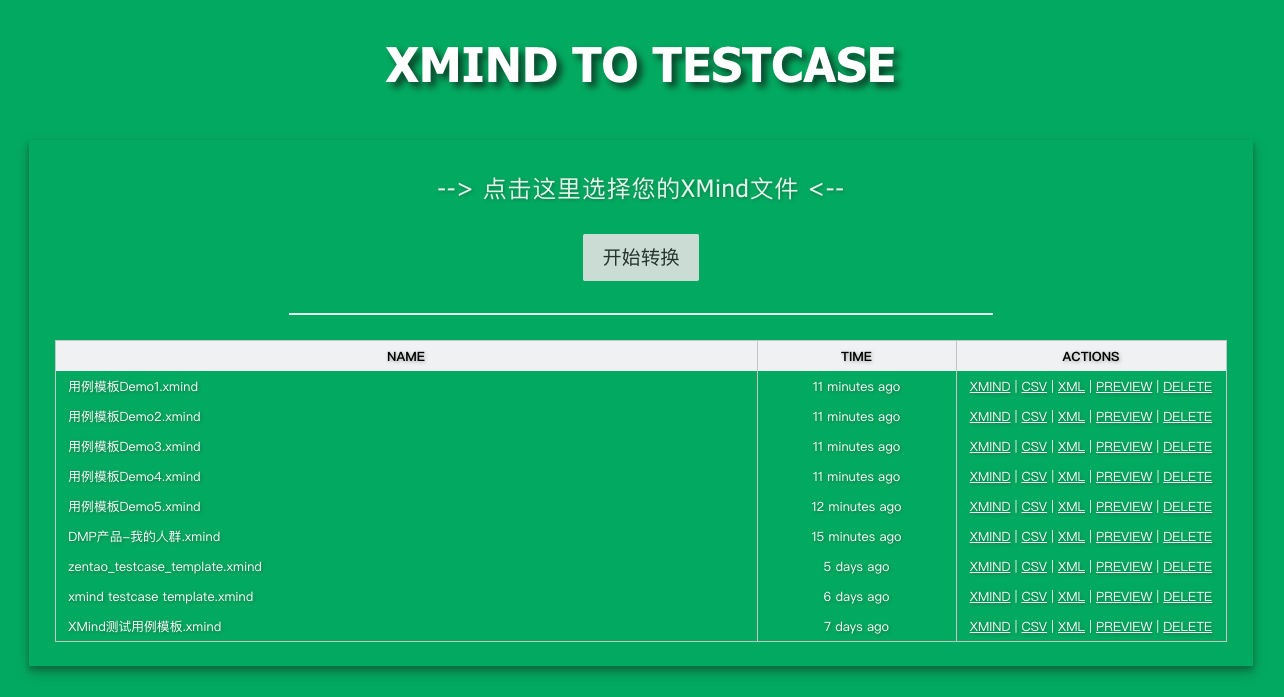
- 🌐 Web 工具 - 提供便捷的 Web 转换界面
- 💻 命令行工具 - 支持 CLI 批量转换
- 🔧 Python API - 便于集成到其他系统
- 📊 执行统计 - 支持测试用例执行结果标识和统计
🌍 其他特性
- 🤖 自动/手动 - 支持通过标签设置用例类型
- 🇨🇳 中文支持 - 导出文件完全支持中文显示
- 🔍 智能检测 - 端口占用自动检测并提供交互式解决方案
- 🎨 现代化 UI - 图标化操作、紧凑布局、长文件名智能截断
- 🪟 跨平台支持 - 提供 Windows、macOS、Linux 一键启动脚本
📸 使用示例
Web 工具界面
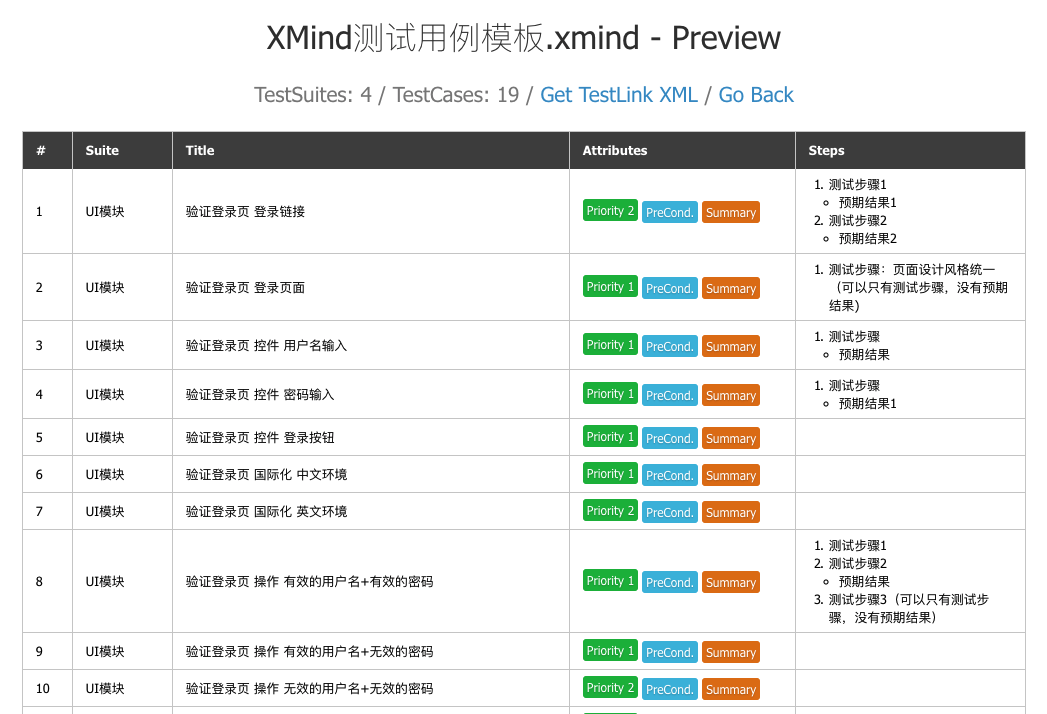
转换结果预览
TestLink 导入结果
禅道导入结果
💡 使用指南
1️⃣ 命令行调用
基本用法
# 转换为所有格式(CSV、XML、JSON)
xmind2cases /path/to/testcase.xmind

# 只转换为 CSV 格式(禅道)
xmind2cases /path/to/testcase.xmind -csv

# 只转换为 XML 格式(TestLink)
xmind2cases /path/to/testcase.xmind -xml

# 只转换为 JSON 格式
xmind2cases /path/to/testcase.xmind -json
输出文件
执行后会生成以下文件:
testcase.csv- 禅道导入格式testcase.xml- TestLink 导入格式testcase.json- 通用 JSON 格式
2️⃣ Web 界面
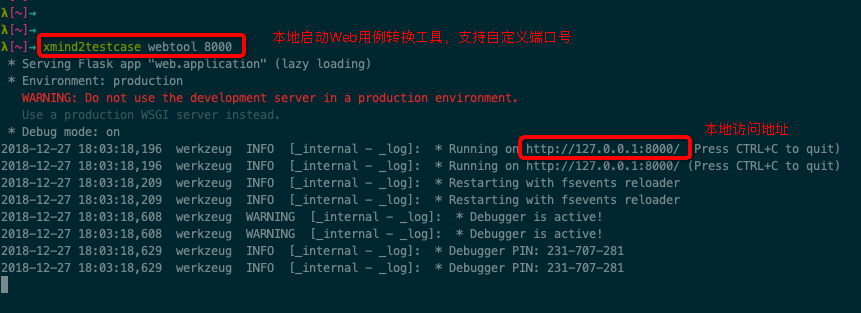
启动 Web 工具
# 默认端口 5002
xmind2cases webtool

# 自定义端口
xmind2cases webtool 8000
在浏览器中访问:http://127.0.0.1:5002
3️⃣ Python API
基本用法
import json
import xmind
from xmind2cases.zentao import xmind_to_zentao_csv_file
from xmind2cases.testlink import xmind_to_testlink_xml_file
from xmind2cases.utils import (
    xmind_testcase_to_json_file,
    xmind_testsuite_to_json_file,
    get_xmind_testcase_list,
    get_xmind_testsuite_list
)


def main():
    xmind_file = 'docs/test.xmind'
    print(f'Start to convert XMind file: {xmind_file}')

    # 转换为禅道 CSV
    zentao_csv_file = xmind_to_zentao_csv_file(xmind_file)
    print(f'Zentao CSV: {zentao_csv_file}')

    # 转换为 TestLink XML
    testlink_xml_file = xmind_to_testlink_xml_file(xmind_file)
    print(f'TestLink XML: {testlink_xml_file}')

    # 转换为 JSON 文件
    testsuite_json_file = xmind_testsuite_to_json_file(xmind_file)
    print(f'TestSuite JSON: {testsuite_json_file}')

    testcase_json_file = xmind_testcase_to_json_file(xmind_file)
    print(f'TestCase JSON: {testcase_json_file}')

    # 获取测试集数据
    testsuites = get_xmind_testsuite_list(xmind_file)
    print(f'TestSuites:\n{json.dumps(testsuites, indent=2, ensure_ascii=False)}')

    # 获取测试用例数据
    testcases = get_xmind_testcase_list(xmind_file)
    print(f'TestCases:\n{json.dumps(testcases, indent=2, ensure_ascii=False)}')

    # 获取原始 XMind 数据
    workbook = xmind.load(xmind_file)
    print(f'XMind Data:\n{json.dumps(workbook.getData(), indent=2, ensure_ascii=False)}')

    print('Finished conversion!')


if __name__ == '__main__':
    main()
📚 API 文档
数据结构
TestCase JSON 格式
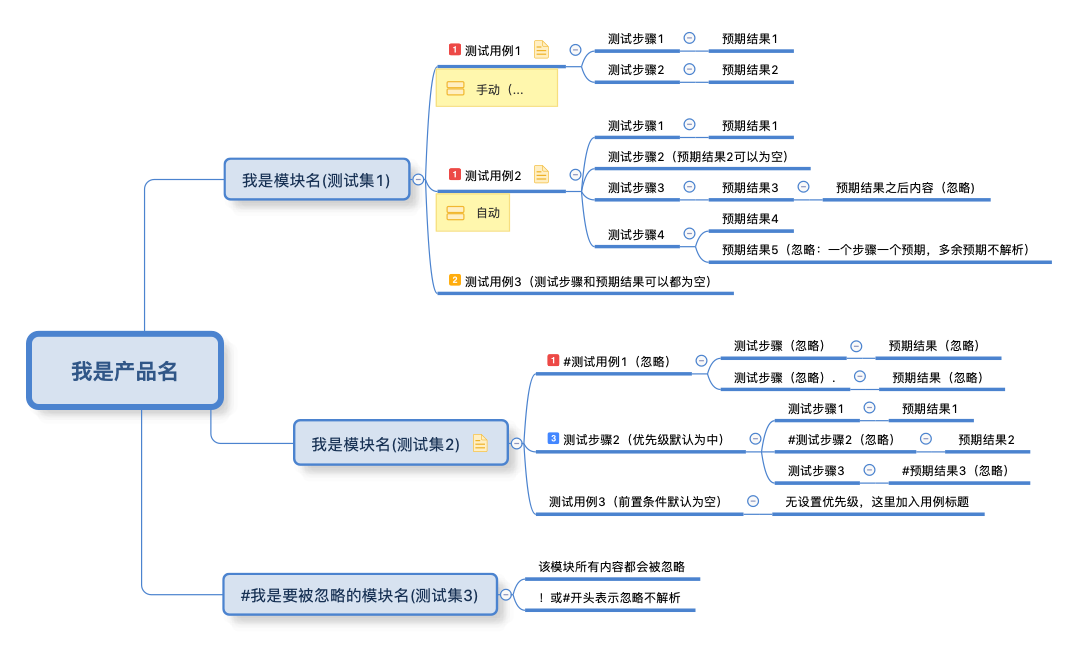
from xmind2cases.utils import get_xmind_testcase_list

xmind_file = 'docs/test.xmind'
testcases = get_xmind_testcase_list(xmind_file)
输出结构:
[
  {
    "name": "测试用例1",
    "version": 1,
    "summary": "测试用例1",
    "preconditions": "前置条件",
    "execution_type": 1,
    "importance": 1,
    "estimated_exec_duration": 3,
    "status": 7,
    "steps": [
      {
        "step_number": 1,
        "actions": "测试步骤1",
        "expectedresults": "预期结果1",
        "execution_type": 1
      }
    ],
    "product": "我是产品名",
    "suite": "我是模块名(测试集1)"
  }
]
字段说明:
| 字段 | 类型 | 说明 |
|---|---|---|
name |
string | 用例标题 |
version |
int | 用例版本 |
summary |
string | 用例摘要 |
preconditions |
string | 前置条件 |
execution_type |
int | 执行类型(1: 手动, 2: 自动) |
importance |
int | 优先级(1: 高, 2: 中, 3: 低) |
estimated_exec_duration |
int | 预计执行时间(分钟) |
status |
int | 状态(1: 草稿, 2: 待评审, ..., 7: 终稿) |
steps |
array | 测试步骤列表 |
product |
string | 产品名称 |
suite |
string | 测试集名称 |
执行结果字段:

详细使用指南请参考:使用指南
示例文件:testcase json
TestSuite JSON 格式
from xmind2cases.utils import get_xmind_testsuite_list

xmind_file = 'docs/test.xmind'
testsuites = get_xmind_testsuite_list(xmind_file)
输出结构:
[
  {
    "name": "我是产品名",
    "details": null,
    "testcase_list": [],
    "sub_suites": [
      {
        "name": "我是模块名(测试集1)",
        "details": null,
        "testcase_list": [
          {
            "name": "测试用例1",
            "version": 1,
            "summary": "测试用例1",
            "preconditions": "前置条件",
            "execution_type": 1,
            "importance": 1,
            "estimated_exec_duration": 3,
            "status": 7,
            "steps": [
              {
                "step_number": 1,
                "actions": "测试步骤1",
                "expectedresults": "预期结果1",
                "execution_type": 1
              }
            ]
          }
        ],
        "sub_suites": []
      }
    ]
  }
]
执行结果统计字段:

示例文件:testsuite json
原始 XMind JSON 格式
基于 XMind 库解析:
import xmind

xmind_file = 'docs/test.xmind'
workbook = xmind.load(xmind_file)
data = workbook.getData()
输出结构:
[
  {
    "id": "7hmnj6ahp0lonp4k2hodfok24f",
    "title": "画布 1",
    "topic": {
      "id": "7c8av5gt8qfbac641lth4g1p67",
      "link": null,
      "title": "我是产品名",
      "note": null,
      "label": null,
      "comment": null,
      "markers": [],
      "topics": [
        {
          "id": "2rj4ek3nn4sk0lc4pje3gvgv9k",
          "title": "我是模块名(测试集1)",
          "topics": [
            {
              "id": "3hjj43s7rv66uncr1srl3qsboi",
              "title": "测试用例1",
              "note": "前置条件\n",
              "label": "手动(执行方式默认为手动)",
              "markers": ["priority-1"],
              "topics": [
                {
                  "id": "3djn37j1fdc6081de319slf035",
                  "title": "测试步骤1",
                  "topics": [
                    {
                      "id": "7v0f1152popou38ndaaamt49l5",
                      "title": "预期结果1"
                    }
                  ]
                }
              ]
            }
          ]
        }
      ]
    }
  }
]
参考示例:查看项目源码中的实际测试数据
📦 发布到 PyPI
使用 uv 进行构建和发布:
# 构建项目
uv build

# 发布到 PyPI
uv publish
🙏 致谢
本项目基于以下优秀的开源项目,特此感谢:
核心参考
-
- 作者: zhuifengshen
- 本项目的设计理念和功能架构深受该项目启发
- 提供了测试用例转换的基础思路和实现方案
-
- 作者: tobyqin
- 优秀的 XMind 文件解析库
- 本项目使用该库进行 XMind 文件格式解析
相关技术
贡献者
感谢所有为本项目提交 Issue、PR 和建议的贡献者!

📄 许可证
MIT License
Copyright (c) 2026 Poco
Made with ❤️ by Poco and contributors


Download files
Download the file for your platform. If you're not sure which to choose, learn more about installing packages.
Source Distribution
Built Distribution
Filter files by name, interpreter, ABI, and platform.
If you're not sure about the file name format, learn more about wheel file names.
Copy a direct link to the current filters
File details
Details for the file xmind2cases-1.7.1.tar.gz.
File metadata
- Download URL: xmind2cases-1.7.1.tar.gz
- Upload date:
- Size: 5.8 MB
- Tags: Source
- Uploaded using Trusted Publishing? No
- Uploaded via: uv/0.10.0 {"installer":{"name":"uv","version":"0.10.0","subcommand":["publish"]},"python":null,"implementation":{"name":null,"version":null},"distro":{"name":"macOS","version":null,"id":null,"libc":null},"system":{"name":null,"release":null},"cpu":null,"openssl_version":null,"setuptools_version":null,"rustc_version":null,"ci":null}
File hashes
| Algorithm | Hash digest | |
|---|---|---|
| SHA256 |
af4014ec8342da3798d8b7d0d1536ea09d90f09844c7c0e460487525100efef6
|
|
| MD5 |
deafd68682c76e77e606c7a7098986d1
|
|
| BLAKE2b-256 |
926a24230995d41e9a869397af273d683ece6f8c159377a3dd204341467d003b
|
File details
Details for the file xmind2cases-1.7.1-py3-none-any.whl.
File metadata
- Download URL: xmind2cases-1.7.1-py3-none-any.whl
- Upload date:
- Size: 11.7 MB
- Tags: Python 3
- Uploaded using Trusted Publishing? No
- Uploaded via: uv/0.10.0 {"installer":{"name":"uv","version":"0.10.0","subcommand":["publish"]},"python":null,"implementation":{"name":null,"version":null},"distro":{"name":"macOS","version":null,"id":null,"libc":null},"system":{"name":null,"release":null},"cpu":null,"openssl_version":null,"setuptools_version":null,"rustc_version":null,"ci":null}
File hashes
| Algorithm | Hash digest | |
|---|---|---|
| SHA256 |
5b71997a112e7622df2de3d757ac7ee6371ffe671d2078101a85909f9235531a
|
|
| MD5 |
8ce67da28d00ebb00591437f61fc485f
|
|
| BLAKE2b-256 |
61f609cbee9612dcc064df2e1e0b6564f4b5800cf85fd8b95cf021cd8c7e90f3
|






