
xyz_canvas
Interactive canvas for editing 3D geometry, using only matplotlib.pyplot
What is it?
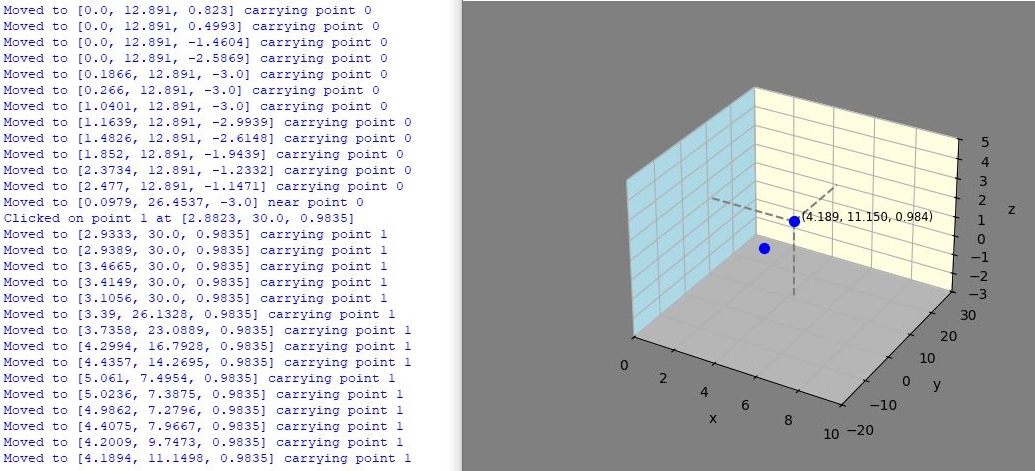
XYZ_canvas provides the starting point to create Python code that allows defining and editing objects in 3D space, using only Matplotlib and just over 200 lines of library in canvas.py.
This library provides you with the 3D co-ordinates of points clicked on and moved to / over, so that you can create your own code to process the points created. You can reach down into the definitions made in canvas.py to manipulate what's created during use, e.g. delete all the points as shown in the customisation example.
How can I use it?
The "demo_V1.1.0_minimal.py" program shows how simple it is to instantiate the canvas:
from xyz_canvas.canvas import xyz_canvas

#instantiating the canvas:
demo = xyz_canvas(  xlim =[0,1], ylim =[0,1], zlim=[0,1],
                                xlabel="x", ylabel="y", zlabel="z"
                               )

# showing the plot
demo.plt.show()

# note that this is so minimal that all it does is display;
# the resulting points are not used here.

print("Demo finished ...")
If you want to do things with the points created, look in "demo_V1.1.0_with_customisation.py". Here you'll see examples of customising the colour scheme and reacting to mouse clicks and mouse moves.
Installation
Install with pip:
pip install xyz_canvas
Or simply download the canvas.py and demo.py files, and develop from there.
Future plans / ideas
- demo how to build on top of this to create objects? (might highlight extra functions needed here)
- add snap to grid (make it settable as dx,dy,dz
- polar / spherical co-ordinates?
- transforms?
1 maintainer

Download files
Download the file for your platform. If you're not sure which to choose, learn more about installing packages.
Source Distribution
Built Distribution
Filter files by name, interpreter, ABI, and platform.
If you're not sure about the file name format, learn more about wheel file names.
Copy a direct link to the current filters
File details
Details for the file xyz_canvas-1.1.2.tar.gz.
File metadata
- Download URL: xyz_canvas-1.1.2.tar.gz
- Upload date:
- Size: 5.8 kB
- Tags: Source
- Uploaded using Trusted Publishing? No
- Uploaded via:
twine/6.1.0 CPython/3.12.2
File hashes
| Algorithm | Hash digest | |
|---|---|---|
| SHA256 |
9a32601ff7dcd6cb2b263f092a8f7186fe5dfcc4b0aca5eba75895830328e2f3
|
|
| MD5 |
b8b3d672c8eca843c55545ef6a334679
|
|
| BLAKE2b-256 |
6019567b32947da4de104cab7b07de3dcdb196fc3cc53f920dcf8169679a5e74
|
File details
Details for the file xyz_canvas-1.1.2-py3-none-any.whl.
File metadata
- Download URL: xyz_canvas-1.1.2-py3-none-any.whl
- Upload date:
- Size: 6.7 kB
- Tags: Python 3
- Uploaded using Trusted Publishing? No
- Uploaded via:
twine/6.1.0 CPython/3.12.2
File hashes
| Algorithm | Hash digest | |
|---|---|---|
| SHA256 |
f9ac594d8875e6921c0b98af53957a19350790b2da9d232091a3170aa41f5aeb
|
|
| MD5 |
2c2f0e1c70085c9e39d2a51610c18a12
|
|
| BLAKE2b-256 |
53d8c3df0ccaab8102f20002bd428d20c5d17ff78abf2a4201ef5b841ae879dd
|














