
Interactive canvas for editing 3D geometry, using matplotlib.pyplot

Project description
xyz_canvas
Interactive canvas for editing 3D geometry, using matplotlib.pyplot
This is a demo of xyz_canvas (pre-release, V0.2.0), a Python library to add, edit, and connect 3D wire-frame objects using only Matplotlib. The idea is that this will be called by code that needs the user to define / edit these objects in 3D space.
Currently, only lines are supported but the plan is to include at least lines, rectangles, arcs (circles) and helices. Shape types are seleced via the buttons next to the geometry display. The clear button is implemented, as is Exit & Close and List, but the others are placeholders.
To add a line, click two points within the axis space (note that no feedback is given for the first click).
The view may be rotated at any time by clicking and dragging just oustide the axis space.
Currently, endpoints / vertices are pinned to the 'closest' backplane (shaded & gridded). Methods to move vertices into general 3D space by clicking and typing co-ordinates, snapping to a 3D grid / other objects, will be added soon.
Installation
Install with pip:
pip install xyz_canvas
Demo Screenshot
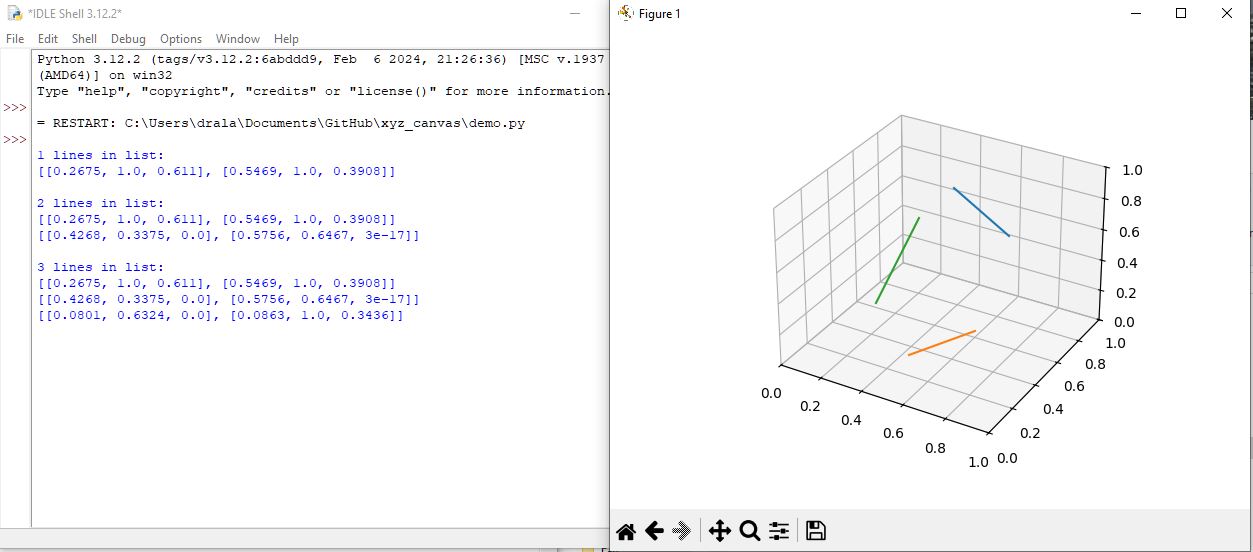
The file demo.py currently allows you to add lines to the canvas by clicking end points sequentially. The callback function then has access to the lines collection. At the moment, no markers precede line generation but that's my next step, as well as adding delete, move, attach, snap to grid, snap to object methods.
The XYZ co-ordinates all snap to the nearest backplane (XY, XZ, YZ) but I will add ways to put the lines into arbitrary locations.
Release history Release notifications | RSS feed


Download files
Download the file for your platform. If you're not sure which to choose, learn more about installing packages.
Source Distribution
Built Distribution
Filter files by name, interpreter, ABI, and platform.
If you're not sure about the file name format, learn more about wheel file names.
Copy a direct link to the current filters
File details
Details for the file xyz_canvas-0.2.0.tar.gz.
File metadata
- Download URL: xyz_canvas-0.2.0.tar.gz
- Upload date:
- Size: 5.0 kB
- Tags: Source
- Uploaded using Trusted Publishing? No
- Uploaded via: twine/6.1.0 CPython/3.12.2
File hashes
| Algorithm | Hash digest | |
|---|---|---|
| SHA256 |
3164767e6c6d0f30818b73e8d7e48d208da8388b2eb6ea5d7628ce80d2f937a8
|
|
| MD5 |
1d2d85f0537d036b82753fc2346dcd8e
|
|
| BLAKE2b-256 |
15b1f48ba6d5ac5429bb35ac08edfba5bcd5884b310c2e87ec811abf4b610c86
|
File details
Details for the file xyz_canvas-0.2.0-py3-none-any.whl.
File metadata
- Download URL: xyz_canvas-0.2.0-py3-none-any.whl
- Upload date:
- Size: 5.4 kB
- Tags: Python 3
- Uploaded using Trusted Publishing? No
- Uploaded via: twine/6.1.0 CPython/3.12.2
File hashes
| Algorithm | Hash digest | |
|---|---|---|
| SHA256 |
403b92d2766a88f865400be22cb64c95edd87c123082cfcd56d2ad6d6f6de073
|
|
| MD5 |
985a42098aefb63575d9b26f41f0c736
|
|
| BLAKE2b-256 |
60a92ad2e7f5582f001258c2acf827b645148454fefe2bf578b7db29eb0e55b8
|






