
Interactive canvas for editing 3D geometry, using matplotlib.pyplot

Project description
xyz_canvas
Interactive canvas for editing 3D geometry, using only matplotlib.pyplot
This is a demo of xyz_canvas (pre-release, V0.4.0), a Python library intended to support adding, editing, and connecting 3D wire-frame objects using only Matplotlib.
The idea is that this will be called by code that needs the user to define / edit these objects in 3D space.
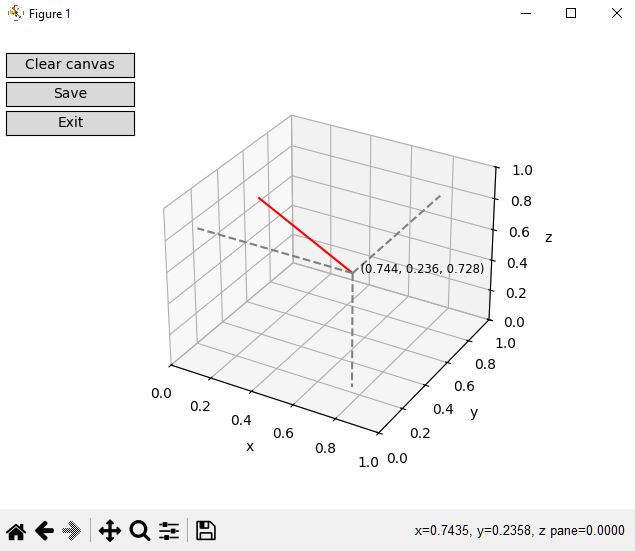
The capability being demonstrated is being able to create and edit in 3D space using only Matplotlib. This is somewhat distinct from the demo program itself, which works as described below. The features of the demo that support this capability are:
- Using ax.format_coord(event.xdata, event.ydata) to create a '3D Mouse' class 'mouse_3D'
- Using the 3D mouse to position lines with end points pinned to the 'backplanes' of the 3D view
- Using a 3D frame visualisation, and temporarily fixing one coordinate's value, to provide a UI to move end points into general 3D space (away from backplanes)
- Using the backplane-pinned 3D coordinates of the 3D mouse at the time of line end selection to decide which coordinate to fix during the 3D move
Demo progam
The demo program demo.py is minimal, as is the object creation capability of the canvas.py 'engine', but these limitations don't detract from the core idea stated above.
Currently, objects consist only of lines, which may be disconnected. An object consists of one or more lines. Pressing 'save' fires the callback with the set of added lines as an argument. To add a line, click two points within the axis space. The view may be rotated at any time by clicking and dragging just oustide the axis space.
Known issues
As of now, there are no known issues with the capability being demonstrated; it is possible to use only the mouse (and only the main button) to create and move line ends in 3D. However, see below.
Next Steps
I intend to make the demonstration capabilty more useful, e.g. I will add a 'delete most recent' button alongside the 'clear' (all) button, so that this could be used as-is within other software. Also note that I need to work out if it's possible to disentangle the core capability from the supporting demonstration code, as the latter isn't fully contained in demo.py and infact exists within canvas.py.
One way to do this might be to combine steps 2 and 3 above, and rewriting the library so that its sole function is to get a true 3D point from the user.
Installation
Install with pip:
pip install xyz_canvas
Demo Screenshot
Release history Release notifications | RSS feed


Download files
Download the file for your platform. If you're not sure which to choose, learn more about installing packages.
Source Distribution
Built Distribution
Filter files by name, interpreter, ABI, and platform.
If you're not sure about the file name format, learn more about wheel file names.
Copy a direct link to the current filters
File details
Details for the file xyz_canvas-0.4.0.tar.gz.
File metadata
- Download URL: xyz_canvas-0.4.0.tar.gz
- Upload date:
- Size: 6.0 kB
- Tags: Source
- Uploaded using Trusted Publishing? No
- Uploaded via: twine/6.1.0 CPython/3.12.2
File hashes
| Algorithm | Hash digest | |
|---|---|---|
| SHA256 |
c710076150a9c8ce88cb9833f32dda1b6bdc748decdb62e350e6f397a0388423
|
|
| MD5 |
732a56c1901a05a6190587838454e96a
|
|
| BLAKE2b-256 |
c5f23ef0750235ea5104637f4b3ec0af9bf9bf8d0c766c8dbe5a65f108373e45
|
File details
Details for the file xyz_canvas-0.4.0-py3-none-any.whl.
File metadata
- Download URL: xyz_canvas-0.4.0-py3-none-any.whl
- Upload date:
- Size: 6.2 kB
- Tags: Python 3
- Uploaded using Trusted Publishing? No
- Uploaded via: twine/6.1.0 CPython/3.12.2
File hashes
| Algorithm | Hash digest | |
|---|---|---|
| SHA256 |
7145dcf3585fb1e31f582486eedd99371b5f622691e37aeb8bc45f68c812169d
|
|
| MD5 |
07ed19e426efa72647c2784e0e08be37
|
|
| BLAKE2b-256 |
b00d10dc90c195330ff49f3c2672a0ba174fe485a985561548a8c07049d295ed
|






