
youtube-to-docs

Click on the image below to see a demo of YouTube to docs:
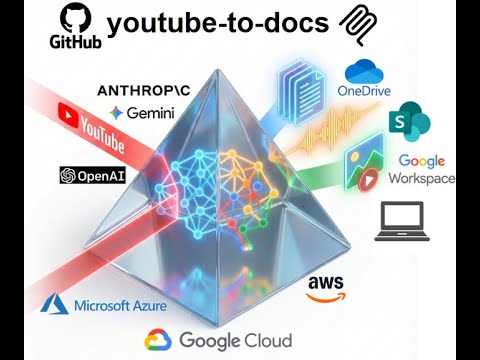
Convert YouTube videos into structured docs, summaries, audio, and visual assets for easier discovery.
It's built for people to stay in charge. Every output is a plain file (or a Google Doc or Word file on Drive or SharePoint) that you can review and edit. The next run reads your edited files instead of regenerating them, so a corrected transcript carries through to the summary, Q&A, infographic, audio and captions you make from it. See Review and edit the outputs.
View all available CLI options:
uvx youtube-to-docs --help
Optional Features
To keep the installation light, some features are optional. You can enable them by specifying "extras":
audio: Required for downloading audio and video from YouTube (usesyt-dlp, withyt-dlp-ejsand Deno to solve YouTube's challenges).video: Required for video generation (usesstatic-ffmpeg).workspace: Required for Google Drive integration.m365: Required for Microsoft SharePoint/OneDrive integration.huggingface: Required for storing artifacts to a Hugging Face dataset (useshuggingface_hub).aws: AWS Bedrock support.azure: Required for Azure OpenAI models.gcp: Required for Google Gemini, Vertex AI models, and GCP Cloud TTS (usesgoogle-genaiand google-cloud libs).app: Web app with browser-based UI (usesfastapi,uvicorn).all: Installs everything.
Example: Run with audio and video support
uvx --with "youtube-to-docs[audio,video]" youtube-to-docs ...
Example: Run with everything
uvx --with "youtube-to-docs[all]" youtube-to-docs ...
Note: The commands above require uv. You can install it via:
- macOS/Linux:
curl -LsSf https://astral.sh/uv/install.sh | sh - Windows:
powershell -ExecutionPolicy ByPass -c "irm https://astral.sh/uv/install.ps1 | iex"
Install as a plugin (the process_video MCP server and the youtube-to-docs skill) in Claude Code:
claude plugin marketplace add DoIT-Artificial-Intelligence/youtube-to-docs
claude plugin install youtube-to-docs@youtube-to-docs
or in Antigravity:
agy plugin install https://github.com/DoIT-Artificial-Intelligence/youtube-to-docs
Then ask for what you want, e.g. "Make the best accessible captions for https://www.youtube.com/watch?v=B0x2I_doX9o", or run /youtube-to-docs <url>.
Run as a web app:
uvx --from "youtube-to-docs[all]" youtube-to-docs-app
Then open http://localhost:8000 in your browser. See the Web App docs for details.
Created with the help of AI. All artifacts have been checked and work as expected.
1 maintainer

Metadata
1 maintainer
Release files for youtube-to-docs 0.0.135
For a detailed explanation of source distributions (sdists) and built distributions (wheels), please see the package formats documentation.
Source distribution (sdist)
| File | Size | Uploaded | Provenance | |
|---|---|---|---|---|
| youtube_to_docs-0.0.135.tar.gz | 781.7 kB | Without provenance | Details |
Built distribution (wheel)
| File | Interpreter | ABI | Platform | Reset |
|---|---|---|---|---|
| youtube_to_docs-0.0.135-py3-none-any.whl | Python 3 | none | any | Details |
Total release size: 1.5 MB
Release files / youtube_to_docs-0.0.135.tar.gz
| Download URL | youtube_to_docs-0.0.135.tar.gz |
|---|---|
| Size | 781.7 kB |
| Tags | Source |
|
SHA-256 checksum How to use checksums |
f01a8110905ac1b1a01d7aefc475d18542b2ed4cc4b722c3bb46342325786028
|
|
BLAKE2b-256 checksum How to use checksums |
29997ee88cb606df33459ee34f5314ec7b696e7daeffbaab70d128fbebd0d6d2
|
| Upload date | |
|
Uploaded using Trusted Publishing? What is trusted publishing? |
No |
| Uploaded via |
twine/7.0.0 CPython/3.13.16
|
Release files / youtube_to_docs-0.0.135-py3-none-any.whl
| Download URL | youtube_to_docs-0.0.135-py3-none-any.whl |
|---|---|
| Size | 730.5 kB |
| Tags | Python 3 |
|
SHA-256 checksum How to use checksums |
771969cc58e71c1070c6089b4ac582cb5d90256456c76fd81c4b5553057c8034
|
|
BLAKE2b-256 checksum How to use checksums |
4865f6b9c0048cdb54b8312d5a00bb4d4a581c8d7ecc0fadfc6ee719a7a65c90
|
| Upload date | |
|
Uploaded using Trusted Publishing? What is trusted publishing? |
No |
| Uploaded via |
twine/7.0.0 CPython/3.13.16
|
Security for youtube-to-docs 0.0.135
Provenance
Provenance describes where a file came from. On PyPI, provenance is shared via attestations, which provide a verifiable record of the build or publishing details. View details, limitations and caveats.
No provenance found
None of the files in this release were uploaded with provenance metadata.
A note on package security
PyPI is a repository for distributing packages, not a service for auditing them. While third-party security researchers and our staff do their best to detect and remove malicious packages, PyPI cannot guarantee the quality, security or suitability of any given package.
To learn more about protecting yourself from malicious actors, visit our package security documentation.














