
Simple yet useful Termux GUI for yt-dlp.

Project description


Simple yet useful Termux GUI for yt-dlp.
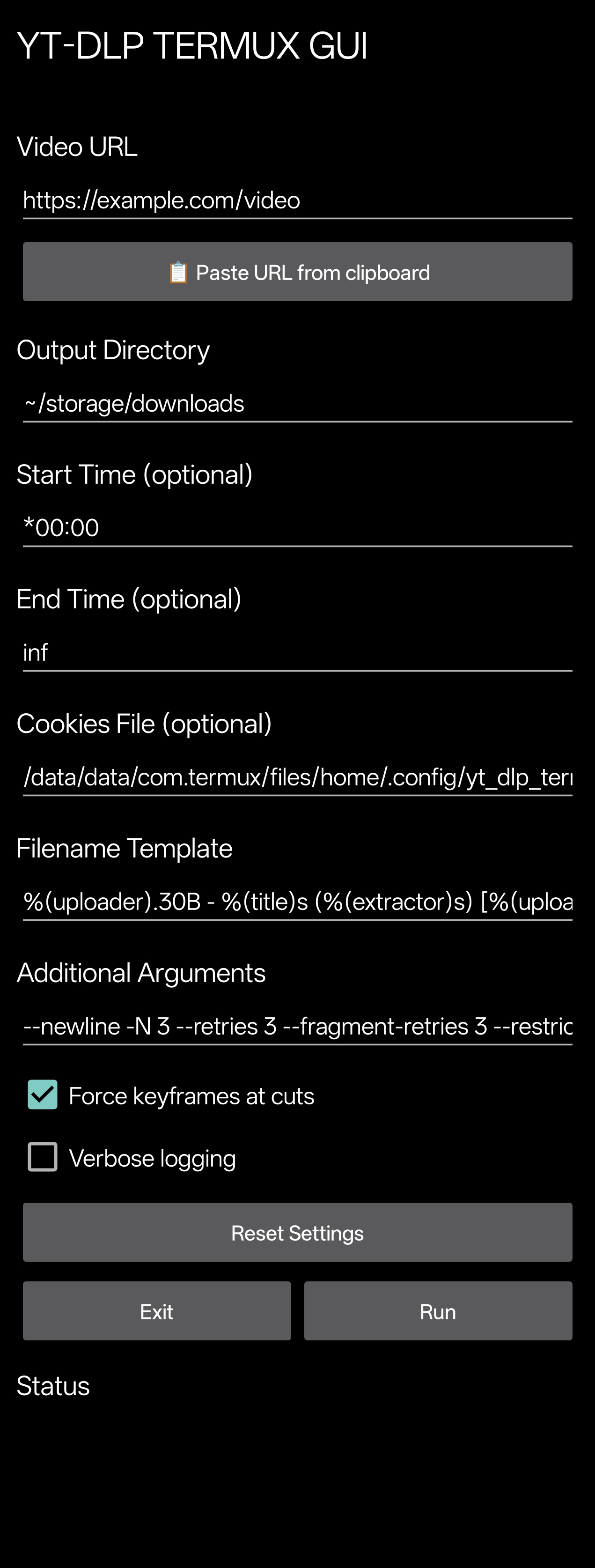
Prerequisites
These must be installed before using yt-dlp-termux-gui:
Installation
pip install yt-dlp-termux-gui --upgrade
How to use (declarative)
import yt_dlp_termux_gui


# launch the GUI
yt_dlp_termux_gui.launch()

# get settings
yt_dlp_termux_gui.settings = get_settings()

# reset settings
yt_dlp_termux_gui.reset_settings()

# get settings file path
yt_dlp_termux_gui.settings_path = SETTINGS_PATH

# get widget name (yt-dlp-gui.sh)
yt_dlp_termux_gui.widget_name = WIDGET_SCRIPT_NAME

# get widget title (YT-DLP TERMUX GUI)
yt_dlp_termux_gui.widget_title = WIDGET_TITLE

# create Termux:Widget shortcut
yt_dlp_termux_gui.ensure_termux_widget(force=True)

# check if running inside Termux
yt_dlp_termux_gui.is_termux = detect_termux()

# ensure dependencies are installed
#
# IMPORTANT:
# the plugins 'Termux:GUI' and 'Termux:Widget'
# must be installed the same way as Termux was installed
# Termux:GUI --> https://github.com/termux/termux-gui
# Termux:Widget --> https://github.com/termux/termux-widget
yt_dlp_termux_gui.ensure_packages(force=True)
How to use (CLI)
Usage: yt-dlp-termux-gui [OPTIONS...] [COMMAND]

Commands:
deps --> Ensure dependencies (install missing packages)
launch --> Launch the GUI
widget --> Ensure Termux:Widget shortcut for the GUI

Options:
--verbose <silent|debug|info|warning|error|critical> --> Set logging level
--silent --> Disable ALL GUI logs in Termux
--widget-name --> Print widget name
--widget-script-name --> Print widget script filename
--settings --> Print current settings
--settings-path --> Print settings path
--settings-reset --> Reset settings
-h, --help --> Show this help message
-v, -V, --version --> Print version

Options [deps]:
--force --> Overwrite 'curl-impersonate' compiled binaries if they already exist

Options [launch]:
--no-activity-logs --> Disable GUI activity logs in Termux
--init-logs --> Enable GUI initialization logs in Termux by the GUI

Options [widget]:
--force --> Overwrite existing widget if it already exist
Tools
Terminal
CLI
Modules
Release history Release notifications | RSS feed


Download files
Download the file for your platform. If you're not sure which to choose, learn more about installing packages.
Source Distribution
yt_dlp_termux_gui-1.1.3.tar.gz
(260.4 kB
view details)
Built Distribution
Filter files by name, interpreter, ABI, and platform.
If you're not sure about the file name format, learn more about wheel file names.
Copy a direct link to the current filters
File details
Details for the file yt_dlp_termux_gui-1.1.3.tar.gz.
File metadata
- Download URL: yt_dlp_termux_gui-1.1.3.tar.gz
- Upload date:
- Size: 260.4 kB
- Tags: Source
- Uploaded using Trusted Publishing? No
- Uploaded via: twine/6.2.0 CPython/3.13.3
File hashes
| Algorithm | Hash digest | |
|---|---|---|
| SHA256 |
b8c1d3bdb1c58d6b2a251cc935a9118c5be22b9f12375790fa6c30b30f1392a3
|
|
| MD5 |
6797e37ac2df3c3f938c6a7348f88c84
|
|
| BLAKE2b-256 |
114da04fc0642060a5a7060eaf0e31cdc20a41f4e4660962c502d6e6cb7ecc72
|
File details
Details for the file yt_dlp_termux_gui-1.1.3-py3-none-any.whl.
File metadata
- Download URL: yt_dlp_termux_gui-1.1.3-py3-none-any.whl
- Upload date:
- Size: 260.9 kB
- Tags: Python 3
- Uploaded using Trusted Publishing? No
- Uploaded via: twine/6.2.0 CPython/3.13.3
File hashes
| Algorithm | Hash digest | |
|---|---|---|
| SHA256 |
aad5bac8e2bad5ed64006ef05452132f9e1bd700daa662b5fc0fc310d411e234
|
|
| MD5 |
622576a8700efc466a542c7274f03056
|
|
| BLAKE2b-256 |
e85f56ae76ca386d228086e531e6f1ea22c2e701fa8969a2cff605bff4eab213
|






