
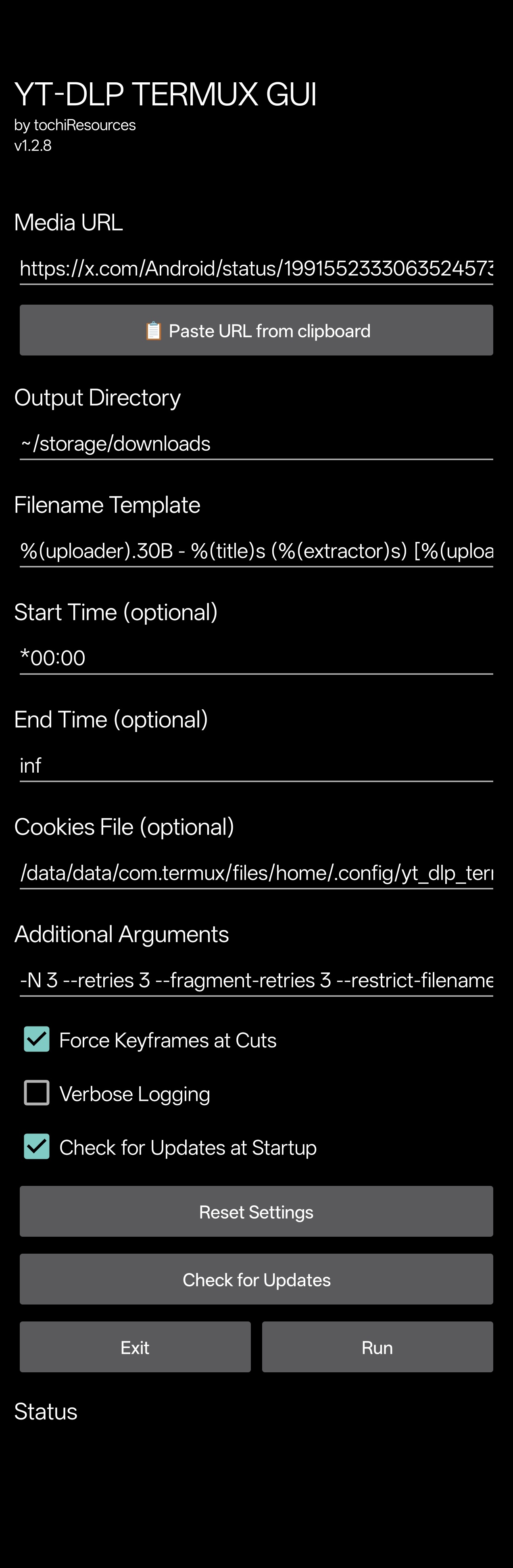
Simple yet useful Termux GUI for yt-dlp.

Project description


Simple yet useful Termux GUI for yt-dlp.
Prerequisites
These must be installed before using yt-dlp-termux-gui:
Installation
pip install yt-dlp-termux-gui --upgrade
How to use (declarative)
Precautions
check if required dependencies are installed
import yt_dlp_termux_gui

# force=True -> Overwrite 'curl-impersonate' compiled binaries if they already exist
yt_dlp_termux_gui.ensure_packages(force=True)
create Termux:Widget shortcut (optional)
# task=True -> Make the widget a Termux:Widget task to allow it to run in the background
#
# WARNING:
# the plugins 'Termux:GUI' and 'Termux:Widget'
# must be installed the same way as Termux was installed
# Termux:GUI --> https://github.com/termux/termux-gui
# Termux:Widget --> https://github.com/termux/termux-widget
yt_dlp_termux_gui.ensure_termux_widget(force=True, task=True)
launch the GUI
# launch the GUI
yt_dlp_termux_gui.launch()
manage settings
# get settings
settings = yt_dlp_termux_gui.get_settings()

# reset settings
yt_dlp_termux_gui.reset_settings()

# get settings file path (~/.config/yt_dlp_termux_gui/settings.json)
settings_path = yt_dlp_termux_gui.SETTINGS_PATH
get widget information
# get widget name (yt-dlp-gui.sh)
widget_name = yt_dlp_termux_gui.WIDGET_SCRIPT_NAME

# get widget title (YT-DLP TERMUX GUI)
widget_title = yt_dlp_termux_gui.WIDGET_TITLE
How to use (CLI)
Usage: yt-dlp-termux-gui [OPTIONS...] [COMMAND]

Commands:
deps --> Ensure dependencies (install missing packages)
launch --> Launch the GUI
widget --> Ensure Termux:Widget shortcut for the GUI

Options:
--verbose <silent|debug|info|warning|error|critical> --> Set logging level
--silent --> Disable ALL GUI logs in Termux
--widget-name --> Print widget name
--widget-script-name --> Print widget script filename
--settings --> Print current settings
--settings-path --> Print settings path
--settings-reset --> Reset settings
-h, --help --> Show this help message
-v, -V, --version --> Print version

Options [deps]:
--force --> Overwrite 'curl-impersonate' compiled binaries if they already exist

Options [launch]:
--no-activity-logs --> Disable GUI activity logs in Termux
--init-logs --> Enable GUI initialization logs in Termux by the GUI

Options [widget]:
--force --> Overwrite existing widget if it already exist
--task --> Make the widget a Termux:Widget task to allow it to run in the background
Tools
Terminal
CLI
Binaries
Release history Release notifications | RSS feed


Download files
Download the file for your platform. If you're not sure which to choose, learn more about installing packages.
Source Distribution
Built Distribution
Filter files by name, interpreter, ABI, and platform.
If you're not sure about the file name format, learn more about wheel file names.
Copy a direct link to the current filters
File details
Details for the file yt_dlp_termux_gui-1.2.11.tar.gz.
File metadata
- Download URL: yt_dlp_termux_gui-1.2.11.tar.gz
- Upload date:
- Size: 420.1 kB
- Tags: Source
- Uploaded using Trusted Publishing? No
- Uploaded via: twine/6.2.0 CPython/3.13.3
File hashes
| Algorithm | Hash digest | |
|---|---|---|
| SHA256 |
aae499107d95cbd9d8db1769f80e753379663b42ce7ad2e1e8e31c09fe5fbe42
|
|
| MD5 |
bb3b49c5460640ea2a14e14bf98ab449
|
|
| BLAKE2b-256 |
a03fa2552f0b74511e6ab3c065665573bce2dcc3228a1c2c68458808a09ff1a2
|
File details
Details for the file yt_dlp_termux_gui-1.2.11-py3-none-any.whl.
File metadata
- Download URL: yt_dlp_termux_gui-1.2.11-py3-none-any.whl
- Upload date:
- Size: 420.2 kB
- Tags: Python 3
- Uploaded using Trusted Publishing? No
- Uploaded via: twine/6.2.0 CPython/3.13.3
File hashes
| Algorithm | Hash digest | |
|---|---|---|
| SHA256 |
be23b2786d235d1a21a76f704b26a850d4836594a66b7061787bf5b7fb27fbf6
|
|
| MD5 |
0b6a505843c7c5a3bf4446bc4ad05a10
|
|
| BLAKE2b-256 |
81234fe5130c33aa4f04b6f4906a770affcb4decefd28cd0de39e53e9176e199
|






