
Simple yet useful Termux GUI for yt-dlp.

Project description


Simple yet useful Termux GUI for yt-dlp.
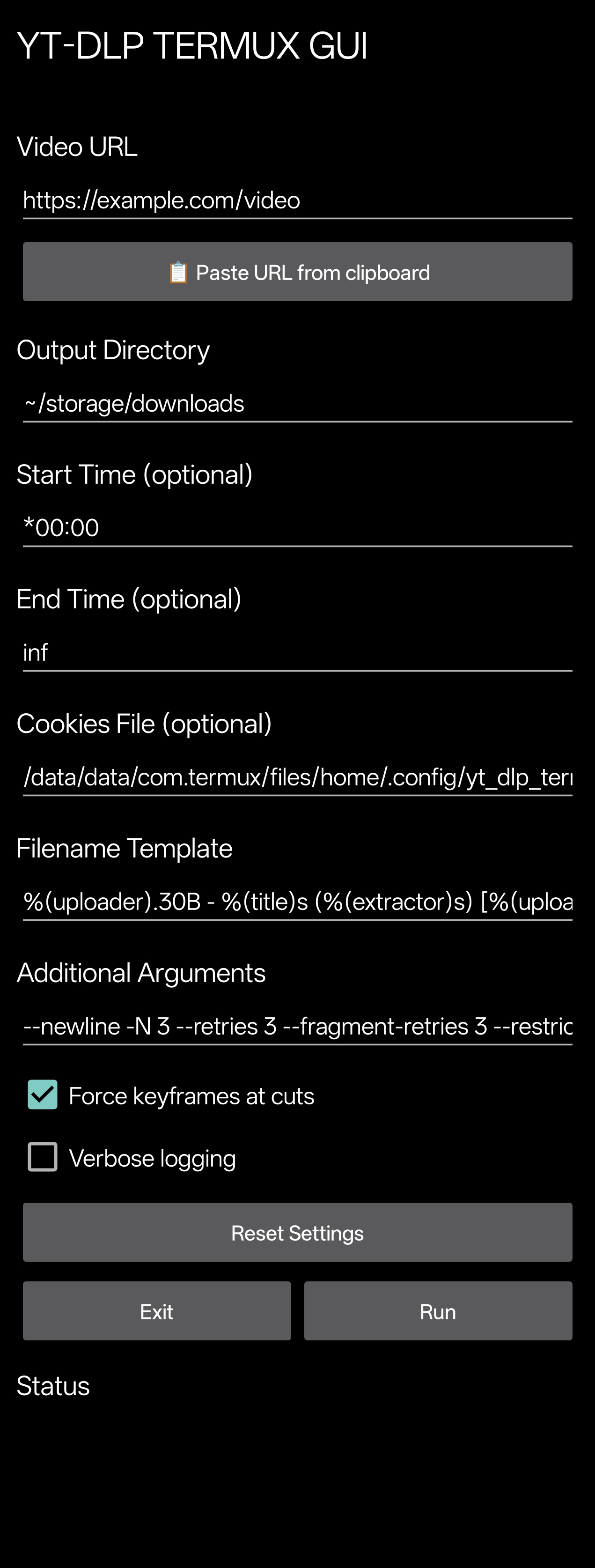
Prerequisites
These must be installed before using yt-dlp-termux-gui:
Installation
pip install yt-dlp-termux-gui --upgrade
How to use (declarative)
Precautions
check if required dependencies are installed
import yt_dlp_termux_gui

# force=True -> Overwrite 'curl-impersonate' compiled binaries if they already exist
yt_dlp_termux_gui.ensure_packages(force=True)
create Termux:Widget shortcut (optional)
# task=True -> Make the widget a Termux:Widget task to allow it to run in the background
#
# WARNING:
# the plugins 'Termux:GUI' and 'Termux:Widget'
# must be installed the same way as Termux was installed
# Termux:GUI --> https://github.com/termux/termux-gui
# Termux:Widget --> https://github.com/termux/termux-widget
yt_dlp_termux_gui.ensure_termux_widget(force=True, task=True)
launch the GUI
# launch the GUI
yt_dlp_termux_gui.launch()
manage settings
# get settings
settings = yt_dlp_termux_gui.get_settings()

# reset settings
yt_dlp_termux_gui.reset_settings()

# get settings file path (~/.config/yt_dlp_termux_gui/settings.json)
settings_path = yt_dlp_termux_gui.SETTINGS_PATH
get widget information
# get widget name (yt-dlp-gui.sh)
widget_name = yt_dlp_termux_gui.WIDGET_SCRIPT_NAME

# get widget title (YT-DLP TERMUX GUI)
widget_title = yt_dlp_termux_gui.WIDGET_TITLE
How to use (CLI)
Usage: yt-dlp-termux-gui [OPTIONS...] [COMMAND]

Commands:
deps --> Ensure dependencies (install missing packages)
launch --> Launch the GUI
widget --> Ensure Termux:Widget shortcut for the GUI

Options:
--verbose <silent|debug|info|warning|error|critical> --> Set logging level
--silent --> Disable ALL GUI logs in Termux
--widget-name --> Print widget name
--widget-script-name --> Print widget script filename
--settings --> Print current settings
--settings-path --> Print settings path
--settings-reset --> Reset settings
-h, --help --> Show this help message
-v, -V, --version --> Print version

Options [deps]:
--force --> Overwrite 'curl-impersonate' compiled binaries if they already exist

Options [launch]:
--no-activity-logs --> Disable GUI activity logs in Termux
--init-logs --> Enable GUI initialization logs in Termux by the GUI

Options [widget]:
--force --> Overwrite existing widget if it already exist
--task --> Make the widget a Termux:Widget task to allow it to run in the background
Tools
Terminal
CLI
Binaries
Release history Release notifications | RSS feed


Download files
Download the file for your platform. If you're not sure which to choose, learn more about installing packages.
Source Distribution
yt_dlp_termux_gui-1.2.0.tar.gz
(262.8 kB
view details)
Built Distribution
Filter files by name, interpreter, ABI, and platform.
If you're not sure about the file name format, learn more about wheel file names.
Copy a direct link to the current filters
File details
Details for the file yt_dlp_termux_gui-1.2.0.tar.gz.
File metadata
- Download URL: yt_dlp_termux_gui-1.2.0.tar.gz
- Upload date:
- Size: 262.8 kB
- Tags: Source
- Uploaded using Trusted Publishing? No
- Uploaded via: twine/6.2.0 CPython/3.13.3
File hashes
| Algorithm | Hash digest | |
|---|---|---|
| SHA256 |
a7a45ad3f764a0007f838f6478527292fe511fc8cc68ef9565dc9e62a5d73370
|
|
| MD5 |
c269be237f657e4a4a47d9ac45943437
|
|
| BLAKE2b-256 |
e737f5c563a1bffde377fd40f8f39242dde919bc5c9af2f1297fb0ecf82e5470
|
File details
Details for the file yt_dlp_termux_gui-1.2.0-py3-none-any.whl.
File metadata
- Download URL: yt_dlp_termux_gui-1.2.0-py3-none-any.whl
- Upload date:
- Size: 263.0 kB
- Tags: Python 3
- Uploaded using Trusted Publishing? No
- Uploaded via: twine/6.2.0 CPython/3.13.3
File hashes
| Algorithm | Hash digest | |
|---|---|---|
| SHA256 |
50698621bfa8391115945146c12d25a874dc05eb553de7377d459a88881e3d82
|
|
| MD5 |
1e5cfaa9395402431f22bd71fa2481b2
|
|
| BLAKE2b-256 |
210818eb2e4346ec6704c929ac5793580d7540379f77d6c3bc4db1cdd46a35e2
|






