
🌊 ZimaBlue
Simulate, test, and replay robotic pool cleaners.
Driving everywhere is not the same as cleaning everything.
ZimaBlue measures both — and lets you watch it happen.







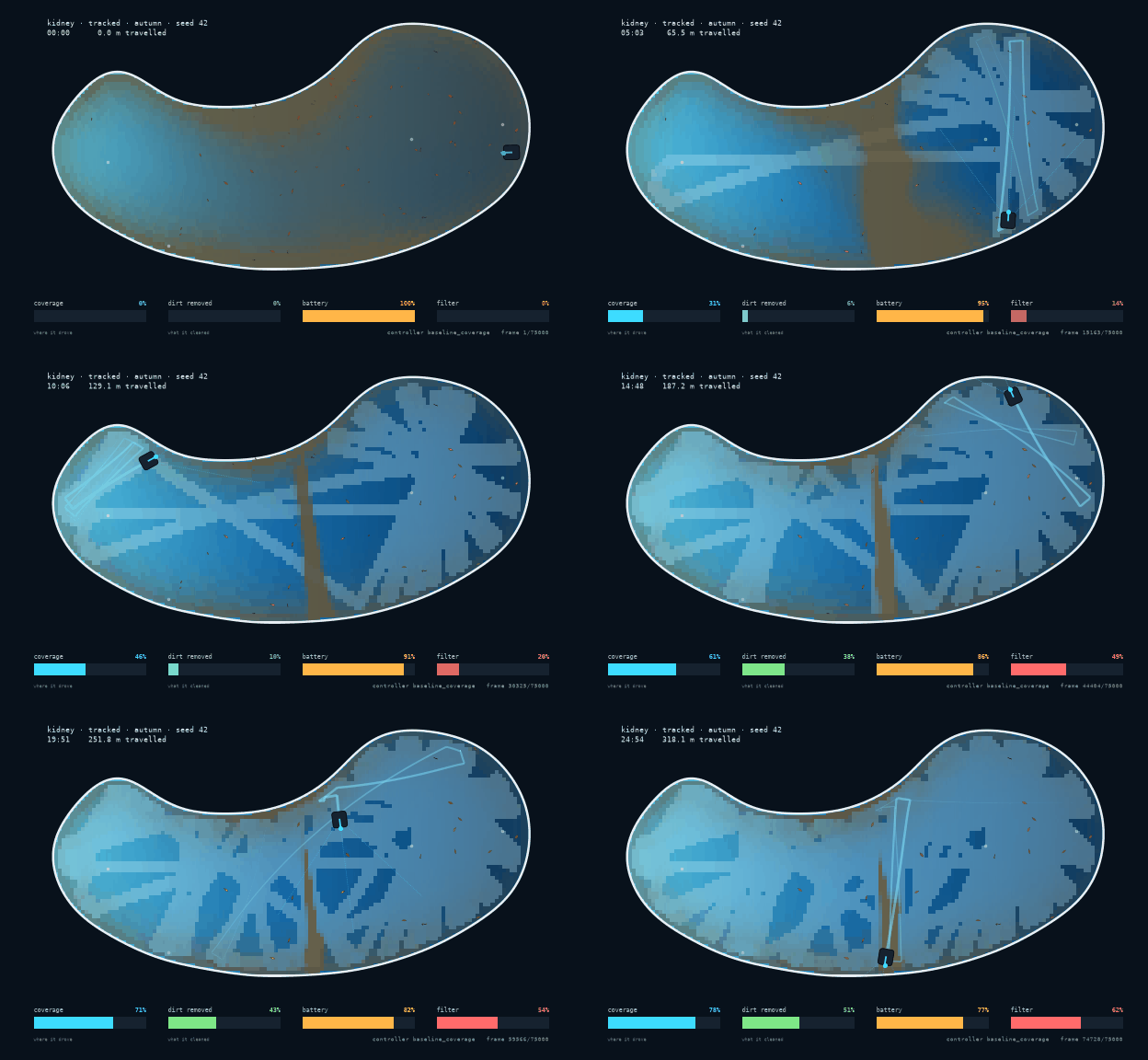
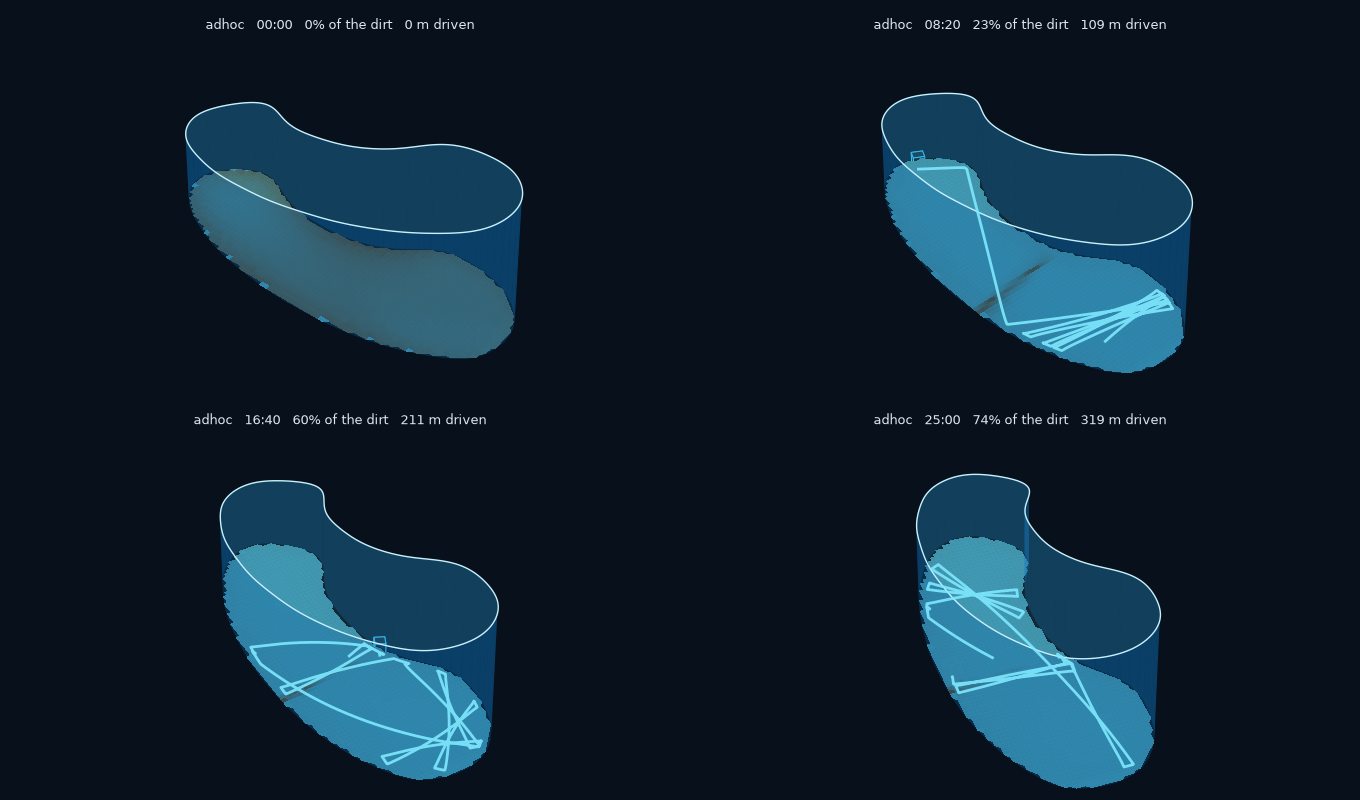
25 simulated minutes in a kidney pool, replayed at 260×.
Watch the coverage and dirt meters drift apart.
Give ZimaBlue a pool, a cleaner, some dirt and a control algorithm. It simulates the run, records it, replays it, and scores how clean the pool actually got. That is a different question from how much of the floor the robot drove over, and the gap between the two is what this is for.
git clone https://github.com/JGalego/ZimaBlue
cd ZimaBlue
pip install -e ".[dev]"
zimablue demo
No GPU. No ROS. No Docker. No Omniverse. No multi-gigabyte assets.
Build a pool
import zimablue as zb

pool = zb.make_pool("kidney")  # rectangular · sloped · l_shaped · oval · stairs
Geometry is a Shapely polygon plus a pluggable depth model, so a sloped floor and a flat one differ only in which model they hold. Drains, returns, skimmers, stairs and obstacles hang off it; the blocking ones come out of the navigable area, so coverage is measured against the floor the robot can actually reach.
The kidney boundary is a low-order Fourier curve, which makes it smooth everywhere — a wall follower meeting a corner behaves differently from one tracing a curve, and a real kidney pool has no corners.
Have a photo instead of a spec? zb.pool_from_image("backyard.jpg", sample=(640, 410), width=8.4) finds the water, traces its edge and scales it.
A photograph carries no scale of its own, so one real measurement is required;
for a shot taken from the poolside, four points on a rectangle you can measure
also undo the perspective, which is worth about 23% of the area. See
imaging.
Colour rules find the water by default. Point segmenter=SamSegmenter.load(...)
at a SAM export and a model finds it instead — worth it for a black-bottomed
pool, or one half in shade. On a drone photo the two agree to 3.7%, which is a
reasonable amount of confidence in both. See machine learning.
In a notebook, zb.preview(pool) renders it in the browser — drag to rotate,
scroll to zoom. The pool's geometry is shipped to the page as JSON and
projected there, so it needs no widget extensions and keeps working in an
exported HTML file. Hand it a finished run and it tints the floor with the
dirt left behind and draws the path that was driven.
Add a cleaner
Cleaners are built from components:
robot = zb.Cleaner(
    chassis=zb.Chassis(length=0.45, mass=10.5),
    cleaning=zb.CleaningSystem(
        brush=zb.Brush(width=0.38, aggressiveness=1.2),
        filter=zb.Filter(capacity=1200.0, mesh=45e-6),
    ),
    sensors=[zb.Encoder(), zb.IMU(), zb.Sonar(beam_angles=(0.0, 0.7, -0.7))],
)
Encoders, IMU, pressure/depth, contact and sonar share one pipeline of sampling rate, noise, bias with random walk, latency, quantisation, saturation, dropout and stuck values. Encoders report wheel speed, so odometry drifts because the wheels really do slip; no error is injected to make it happen.
You can break a sensor on purpose:
robot.sensors.sonar.inject_fault(
    bias=0.15,  # reads 15 cm long
    dropout_probability=0.02,  # loses 2% of pings
    start_time=300.0,  # ...starting five minutes in
)
Make it dirty
Dirt carries density, particle size, adhesion and a settling velocity derived from the Ferguson–Church equation — 350 µm sand comes out at 47.6 mm/s against a measured ~45. Sediment and algae live in continuous rasters; leaves and twigs are discrete items, some too big for the intake to swallow.
Removal is gated by how much agitation breaks the bond, so the brush matters more the more adhered the dirt is: ~1.0× for sand, 2.2× for algae, 3.5× for biofilm. Turn the brush off and a robot can drive over algae all day.
Run it
sim = zb.Simulation(pool="kidney", robot="tracked", dirt="autumn", seed=42)
result = sim.run(minutes=30)

print(result.metrics.summary())
result.save("runs/example.zbr")
  coverage            80.8 %   (walls 79 %)
  dirt removed        58.0 %   (581 g of 1002 g)
  uniformity          74.4 %
  revisits            1.95   extra passes/cell
  distance           384.9 m
  runtime             30.0 min
  energy              33.3 Wh   (battery 72 % left)
  collisions           468
  stuck                  0 events, 0.0 s
Driving it is a boustrophedon baseline, a random-bounce floor, a map-building
systematic controller, or one of two ground-truth oracles that are
explicitly not deployable: lawnmower_oracle drives a perfect path and
dirt_oracle heads for whatever is dirtiest. Yours needs a class with reset
and step, and sees sensor readings only.
Or train one. zimablue[rl] puts a Gymnasium env over the same loop, at 24×
real time on one core with no GPU, and the reward is the experiment: pay for
coverage and you get a policy that drives beautifully over dirt it never picks
up. See machine learning.
systematic runs an EKF over position, heading and gyro bias. The bias is
only observable when the robot stops — a stationary gyro's reading is its
bias — so zero-velocity updates are what keep heading from fanning out over
half an hour.
Run the same version on the same platform, with the same scenario and seed,
and you get the exact same recording every time. That comes from a fixed
timestep, no wall-clock reads while stepping, and one seeded RNG tree whose
named streams mean adding a sensor never shifts another's noise. .zbr is a
ZIP of a JSON manifest, columnar npz frames, sparse events and dirt
keyframes — unzip it and read it with numpy.load. Pool geometry and robot
config are embedded, so a recording stays replayable after the preset it came
from changes.
Watch it
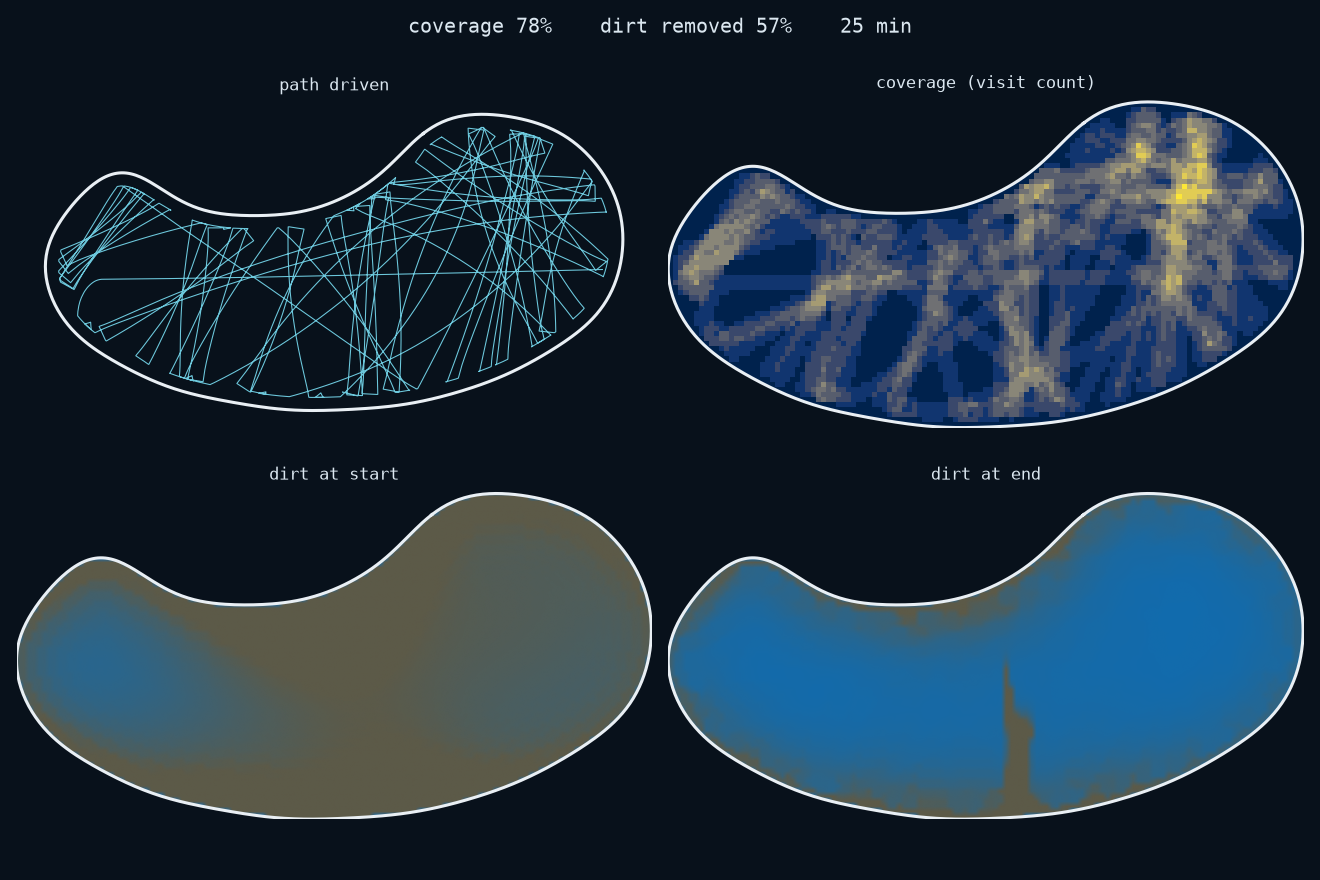
zimablue replay runs/example.zbr
Playback runs at 0.25× to 25×, with pause, scrub, step and speed control; 1× plays the run at the speed it happened. The cleaned swath is drawn under the dirt, so a patch the robot drove over but failed to clean still looks dirty. Sonar beams, wall contacts, battery and filter fill are all on screen, and if the controller publishes a pose estimate it appears as an amber ghost drifting away from the true position.
Headless? zimablue replay run.zbr --gif out.gif.
From the bumper
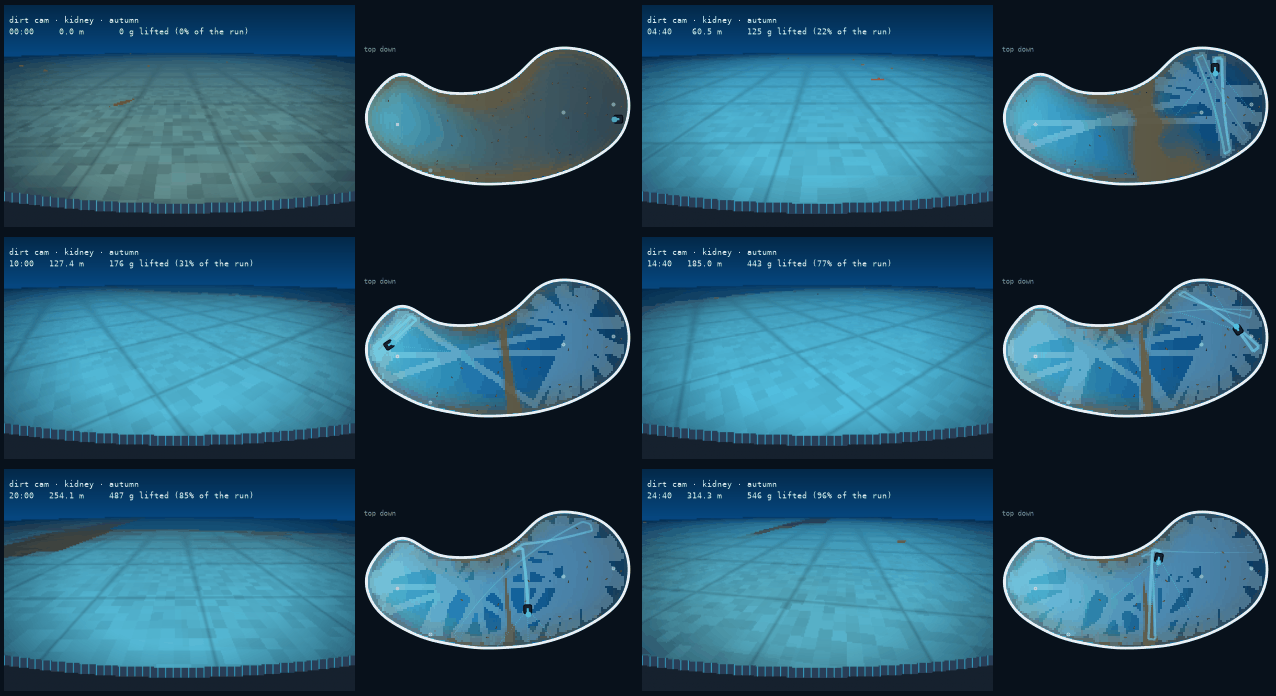
Dirt cam, with the top-down view alongside. The two disagree constantly.
zimablue replay runs/example.zbr --dirtcam --gif out.gif
Watching from above is calming. From 18 cm off the floor the same pool is a silt plain with leaves in it, which is closer to what a cleaner is driving through. From above you see where the robot went; from down here you see what it left behind.
It is inverse perspective mapping over the same dirt raster the metrics are computed from — one NumPy expression per frame across a grid of rays, no 3D engine involved.
In 3D
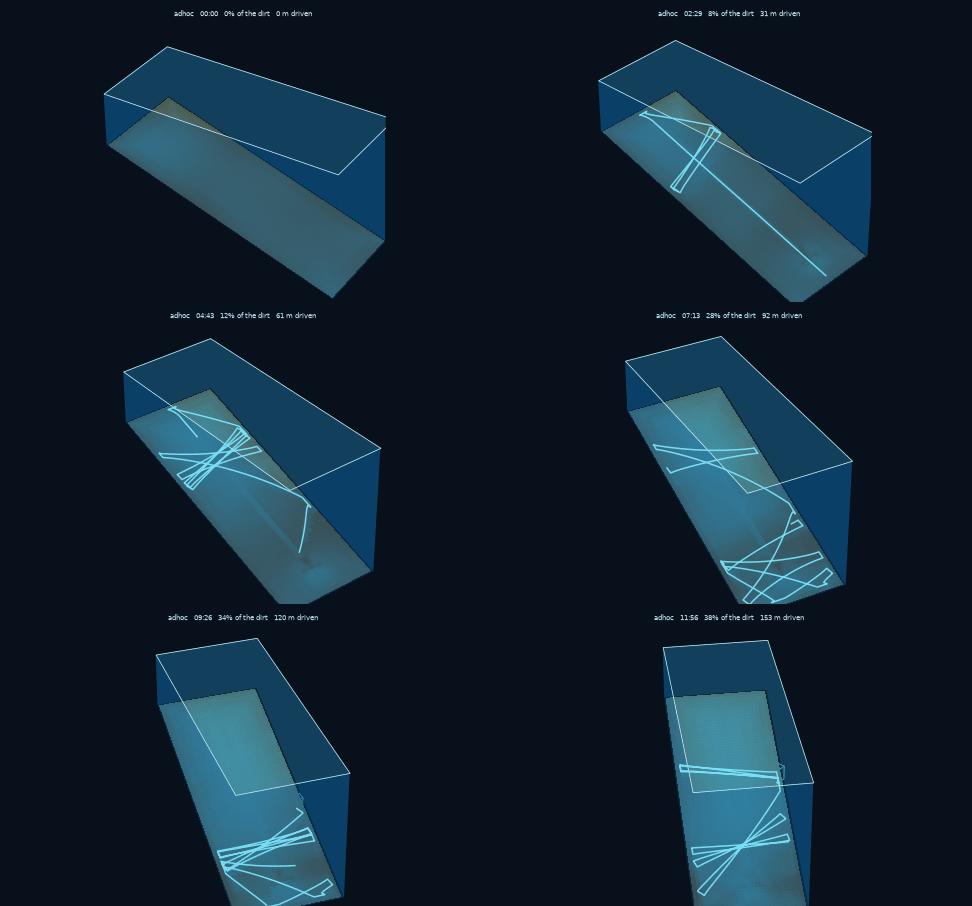
A sloped pool: 1.0 m at the shallow end, 2.4 m at the deep end.
zimablue replay runs/example.zbr --3d --gif out.gif
The floor is a surface built from the pool's depth model, the walls are extruded from its boundary, and the robot sits at the local floor depth — so in a sloped pool it really is metres lower at the deep end. The camera orbits slowly for parallax, and vertical scale is exaggerated about 3.6× because a 12 m pool 2 m deep is otherwise a pancake.
This renders in 3D; it does not simulate in 3D. The motion still comes from the 2D backend. A 3D backend — buoyancy, contact, wall climbing, cameras — is designed but not built, and the roadmap says so.
Measure it
Coverage is where the robot drove. Cleanliness is what it removed. They come apart, and most simulators will not tell you so.
The oracle makes it obvious. Over 30 minutes in a kidney pool:
| controller | coverage | dirt removed | distance |
|---|---|---|---|
lawnmower_oracle (ground truth) |
88.3% | 33.3% | 180 m |
random_bounce |
84.7% | 44.8% | 393 m |
baseline_coverage |
80.8% | 58.0% | 385 m |
The ranking inverts completely. Best coverage is worst cleaning, and worst coverage is best cleaning. The oracle drives a perfect path, finishes early and stops; the scrappier controllers keep going over the same adhered dirt, which is what actually removes it. Report only coverage and you get the order exactly backwards.
Better localisation currently makes things worse. Calibrating the odometry improves the mapping controller's position estimate fivefold and halves its coverage.
encoder_scale |
position error | coverage |
|---|---|---|
| 1.00 (uncalibrated) | 13.7 m | 73.9% |
| 0.94 (calibrated) | 3.8 m | 52.6% |
The estimator is not at fault — 3.8 m after 340 m of travel with no absolute reference is respectable dead reckoning. The planner is. With a poor estimate the lane plan is effectively randomised and the robot wanders widely, covering ground the way random bounce does; with a good one it runs short disciplined lanes and spends its time turning. Coverage is being won by accident, and fixing that is the top roadmap item.
Scale it
zimablue run   kidney --record runs/kidney.zbr        # a bundled scenario
zimablue run   scenarios/autumn_kidney.yaml           # or your own file
zimablue batch kidney --episodes 100 --out results.json
A scenario is YAML: pool, robot, dirt, controller, seed, duration, termination. Batches vary the seed and aggregate, keeping enough metadata to reproduce any individual failure exactly.
Extend it
Commercial pool cleaners are evaluated by driving them around a real pool with real dirt: slow, expensive, impossible to repeat. Meanwhile Gazebo, MuJoCo and Isaac Sim each make their engine the API, so anything pool-specific you build cannot outlive the engine.
Here the domain model is the API. Pools, dirt, cleaners, scenarios, recordings and metrics are ZimaBlue concepts. Whatever integrates the equations sits behind an interface and can be swapped — today it is a deterministic CPU-only 2D backend running at 25–30× real time on one core.
                         ZimaBlue domain API
                                 │
              ┌──────────────────┼──────────────────┐
        World model         Robot model         Controller
     pool · water · dirt   body · sensors      (replaceable)
              └──────────────────┼──────────────────┘
                                 │
                        SimulationBackend
                                 │
                  ┌──────────────┴──────────────┐
             Fast2DBackend                IsaacSimBackend
              (CPU, today)                  (planned)
                                 │
                    Recording · Replay · Metrics
A backend owns dynamics and sensing, nothing else. Dirt accounting, metrics and
recording are computed by shared code from the state it returns, so a new
backend inherits them and cannot redefine how they are measured. A .zbr
written by the 3D backend will have to replay in the 2D viewer; that is the
acceptance test.
Pools, robots, dirt, controllers and backends are all registries, so adding one
means writing a function. Issues and pull requests welcome — see
CONTRIBUTING.md, which is mostly about not breaking
determinism and preferring a small real model to a large fake one.
Read more
| Getting started | Install, first run, common tasks |
| From a photo | Tracing a pool out of a picture, and what a picture cannot tell you |
| Machine learning | SAM for the water mask, Gymnasium for the controller |
| Architecture | Layering, backends, determinism contract |
| Research | Prior art, and which decision each finding drove |
| References | Verified bibliography, with what the code implements |
| Scenarios | YAML experiments and batch sweeps |
| Recording | The .zbr format, channel by channel |
| Replay | Controls, exporters, rendering notes |
| Roadmap | Done, next, and deliberately not planned |
| Releasing | Publishing to TestPyPI and PyPI |
Examples
Every one takes --minutes if you want a shorter run.
basic.py |
The smallest useful program: pool in, metrics out |
custom_pool.py |
Build a pool from geometry, depth models and features, then read the spatial metrics |
pool_from_photo.py |
Trace a pool out of a photograph, check the trace, then clean it — --sam to segment with a model |
rl_env.py |
The Gymnasium env, and the baseline a trained policy has to beat |
tune_controller.py |
Search the shipped controller's parameters, which is the cheap thing to try first |
train_policy.py |
Train a controller with PPO, score it against the shipped ones, and replay it |
custom_robot.py |
Compose a cleaner from components and break a sensor on purpose |
custom_controller.py |
Write an autonomy stack and benchmark it against the shipped ones |
estimation_replay.py |
The EKF controller, with the pose estimate drawn against ground truth |
batch_experiment.py |
Run a scenario across seeds, then reproduce its worst episode exactly |
replay.py |
Replay a recording flat, in 3D, from the bumper, or interactively |
tour.ipynb |
All of the above in one notebook, with the pool turnable in the browser |
Did you know?
That sharp "chlorine" smell at a busy pool is mostly not chlorine, and the red stinging eyes are not chlorine's fault either. Chlorine reacts with what swimmers bring in with them — sweat, skin cells, sunscreen, and yes, pee — and the chloramines that come out of the reaction are what you smell and what stings. A pool that reeks is a pool that has been swum in. So shower first, and use the toilet before you get in.
ZimaBlue models sand, algae, biofilm and leaves. Swimmers are out of scope. (CDC)
License
MIT.
1 maintainer

Download files
Download the file for your platform. If you're not sure which to choose, learn more about installing packages.
Source Distribution
Built Distribution
Filter files by name, interpreter, ABI, and platform.
If you're not sure about the file name format, learn more about wheel file names.
Copy a direct link to the current filters
File details
Details for the file zimablue-0.2.0.tar.gz.
File metadata
- Download URL: zimablue-0.2.0.tar.gz
- Upload date:
- Size: 296.2 kB
- Tags: Source
- Uploaded using Trusted Publishing? Yes
- Uploaded via:
twine/7.0.0 CPython/3.13.14
File hashes
| Algorithm | Hash digest | |
|---|---|---|
| SHA256 |
03473a67358ffcf264f03b336d0924dcb2a2d7ff9dc94b127e72b63e676452e2
|
|
| MD5 |
728744a28297b5af4312ab0e70727b35
|
|
| BLAKE2b-256 |
2fd346c2a7349c3b728ee18b40cdc64d5e010c598f947e8994c802965441b177
|
Provenance
The following attestation bundles were made for zimablue-0.2.0.tar.gz:
Publisher:
release.yml on JGalego/ZimaBlue
-
Statement:
-
Statement type:
https://in-toto.io/Statement/v1 -
Predicate type:
https://docs.pypi.org/attestations/publish/v1 -
Subject name:
zimablue-0.2.0.tar.gz -
Subject digest:
03473a67358ffcf264f03b336d0924dcb2a2d7ff9dc94b127e72b63e676452e2 - Sigstore transparency entry: 2498484807
- Sigstore integration time:
-
Permalink:
JGalego/ZimaBlue@48de5ff50880cffae442d45104b675319ae87364 -
Branch / Tag:
refs/tags/v0.2.0 - Owner: https://github.com/JGalego
-
Access:
public
-
Token Issuer:
https://token.actions.githubusercontent.com -
Runner Environment:
github-hosted -
Publication workflow:
release.yml@48de5ff50880cffae442d45104b675319ae87364 -
Trigger Event:
push
-
Statement type:
File details
Details for the file zimablue-0.2.0-py3-none-any.whl.
File metadata
- Download URL: zimablue-0.2.0-py3-none-any.whl
- Upload date:
- Size: 205.6 kB
- Tags: Python 3
- Uploaded using Trusted Publishing? Yes
- Uploaded via:
twine/7.0.0 CPython/3.13.14
File hashes
| Algorithm | Hash digest | |
|---|---|---|
| SHA256 |
5607ab052b8320f8ae3e695eef7bde5748c458c60bbea7cad84fb7fdb1206b90
|
|
| MD5 |
88e9531bd0d62cb002f26099c3ec8151
|
|
| BLAKE2b-256 |
399879209881522b401674e6fca7c22162c22582b73eabe7eb8041279cc33132
|
Provenance
The following attestation bundles were made for zimablue-0.2.0-py3-none-any.whl:
Publisher:
release.yml on JGalego/ZimaBlue
-
Statement:
-
Statement type:
https://in-toto.io/Statement/v1 -
Predicate type:
https://docs.pypi.org/attestations/publish/v1 -
Subject name:
zimablue-0.2.0-py3-none-any.whl -
Subject digest:
5607ab052b8320f8ae3e695eef7bde5748c458c60bbea7cad84fb7fdb1206b90 - Sigstore transparency entry: 2498484810
- Sigstore integration time:
-
Permalink:
JGalego/ZimaBlue@48de5ff50880cffae442d45104b675319ae87364 -
Branch / Tag:
refs/tags/v0.2.0 - Owner: https://github.com/JGalego
-
Access:
public
-
Token Issuer:
https://token.actions.githubusercontent.com -
Runner Environment:
github-hosted -
Publication workflow:
release.yml@48de5ff50880cffae442d45104b675319ae87364 -
Trigger Event:
push
-
Statement type:







