
zpickle





Transparent, drop-in compression for Python's pickle — smaller files, same API.
zpickle adds high-performance compression to your serialized Python objects using multiple state-of-the-art algorithms without changing how you work with pickle.
# Replace this:
import pickle

# With this:
import zpickle as pickle

# Everything else stays the same!
Features
- Drop-in replacement for the standard
picklemodule - Transparent compression — everything happens automatically
- Multiple algorithms — choose
zstd,brotli,zlib,lzma,bzip2,lz4,snappy,gzip, ordeflate(powered bycompress_utils) - Configure once, use everywhere — set global defaults for your entire app
- Smaller data — 2-10× smaller serialized data (depending on content and algorithm)
- Backward compatible — automatically reads both compressed and regular pickle data
- Complete API compatibility — all pickle functions work as expected
- Free-threading ready — supports free-threaded Python 3.14t and 3.15t, where
dump/loadcalls on different threads run in parallel
Installation
pip install zpickle
Quick Start
Basic Usage
import zpickle as pickle

# Serializing works exactly like pickle
data = {"complex": ["nested", {"data": "structure"}], "with": "lots of repetition"}
serialized = pickle.dumps(data)  # Automatically compressed!

# Deserializing works the same way
restored = pickle.loads(serialized)  # Automatically decompressed!

# File operations work too
with open("data.zpkl", "wb") as f:
    pickle.dump(data, f)

with open("data.zpkl", "rb") as f:
    restored = pickle.load(f)
Custom Configuration
import zpickle

# Configure global settings
zpickle.configure(algorithm='brotli', level=9)  # Higher compression

# Or configure for a single operation
data = [1, 2, 3] * 1000
compressed = zpickle.dumps(data, algorithm='zstd', level=6)
Performance
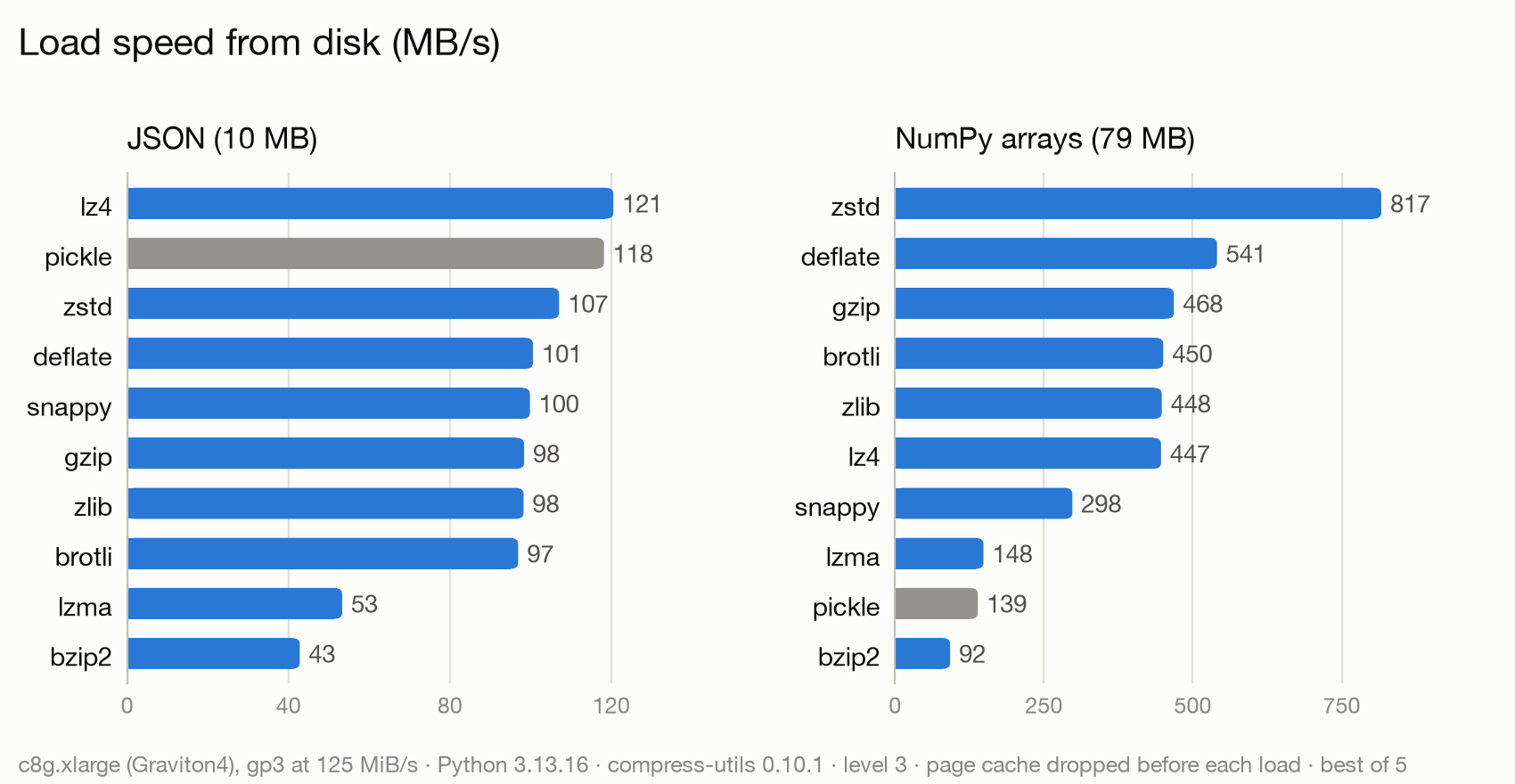
Benchmarked on an AWS c8g.xlarge (4 vCPU Graviton4, 8 GiB) with a gp3 EBS volume at its default 125 MiB/s, using Python 3.13 and compress-utils 0.10.1 at level 3 (zpickle's default). Each dataset is written to a file with zpickle.dump() and read back with zpickle.load(); the page cache is dropped before every load, so reads come from the disk rather than memory. Speeds are MB/s of uncompressed pickle data (best of 5), so every codec is compared with plain pickle on the same file path. Datasets: JSON city data (10 MB pickled) and NumPy arrays (79 MB).
Load speed from disk (MB/s, higher is better):
Compression ratio versus plain pickle (higher is better):
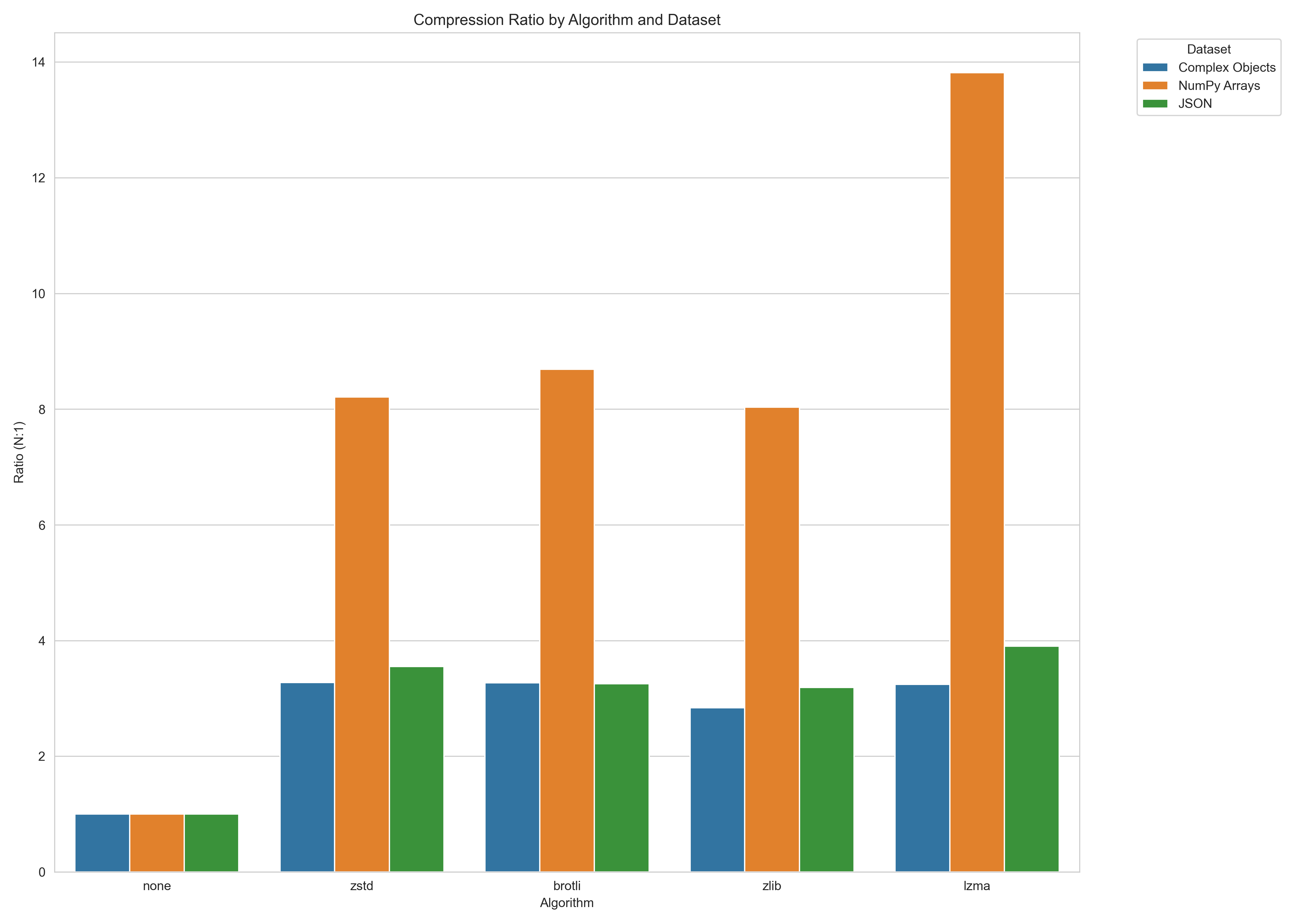
Note: Performance varies by data characteristics and storage. Run benchmarks on your own data and hardware for accurate results.
To run the file benchmark yourself (--drop-caches needs Linux and passwordless sudo), then draw the charts:
python -m benchmarks.file_benchmark run --dir /path/on/target/disk --out results.jsonl --drop-caches
python -m benchmarks.file_benchmark plot results.jsonl --datasets cities-json numpy-arrays
The in-memory benchmark (dumps()/loads(), no disk) is still available with python -m benchmarks.benchmark.
How It Works
zpickle applies compression with minimal overhead:
- Objects are first serialized using standard pickle
- The pickle data is compressed using the selected algorithm
- A small header (8 bytes) is added to identify the format and algorithm
- When deserializing,
zpickleauto-detects the format and decompresses if needed
API Reference
zpickle maintains complete API compatibility with the standard pickle module:
Core Functions
dumps(obj, protocol=None, ..., algorithm=None, level=None)- Serialize and compress objectloads(data, ...)- Deserialize and decompress objectdump(obj, file, protocol=None, ..., algorithm=None, level=None)- Serialize to fileload(file, ...)- Deserialize from file
Configuration
configure(algorithm=None, level=None, min_size=None)- Set global defaultsget_config()- Get current configuration
Classes
Pickler(file, ...)- Subclass of pickle.Pickler with compressionUnpickler(file, ...)- Subclass of pickle.Unpickler with decompression
Alternatives
- Standard
pickle: No compression, but native to Python compressed_pickle: Similar concept, but less configurablejoblib: More focused on large NumPy arrays and parallel processingmsgpack,protobuf: Different serialization formats (not pickle-compatible)
License
MIT © Nicolas Dupont — Read more >
Links
- GitHub Repository
- PyPI Package
- Issue Tracker
- compress-utils - The underlying compression library
1 maintainer

Metadata
1 maintainer
Release files for zpickle 1.5.0
For a detailed explanation of source distributions (sdists) and built distributions (wheels), please see the package formats documentation.
Source distribution (sdist)
| File | Size | Uploaded | Provenance | |
|---|---|---|---|---|
| zpickle-1.5.0.tar.gz | 1.1 MB | With provenance | Details |
Built distribution (wheel)
| File | Interpreter | ABI | Platform | Reset |
|---|---|---|---|---|
| zpickle-1.5.0-py3-none-any.whl | Python 3 | none | any | Details |
Total release size: 1.2 MB
Release files / zpickle-1.5.0.tar.gz
| Download URL | zpickle-1.5.0.tar.gz |
|---|---|
| Size | 1.1 MB |
| Tags | Source |
|
SHA-256 checksum How to use checksums |
e979d8229266f77e274708448eac9d808cac3f861af7102605b055f5bc432311
|
|
BLAKE2b-256 checksum How to use checksums |
f92934327a8060fb666aa836d6910690372c0e7a82e76d315083598e0acf307d
|
| Upload date | |
|
Uploaded using Trusted Publishing? What is trusted publishing? |
Yes |
| Uploaded via |
twine/7.0.0 CPython/3.13.16
|
Provenance
Provenance describes where a file came from. On PyPI, provenance is shared via attestations, which provide a verifiable record of the build or publishing details. View details, limitations and caveats.


PyPI Publish Attestation
PyPI verified that this artifact, at this checksum, originated from the publisher listed below.
Signed by GitHub Actions, verified by PyPI on Oct 22, 2026.
Transparency logRelease files / zpickle-1.5.0-py3-none-any.whl
| Download URL | zpickle-1.5.0-py3-none-any.whl |
|---|---|
| Size | 16.6 kB |
| Tags | Python 3 |
|
SHA-256 checksum How to use checksums |
9fc54a616a00843e7ccd7f1a10fa2093504a4e4e13084d234b20a50630dfc4fd
|
|
BLAKE2b-256 checksum How to use checksums |
642c20ae806ecc8032418a372034981ee9b17d435e28f12ee08796be3889a9c5
|
| Upload date | |
|
Uploaded using Trusted Publishing? What is trusted publishing? |
Yes |
| Uploaded via |
twine/7.0.0 CPython/3.13.16
|
Provenance
Provenance describes where a file came from. On PyPI, provenance is shared via attestations, which provide a verifiable record of the build or publishing details. View details, limitations and caveats.
PyPI Publish Attestation
PyPI verified that this artifact, at this checksum, originated from the publisher listed below.
Signed by GitHub Actions, verified by PyPI on Oct 22, 2026.
Transparency logSecurity for zpickle 1.5.0
Provenance
Provenance describes where a file came from. On PyPI, provenance is shared via attestations, which provide a verifiable record of the build or publishing details. View details, limitations and caveats.
Full provenance
All 2 files in this release have been uploaded with provenance metadata.
Attestation for zpickle-1.5.0.tar.gz
PyPI Publish Attestation
PyPI verified that this artifact, at this checksum, originated from the publisher listed below.
Signed by GitHub Actions, verified by PyPI on Oct 22, 2026.
Transparency logA note on package security
PyPI is a repository for distributing packages, not a service for auditing them. While third-party security researchers and our staff do their best to detect and remove malicious packages, PyPI cannot guarantee the quality, security or suitability of any given package.














