
A cross-platform curses-based monitoring tool

Project description





Follow Glances on Twitter: @nicolargo or @glances_system
Summary
Glances is a cross-platform monitoring tool which aims to present a maximum of information in a minimum of space through a curses or Web based interface. It can adapt dynamically the displayed information depending on the user interface size.
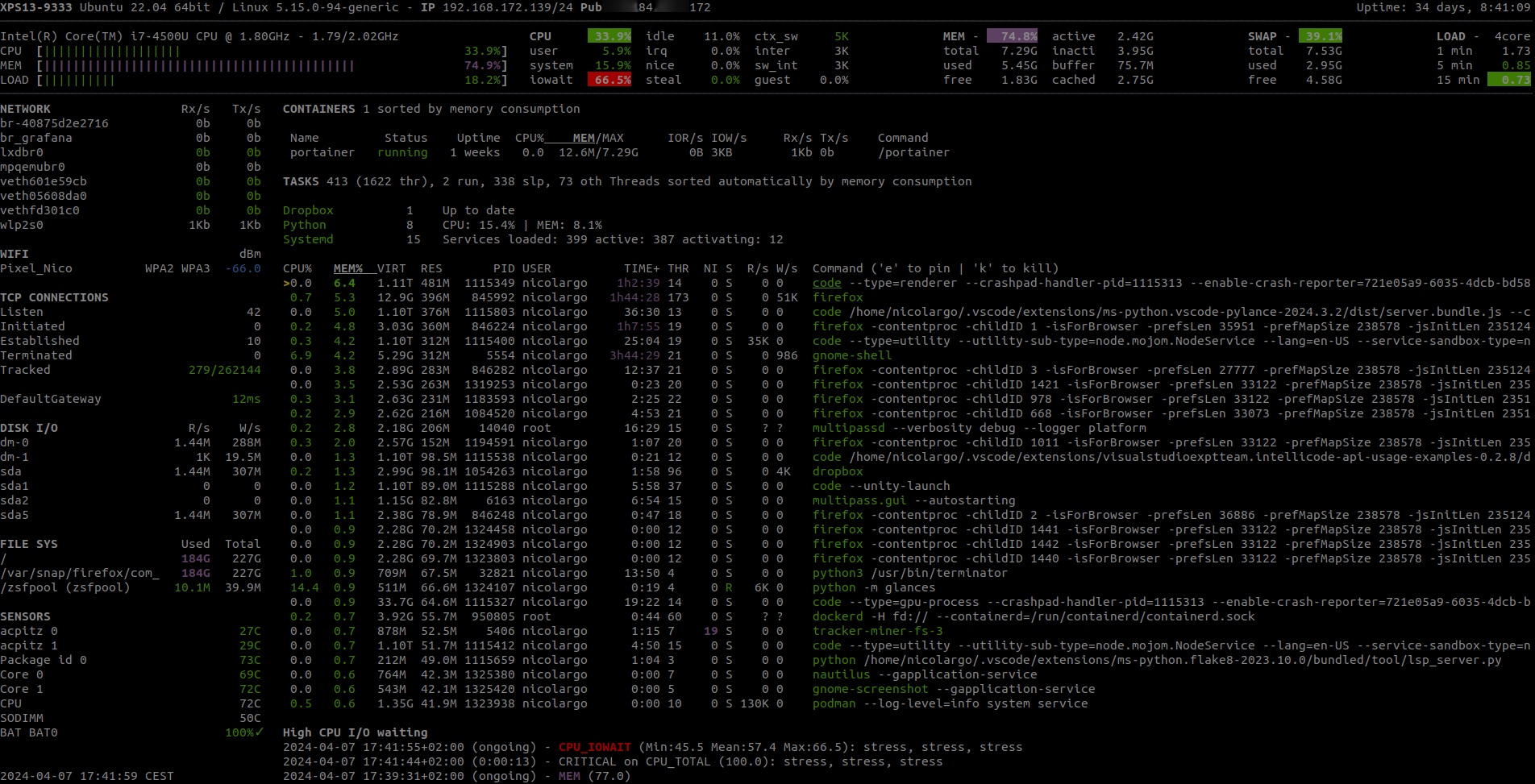
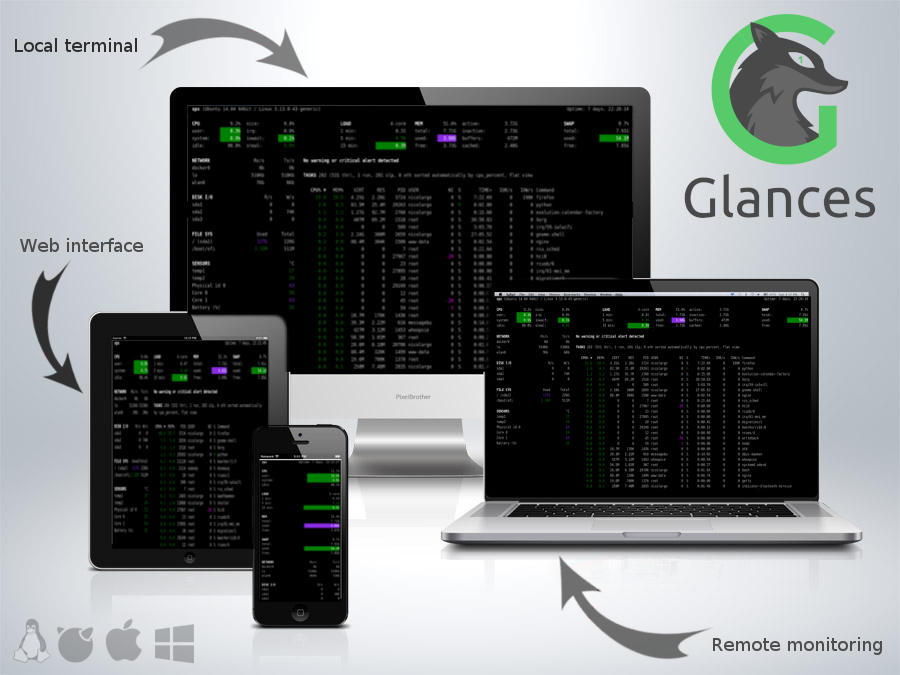
It can also work in client/server mode. Remote monitoring could be done via terminal, Web interface or API (XML-RPC and RESTful). Stats can also be exported to files or external time/value databases.
Glances is written in Python and uses libraries to grab information from your system. It is based on an open architecture where developers can add new plugins or exports modules.
Requirements
python 2.7,>=3.3
psutil>=2.0.0 (better with latest version)
Optional dependencies:
batinfo (for battery monitoring support) [Linux-only]
bernhard (for the Riemann export module)
bottle (for Web server mode)
cassandra-driver (for the Cassandra export module)
couchdb (for the CouchDB export module)
docker (for the Docker monitoring support) [Linux-only]
elasticsearch (for the Elastic Search export module)
hddtemp (for HDD temperature monitoring support) [Linux-only]
influxdb (for the InfluxDB export module)
matplotlib (for graphical/chart support)
netifaces (for the IP plugin)
nvidia-ml-py (for the GPU plugin) [Python 2-only]
pika (for the RabbitMQ/ActiveMQ export module)
potsdb (for the OpenTSDB export module)
py3sensors (for hardware monitoring support) [Linux-only]
py-cpuinfo (for the Quicklook CPU info module)
pymdstat (for RAID support) [Linux-only]
pysnmp (for SNMP support)
pystache (for the action script feature)
pyzmq (for the ZeroMQ export module)
requests (for the Ports plugin)
scandir (for the Folders plugin) [Only for Python < 3.5]
statsd (for the StatsD export module)
wifi (for the wifi plugin) [Linux-only]
zeroconf (for the autodiscover mode)
Note for Python 2.6 users
Since version 2.7, Glances no longer support Python 2.6. Please upgrade to at least Python 2.7/3.3+ or downgrade to Glances 2.6.2 (latest version with Python 2.6 support).
Note for CentOS Linux 6 and 7 users
Python 2.7, 3.3 and 3.4 are now available via SCLs. See: https://lists.centos.org/pipermail/centos-announce/2015-December/021555.html.
Installation
Several method to test/install Glances on your system. Choose your weapon !
Glances Auto Install script: the total way
To install both dependencies and latest Glances production ready version (aka master branch), just enter the following command line:
curl -L https://bit.ly/glances | /bin/bashor
wget -O- https://bit.ly/glances | /bin/bashNote: Only supported on some GNU/Linux distributions. If you want to support other distributions, please contribute to glancesautoinstall.
PyPI: The simple way
Glances is on PyPI. By using PyPI, you are sure to have the latest stable version.
To install, simply use pip:
pip install glancesNote: Python headers are required to install psutil. For example, on Debian/Ubuntu you need to install first the python-dev package. For Fedora/CentOS/RHEL install first python-devel package. For Windows, just install psutil from the binary installation file.
Note 2 (for the Wifi plugin): If you want to use the Wifi plugin, you need to install the wireless-tools package on your system.
You can also install the following libraries in order to use optional features (like the Web interface, exports modules, sensors…):
pip install glances[action,batinfo,browser,cpuinfo,chart,docker,export,folders,gpu,ip,raid,snmp,web,wifi]
pip install https://bitbucket.org/gleb_zhulik/py3sensors/get/tip.zip
To upgrade Glances to the latest version:
pip install --upgrade glances
pip install --upgrade glances[...]
If you need to install Glances in a specific user location, use:
export PYTHONUSERBASE=~/mylocalpath
pip install --user glances
Docker: the funny way
A Glances container is available. It will include the latest development HEAD version. You can use it to monitor your server and all your others containers !
Get the Glances container:
docker pull nicolargo/glancesRun the container in console mode:
docker run -v /var/run/docker.sock:/var/run/docker.sock:ro --pid host -it docker.io/nicolargo/glancesAdditionally, if you want to use your own glances.conf file, you can create your own Dockerfile:
FROM nicolargo/glances
COPY glances.conf /glances/conf/glances.conf
CMD python -m glances -C /glances/conf/glances.conf $GLANCES_OPT
Alternatively, you can specify something along the same lines with docker run options:
docker run -v ./glances.conf:/glances/conf/glances.conf -v /var/run/docker.sock:/var/run/docker.sock:ro --pid host -it docker.io/nicolargo/glancesWhere ./glances.conf is a local directory containing your glances.conf file.
Run the container in Web server mode (notice the GLANCES_OPT environment variable setting parameters for the glances startup command):
docker run -d --restart="always" -p 61208-61209:61208-61209 -e GLANCES_OPT="-w" -v /var/run/docker.sock:/var/run/docker.sock:ro --pid host docker.io/nicolargo/glancesGNU/Linux
Glances is available on many Linux distributions, so you should be able to install it using your favorite package manager. Be aware that Glances may not be the latest one using this method.
FreeBSD
To install the binary package:
# pkg install py27-glancesTo install Glances from ports:
# cd /usr/ports/sysutils/py-glances/
# make install clean
macOS
macOS users can install Glances using Homebrew or MacPorts.
Homebrew
$ brew install python
$ pip install glances
MacPorts
$ sudo port install glancesWindows
Install Python for Windows (Python 2.7.9+ and 3.4+ ship with pip) and then just:
$ pip install glancesSource
To install Glances from source:
$ wget https://github.com/nicolargo/glances/archive/vX.Y.tar.gz -O - | tar xz
$ cd glances-*
# python setup.py installNote: Python headers are required to install psutil.
Chef
An awesome Chef cookbook is available to monitor your infrastructure: https://supermarket.chef.io/cookbooks/glances (thanks to Antoine Rouyer)
Puppet
You can install Glances using Puppet: https://github.com/rverchere/puppet-glances
Usage
For the standalone mode, just run:
$ glancesFor the Web server mode, run:
$ glances -wand enter the URL http://<ip>:61208 in your favorite web browser.
For the client/server mode, run:
$ glances -son the server side and run:
$ glances -c <ip>on the client one.
You can also detect and display all Glances servers available on your network or defined in the configuration file:
$ glances --browserand RTFM, always.
Documentation
For complete documentation have a look at the readthedocs website.
If you have any question (after RTFM!), please post it on the official Q&A forum.
Gateway to other services
Glances can export stats to: CSV file, InfluxDB, Cassandra, CouchDB, OpenTSDB, StatsD, ElasticSearch, RabbitMQ/ActiveMQ, ZeroMQ, and Riemann server.
How to contribute ?
If you want to contribute to the Glances project, read this wiki page.
There is also a chat dedicated to the Glances developers:

License
LGPLv3. See COPYING for more details.
Release history Release notifications | RSS feed


Download files
Download the file for your platform. If you're not sure which to choose, learn more about installing packages.
Source Distribution
Built Distributions
Filter files by name, interpreter, ABI, and platform.
If you're not sure about the file name format, learn more about wheel file names.
Copy a direct link to the current filters
File details
Details for the file Glances-2.8.2.tar.gz.
File metadata
- Download URL: Glances-2.8.2.tar.gz
- Upload date:
- Size: 5.5 MB
- Tags: Source
- Uploaded using Trusted Publishing? No
File hashes
| Algorithm | Hash digest | |
|---|---|---|
| SHA256 |
6095dcdf0b7a6b6819cc647ee9733ddce309c0745107258850d601109e3411d0
|
|
| MD5 |
c0c2ab53948449f848adbec8fc3473c7
|
|
| BLAKE2b-256 |
3eac69d4268940943537bcdeaafcaa3b0c785dfee475c04a3a10ad7668b49082
|
File details
Details for the file Glances-2.8.2-py3.6.egg.
File metadata
- Download URL: Glances-2.8.2-py3.6.egg
- Upload date:
- Size: 1.0 MB
- Tags: Egg
- Uploaded using Trusted Publishing? No
File hashes
| Algorithm | Hash digest | |
|---|---|---|
| SHA256 |
5e34fb162b99d5f41f28f36530add9ebb2353584a7e834f25fcb0655471c2a2e
|
|
| MD5 |
179f3dba13c61ecc30bf7d8e149c09af
|
|
| BLAKE2b-256 |
1f2729abe6d5befbfc1af286d6f757617243f6e913ecc3f92fd0791f3f2b0157
|
File details
Details for the file Glances-2.8.2-py3.5.egg.
File metadata
- Download URL: Glances-2.8.2-py3.5.egg
- Upload date:
- Size: 1.0 MB
- Tags: Egg
- Uploaded using Trusted Publishing? No
File hashes
| Algorithm | Hash digest | |
|---|---|---|
| SHA256 |
c483f8e2f97c582ac9402bcd20946933bd0d2b8df4b36e5fa60b4847a52ded9c
|
|
| MD5 |
3d96f6a71009c4eae0162fff90ca2212
|
|
| BLAKE2b-256 |
7835732cce187cf444511fc47d74057f0d4907e517d6fdc5e00a306f58a72d55
|
File details
Details for the file Glances-2.8.2-py3.4.egg.
File metadata
- Download URL: Glances-2.8.2-py3.4.egg
- Upload date:
- Size: 1.0 MB
- Tags: Egg
- Uploaded using Trusted Publishing? No
File hashes
| Algorithm | Hash digest | |
|---|---|---|
| SHA256 |
4ce1f56e1f9bb95024ae46d1b1460df1310f215a575906bf296ec0a36aa750e5
|
|
| MD5 |
e9674b19c2f4bbe928573096dc70d622
|
|
| BLAKE2b-256 |
e00d04c9914cee163c41306a1d4c44f9b2c4c58f0f26d2a60415b966d15abc92
|
File details
Details for the file Glances-2.8.2-py3.3.egg.
File metadata
- Download URL: Glances-2.8.2-py3.3.egg
- Upload date:
- Size: 1.0 MB
- Tags: Egg
- Uploaded using Trusted Publishing? No
File hashes
| Algorithm | Hash digest | |
|---|---|---|
| SHA256 |
b7cbf4fa38fb49b2d9b7e304acedf4584cb21f2836f839b343fcf705be6a2974
|
|
| MD5 |
afce2b7fea3f62e4f80e4a62b646b67c
|
|
| BLAKE2b-256 |
095baacf4fd9215b5840d17df311da3089684bd055dd7ea96c36ff0383c7d3d1
|
File details
Details for the file Glances-2.8.2-py2.7.egg.
File metadata
- Download URL: Glances-2.8.2-py2.7.egg
- Upload date:
- Size: 1.0 MB
- Tags: Egg
- Uploaded using Trusted Publishing? No
File hashes
| Algorithm | Hash digest | |
|---|---|---|
| SHA256 |
07a5e911835878fa6566048590d63808f7bce9e5c801c38b1099b782949edf29
|
|
| MD5 |
cd0c063725d6933cd95b57bc4032d9b8
|
|
| BLAKE2b-256 |
172bc1ae63b4b07441d13ac426dbaaa02bc099a38d4071becc6d03b777118da8
|






