




Abraia Vision SDK
The Abraia Vision SDK is a high-performance, edge-ready Python library and toolkit for computer vision, image processing, model training, and advanced inference. It unifies state-of-the-art vision models (such as YOLO, SAM, CLIP, and custom recognition pipelines) into a seamless API for production-ready applications, real-time video analysis, object tracking, hyperspectral imaging, and edge hardware deployment.
📚 Table of Contents
📦 Installation
Install the Abraia SDK from PyPI:
pip install -U abraia
For training and development run the installation with optional extras (dev, multiple):
pip install -U abraia[dev,multiple]
🚀 Core Modules & Features
1. Inference & Computer Vision (abraia.inference)
- Object Detection: Fast ONNX/YOLO-based object detection (
abraia.inference.Model). - Segmentation (SAM): Segment Anything Model integration for precise image masking (
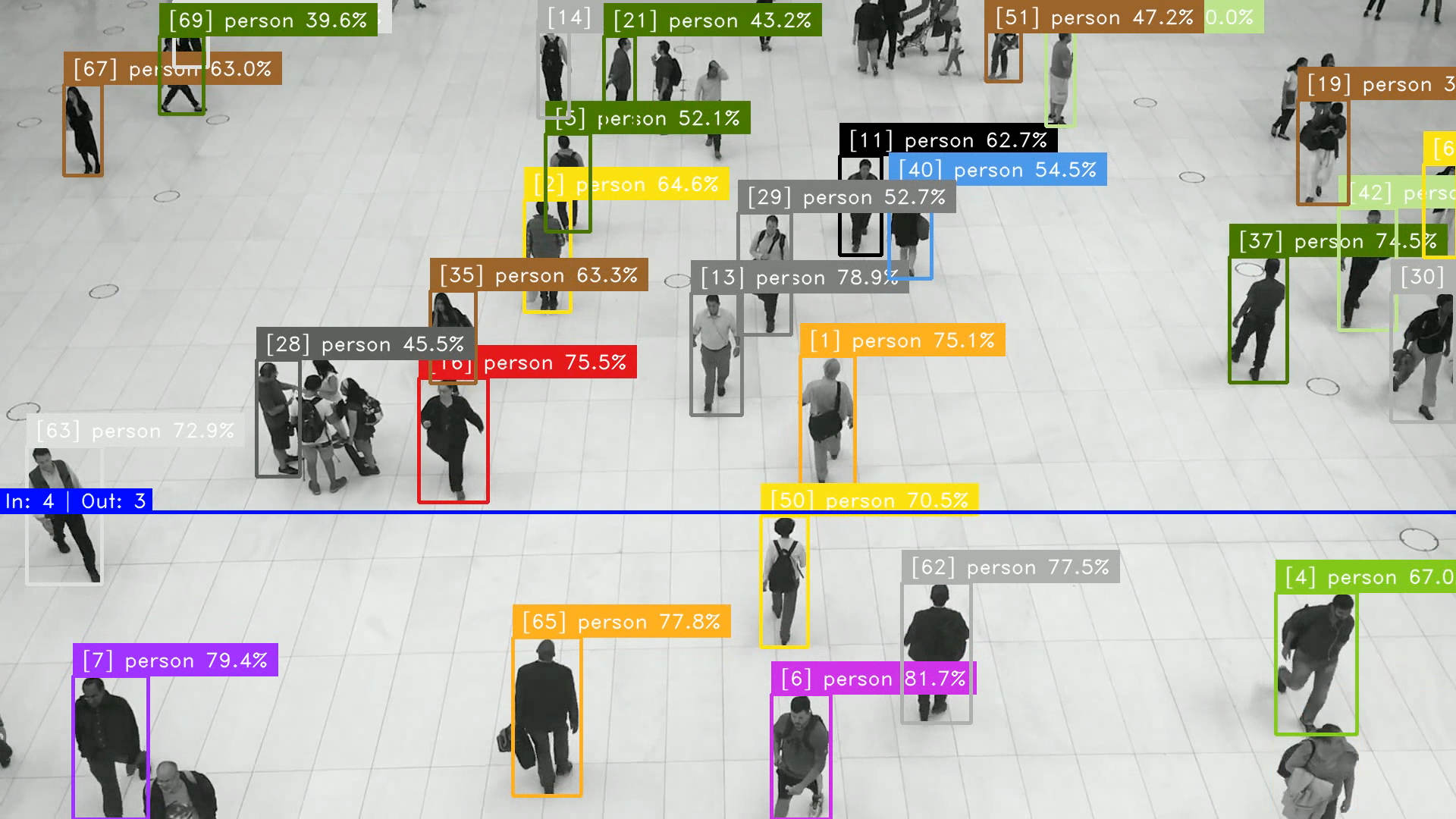
abraia.inference.Sam). - Object Tracking & People Flow: Advanced multi-object tracking (
Tracker), line crossing counters (LineCounter), and region duration timers (RegionTimer). - Face Recognition: Identify and match faces in images and streams (
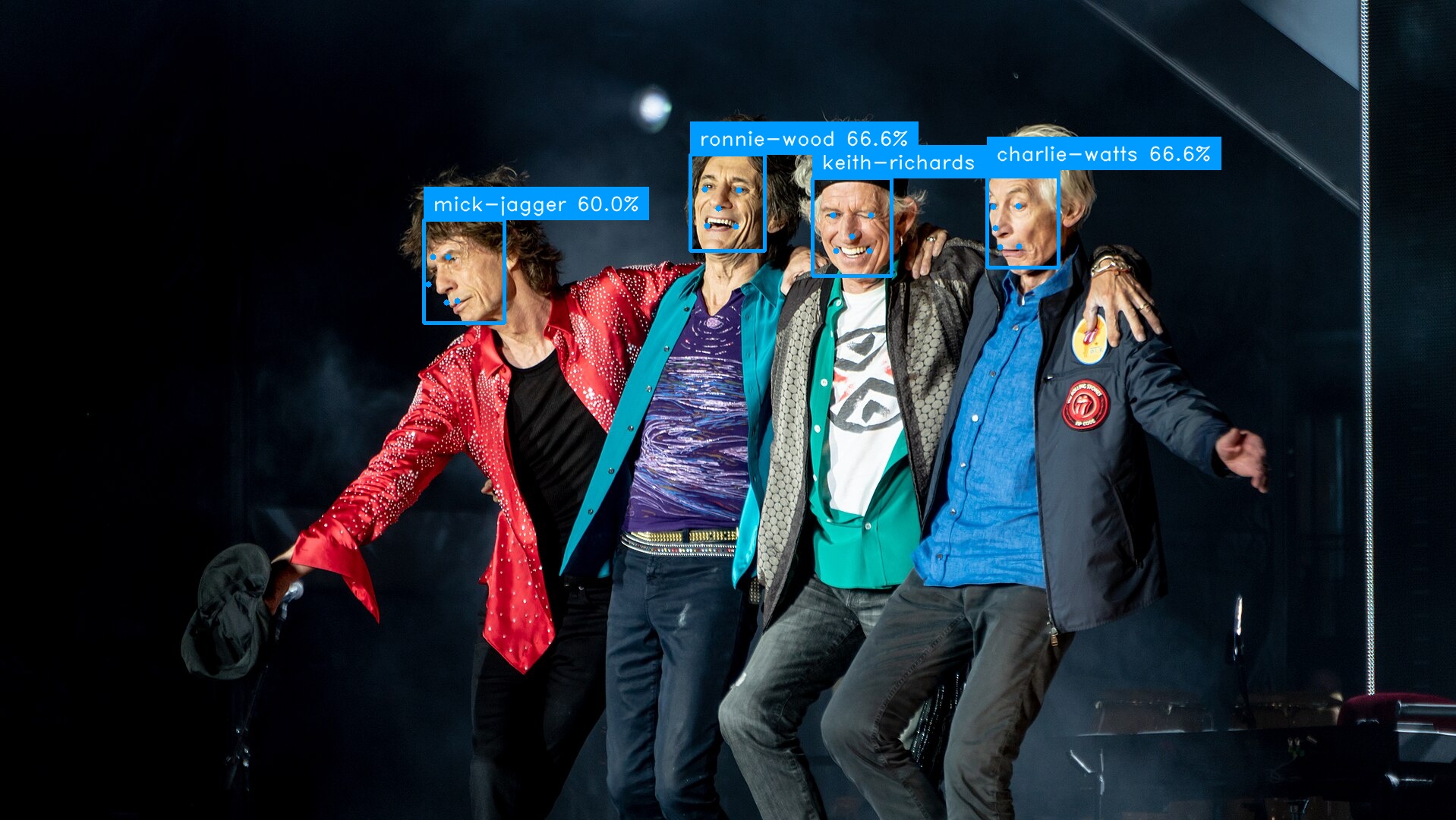
FaceRecognizer). - License Plate Recognition (ALPR): Automatic license plate detection and text recognition (
PlateRecognizer). - OCR: Extract text from images (
Ocr). - Semantic Search (CLIP): Vector embeddings and similarity search for text-to-image and image-to-image retrieval (
Clip).
2. Image Editing & Enhancement (abraia.editing)
- Upscaling: Super-resolution image enhancement (
upscale). - Smart Cropping: Intelligent content-aware cropping (
smartcrop). - Background Removal: Foreground segmentation and background removal (
removebg). - Inpainting: Image restoration and object removal (
inpaint).
3. Multispectral & Hyperspectral Imaging (abraia.multiple)
- Specialized tools for hyperspectral and multispectral image analysis, cube processing, and spectral signature extraction (
abraia.multiple.hsi).
4. Edge AI & Hardware Acceleration (abraia.hailo)
- Optimized runtime support and toolboxes for Hailo NPU hardware acceleration (
abraia.hailo).
5. Training & Dataset Operations (abraia.training)
- Tools for training custom classification (
classify) and detection (detect) models, along with dataset preprocessing utilities (dataset,ops).
6. Utilities & Video Processing (abraia.utils)
- Robust video frame iteration and manipulation (
Video). - Annotation and rendering tools (
render_results,render_counter,render_region). - Compression and sketch generation utilities.
💡 Examples & Usage Guides
People Monitoring & Tracking
Monitor people flow, count crossings, and track dwell times in public spaces or commercial areas:
from abraia.inference import Model, Tracker
from abraia.inference.tools import LineCounter, RegionTimer
from abraia.utils import Video, render_results, render_counter, render_region

model = Model("multiple/models/yolov8n.onnx")
video = Video('people-walking.mp4')
tracker = Tracker(frame_rate=video.frame_rate)
line_counter = LineCounter([(0, 650), (1920, 650)])
region_timer = RegionTimer([(10, 600), (1690, 600), (1690, 700), (10, 700)])

for k, frame in enumerate(video):
    results = model.run(frame, labels=['person'])
    results = tracker.update(results)
    in_count, out_count = line_counter.update(results)
    in_objects, out_objects = region_timer.update(results, k / video.frame_rate)
    frame = render_counter(frame, line_counter.line, f"In: {in_count} | Out: {out_count}")
    frame = render_region(frame, region_timer.region, f"Count: {len(in_objects)}")
    frame = render_results(frame, in_objects)
    video.show(frame)
Face Recognition
Identify and recognize people in images:
import os

from abraia.inference import FaceRecognizer
from abraia.utils import load_image, save_image, render_results

img = load_image('images/rolling-stones.jpg')
out = img.copy()

recognition = FaceRecognizer()

index = []
for src in ['mick-jagger.jpg', 'keith-richards.jpg', 'ronnie-wood.jpg', 'charlie-watts.jpg']:
    img = load_image(f"images/{src}")
    rslt = recognition.identify_faces(img)[0]
    index.append({'name': os.path.splitext(src)[0], 'vector': rslt['vector']})

results = recognition.identify_faces(results, index)
render_results(out, results)
save_image(out, 'images/rolling-stones-identified.jpg')
License Plate Recognition (ALPR)
Automatically detect and recognize car license plates in images and video streams:
from abraia.inference import PlateRecognizer
from abraia.utils import load_image, show_image, render_results

alpr = PlateRecognizer()

img = load_image('images/car.jpg')
results = alpr.recognize(img)
frame = render_results(img, results)
show_image(img)

Semantic Search with CLIP
Search images using natural language text queries via CLIP embeddings:
from tqdm import tqdm
from glob import glob
from abraia.utils import load_image
from abraia.inference.clip import Clip
from abraia.inference.ops import search_vector

clip_model = Clip()

image_paths = glob('images/*.jpg')
image_index = [{'vector': clip_model.get_image_embeddings([load_image(image_path)])[0]} for image_path in tqdm(image_paths)]

text_query = "full body person"
vector = clip_model.get_text_embeddings([text_query])[0]

idxs, scores = search_vector(vector, image_index)
print(f"Similarity score is {scores[0]} for image {image_paths[idxs[0]]}")
🍓 Real-Time Edge Object Counter on Raspberry Pi with Hailo NPU
Deploy high-performance real-time object detection and counting on a Raspberry Pi equipped with a Hailo AI expansion board (such as Hailo-8 or Hailo-8L). This pipeline combines hardware-accelerated model inference (abraia.hailo), multi-object tracking (abraia.inference.Tracker), line crossing counters (LineCounter), and region timers (RegionTimer), integrated with the asynchronous video processing pipeline (VideoInput & VideoDisplay).
Implementation Guide
Create a script (e.g., edge_counter.py) ready for deployment on your Raspberry Pi:
import threading
from abraia.hailo.toolbox import ModelInference
from abraia.inference import Tracker
from abraia.inference.tools import LineCounter, RegionTimer
from abraia.utils import VideoInput, VideoDisplay, render_results, render_counter, render_region
from abraia.hailo.detect import run_inference_pipeline

# 1. Initialize threaded video input (e.g., Raspberry Pi Camera or RTSP stream)
stop_event = threading.Event()
input_data = VideoInput(input_src=0, resolution=(1920, 1080), stop_event=stop_event)
visualizer = VideoDisplay(source_fps=input_data.source_fps, stop_event=stop_event)

# 2. Load Hailo compiled model (.hef) optimized for edge NPU
model_inference = ModelInference(
    hef_path="yolov8n.hef",
    task="detect",
    labels=["person", "car"],
    batch_size=1,
    score_threshold=0.3
)

# 3. Setup Tracker & Analytics Tools (Line Counter & Region Timer)
tracker = Tracker(frame_rate=input_data.source_fps or 30.0)
line_counter = LineCounter([(100, 540), (1820, 540)])     # Crossing boundary line
region_timer = RegionTimer([(300, 200), (1620, 200), (1620, 900), (300, 900)]) # Zone of interest

# 4. Custom Inference & Analytics Result Handler
def edge_processing_handler(frame, detections, tracker=None, tracklet_history=None):
    if tracker:
        detections = tracker.update(detections)

    # Update line crossing and region analytics
    in_count, out_count = line_counter.update(detections)
    in_objects, out_objects = region_timer.update(detections, 1.0 / (input_data.source_fps or 30.0))

    # Render real-time visual overlays
    frame = render_counter(frame, line_counter.line, f"In: {in_count} | Out: {out_count}")
    frame = render_region(frame, region_timer.region, f"Zone Count: {len(in_objects)}")
    return render_results(frame, detections)

# 5. Run High-Performance Edge Pipeline
try:
    run_inference_pipeline(
        model_inference=model_inference,
        input_data=input_data,
        visualizer=visualizer,
        tracker=tracker
    )
finally:
    stop_event.set()
Deployment on Raspberry Pi
Execute the script directly on the Raspberry Pi:
python3 edge_counter.py
📄 License
This project is licensed under the MIT License.
1 maintainer

Download files
Download the file for your platform. If you're not sure which to choose, learn more about installing packages.
Source Distribution
Built Distribution
Filter files by name, interpreter, ABI, and platform.
If you're not sure about the file name format, learn more about wheel file names.
Copy a direct link to the current filters
File details
Details for the file abraia-0.27.3.tar.gz.
File metadata
- Download URL: abraia-0.27.3.tar.gz
- Upload date:
- Size: 88.0 kB
- Tags: Source
- Uploaded using Trusted Publishing? No
- Uploaded via:
twine/7.0.0 CPython/3.13.14
File hashes
| Algorithm | Hash digest | |
|---|---|---|
| SHA256 |
9ef5b2c97b143efd014ef4d7a4422a3e5e20a0bb97cf4ccfda09066dbfaecfc8
|
|
| MD5 |
c4a16dcaf8d95dce6a663ce8cbccb218
|
|
| BLAKE2b-256 |
bcf6021df363b9c41e364e824d7afe30463aa12d0399ab290c1e8d08d36117b0
|
File details
Details for the file abraia-0.27.3-py3-none-any.whl.
File metadata
- Download URL: abraia-0.27.3-py3-none-any.whl
- Upload date:
- Size: 1.5 MB
- Tags: Python 3
- Uploaded using Trusted Publishing? No
- Uploaded via:
twine/7.0.0 CPython/3.13.14
File hashes
| Algorithm | Hash digest | |
|---|---|---|
| SHA256 |
f0372bb5cd2fd305107dd826efe408c37aed0f05fc6da86ac13663e41f3532c0
|
|
| MD5 |
9875a2026d60a94443d340987e9091c2
|
|
| BLAKE2b-256 |
8e97d243179057796b6de838328362908f3c7acc56a869d76a0b2f6739fa5240
|














