
ActionDraw
Private plans. Encrypted projects. One canvas.
ActionDraw is a security-focused desktop planning app. Turn ideas into mindmaps,
visual task diagrams, and actionable plans while keeping saved project content
in encrypted .progress files. Choose a passphrase, a YubiKey, or both to
protect your work.
AES-256-GCM encryption · Argon2id key derivation · Optional YubiKey protection
Get started · Security · Mindmap walkthrough · Features · Development
| Plan with clarity | Protect your work | Keep moving |
|---|---|---|
| Map projects, focus on branches, and connect ideas on a visual canvas. | Save encrypted projects with passphrase and optional hardware-key protection. | Keep notes, priorities, completion marks, and reminders beside your tasks. |
Security at the core
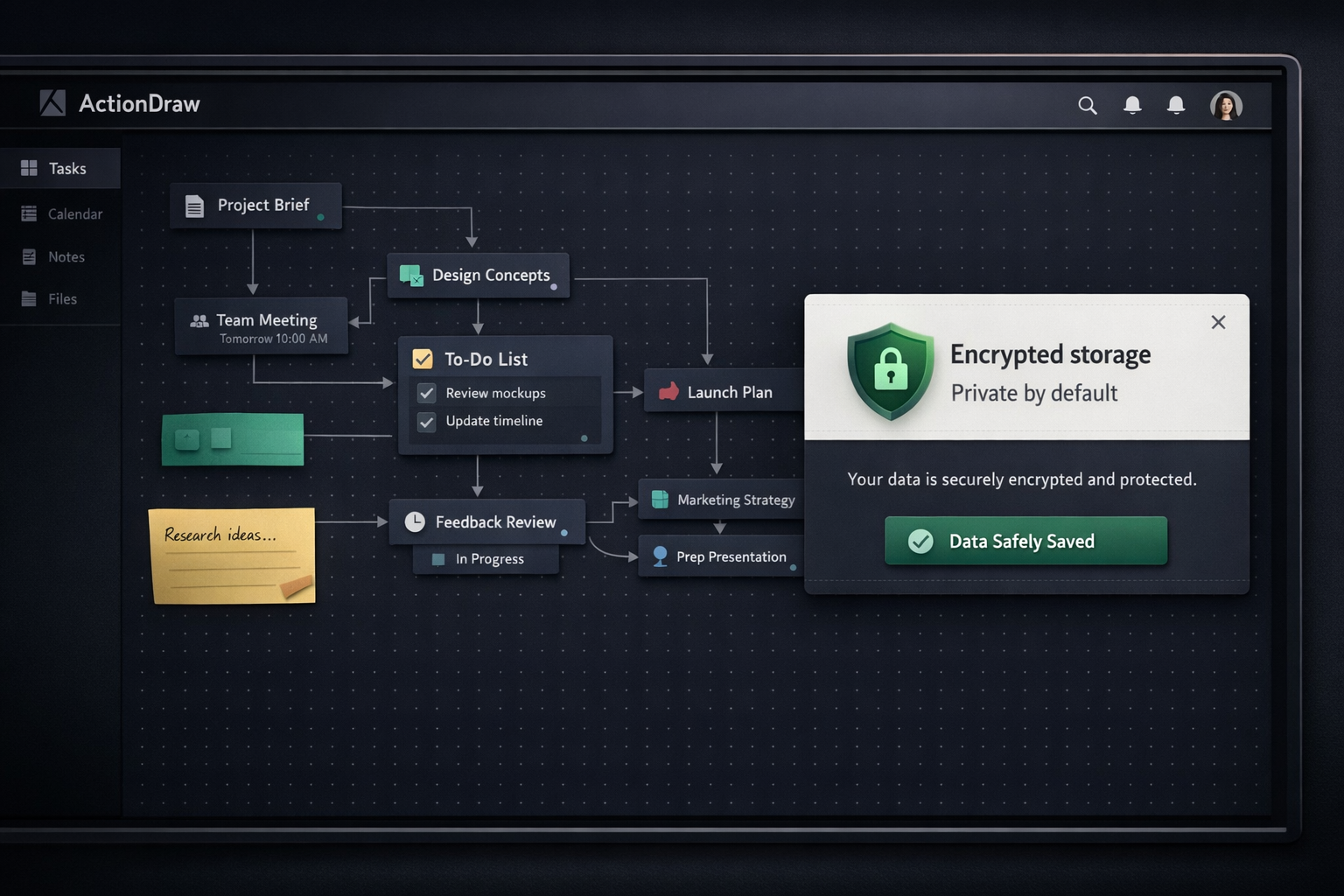
Encryption is part of the project save workflow. ActionDraw saves project
content locally in encrypted .progress files, with three protection modes:
Passphrase only, YubiKey only, and Passphrase + YubiKey.
| Protection | How ActionDraw uses it |
|---|---|
| Authenticated encryption | AES-256-GCM encrypts project content and detects changes to authenticated data when the file is opened. |
| Memory-hard key derivation | Argon2id derives the encryption key from your chosen credentials and a random salt. |
| Hardware-key support | Optional YubiKey HMAC challenge-response can be used on its own or combined with a passphrase. |
| Fresh encryption on save | Each save uses a fresh random nonce and an HKDF-derived subkey. |
On your first save, choose a protection mode and supply its credentials. Save As prompts for a protection mode again. Opening an encrypted project requires the credentials for that file; subsequent saves in the same session reuse cached key material.
Optional YubiKey support
Install the hardware-key dependency with:
pip install "actiondraw[yubikey]"
Use a YubiKey with HMAC challenge-response configured in slot 1 or 2. Choose Passphrase + YubiKey when you want both credentials required to open the project.
What encryption covers
Encryption protects the saved project content. The outer file includes format and encryption metadata so ActionDraw can decrypt it. While a project is open, its content and cached key material are available to the running application.
Optional ntfy notifications send reminder titles and goal or scope labels to
the configured server. Enable them only for content you intend to share with
that service. See Notifications for configuration.
Quick start
Requires Python 3.10+. Installation includes PySide6 (Qt) and the other required dependencies.
pip install actiondraw
actiondraw
To run the standalone priority plot:
priorityplot
New projects open on a blank starting page. Choose Add goal, give it a name, and start organizing its steps in the goal’s mind map. Deleting the last goal returns to the starting page; empty projects can also be saved and reopened. Save the project to select its encryption mode.
Follow the walkthrough · View keyboard shortcuts
Plan a project with the mindmap
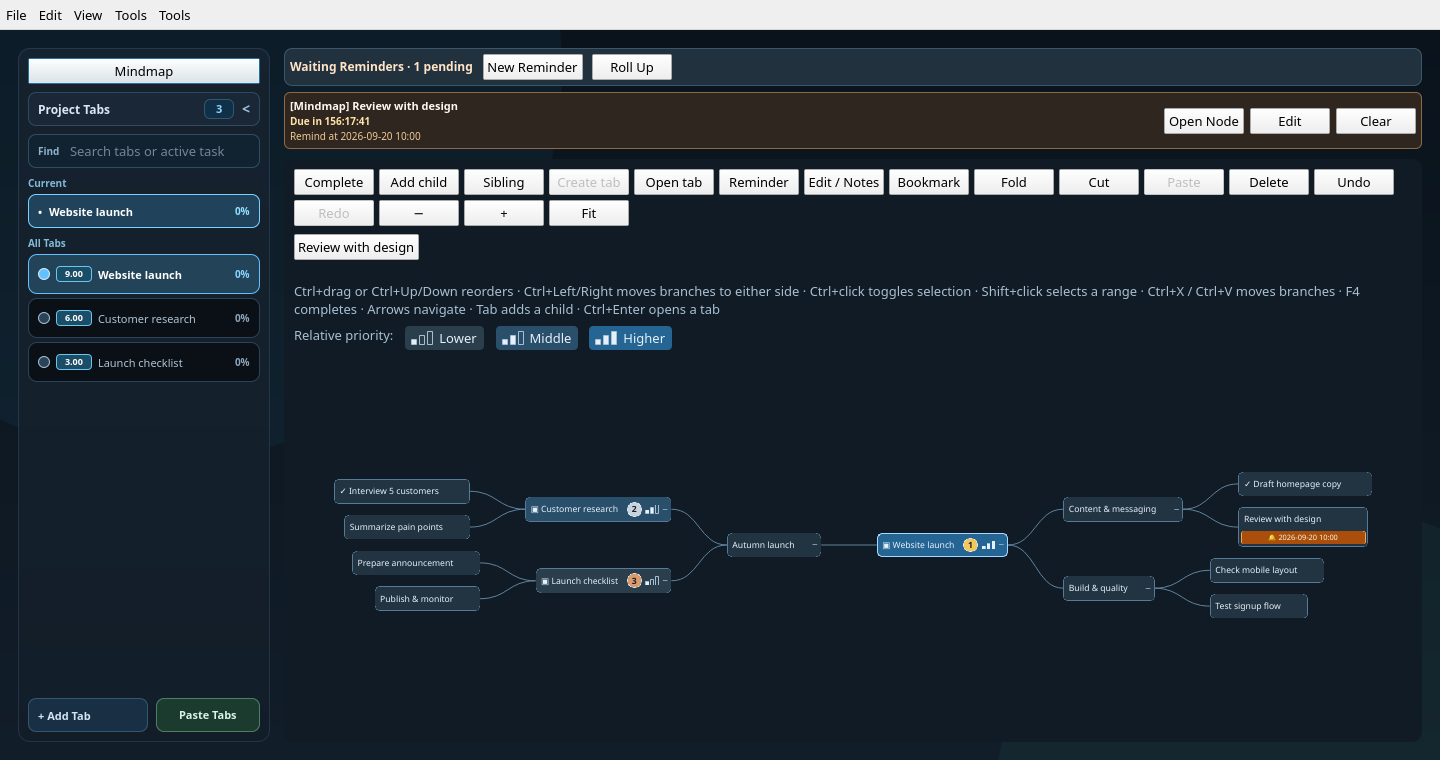
The screenshots use a fictional Autumn launch project. Each project goal is also a node in the map, so you can organize the big picture and open the work behind it from the same place.
1. Lay out the whole project
Choose Mindmap above the sidebar goals to open the full project map. Start with goals such as Website launch, Customer research, and Launch checklist, then select a node and click + beside it to add a child. Enter a title and press Enter; canceling leaves the map unchanged. Use the smaller + above or below a node to add a sibling. Click a node’s checkbox to mark it complete or incomplete.
In the overview above, the website branch contains content and quality checks, while research and the launch checklist sit on the left. Drag a node onto another node to nest it, or onto its top or bottom edge to reorder it. Use the right-click menu to place a branch on the left or right. Scroll to zoom, drag the background to pan, and choose Fit to see the whole map.
Click ▾ on a node to fold its branch, or ▸ to unfold it. The map toolbar also offers Fold all and Unfold all for the current view. Fold all keeps the view root and its immediate children visible; unfold all opens every nested branch. In a focused branch view these actions affect that branch. Each action can be undone with Ctrl+Z.
Blue shades and one, two, or three filled bars show lower, middle, or higher relative priority for goals included in the priority plot. Numbered badges mark the top three; hover over a node for its score. The scale compares all included project goals, so folding or focusing a branch does not change its priority. Tied scores share a level; a single task or all-equal scores use the middle level. Notes and excluded goals have no priority indicator.
2. Open a branch and focus on the next steps
Click a goal node to open it. Goals with children open their own mindmap branch; use Canvas to switch to that goal's diagram. The goal's Mindmap control opens or starts its branch, while the sidebar Mindmap returns to the full project map. Alt+Left returns to the previous view.
To reuse a goal's branch elsewhere, right-click a node, choose Add goal…, and search for the existing goal. The ↗ reference shows the same children, and edits made inside it appear everywhere that branch is used. Remove goal reference removes only that placement; deleting a child changes the shared branch. Circular references are rejected, including those introduced by moving branches.
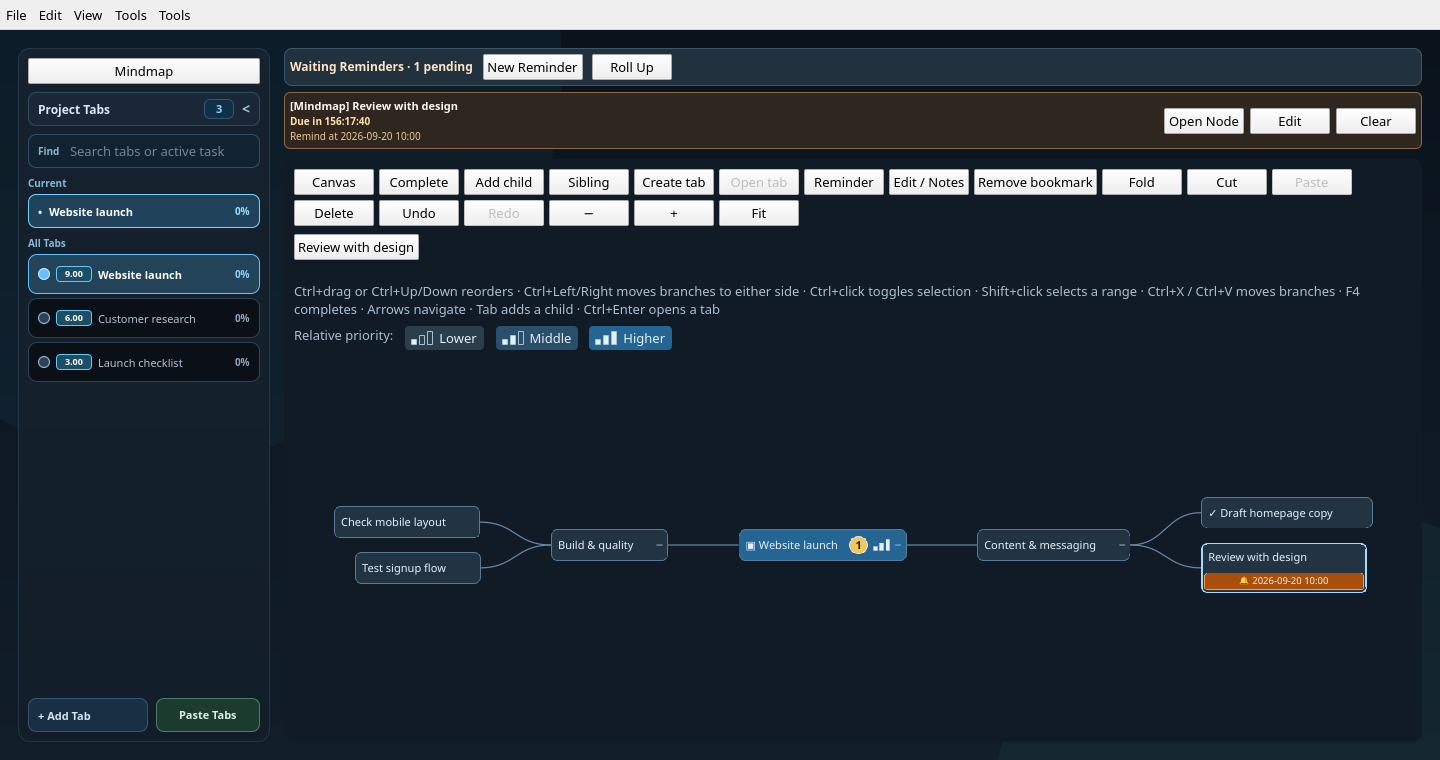
Here, Website launch is the branch root. The finished homepage draft has a check mark, and Review with design has a reminder. Both the full map and this focused view edit the same nodes and share undo/redo.
Select a thought and choose Create goal when it needs its own workspace. Use Bookmark to keep a frequently visited node within reach; its button appears above the map.
3. Keep context and reminders beside the work
Select a node and choose Edit / Notes (or press F2) to capture decisions, questions, and what it will take to finish. In this example, the design review has an agenda and a clear completion condition.
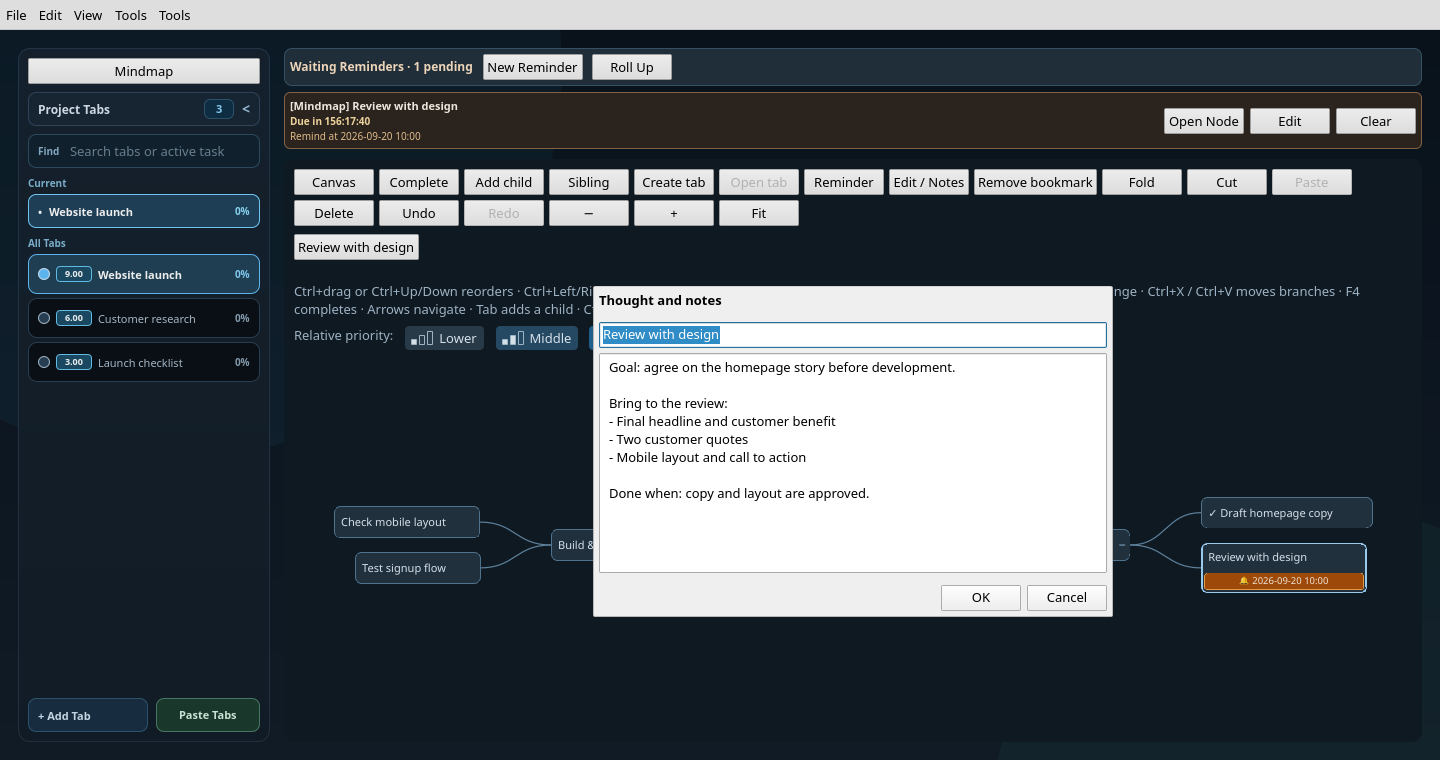
Choose Reminder for a selected node to set a date and time, with optional notifications. An orange bell and date appear beneath its title. Every node supports a reminder, including goal nodes and the project root.
Waiting Reminders stays visible above both the canvas and mindmap. Choose Open Node to reveal the relevant node, even inside a folded branch. The right-click menu lets you update or clear its reminder. A month calendar shows how many future reminders are waiting on each day, including later today. Select a date to filter the list; New Reminder prefills that selected date. Choose All days to see everything. Use the month arrows and Today to navigate; Roll Up collapses both the calendar and list.
Use Complete or F4 to mark selected nodes with a ✓. If all selected nodes are complete, the same action clears the marks. Completing a node does not complete its descendants or canvas tasks. Completion marks, notes, and the map are saved with the project.
Completing or deleting a node cancels its reminder; undo restores it. Reminders that have already fired stay cleared through undo/redo. Use Renew in the due alert to schedule another one.
Add to plan offers Ready, hourly slots, and Monday–Sunday with dates and
pending task counts. Choosing a weekday schedules a one-time move to Kanban
Ready at 08:00 local time, including today (immediately if 08:00 has passed).
A separate Add to Kanban → Ready reminder lets you reschedule or cancel;
ordinary reminders remain independent. Choosing another day replaces the
pending schedule. Due schedules show an in-app alert and use the configured
ntfy notifications; missed schedules run when the app next opens the project.
A small calendar badge marks planned nodes without adding a row: amber means scheduled, blue means on Kanban, and a blue badge with an amber dot means both. Hover for the current column/hour, board-entry time when known, and scheduled date. Moving a card preserves its entry time; removing and re-adding resets it.
4. Reorganize as the plan changes
Ctrl+click toggles nodes in the selection without opening goals. Shift+click selects a range, and Shift+arrow keys extend the selection. To move several branches, select them, press Ctrl+X, select a destination, and press Ctrl+V. The move preserves descendants and goal links and can be undone with Ctrl+Z.
Cut branches stay dimmed until pasted; Escape cancels the cut. Clicking a goal while a cut is pending selects it as the destination. Cut selections are local to the current project. Deleting a project goal keeps its map node as a thought.
With no cut pending, Ctrl+V adds clipboard text beneath the selected node. Plain text uses one node per non-empty line and indentation for nesting; OPML outlines retain their hierarchy.
Open your plans on your phone
Choose File → Start Server…, select the network address and press Start Server. ActionDraw prefers an available Tailscale interface; you can choose another local interface and port. Save the project first if prompted, then scan the QR code with your phone or use Copy Link. Keep ActionDraw running and the computer awake. Both devices must be able to reach each other over Tailscale or your private network; ActionDraw does not configure network access for you.
The phone opens the Mindmap with secondary controls tucked under Tools. Choose Expand map for more screen space while keeping quick-add and notes available; Exit expanded restores navigation. Tools reveals search, other views, goals and undo/redo.
Tap a node to select it. Use the checkbox beside it to mark it complete, or + to add a child with a short title-only form. The buttons remain finger-sized as you zoom. For repeated entry, use the quick-entry field and choose Child or Sibling. The new node is selected and brought into view so you can keep building the branch. Parent, Child, Previous and Next navigate without opening an editor. Double-tap a node (or choose Focus) to focus its branch; use breadcrumbs, Up a branch or Whole map to return. Pinch to zoom, drag to pan, and use Expand/Collapse for the selected branch. Search results jump to the matching node on the map. Edit / Notes opens the full node editor.
Outline, Calendar, Kanban and Notes remain available. Goal settings include date ranges and Markdown tabs. Branches can be copied as text or imported and exported as OPML. The mobile client does not include the legacy canvas, drawing, causal models or priority-plot editing.
Phone edits update the desktop project and save automatically with its existing encryption. Connected · Saved confirms persistence; Retry Save handles failed writes. Undo/redo uses the same history as the desktop. Browsing, selection, folding and zoom on the phone do not move the desktop view. Idle refreshes use small change-check responses and back off from two to ten seconds; hidden pages stop polling. Snapshots and map layouts are reused until data changes. Idle checks do not scan or serialize the project; model change signals invalidate the cache. Every submitted edit and full page refresh checks the current project before proceeding, including older editing paths that do not emit change signals. If the project changes while you are editing, your draft is retained and you can review the current content before resubmitting. Connection loss keeps the current draft in the open page, but offline edits are not queued and reloading discards that draft.
The QR link grants editing access until you stop the server. Keep it private. The server uses HTTP on the selected interface: use Tailscale's encrypted network or another trusted private network. File → Server… → Stop Server revokes the link, as does loading another project, saving to a different destination or closing ActionDraw. Each start generates a new link. Scheduling uses the computer's local timezone, shown on the phone; goal periods are inclusive dates.
If the phone cannot connect, check that Tailscale is active on both devices, the displayed interface is reachable, and the computer's firewall allows the selected port (8765 by default). An occupied port is reported in the server dialog; choose another port and start again.
If the browser reports ERR_SSL_PROTOCOL_ERROR or says the site does not
support secure connections, check that the address starts with http://, not
https://. Keep the rest of the copied link, including #key=…, unchanged.
Some browsers automatically attempt HTTPS. If offered, choose Continue to
site for this private-network address. The current server does not provide TLS;
Tailscale encrypts traffic between devices when you use its address.
Mindmap shortcuts
These shortcuts apply while the mindmap has focus, outside dialogs and menus.
| Action | Shortcut |
|---|---|
| Select a nearby visible node | Arrow keys |
| Extend the selection | Shift + arrow keys |
| Add a child / sibling | Tab / Enter |
| Open the selected goal | Ctrl + Enter |
| Edit title and notes | F2 |
| Fold or unfold | Space |
| Toggle completion | F4 |
| Move a node up / down | Ctrl + Up / Down |
| Place a branch left / right | Ctrl + Left / Right |
| Cut branches / paste branches or clipboard outlines | Ctrl + X / Ctrl + V |
| Cancel a pending cut | Escape |
| Undo / redo | Ctrl + Z / Ctrl + Y |
| Return to the previous view | Alt + Left |
Beyond the mindmap
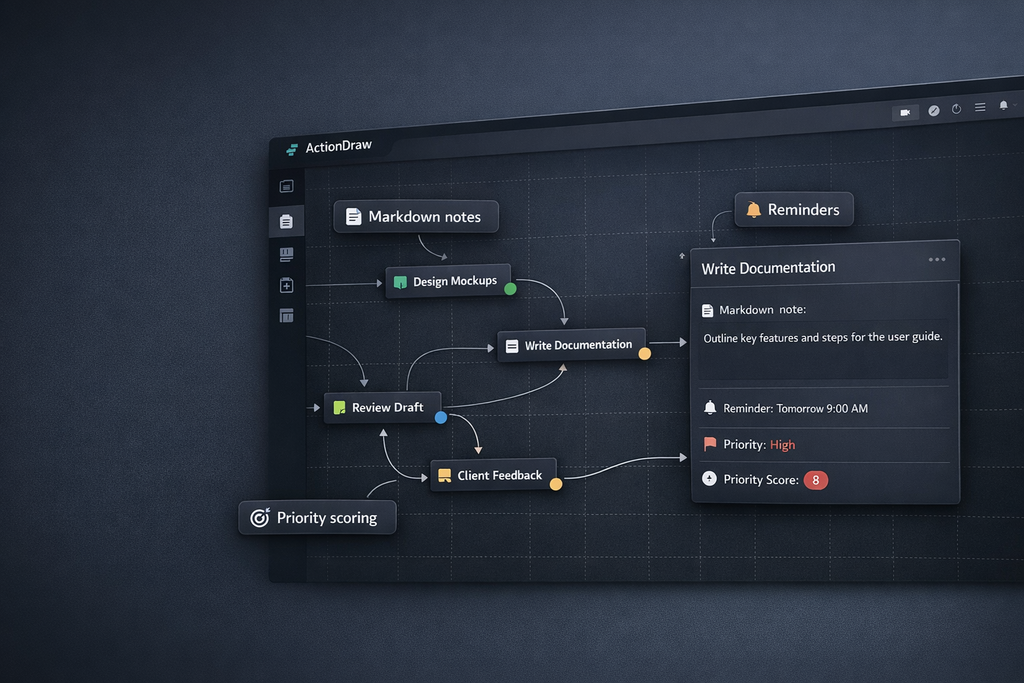
- Visual task diagrams — arrange boxes, databases, servers, clouds, and sticky notes; connect them with arrows that follow the nodes.
- Markdown notes — open a rich Markdown editor from a canvas node.
- Time tracking and reminders — track work and schedule follow-ups.
- Priority scoring — compare tasks by impact and effort in the integrated priority plot.
- Obstacles and wishes — use dedicated shapes for blockers and goals.
- Free drawing and images — sketch on the canvas and paste external graphics.
- Action Paint — sketch a scene, arrange numbered actions, then add them as a connected task chain in the diagram or as nodes in a goal's mindmap.
- Causal models — map causes and effects, record assumptions, and turn ordered actions into tasks.
Causal models
Open Causal Model beside Action Paint to build a causal diagram for the current goal. Double-click empty canvas space to add a variable, action, or outcome node there. Drag a node's → handle onto another node to connect the cause to its effect; a preview arrow follows the pointer. Drop on empty space or press Escape to cancel. Connections must form a directed acyclic graph; represent feedback with separate nodes for successive times.
Drag nodes to arrange the canvas. Double-click a node to edit its label, type, or notes; double-click an arrow to edit its optional likelihood (0–100%) and explanation. Click a node or arrow to select it, then press Delete (or use the toolbar's Delete button) to remove it. Deleting a node also removes its connections; Undo restores them together. Use Assumptions / conclusions to record the model's context. Undo and redo cover graph edits, node movements, and action ordering.
Use + Add action to create a task node directly, or select an existing node and choose Make action. Action nodes are yellow and numbered, and appear in the Action order list. Drag its ≡ handles (or use the up/down arrows) to choose execution order, then Add to ActionDraw or Add to mindmap to copy their titles in that order. These copies are independent of the model, and the causal edges stay in the causal editor. Each goal's model is saved with the project.
The action list also has + Add action and a Remove action button on each row. Removing an action changes its node to a variable and preserves its label, notes, position, and connections; Undo restores its action status and order. Canvas Delete still removes the whole node and its connections.
You can keep adding actions after importing. Each destination tracks imports separately and receives only actions it has not received before, in current list order. New ActionDraw batches form separate chains. Renaming, reordering, or removing and restoring an imported action does not copy it again or change its existing copies. Import history is saved with the project and survives graph Undo/Redo. For older projects, ActionDraw history is recovered from the last import signature; mindmap history starts empty because it was not recorded.
Edge percentages record your estimated likelihoods. They need not sum to 100%, and they do not calculate outcome probabilities. Numerical causal question answering is reserved for a later version with explicit probability rules.
Notifications
Configure ntfy under Tools > Notification Settings... for notifications.
PROGRESS_NTFY_TOPIC, PROGRESS_NTFY_SERVER, and PROGRESS_NTFY_TOKEN also work
as environment-variable fallbacks.
Run from source
git clone https://github.com/oyvinrog/progress.git
cd progress
python -m venv .venv
source .venv/bin/activate  # Windows: .venv\Scripts\activate
pip install -e ".[dev]"
actiondraw
Run the tests with python -m pytest.
The mindmap screenshots are captures of the actual QML interface with fictional sample data. Regenerate all three from a source checkout with:
python tools/capture_mindmap_screenshots.py
The script uses Qt's offscreen software renderer and writes PNGs to assets/.
It does not load or save project files.
Links and license
The mindmap reuses the MIT-licensed PyPlane core, bundled with its license and source revision.
Planning calendar and goal periods
Workspace tabs are now called Goals; Markdown editor tabs remain tabs. Choose Add Goal → Add Goal with Time Range to give a goal inclusive start and end dates. Existing goals have Set/Edit Time Range and Remove Time Range actions in their context menu. An undated goal stays off the calendar.
The planning calendar counts each goal on every day it covers, together with pending reminders. Select a day to see its goals and reminders, or select All days for all scheduled goals. Completed goals and past goal periods remain visible. Click a goal to open its workspace.
Drag a goal bar to move its period, or drag its first/last edge to resize it. The preview shows the dates that will be saved on release; Escape cancels. Hover a month arrow during a drag to move across months. On smaller windows, scroll the calendar horizontally. Edit Time Range offers the same changes without dragging. Removing a time range does not delete the goal or change its Kanban placement, reminders, or notifications.
1 maintainer

Metadata
1 maintainer
Release files for actiondraw 0.1.47
For a detailed explanation of source distributions (sdists) and built distributions (wheels), please see the package formats documentation.
Source distribution (sdist)
| File | Size | Uploaded | Provenance | |
|---|---|---|---|---|
| actiondraw-0.1.47.tar.gz | 422.7 kB | Without provenance | Details |
Built distribution (wheel)
| File | Interpreter | ABI | Platform | Reset |
|---|---|---|---|---|
| actiondraw-0.1.47-py3-none-any.whl | Python 3 | none | any | Details |
Total release size: 734.9 kB
Release files / actiondraw-0.1.47.tar.gz
| Download URL | actiondraw-0.1.47.tar.gz |
|---|---|
| Size | 422.7 kB |
| Tags | Source |
|
SHA-256 checksum How to use checksums |
5a0a20e7a1e63af72794cfa4e143681cbdc60403621f798c410425196f3173d7
|
|
BLAKE2b-256 checksum How to use checksums |
5434a69bcf8a38b292457256f43ccbb926dcf7ec3b59c5ae0d24eff875910cf0
|
| Upload date | |
|
Uploaded using Trusted Publishing? What is trusted publishing? |
No |
| Uploaded via |
twine/7.0.0 CPython/3.13.16
|
Release files / actiondraw-0.1.47-py3-none-any.whl
| Download URL | actiondraw-0.1.47-py3-none-any.whl |
|---|---|
| Size | 312.2 kB |
| Tags | Python 3 |
|
SHA-256 checksum How to use checksums |
a6334ac8628d06a94780a4acdfdeb9f377716c7c55a159f33787851c2bea82f5
|
|
BLAKE2b-256 checksum How to use checksums |
f08fa55101ee1d67b00dc75f59ce0d99ca0cc1b43ff99e1052793373e6cd2268
|
| Upload date | |
|
Uploaded using Trusted Publishing? What is trusted publishing? |
No |
| Uploaded via |
twine/7.0.0 CPython/3.13.16
|
Security for actiondraw 0.1.47
Provenance
Provenance describes where a file came from. On PyPI, provenance is shared via attestations, which provide a verifiable record of the build or publishing details. View details, limitations and caveats.
No provenance found
None of the files in this release were uploaded with provenance metadata.
A note on package security
PyPI is a repository for distributing packages, not a service for auditing them. While third-party security researchers and our staff do their best to detect and remove malicious packages, PyPI cannot guarantee the quality, security or suitability of any given package.
To learn more about protecting yourself from malicious actors, visit our package security documentation.














