

anatomapa
Paint the human body with your data.
From a dict or a spreadsheet to a publish-ready anatomical heatmap in SVG,
in a few lines of Python and with zero dependencies.
 English
 Português




About
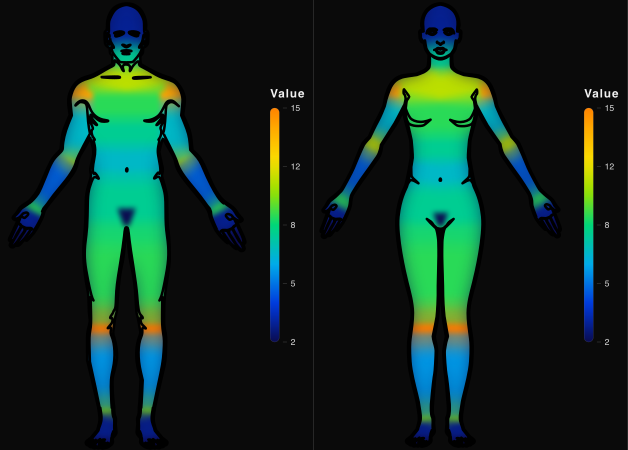
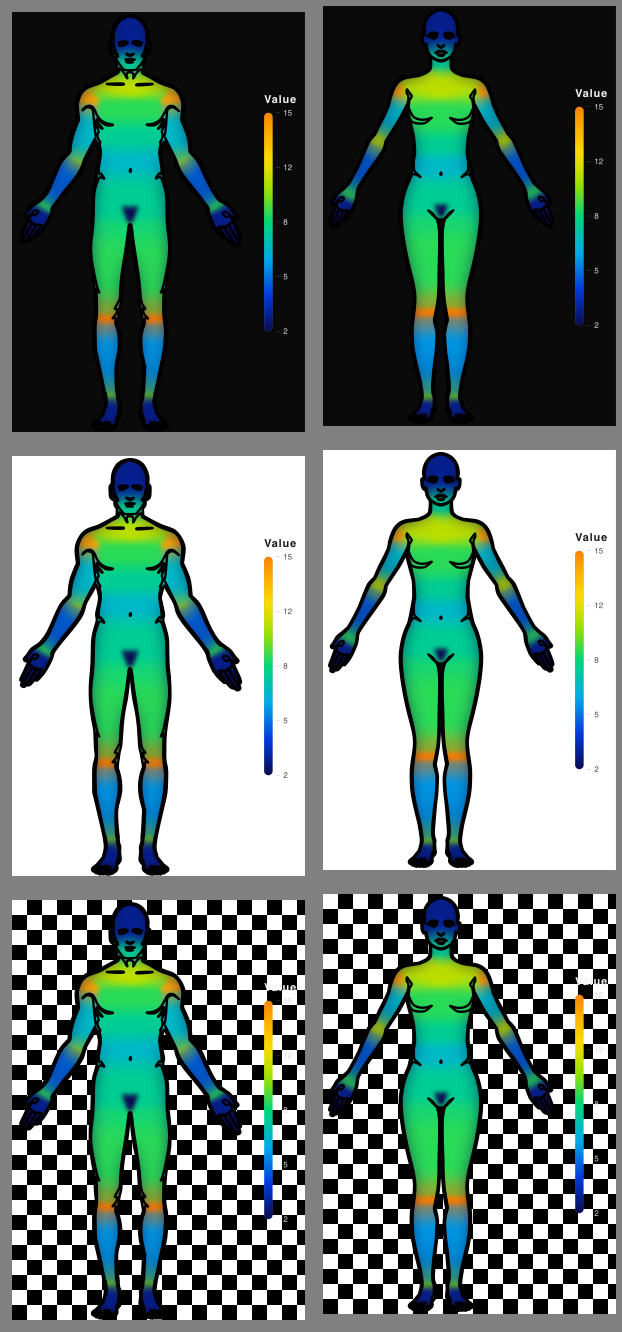
anatomapa is a Python library that generates anatomical heatmaps of the external human body surface: you feed it values per region (frequency, intensity or event density) and it returns the body colored, front and back views, male or female, with color proportional to each region's value. It fits any field that records the body region: venomous animal accidents, occupational trauma, sports injuries, forensics, burns and dermatology.
- Zero dependencies: Python stdlib only at the core; PNG/JPG is an optional extra.
- Deterministic: the same input always produces the exact same SVG.
- Bilingual: understands region names in Portuguese and English and writes labels in either.
Installation
pip install anatomapa
Requires Python 3.10+. For PNG/JPG/JPEG (raster output), install the optional extra, which brings cairosvg and Pillow. The quotes matter, zsh and fish treat brackets as a glob:
pip install "anatomapa[raster]"
Quick start
import anatomapa as am

fig = am.heatmap({"hand": 5153, "foot": 13666, "face": 845})
fig.save("map.svg")
Done: an SVG with hands, feet and face colored by value. The rest of this manual is optional.
Quick examples
import anatomapa as am
from anatomapa import Region

am.heatmap({
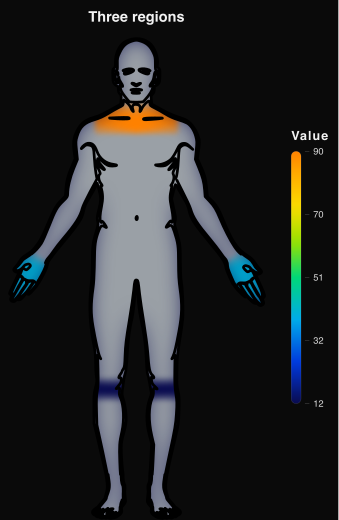
    Region.UPPER_CHEST: 90,
    Region.HAND: 40,
    Region.KNEE: 12,
}).save("map.svg")
A dict with three regions is enough. A region with no value comes out in neutral grey, meaning "no data", not "low value"; and a hand with no side suffix paints both hands.
am.heatmap(
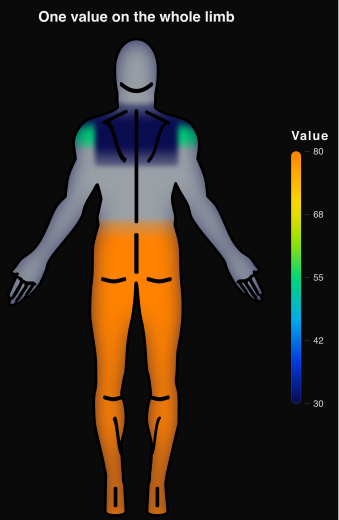
    {Region.LEG: 80, Region.UPPER_BACK: 30},
    view="posterior",
).save("map.svg")
leg is the whole lower limb: a single value flows down to buttocks, thigh, knee, lower
leg, ankle, foot and toes. Inheritance in action: send data at whatever level you have.
am.heatmap({
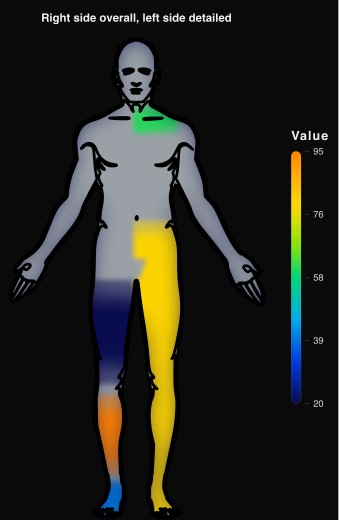
    Region.LEG_RIGHT: 80,        # whole right lower limb
    Region.THIGH_LEFT: 20,       # the left one, segment by segment
    Region.LOWER_LEG_LEFT: 95,
    Region.FOOT_LEFT: 40,
    Region.UPPER_CHEST_RIGHT: 60,
}).save("map.svg")
One side as a whole, the other in detail, in the same call. On the right everything comes out at 80; on the left only what was declared paints, and the toes inherit 40 from the foot, their closest ancestor. The left hip gets no value and stays unpainted: whoever details a side owns covering it all.
data = {
    Region.UPPER_BACK: 120,
    Region.LOWER_BACK: 340,
    Region.SHOULDER_LEFT: 90,
    Region.KNEE: 55,
}

fig = am.heatmap(data, view="both", body="female", title="Injuries by region")
fig.save("map.svg")
fig.save("map.png")  # the format comes from the extension
The figure is an object: build the data in a variable, render once and save to as many formats as you
want, with nothing recomputed (.png needs the raster extra). view="both" draws front and back sharing one scale and one legend.
# one row per region; you declare the columns, nothing is guessed
data = am.from_xlsx("injuries.xlsx", sheet="2024",
                    region_col="Region", value_col="Total", header=True)

# spreadsheet labels rarely match the ids, so the mapping is yours
mapping = {"HAND": Region.HAND, "FORE-ARM": Region.FOREARM, "LOWER LEG": Region.LOWER_LEG}

print(am.validate(data, region_map=mapping))  # check before drawing
am.heatmap(data, region_map=mapping).save("map.svg")
Resolution is strict, so case, accents, spaces and hyphens all count: that is what region_map is for.
validate() is a dry-run that draws nothing, so you can check the mapping before rendering. Mind the cut:
a spreadsheet with ARM and FORE-ARM on separate rows wants UPPER_ARM (the segment above the elbow),
not ARM, which is the whole limb; the same goes for LEG next to THIGH, which is LOWER_LEG.
heatmap() parameters
am.heatmap(values, view="anterior", body="male", lang="pt", format="svg",
           title=None, background="transparent", on_unknown="error",
           region_map=None, split=False)
| Parameter | Values | Default | What it does |
|---|---|---|---|
values |
dict {region: value} or (region, value) pairs |
required | Data; keys may be Region; accepts reader output directly |
view |
"anterior", "posterior", "both" |
"anterior" |
Front, back, or the two side by side sharing one legend |
body |
"male", "female" |
"male" |
Male or female body |
lang |
"pt", "en" |
"pt" |
Language of labels written in the SVG |
format |
"svg", "png", "jpg", "jpeg" |
"svg" |
Default when the saved path has no extension; png/jpg/jpeg need the raster extra |
title |
str or None |
None |
Optional: the title is only drawn when given |
background |
"dark", "light", "transparent" |
"transparent" |
Figure background |
on_unknown |
"error", "skip", "warn" |
"error" |
What to do with an unrecognized name |
region_map |
dict {your label: region id} |
None |
Your own name mapping; takes precedence |
split |
True, False |
False |
Only with view="both", otherwise ValueError: True returns the (front, back) pair of independent figures sharing the same color scale |
Returns a Figure object. An unknown region name raises ResolutionError
(the library's public exception). The palette is always the thermal one (cold blue to hot orange, thermal-camera look) and the scale always linear, no choice.
Background and title
background:"dark"(#0a0a0a),"light"(#ffffff) or"transparent"(default); legend colors adapt to the chosen background.title: bold, centered above the body; a long title shrinks its font to fit and the text is also kept as the SVG<title>. Withsplit=True, each figure gets the title.- Legend and thermal gradient: native, no parameter. The scale only counts values that actually paint (an aggregator fully covered by its children is left out), and tick labels gain decimal places whenever rounding to integers would repeat two of them.
Region names
Identification is strict: a label must be the exact region id or a key of your region_map; nothing
is guessed. An unknown name raises ResolutionError, listing what failed and suggesting the closest match. Control it with on_unknown: "error" (default), "skip" or "warn".
In code: the Region enum. from anatomapa import Region gives 94 constants: the 32 canonical ids
plus _LEFT/_RIGHT versions of the 31 bilateral ones. Each member is the id string itself (Region.HAND == "hand"), with autocomplete and typos becoming immediate errors.
Laterality. Every region is bilateral except genital, central. The id suffix picks the
side: Region.HAND_RIGHT paints only the right hand; without it, both sides. Sides follow the
observer's convention (left of the image), not the anatomical one; a side on a central region is an error.
Your spreadsheet names: region_map. You declare the correspondence once, in code; keys compare
exactly as written in the source, accents and case included. Full Excel example in the Quick examples.
Regions and hierarchy
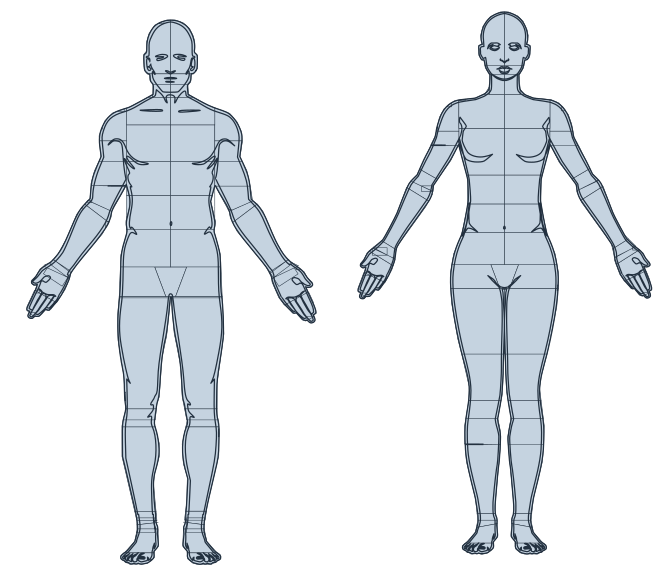
There are 32 regions in a tree up to 3 levels deep; the Inside of column shows each region's parent. A row with no mark under Front or Back is an aggregator: it draws nothing, and a value on it flows down to its children.
| Id | Region | Inside of | Front | Back |
|---|---|---|---|---|
head |
Head | root | ||
face |
Face | head |
✓ | |
skull |
Skull | head |
✓ | |
neck |
Neck | head |
✓ | ✓ |
trunk |
Trunk | root | ||
shoulder |
Shoulder | trunk |
✓ | ✓ |
chest |
Chest | trunk |
||
upper_chest |
Upper chest | chest |
✓ | |
lower_chest |
Lower chest | chest |
✓ | |
abdomen |
Abdomen | trunk |
||
upper_abdomen |
Upper abdomen | abdomen |
✓ | |
lower_abdomen |
Lower abdomen | abdomen |
✓ | |
back |
Back | trunk |
||
upper_back |
Upper back | back |
✓ | |
lower_back |
Lower back | back |
✓ | |
genital |
Genital region | trunk |
✓ | |
arm |
Upper limb | root | ||
upper_arm |
Upper arm | arm |
✓ | ✓ |
elbow |
Elbow | arm |
✓ | ✓ |
forearm |
Forearm | arm |
✓ | ✓ |
wrist |
Wrist | arm |
✓ | ✓ |
hand |
Hand | arm |
✓ | ✓ |
finger |
Fingers | hand |
✓ | ✓ |
leg |
Lower limb | root | ||
hip |
Hip | leg |
✓ | |
buttocks |
Buttocks | leg |
✓ | |
thigh |
Thigh | leg |
✓ | ✓ |
knee |
Knee | leg |
✓ | ✓ |
lower_leg |
Lower leg | leg |
✓ | ✓ |
ankle |
Ankle | leg |
✓ | ✓ |
foot |
Foot | leg |
✓ | ✓ |
toe |
Toes | foot |
✓ | ✓ |
Inheritance (rollup), side-aware. Send data at whatever level you have. To paint each region, the library walks up the tree and uses the first ancestor holding a value. Three rules:
- Walk up until a value is found, and stop at the first one.
- At each step, the explicit side beats the general key (
foot_leftbeforefoot). - A deeper region always beats a shallower ancestor: in
{"leg_left": 10, "foot": 2}, the left foot is 2, not 10.
The real forensic case, one side as a whole and the other in detail, is the third of the Quick examples.
Migrating from 0.3 (breaking changes). leg was the calf (now lower_leg) and arm was the segment
above the elbow (now upper_arm); today they are the whole limbs. Since 0.4.0 there is no runtime warning
anymore: old code runs silently while painting something else, so review your leg and arm usages before upgrading.
pelvis became hip and buttocks moved under leg, so a value on trunk no longer paints the buttocks; chest, abdomen and back remain valid, but became aggregators.
Regions with no data natively show in neutral grey (#9aa0a6), distinct from cold: "no data" never reads as "few cases". No parameter.
Data input
heatmap() accepts a dict or any iterable of (region, value) pairs, so every reader's output goes
in directly. In all of them you declare the columns; nothing is guessed.
from_dict(data): normalizes a{region: value}dict into pairs.from_csv(source, region_col, value_col, delimiter=","): CSV file or string.from_json(source, region_key, value_key): object{"hand": 10}or list[{"region": ..., "value": ...}].from_records(records, region_col, value_col): dicts, namedtuples, dataclasses and pandas DataFrames (duck typing).from_xlsx(source, sheet, region_col, value_col, header, aggregate): Excel.xlsxwith no external dependency; column by index, letter"D"or header name.aggregate="count"counts one row per case,"sum"sums andNone(default) expects one row per region. Full example in the Quick examples.
Output: the Figure object
| Usage | Result |
|---|---|
fig.save("map.svg") |
writes the file; the path extension (.svg, .png, .jpg) decides the format, fig.save(path, format="png") overrides it and, with no extension, the heatmap's format applies |
fig.to_svg() |
returns the SVG as a str |
fig.to_png() |
returns the PNG as bytes (requires anatomapa[raster]) |
fig.to_jpeg() |
returns the JPEG as bytes (requires anatomapa[raster]) |
str(fig) |
same as to_svg(), raw SVG (handy in templates) |
| Jupyter cell | renders inline automatically |
For raster output, install the extra pip install "anatomapa[raster]" (cairosvg and Pillow, imported
only on demand; the core stays zero-dep). Figures rasterise with the same thermal look as the SVG; without the extra, png/jpg/jpeg raises ImportError with the hint.
Utilities
validate(values, body="male", region_map=None) does the dry-run: shows what resolves and what does not, without rendering.
am.validate({"hand": 1, "haand": 2, "hand_right": 3})
# {'resolved': {'hand': 'hand', 'hand_right': 'hand_right'},
#  'unresolved': {'haand': {'reason': 'região desconhecida', 'suggestions': ['hand', 'head', 'hand_left']}}}
list_regions(lang="pt", body="male", view=None) lists the regions, each as {"id", "label", "bilateral", "parent", "views"}; view filters per view (aggregators, whose views is empty, always appear).
Gallery
License and attribution
Released under the MIT license. See LICENSE.
The SVG model silhouettes derive from a public-domain (CC0) source; details in
app/anatomapa/assets/ATTRIBUTION.txt.
Credits
- Pedro Rosa: developer/creator
- Marcelo Reis: Professor of the Graduate Program in Environmental Systems Analysis, CESMAC
- Mozart Melo: coordinator/advisor, CESMAC
- Centro Universitário CESMAC: institution
⭐ If anatomapa helped you, leave a star on the repo! ⭐
1 maintainer

Metadata
1 maintainer
Release files for anatomapa 0.4.4
For a detailed explanation of source distributions (sdists) and built distributions (wheels), please see the package formats documentation.
Source distribution (sdist)
| File | Size | Uploaded | |
|---|---|---|---|
| anatomapa-0.4.4.tar.gz | 104.1 kB | Details |
Built distribution (wheel)
| File | Interpreter | ABI | Platform | Reset |
|---|---|---|---|---|
| anatomapa-0.4.4-py3-none-any.whl | Python 3 | none | any | Details |
Total release size: 209.7 kB
Release files / anatomapa-0.4.4.tar.gz
| Download URL | anatomapa-0.4.4.tar.gz |
|---|---|
| Size | 104.1 kB |
| Tags | Source |
|
SHA-256 checksum How to use checksums |
5d67288dc6288597d91619101615120bc702edeb134b1ff321a645df725448a2
|
|
BLAKE2b-256 checksum How to use checksums |
f1764453ccba53373b4f0be214d7311253f263e7f75bc13d09c822fbad86b873
|
| Upload date | |
|
Uploaded using Trusted Publishing? What is trusted publishing? |
Yes |
| Uploaded via |
twine/7.0.0 CPython/3.13.14
|
Provenance
Provenance describes where a file came from. On PyPI, provenance is shared via attestations, which provide a verifiable record of the build or publishing details. View details, limitations and caveats.


PyPI Publish Attestation
PyPI verified that this artifact, at this checksum, originated from the publisher listed below.
Signed by GitHub Actions, verified by PyPI on Aug 19, 2026.
Transparency logRelease files / anatomapa-0.4.4-py3-none-any.whl
| Download URL | anatomapa-0.4.4-py3-none-any.whl |
|---|---|
| Size | 105.6 kB |
| Tags | Python 3 |
|
SHA-256 checksum How to use checksums |
3d93ba1b0a36693d922cd9afdd93e5187cd2a8ee116460d1f05b467ffe35449d
|
|
BLAKE2b-256 checksum How to use checksums |
c3570750892fd162a5aa077e5b086145e5f5c0284c5a803ff1039e3abd74164a
|
| Upload date | |
|
Uploaded using Trusted Publishing? What is trusted publishing? |
Yes |
| Uploaded via |
twine/7.0.0 CPython/3.13.14
|
Provenance
Provenance describes where a file came from. On PyPI, provenance is shared via attestations, which provide a verifiable record of the build or publishing details. View details, limitations and caveats.
PyPI Publish Attestation
PyPI verified that this artifact, at this checksum, originated from the publisher listed below.
Signed by GitHub Actions, verified by PyPI on Aug 19, 2026.
Transparency log













