

One command, Real results, Quality scored, Privacy audited.




What is Ant Studio?
Ant Studio is a CLI + Python SDK that solves AI problems in one command. Extract fields from 1000 PDFs. Forecast time-series. Detect anomalies. Ask questions about documents. Every command automatically includes quality scoring (78 metrics via llmevalkit) and privacy auditing (via AntGuard).
Not a framework. Not a platform. A tool like ffmpeg for media or curl for HTTP with built-in pipeline tracking that shows exactly what happened at every step.
pip install antstudio
antstudio doc extract ./invoices/ --fields vendor,amount,date --output results.csv
Table of Contents
- Quick Start
- How It Works
- LLM Providers
- Sales Forecasting and Visualization
- Document Intelligence
- Anomaly Detection
- Quality and Audit Reports
- Pipeline Tracking
- Pipeline Tracker UI
- Docker Compose
- Python SDK
- Input Sources and Output Destinations
- Responsible AI -- Always On
- All Commands
- Ant Intelligence Ecosystem
- Architecture
- Testing
- Roadmap
- License
Quick Start
pip install antstudio

# Extract from documents (PDF, DOCX, Excel, images, TXT)
antstudio doc extract ./invoices/ --fields vendor,amount --output results.csv

# Ask questions about documents
antstudio doc ask ./report.pdf "What is the total revenue?"

# Forecast time-series with chart output
antstudio ts forecast ./sales.csv --target revenue --horizon 30 --chart forecast.png

# Detect anomalies
antstudio ts anomaly ./sensors.csv --target temperature --method zscore
Every command auto-runs: Adaptive Intelligence (routing) + llmevalkit (quality) + AntGuard (privacy).
How It Works
Every command creates a tracked pipeline run with step-by-step execution, quality scoring, and privacy auditing:
$ antstudio doc extract ./invoices/ --fields vendor,amount --output results.csv

  Ant Studio v0.2.0 | DocQWise + llmevalkit + AntGuard

  [1/4] Scanning .................... 47 files found
  [2/4] Extracting .................. 47/47 complete
  [3/4] Quality (llmevalkit) ........ 44 passed, 3 flagged
  [4/4] Privacy (AntGuard) .......... data_left: NO | risk: LOW

  Results saved: results.csv (47 rows)
  Report (quality): results_quality.json
  Report (audit): results_audit.json
Every run saves the data output plus quality and audit reports as JSON files alongside it.
LLM Providers
Ant Studio works with any LLM provider. Local models, cloud APIs, or both. Use the provider/model format:
Ollama (local, zero config)
# Auto-detects running Ollama instance
antstudio doc ask ./report.pdf "What is the revenue?"

# Explicit model
antstudio doc ask ./report.pdf "What is the revenue?" --model ollama/llama3.2
antstudio doc ask ./report.pdf "What is the revenue?" --model ollama/mistral
antstudio doc ask ./report.pdf "What is the revenue?" --model ollama/phi3
People download Ollama, pull a model, and it works. No API key, no config, no cloud.
OpenAI
export OPENAI_API_KEY=sk-...
antstudio doc ask ./report.pdf "What is the revenue?" --model openai/gpt-4o
antstudio doc ask ./report.pdf "What is the revenue?" --model openai/gpt-4o-mini
Azure OpenAI
export AZURE_API_KEY=...
export AZURE_API_BASE=https://your-resource.openai.azure.com/
antstudio doc ask ./report.pdf "What is the revenue?" --model azure/gpt-4o
Anthropic
export ANTHROPIC_API_KEY=sk-ant-...
antstudio doc ask ./report.pdf "What is the revenue?" --model anthropic/claude-sonnet-4-20250514
HuggingFace
export HUGGINGFACE_API_KEY=hf_...
antstudio doc ask ./report.pdf "What is the revenue?" --model huggingface/mistralai/Mistral-7B-v0.1
Groq / Mistral / DeepSeek / Together AI
export GROQ_API_KEY=...
antstudio doc ask ./report.pdf "What is the revenue?" --model groq/llama-3.1-70b

export MISTRAL_API_KEY=...
antstudio doc ask ./report.pdf "What is the revenue?" --model mistral/mistral-large-latest

export DEEPSEEK_API_KEY=...
antstudio doc ask ./report.pdf "What is the revenue?" --model deepseek/deepseek-chat

export TOGETHER_API_KEY=...
antstudio doc ask ./report.pdf "What is the revenue?" --model together_ai/meta-llama/Llama-3-70b
Local GGUF models (no internet)
# Download any GGUF model and point to it
antstudio doc ask ./report.pdf "What is the revenue?" --model local:/path/to/model.gguf
Requires pip install antstudio[local] for llama-cpp-python.
Python SDK
from antstudio.llm.engine import LLMEngine

# Auto-detect (Ollama first, then env API keys)
engine = LLMEngine()

# Specific providers
engine = LLMEngine(model="ollama/llama3.2")
engine = LLMEngine(model="openai/gpt-4o")
engine = LLMEngine(model="azure/gpt-4o", api_base="https://xxx.openai.azure.com/")
engine = LLMEngine(model="anthropic/claude-sonnet-4-20250514")
engine = LLMEngine(provider="local", model_path="/path/to/model.gguf")

response = engine.ask("What is the revenue?", system="You are a document analyst.")
print(engine.info())        # provider, model, config
print(engine.list_models()) # available models
Installation extras
pip install antstudio              # Core (Ollama only, zero deps)
pip install antstudio[llm]         # + LiteLLM (100+ cloud providers)
pip install antstudio[local]       # + llama-cpp-python (local GGUF)
pip install antstudio[full]        # Everything
Auto-detection priority
- Ollama running locally? Use it.
- API key in environment? Use that provider.
- No config? Ollama fallback with helpful error message.
Check available models
antstudio models
antstudio status
Sales Forecasting and Visualization
Ant Studio generates production-grade forecast charts that clearly communicate predictions to stakeholders. The chart output includes historical data, forecast line, 95% confidence interval, and summary statistics.
CLI
antstudio ts forecast ./sales.csv --target revenue --horizon 30 --chart forecast.png
Python SDK
from antstudio.ts.forecast import run as forecast

result = forecast("./sales.csv", target="revenue", horizon=30)
result.save_chart("forecast.png", title="Q4 Revenue Forecast")
What the chart shows
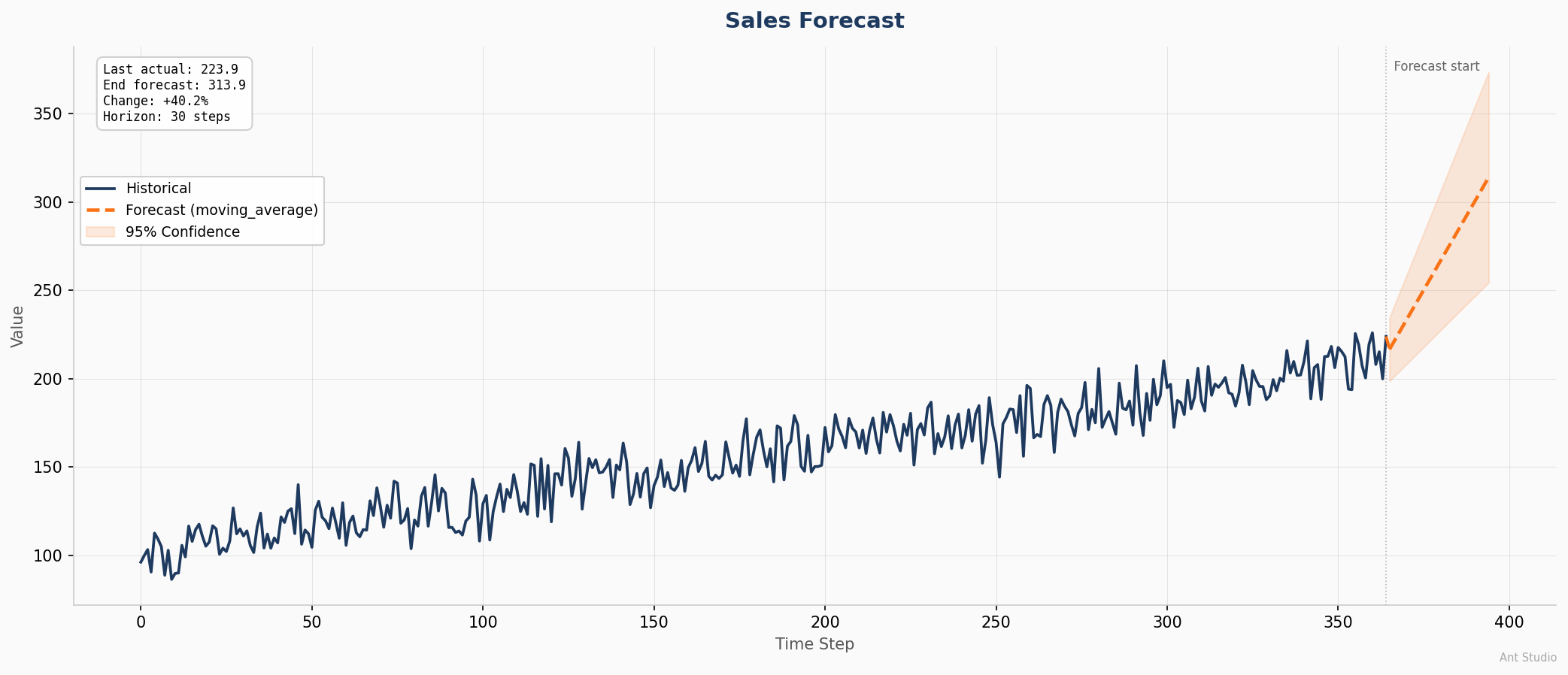
The forecast visualization includes:
- Historical data (solid navy line): the full input time-series so viewers see the trend context
- Forecast predictions (dashed orange line): the model's projected values beyond the last observation
- 95% confidence interval (shaded band): uncertainty grows over the forecast horizon, giving stakeholders a realistic range rather than a single misleading line
- Summary statistics box: last actual value, end-of-forecast value, percentage change, and horizon length at a glance
- Forecast start marker: a vertical dotted line separates observed data from predictions
The chart auto-saves alongside CSV output. When you run --output results.csv, the chart is saved as results_forecast.png in the same directory unless you specify --chart separately.
Customization
result = forecast("./data.csv", target="sales", horizon=14)

# Custom title
result.save_chart("output.png", title="Weekly Sales Projection")

# Without confidence band
result.save_chart("output.png", show_confidence=False)

# Access raw predictions
print(result.predictions)     # [213.4, 215.1, ...]
print(result.model_used)      # "moving_average" or WavQWise model name
print(result.quality)         # llmevalkit scores
Document Intelligence
Field Extraction
Extract structured data from any document type: PDF, DOCX, Excel, images (OCR), and plain text:
antstudio doc extract ./invoices/ --fields vendor,amount,date,invoice_number --output results.csv
Supports batch processing of 1000+ files with recursive directory scanning, automatic file-type routing, and confidence scoring per extraction.
Document Q&A
Ask natural-language questions about documents with automatic RAG mode selection:
antstudio doc ask ./report.pdf "What are the payment terms?"
antstudio doc ask ./contracts/ "Which vendor has the highest liability?"
RAG modes: simple (single document), graph (multi-document entity linking), auto (Adaptive Intelligence picks the best mode).
Anomaly Detection
Detect anomalies in time-series data with Z-score or model-based methods:
antstudio ts anomaly ./sensors.csv --target temperature --method zscore --threshold 2.0 --output anomalies.csv
Output includes index, value, anomaly score, and severity level (medium / high / critical).
Quality and Audit Reports
Every pipeline run automatically saves quality and audit reports as JSON files alongside the output. No extra flags needed.
What gets generated
antstudio ts forecast ./sales.csv --target revenue --horizon 30 --output output/forecast.csv

# Output directory:
output/
  forecast.csv              # pipeline output
  forecast_forecast.png     # visualization chart
  forecast_quality.json     # llmevalkit quality scores
  forecast_audit.json       # antguard privacy audit
Quality report (llmevalkit)
{
  "report_type": "quality",
  "generator": "llmevalkit",
  "pipeline": "Forecast: ./sales.csv",
  "run_id": "a1b2c3d4",
  "summary": {
    "total_steps": 1,
    "passed": 1,
    "failed": 0,
    "average_score": 0.87,
    "all_passed": true
  },
  "steps": {
    "forecast": {
      "score": 0.87,
      "passed": true,
      "method": "llmevalkit"
    }
  }
}
Audit report (AntGuard)
{
  "report_type": "audit",
  "generator": "antguard",
  "pipeline": "Forecast: ./sales.csv",
  "run_id": "a1b2c3d4",
  "command": "ts forecast ./sales.csv",
  "duration_seconds": 3.1,
  "privacy": {
    "data_left_system": false,
    "risk_level": "LOW",
    "antguard_active": true,
    "verdict": "PASS"
  }
}
Use cases
- Compliance: attach
_audit.jsonto prove data never left the system - Debugging: check
_quality.jsonto find which steps scored low - CI/CD: parse JSON in your pipeline to gate deployments on quality thresholds
- Client handoffs: ship reports alongside results as proof of quality
Reports are plain JSON. Parse them, pipe them, integrate them however you want.
Pipeline Tracking
Every command creates a tracked pipeline run, stored locally at ~/.antstudio/runs/. This is tracking without the Kubernetes overhead.
# List all past runs
antstudio runs

  ID         Pipeline                                 Steps        Status     Time
  ---------- ---------------------------------------- ------------ ---------- --------
  a1b2c3d4   Document Extraction: ./invoices/         4/4 passed   success    12.3s
  e5f6g7h8   Forecast: ./sales.csv                    3/3 passed   success    3.1s

# Show detailed step-by-step view
antstudio run-detail a1b2c3d4
Each run records: step name, node type, status, duration, inputs, outputs, quality scores, error messages, and logs. Runs persist as JSON and can be queried programmatically.
Pipeline Tracker UI
Ant Studio includes a web-based pipeline tracker that provides a flow visualization of your pipeline runs. This is a flow pipeline UI, it shows the execution graph, step status, logs, and run history in a browser.
Running the tracker
With Docker Compose (recommended):
docker compose up tracker
# Open http://localhost:8501
Standalone:
pip install flask
cd tracker && python app.py
# Open http://localhost:8501
What the tracker shows
- Runs list: all pipeline runs with status, step count, duration, and timestamp
- Flow graph: node-and-connector visualization of each pipeline. Each step is a node with status indicator (green check / red X), duration, and quality score
- Step logs: timestamped log entries for every step
- Run summary: run ID, total duration, pass/fail counts, connection topology
- Execution history: command-level history with quality PASS/FAIL and privacy LOCAL/ALERT badges
Docker
Ant Studio ships with Docker Compose for reproducible environments. The compose stack includes Ant Studio CLI, Ollama (local LLM), and the Pipeline Tracker UI.
Quick start
# Build and run everything
docker compose up -d

# Run a forecast
docker compose exec antstudio antstudio ts forecast /data/samples/daily_sales.csv \
  --target value --horizon 30 --chart /output/forecast.png

# Extract from documents
docker compose exec antstudio antstudio doc extract /data/my_invoices/ \
  --fields vendor,amount --output /output/results.csv

# Open the tracker UI at http://localhost:8501

# Stop everything
docker compose down
Services
| Service | Port | Description |
|---|---|---|
antstudio |
-- | CLI container with all dependencies |
ollama |
11434 | Local LLM server for document Q&A |
tracker |
8501 | Pipeline tracking web UI |
Volumes
| Volume | Purpose |
|---|---|
./data |
Input data (mount your files here) |
./output |
Generated outputs (CSVs, charts, reports) |
antstudio-runs |
Pipeline run history (persists across restarts) |
ollama-models |
Downloaded Ollama models |
Build just the CLI
docker build -t antstudio .
docker run -v $(pwd)/data:/data -v $(pwd)/output:/output antstudio ts forecast /data/sales.csv --target revenue --horizon 14
Python SDK
Same engine, in code:
from antstudio.doc.extract import run as extract
from antstudio.doc.ask import run as ask
from antstudio.ts.forecast import run as forecast
from antstudio.ts.anomaly import run as detect
from antstudio.llm.engine import LLMEngine

# LLM engine — use any provider
engine = LLMEngine(model="ollama/llama3.2")         # local
engine = LLMEngine(model="openai/gpt-4o")           # cloud
engine = LLMEngine(model="azure/gpt-4o")            # enterprise
engine = LLMEngine(provider="local", model_path="/path/to/model.gguf")  # offline GGUF

# Extract from folder of any file type
# Auto-saves: output.csv + output_quality.json + output_audit.json
results = extract("./invoices/", fields=["vendor", "amount", "date"], output="output.csv")
print(results.quality)     # llmevalkit scores
print(results.audit)       # AntGuard report

# Forecast with chart
# Auto-saves: forecast.csv + forecast_forecast.png + forecast_quality.json + forecast_audit.json
fc = forecast("./sales.csv", target="revenue", horizon=30, output="forecast.csv")
fc.save_chart("chart.png", title="Revenue Forecast", show_confidence=True)
print(fc.predictions)      # [213.4, 215.1, ...]
print(fc.model_used)        # model name

# Anomaly detection
# Auto-saves: anomalies.csv + anomalies_quality.json + anomalies_audit.json
anom = detect("./sensors.csv", target="temperature", method="zscore", output="anomalies.csv")
print(anom.items)           # [{"index": 42, "value": 98.5, "score": 3.2, "severity": "high"}, ...]

# Document Q&A with any model
answer = ask("./report.pdf", "What are the payment terms?", model="openai/gpt-4o")
print(answer.text, answer.confidence)
Input Sources and Output Destinations
Inputs
# Local file (PDF, DOCX, Excel, CSV, TXT, images)
antstudio doc extract ./invoice.pdf

# Local folder (batch 1000+ files, recursive)
antstudio doc extract ./invoices/

# Specific file types from folder
antstudio doc extract ./mixed_docs/ --extensions .pdf,.docx,.xlsx,.png

# Network drive / NAS
antstudio doc extract /mnt/nas/documents/

# Database
antstudio doc extract --db "postgresql://user:pass@host/db" --query "SELECT * FROM docs"

# URL
antstudio doc extract --url "https://example.com/report.pdf"
Supported file types: PDF, DOCX, XLSX/XLS, CSV, TXT, MD, JSON, XML, HTML, PNG, JPG, JPEG, BMP, TIFF (images via OCR)
Outputs
# CSV, Excel, JSON
antstudio doc extract ./invoices/ --output results.csv
antstudio doc extract ./invoices/ --output results.xlsx
antstudio doc extract ./invoices/ --output results.json

# Database
antstudio doc extract ./invoices/ --output-db "postgresql://user:pass@host/db" --table extracted
Responsible AI -- Always On
Three pillars run on every command. Never configured. Never skipped.
| Pillar | Library | What It Does |
|---|---|---|
| Routing | Adaptive Intelligence | Auto-detects file type, routes to correct pipeline |
| Quality | llmevalkit (78 metrics) | Scores every output. Flags low confidence. |
| Privacy | AntGuard | Monitors file/network. Proves data stayed local. |
Every command output includes quality and privacy status:
Quality: 44 passed, 3 flagged
Privacy: data_left: NO | risk: LOW
All Commands
# Document Intelligence
antstudio doc extract <source> [options]    # Extract fields from documents
antstudio doc ask <source> "question"       # Ask questions about documents

# Temporal Intelligence
antstudio ts forecast <source> [options]    # Forecast time-series (with chart output)
antstudio ts anomaly <source> [options]     # Detect anomalies

# Pipeline Tracking
antstudio runs                              # List all pipeline runs
antstudio run-detail <run_id>               # Detailed step-by-step view
antstudio history                           # Execution history with quality scores

# System
antstudio models                            # List all available models (Ollama + configured API providers)
antstudio status                            # Library + system status
Ant Intelligence Ecosystem
Ant Studio is the unified interface to the Ant Intelligence Ecosystem -- seven libraries that each solve one domain:
| Library | Domain | Tagline | PyPI |
|---|---|---|---|
| DocQWise | Documents | Read. Extract. Retrieve. |  |
| WavQWise | Temporal | Sense. Forecast. Alert. |  |
| SightRAG | Vision | See. Search. Retrieve. |  |
| SonarWise | Audio | Hear. Search. Retrieve. |  |
| Adaptive Intelligence | Routing | Learn. Remember. Adapt. |  |
| llmevalkit | Quality | Evaluate. Score. Improve. |  |
| AntGuard | Privacy | Guard. Detect. Protect. |  |
Architecture
antstudio/
  __init__.py          # Package entry
  cli.py               # Click CLI (doc, ts, runs, status)
  pipeline.py          # step tracking + JSON persistence
  backbone/
    __init__.py         # Backbone -- auto quality + privacy on every command
  doc/
    __init__.py
    extract.py          # Document field extraction (DocQWise + regex fallback)
    ask.py              # Document Q&A with RAG modes (simple, graph, auto)
    loader.py           # Universal file loader (PDF, DOCX, Excel, images, TXT)
  ts/
    __init__.py
    forecast.py         # Time-series forecasting with visualization
    anomaly.py          # Anomaly detection (Z-score + WavQWise)
  io/
    __init__.py
    reader.py           # Universal input (file, folder, DB, URL)
    writer.py           # Universal output (CSV, Excel, JSON, DB, webhook)
  llm/
    __init__.py
    engine.py           # Universal LLM engine (Ollama, OpenAI, Azure, Anthropic, HuggingFace, Groq, local GGUF)
    ollama.py           # Backward-compatible wrapper
  reports.py            # Quality + audit report generator (JSON)

tracker/
  app.py               # Flask API for pipeline tracking UI
  static/
    index.html          #  flow visualization

data/
  samples/             # Sample datasets for testing

docker-compose.yml     # Full stack: CLI + Ollama + Tracker UI
Dockerfile             # CLI container
Dockerfile.tracker     # Tracker UI container
Testing
pip install pytest
python -m pytest tests/ -v
Test coverage includes document extraction (single file, folder, CSV output), time-series forecasting, anomaly detection, backbone auto-audit, results export, and Ollama integration.
Roadmap
v0.2.x -- Current
- CLI with doc extract, doc ask, ts forecast, ts anomaly
- Pipeline tracking with step visualization
- Production-grade forecast chart output (historical + forecast + confidence interval)
- Backbone: auto quality scoring + privacy auditing on every command
- Docker Compose (CLI + Ollama + Tracker UI)
- Pipeline Tracker web UI with flow graph and run history
- Multi-provider LLM engine (Ollama, OpenAI, Azure, Anthropic, HuggingFace, Groq, Mistral, DeepSeek, local GGUF)
- Quality + audit reports saved as JSON alongside every pipeline output
- Local GGUF model support via llama-cpp-python
v0.3.x -- Next
- SDK hardening -- wire real DocQWise, WavQWise, llmevalkit, AntGuard imports
- Prompt-to-pipeline -- user types a sentence, LLM generates workflow JSON, pipeline runs
- Flask to FastAPI migration for tracker + unified backend
- SightRAG integration for visual document understanding (OCR + layout)
- SonarWise integration for audio pipeline (transcription + retrieval)
- Anomaly detection chart output (highlight anomalies on time-series plot)
- Multi-model forecasting comparison (run multiple models, pick best)
v0.4.x -- Future
- Drag-and-drop canvas (React Flow visual pipeline builder)
- Pipeline Tracker: real-time WebSocket updates during execution
- Pipeline Tracker: parallel branch visualization for multi-path pipelines
- Cloud output adapters (S3, Azure Blob, GCS, webhooks)
- Scheduled pipeline runs (cron-style recurring execution)
- Pipeline templates (reusable pipeline definitions as YAML)
- Ant Studio Server mode (REST API for remote execution)
- Export pipeline runs to MLflow / W&B format
License
Apache 2.0

Venkatkumar Rajan: One ecosystem. Limitless possibilities.
1 maintainer

Metadata
1 maintainer
Release files for antstudio 0.2.0
For a detailed explanation of source distributions (sdists) and built distributions (wheels), please see the package formats documentation.
Source distribution (sdist)
| File | Size | Uploaded | Provenance | |
|---|---|---|---|---|
| antstudio-0.2.0.tar.gz | 44.1 kB | Without provenance | Details |
Built distribution (wheel)
| File | Interpreter | ABI | Platform | Reset |
|---|---|---|---|---|
| antstudio-0.2.0-py3-none-any.whl | Python 3 | none | any | Details |
Total release size: 83.2 kB
Release files / antstudio-0.2.0.tar.gz
| Download URL | antstudio-0.2.0.tar.gz |
|---|---|
| Size | 44.1 kB |
| Tags | Source |
|
SHA-256 checksum How to use checksums |
2108bf98131080c0a455de74b3fdfea57d58c0b829798d8b7ba02f04224b1636
|
|
BLAKE2b-256 checksum How to use checksums |
22e354bc511235bb6f89a33aee72e7b29c0284d9ff4f81bd445aef7e366e3f78
|
| Upload date | |
|
Uploaded using Trusted Publishing? What is trusted publishing? |
No |
| Uploaded via |
twine/7.0.0 CPython/3.12.0
|
Release files / antstudio-0.2.0-py3-none-any.whl
| Download URL | antstudio-0.2.0-py3-none-any.whl |
|---|---|
| Size | 39.1 kB |
| Tags | Python 3 |
|
SHA-256 checksum How to use checksums |
cdb0e8c8e5323f59fce78fab5e3ec05da59bcf951ed82baa598cd84065617093
|
|
BLAKE2b-256 checksum How to use checksums |
ad5c48dbf56fd3f69cf8e5a9e602d9a1fda47292ef9f1f520ef0f4b1f7a8f01c
|
| Upload date | |
|
Uploaded using Trusted Publishing? What is trusted publishing? |
No |
| Uploaded via |
twine/7.0.0 CPython/3.12.0
|
Security for antstudio 0.2.0
Provenance
Provenance describes where a file came from. On PyPI, provenance is shared via attestations, which provide a verifiable record of the build or publishing details. View details, limitations and caveats.
No provenance found
None of the files in this release were uploaded with provenance metadata.
A note on package security
PyPI is a repository for distributing packages, not a service for auditing them. While third-party security researchers and our staff do their best to detect and remove malicious packages, PyPI cannot guarantee the quality, security or suitability of any given package.














