














App Mesh
One secure daemon to run, schedule, and remote-control apps across machines.
App Mesh is a lightweight, cross-platform daemon that secures access with OAuth, offers official APIs and SDKs, and automates operations with built-in workflow engine and LLM Agent.
Use App Mesh to:
- Operate services — manage long-running processes like systemd does, plus health checks, cgroup limits, Docker apps, multi-tenancy, and a Web GUI.
- Execute remotely — run commands, scripts, or in-memory tasks on any node via CLI, REST, or SDK.
- Power AI agents — provide sandboxed build-and-run environments for AI coding assistants, MCP servers, and LLM agent runtimes.
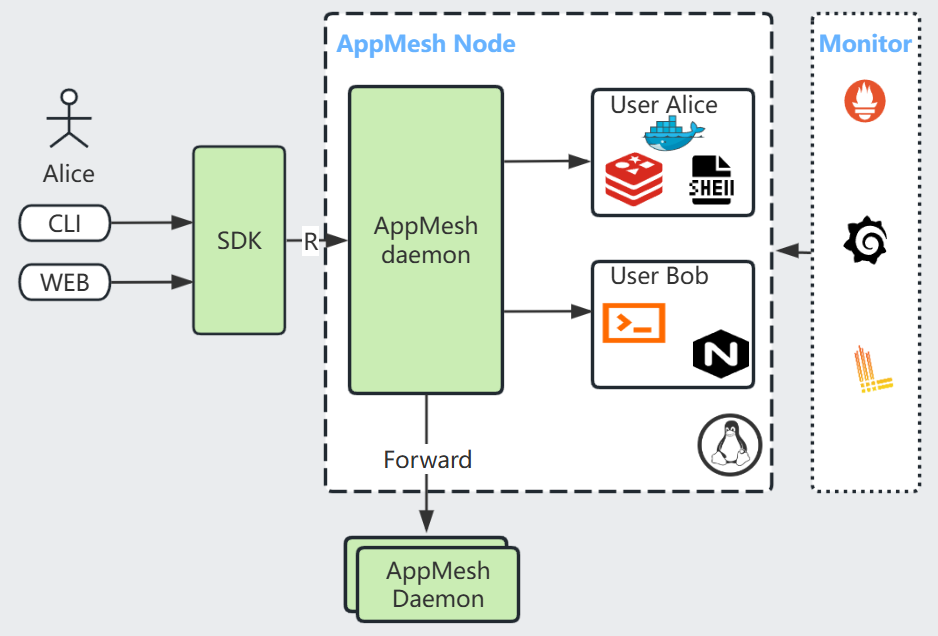
⚡ Quick Start
Start the daemon in Docker:
docker run -d -p 6060:6060 --restart=always --name=appmesh --net=host -v /var/run/docker.sock:/var/run/docker.sock laoshanxi/appmesh:latest
Manage applications with the appm CLI — sign in first with appm logon.
# Sign in once (non-interactive)
$ sudo /opt/appmesh/script/appmesh-auth.sh print-initial-password | script -qc "appm logon -u admin@appmesh.local" /dev/null

# List registered applications
$ appm ls
ID  NAME    OWNER           STATUS    HEALTH  PID  USER  MEMORY    %CPU  RETURN  AGE  DURATION  STARTS  COMMAND
1   py-exec system  disabled  -       -    -     -         -     -       37s  -         0       "python3 ../../bin/py_exec.py"
2   ping    system  enabled   OK      747  root  5.9 MiB   0     -       37s  37s       1       "ping cloudflare.com"
3   py-task system  enabled   OK      748  root  29.7 MiB  0     -       37s  37s       1       "python3 ../../bin/py_task.py"

# Register a new application
$ appm add -a myapp -c "ping www.baidu.com"

# View its live output
$ appm ls -a myapp -o
PING www.baidu.com (183.2.172.17) 56(84) bytes of data.
64 bytes from 183.2.172.17 (183.2.172.17): icmp_seq=1 ttl=52 time=34.9 ms

# appm -h for more usage
Send tasks to a running application and get responses back through the SDK:
import os
from appmesh import AppMeshClient
client = AppMeshClient(bearer_token=os.environ["APPMESH_BEARER_TOKEN"])

result_from_server = "0"
for i in range(10):
    task_data = f"print({result_from_server} + {i}, end='')"
    result_from_server = client.run_task(app_name="py-task", data=task_data)
    print(result_from_server)
For native packages (.deb/.rpm), systemd setup, and cluster initialization, see the Installation Guide and the Dockerfile.
🚀 Core Capabilities
| Capability | What you get |
|---|---|
| Application management | Full remote CRUD and control — cgroup limits, OS user, environment variables, Docker apps, stdin/stdout — with monitoring of start counts, exit codes, errors, and health checks |
| Scheduling | Long- and short-running apps, periodic jobs, cron expressions, custom timings, and policy-driven start/exit behaviors |
| Remote execution | Run commands and scripts on any node; send in-memory tasks to running applications for high-performance computing |
| Workflow engine | GitHub-Actions-style YAML pipelines with DAG scheduling, running natively on App Mesh |
| Security | OAuth/OIDC bearer authentication (RFC 6750) with Principal-based RBAC and multi-tenant isolation; SSL/TLS on TCP/HTTP/WebSocket; HMAC-PSK internal verification |
| Observability | Built-in Prometheus exporter, Grafana datasource, Loki integration, host/app resource metrics |
| Extras | File upload/download API, remote shell execution, hot config reload, bash completion |
Runs on Linux, macOS, and Windows (x86 and ARM).
🤖 AI & LLM Integration
App Mesh's secure remote-execution core makes it a natural runtime for AI workloads:
- Remote sandbox for AI coding assistants — give agents an isolated build-and-run environment instead of your local shell.
- MCP server — manage App Mesh from AI clients over Model Context Protocol (Streamable HTTP with OAuth 2.1, RBAC enforced by the daemon).
- LLM agent runtime — host Claude-Agent-SDK-based agents as managed App Mesh applications; see the architecture design (SOP).
- Remote execution skill for Codex and Claude Code, and MQTT bridge for IoT scenarios.
🔄 Workflow Pipeline
Define CI/CD pipelines as YAML — similar to GitHub Actions, but running natively on App Mesh with the built-in Workflow Engine:
- DAG scheduling — jobs run in dependency order, independent jobs in parallel
- 4 step types — shell commands, existing Apps, Task API messages, sub-workflows
- Error handling — retry with exponential backoff,
continue-on-error,finallycleanup blocks - Expressions —
${{ inputs.env }},${{ steps.build.stdout }},success(),failure(),always() - Remote execution — target specific nodes by label or hostname
appm workflow add -f pipeline.yaml        # register
appm workflow run pipeline -e env=prod -f # run and follow output
appm workflow runs pipeline               # view history
🧰 Interfaces & SDKs
| Interface | Details |
|---|---|
| CLI | appm command reference |
| REST | REST APIs · OpenAPI spec |
| Web GUI | app-mesh-ui |
| SDKs | Python · Golang · Rust · Java · JavaScript · C++ |
💡 Success Stories
AI & automation
- Remote build-and-run sandbox for AI coding assistants
- LLM agent runtime hosted as an App Mesh app · architecture and workflow design (SOP)
- Manage App Mesh from AI clients via MCP (HTTP + OAuth)
Remote computing
- In-memory remote task execution
- Remote command and Python script execution
- Parallel task execution with the Python SDK
Operations & observability
- Observability stack with Grafana, Prometheus, and Loki
- Customize application startup and exit behavior
- Promote a native application into a managed microservice
- Secure REST-based file server
Platform & Kubernetes
- Run non-container applications on Kubernetes
- Kubernetes local-PV provisioning via Open Service Broker
🆚 Comparison
| Feature | App Mesh | Supervisor | crontab |
|---|---|---|---|
| Schedule accuracy | Seconds | Seconds | Minutes |
| Language | C++17 | Python | C |
| Web GUI | √ | √ | |
| Command lines | √ | √ | √ |
| SDK | √ | ||
| Cron schedule expression | √ | √ | |
| Manage docker app | √ | ||
| Session login | √ | ||
| Manage stdout/stderr | √ | √ | |
| Health check | √ | ||
| Authentication | √ | √ | |
| Multi-tenant | √ | √ |
📚 Documentation
- Read the Docs — full documentation
- Installation Guide
- Security
- Workflow Guide
🔗 Library dependencies
Community & License
Questions and discussions are welcome on Gitter. Licensed under the MIT License.
1 maintainer

Release files for appmesh 3.0.2
For a detailed explanation of source distributions (sdists) and built distributions (wheels), please see the package formats documentation.
Built distribution (wheel)
| File | Interpreter | ABI | Platform | Reset |
|---|---|---|---|---|
| appmesh-3.0.2-py3-none-any.whl | Python 3 | none | any | Details |
Release files / appmesh-3.0.2-py3-none-any.whl
| Download URL | appmesh-3.0.2-py3-none-any.whl |
|---|---|
| Size | 59.4 kB |
| Tags | Python 3 |
|
SHA-256 checksum How to use checksums |
0c7409b1244719e7c4fcc73b7dcd971e208a7e2141c2f94b8ea387d04bee62ca
|
|
BLAKE2b-256 checksum How to use checksums |
cec2ba7560ed725a6eb1453fe8c096b10733416a63b5236634d8dbd22476a0e6
|
| Upload date | |
|
Uploaded using Trusted Publishing? What is trusted publishing? |
No |
| Uploaded via |
twine/6.1.0 CPython/3.13.14
|














