
ascii2svg
Your text diagrams, drawn properly. Every character stays exactly where you put it.
Live demo · Scroll demo · Download the Claude skill
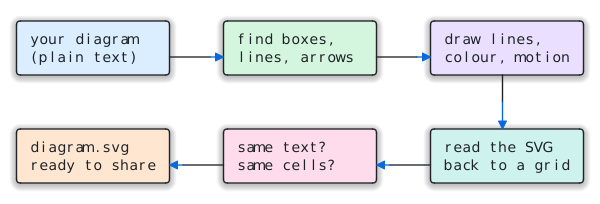
You sketch a diagram in plain text, in a README, a code comment, a chat with an AI, or a notes app. It looks right in a monospace font and falls apart everywhere else: Slack, email, Confluence, slides, a phone.
ascii2svg turns it into a crisp SVG that draws itself, follows your reader's light or dark
mode, and shows data moving along the arrows. It is still 1:1: every run reads its
own SVG back and checks it against your text, cell by cell. If anything moved, it tells you.
Type this…
+------------+     +------------+     +------------+     +-------------+
|    Idea    |---->|   Draft    |---->|   Review   |---->|   Publish   |
+------------+     +------------+     +-----+------+     +-------------+
                         ^                  |
                         |                  |
                         +------------------+
                           needs changes
…get this
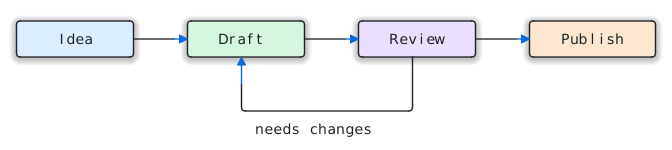
python3 scripts/ascii2svg.py workflow.txt -o workflow.svg --color --theme auto --animate
Plain + - | became real lines, v ^ < > became arrowheads, and the words stayed words.
It works just as well with Unicode box characters (┌─┐ │ └─┘ ╭╮ ═║ ▶).
Who it's for
If you don't write code: ask Claude. With this repo installed as a skill, say "turn this diagram into an image for my slides" or "make this look nice for our wiki", and it picks the options for where the diagram is going, checks the result, and hands you the file. Nothing to learn.
If you do: it's one Python file with no dependencies. It reads a file, stdin, or --text, and
writes an SVG plus a JSON report that an agent or a CI job can check (exit_code, roundtrip, warnings).
It never guesses: a character it isn't sure about stays text.
Pick a look
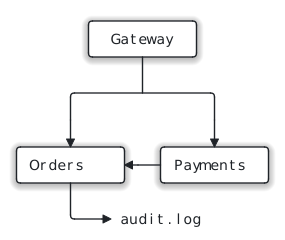
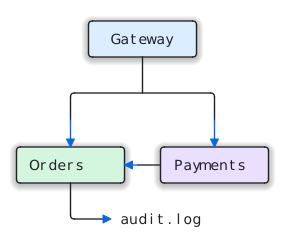
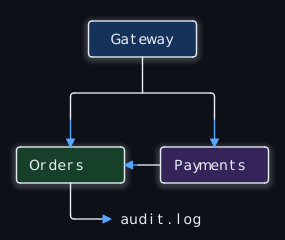
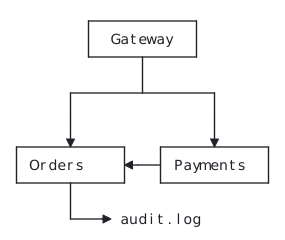
Same diagram, same guarantee, five ways:
| Default | Colour | Dark | Alive | |
|---|---|---|---|---|
 |
 |
 |
 |
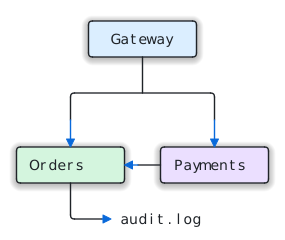 |
| (no options) | --color |
--theme dark--color |
--style flat--square |
--animate--color--theme auto |
| Option | What it does |
|---|---|
--color |
Soft tints grouped by what contains what: each top-level group gets its own hue, nested boxes keep it. Arrows turn accent blue. |
--theme light|dark|auto |
auto follows the reader's system light/dark setting, which suits GitHub READMEs and docs sites. |
--animate draw |
The diagram draws itself once, top to bottom: lines are sketched in accent blue and settle to ink, boxes fade in, arrowheads pop. |
--animate flow (or bare --animate) |
draw, then glowing pulses keep travelling along every connector toward its arrowhead, so readers can see where things go. |
--animate scroll |
For tall diagrams, as a web page: each part appears as the reader scrolls to it, and long connectors grow downward with the scroll. See below. |
-o page.html (or --html) |
A standalone web page with the diagram inline. Double-click to open, or email it. |
--style glow|shadow|flat |
Depth under the boxes. The glow shrinks automatically so it never sits behind a label. |
--square |
Keep corners square (they are rounded by default). |
The animation is careful about where it runs:
- It never changes what's drawn. An animated file is the static file plus timing. When the animation ends, you're looking at exactly what the self-check verified. Tools that don't play animation (PNG export, most editors) show the finished drawing.
- It respects the reader. With reduce motion turned on in the OS, nothing moves.
drawandflowneed no JavaScript. They use CSS and SVG<animate>only, so they play inside a plain<img>tag, which is how GitHub, Notion and most docs sites show images.- Hover a box in a browser and it lights up. That helps when you're presenting.
Tall diagrams: reveal as you scroll
A 70-row architecture diagram drawn on a timer finishes before anyone scrolls down to it.
With --animate scroll, the diagram unfolds with the reader instead:
python3 scripts/ascii2svg.py architecture.txt -o architecture.html --color --theme auto --animate scroll
- Boxes and labels fade in as they reach the lower edge of the screen.
- Long vertical connectors are drawn by the scroll: they grow downward in accent blue as you read, then settle to ink.
- Each flow pulse starts once its whole route is on screen.
- With reduce motion on, the page shows the finished diagram.
Why a web page, not just an SVG? An SVG shown as an image (which is how GitHub READMEs,
Notion and most docs sites show them) can't see the page it sits in, so it can't know how
far you've scrolled. CSS scroll timelines don't drive SVG shapes either: we tested it, and
Chromium leaves them inactive. So scroll writes an .html page with the SVG inline and about
2 KB of plain JavaScript (IntersectionObserver and CSS animations, no libraries). It uses only
standard browser features and works offline, though so far it has been tested in Chromium only. --animate scroll with a plain .svg output
is refused with an explanation. The SVG inside the page is the same self-checked drawing; the
script only decides when each part appears.
Try it: open the scroll demo and scroll.
It's docs/architecture.html, served by GitHub Pages.
Where is it going?
| Destination | Use |
|---|---|
| GitHub README, docs site | --theme auto --color --animate, then commit the .svg |
| A tall diagram people will scroll through, or a page to share | -o diagram.html --color --theme auto --animate scroll |
| Slides (Keynote, Google Slides, PowerPoint) | --color --animate draw for a live build. For a still, --color --png |
| Slack, email, Jira, anywhere SVG isn't shown | --color --png (needs pip install cairosvg). PNGs are always the finished frame |
| Printed docs, a PDF | --style flat --square |
| Dark-mode apps | --theme dark --color |
A bigger one
The flows follow the real wiring: through junctions, down to both branches of a fan-out, and across the edge of a container.
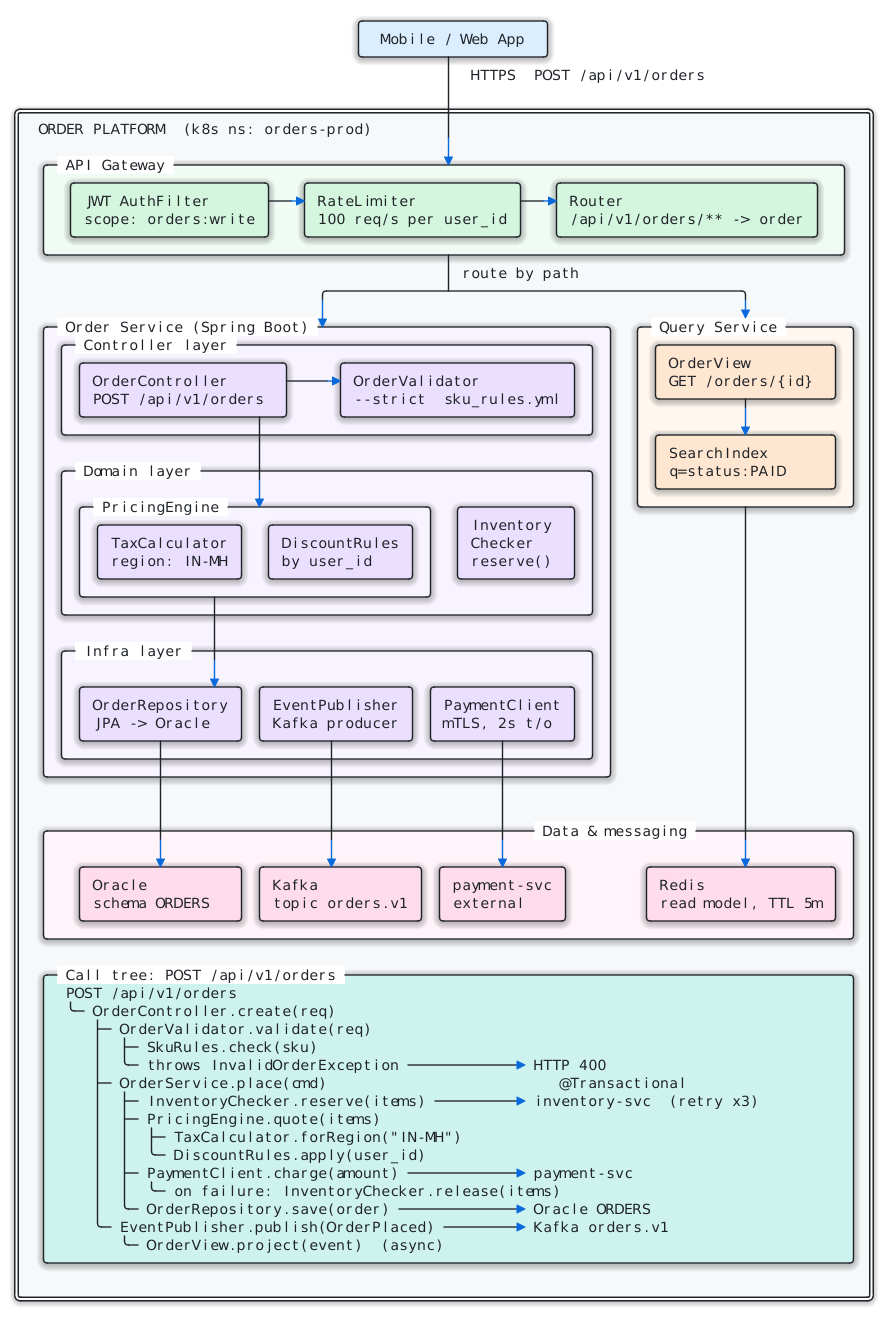
The text it came from (72 × 96 characters)
See tests/fixtures/complex_unicode.txt. 28 boxes, 18 arrows, a
call tree and double-line borders, all drawn from plain text.
Install
Python 3.9+ and nothing else:
pip install ascii2svg                 # adds the `ascii2svg` command and the `ascii2svg` module
pip install "ascii2svg[width,png]"    # optional: wcwidth (character widths) + cairosvg (--png)
It is a single file with no dependencies, so you can also just copy
scripts/ascii2svg.py into your project.
As a Python library:
import ascii2svg

svg, report = ascii2svg.render(open("diagram.txt").read(), color=True, theme="auto", animate="flow")
assert report["roundtrip"] == "exact"          # the 1:1 self-check passed
open("diagram.svg", "w", encoding="utf-8").write(svg)

page, report = ascii2svg.render(text, color=True, animate="scroll", html=True)   # a scroll-reveal page
render() takes the same options as the CLI (style, square, theme, color, animate, html,
title, tab_size) and returns the markup plus the same report as --json. It raises ValueError
for empty or oversized input and for unknown options.
As a Claude skill: download ascii2svg.skill
from the latest release (or build it: python3 tools/package_skill.py → dist/ascii2svg.skill), then:
- claude.ai / Claude desktop: Customize → Skills → upload
ascii2svg.skill. - Claude Code: unzip it into
~/.claude/skills/(you get~/.claude/skills/ascii2svg/).
SKILL.md tells Claude when to use it, which look fits which destination (including
scroll pages for tall diagrams), and how to read the report before handing you the file.
Usage
ascii2svg [INPUT] [-o OUT.svg|OUT.html] [--html] [--json] [--color] [--theme light|dark|auto]
          [--animate [draw|flow|scroll]] [--style glow|shadow|flat] [--square]
          [--png [PATH]] [--strict] [--text TEXT] [--tab-size N] [--title TEXT]
| Input | How |
|---|---|
| File | ascii2svg diagram.txt -o out.svg |
| stdin | cat diagram.txt | ascii2svg > out.svg |
| Inline | ascii2svg --text "$DIAGRAM" --json (the SVG comes back inside the JSON when there's no -o) |
| Markdown | The first ``` code block is used. Prose around it is dropped (and reported) |
stdout is always exactly one thing: the SVG (or the page, with --html), or (with --json) the report. A one-line
summary goes to stderr.
What gets drawn
| Source | Drawn as lines when… | Otherwise |
|---|---|---|
─│┌┐└┘├┤┬┴┼╭╮╰╯═║╔╗╚╝╪, ▼▲▶◀ |
always | – |
ASCII + - | |
they form a closed box, or attach to one directly or through + junctions |
stay text |
ASCII v ^ < > |
they end a line that is drawn, or point at a box (touching, or one space away) | stay text |
When unsure, a character stays text, so the worst case is the character itself in its own cell,
never a wrong shape. a->b, --dry-run, user_id, C:\temp, markdown tables and |-- file
trees all stay exactly as written.
How 1:1 is guaranteed
Every run parses the SVG it just wrote (lines, curves, arrowheads, text positions) back into a
character grid and compares it with the input, cell by cell. ASCII characters may only appear as
the line they stand for (-→─, |→│, +→corner or junction, v→▼). Any mismatch is
exit code 2. This covers every look, including animated ones and the still frame used for PNGs.
JSON report
| Field | Meaning |
|---|---|
ok, exit_code |
Overall result (see exit codes) |
roundtrip |
exact: the SVG was read back and matches the input cell for cell |
rows, cols, boxes, arrowheads, text_cells |
What was found |
flows |
Connectors animated with --animate flow (one per arrowhead route) |
style, theme, color, animate |
The look that was rendered |
ascii_drawn_as_lines |
ASCII characters drawn as lines |
ascii_line_like_kept_as_text |
ASCII - | + not drawn because they don't attach to anything |
normalized |
Every clean-up applied (tabs, odd spaces, zero-width and control characters, colour codes, code fence, indentation, bad UTF-8) |
warnings |
Line ends that meet nothing, with 1-based row/col. Usually a misaligned source |
tips |
Suggestions, e.g. "tall diagram: use --animate scroll" when a timed animation would finish off-screen |
svg / html, png |
Output paths (or the markup itself when no -o is given) |
self_check_problems |
Only when roundtrip isn't exact |
Exit codes
| Code | Meaning |
|---|---|
| 0 | OK (warnings allowed) |
| 1 | Bad input or usage (message in error) |
| 2 | Self-check failed: the SVG is not 1:1. Don't use it |
| 3 | --strict and there were warnings |
Using it from any agent framework
Expose it as one tool and run the CLI in the handler:
{
  "name": "render_ascii_diagram",
  "description": "Render an ASCII/Unicode box diagram to an SVG file, keeping every character in place. Returns a JSON report; exit_code 0 means success.",
  "input_schema": {
    "type": "object",
    "properties": {
      "diagram": {"type": "string", "description": "The diagram text (a markdown code block is fine)"},
      "output_path": {"type": "string", "description": "Where to write the .svg"},
      "color": {"type": "boolean", "description": "Tint boxes by group and colour the arrows"},
      "theme": {"type": "string", "enum": ["light", "dark", "auto"]},
      "animate": {"type": "string", "enum": ["none", "draw", "flow", "scroll"],
                  "description": "scroll needs output_path ending in .html"}
    },
    "required": ["diagram", "output_path"]
  }
}
import json, subprocess, sys

def render_ascii_diagram(diagram, output_path, color=False, theme="light", animate="none"):
    args = [sys.executable, "scripts/ascii2svg.py", "-o", output_path, "--json",
            "--theme", theme, "--animate", animate] + (["--color"] if color else [])
    p = subprocess.run(args, input=diagram.encode(), capture_output=True)
    return json.loads(p.stdout)          # always JSON, including on errors
Tests
python3 tests/test_ascii2svg.py        # or: python3 -m pytest tests
python3 docs/build.py                  # regenerate every image in this README
28 tests over 11 test diagrams:
- round-trip in every style and every look
- animation that ends on the static drawing and respects reduced motion
- flow routes that start at the right box
- scroll reveal driven by the page, with no script inside the SVG
- colour groups
- the ASCII traps
- glow never behind a label
- planted faults that must be caught
- byte-identical repeat runs
- width fallback vs
wcwidth - CLI behaviour, including UTF-8 output on Windows consoles, and the
render()library API
They pass with and without the optional packages.
License
MIT. Use it, change it and ship it, commercially too; keep the copyright notice.
Not yet
- Auto-repair of misaligned diagrams. It warns with row/column instead.
- ASCII rounded corners (
.-') and diagonals (/ \). These stay text. - Free-floating ASCII connectors that touch no box (e.g.
A ---> Bbetween plain words). These stay text. - An MCP server and a JS/npm port.
- Every renderer checked. The original static look was verified in cairo and resvg. The new
looks (colour, themes, animation) have been checked in Chromium only so far, not yet in
Firefox, Safari, or through cairo for
--png.
1 maintainer

Release files for ascii2svg 1.2.0
For a detailed explanation of source distributions (sdists) and built distributions (wheels), please see the package formats documentation.
Source distribution (sdist)
| File | Size | Uploaded | |
|---|---|---|---|
| ascii2svg-1.2.0.tar.gz | 42.2 kB | Details |
Built distribution (wheel)
| File | Interpreter | ABI | Platform | Reset |
|---|---|---|---|---|
| ascii2svg-1.2.0-py3-none-any.whl | Python 3 | none | any | Details |
Total release size: 68.9 kB
Release files / ascii2svg-1.2.0.tar.gz
| Download URL | ascii2svg-1.2.0.tar.gz |
|---|---|
| Size | 42.2 kB |
| Tags | Source |
|
SHA-256 checksum How to use checksums |
b10e8735f9aba4b36af46f5447c64e95fc010c6a1470f049f4826eb9403a13c4
|
|
BLAKE2b-256 checksum How to use checksums |
9c2cf1aedbeaeab89c7d3dc2d00110c5d248b585ade3faea81e4408e8f8e67fd
|
| Upload date | |
|
Uploaded using Trusted Publishing? What is trusted publishing? |
Yes |
| Uploaded via |
twine/7.0.0 CPython/3.13.14
|
Provenance
Provenance describes where a file came from. On PyPI, provenance is shared via attestations, which provide a verifiable record of the build or publishing details. View details, limitations and caveats.


PyPI Publish Attestation
PyPI verified that this artifact, at this checksum, originated from the publisher listed below.
Signed by GitHub Actions, verified by PyPI on Sep 23, 2026.
Transparency logRelease files / ascii2svg-1.2.0-py3-none-any.whl
| Download URL | ascii2svg-1.2.0-py3-none-any.whl |
|---|---|
| Size | 26.7 kB |
| Tags | Python 3 |
|
SHA-256 checksum How to use checksums |
ed40f78ee1b8262d9a9fc058d2f0878863c120fabcf3891ec3b420fe4e763461
|
|
BLAKE2b-256 checksum How to use checksums |
4461fbb29ab834913627918ec9793bff789b05d8da9cbe317e2497edd6ce46a1
|
| Upload date | |
|
Uploaded using Trusted Publishing? What is trusted publishing? |
Yes |
| Uploaded via |
twine/7.0.0 CPython/3.13.14
|
Provenance
Provenance describes where a file came from. On PyPI, provenance is shared via attestations, which provide a verifiable record of the build or publishing details. View details, limitations and caveats.
PyPI Publish Attestation
PyPI verified that this artifact, at this checksum, originated from the publisher listed below.
Signed by GitHub Actions, verified by PyPI on Sep 23, 2026.
Transparency log













