
Atlas Mind





It's your mind, not someone else's.
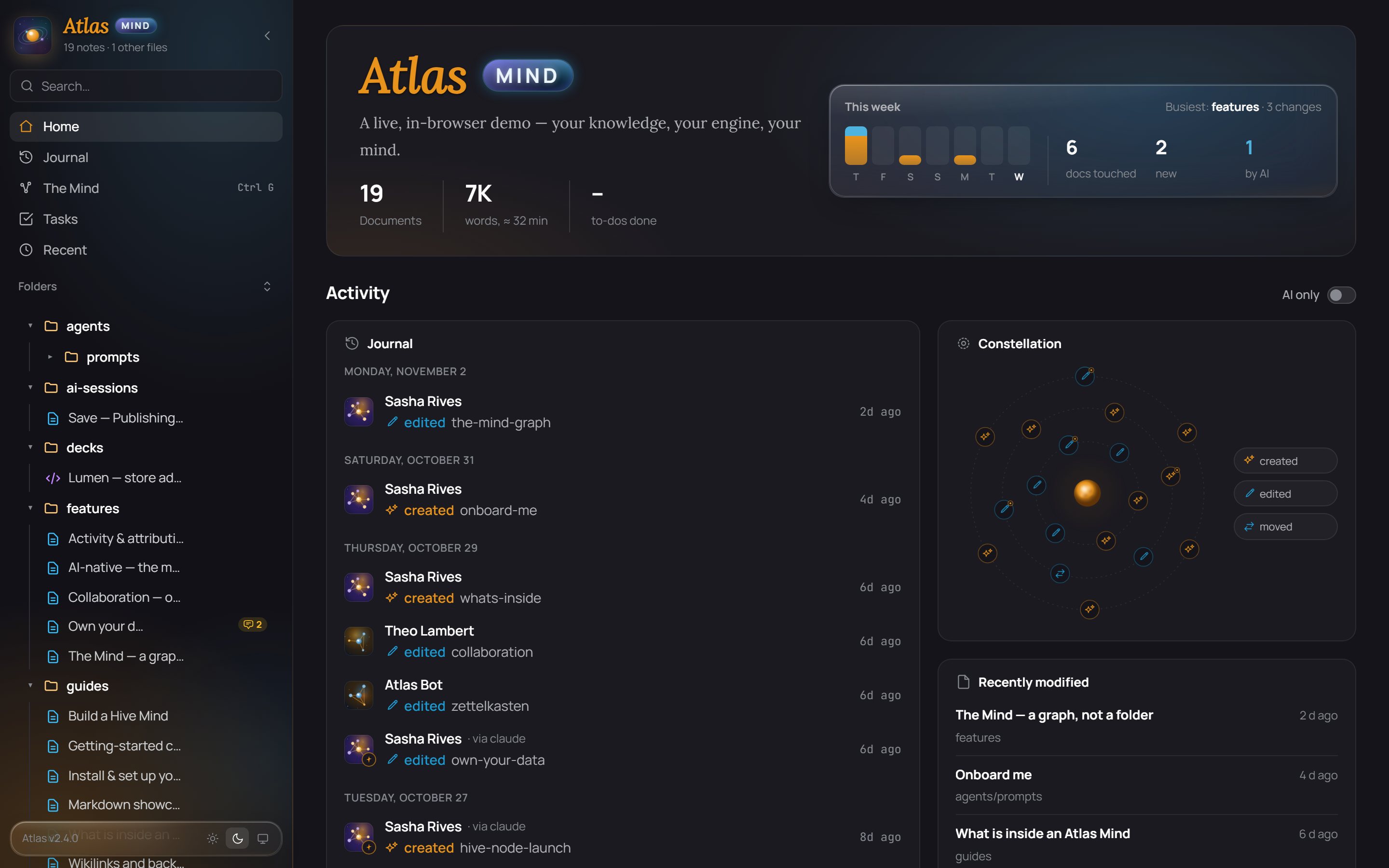
Atlas Mind is the memory you share with your AI. Your notes stay plain files in your own git repository, served by an engine you can read line by line; your assistant reads and writes them over MCP, and every change says who made it, you or the AI, so you can see it, rewind it or undo it.
Create your Atlas → free, no card, no terminal · Live demo → the real viewer, in your browser · What is Atlas Mind?
Why Atlas
- Your files. Markdown with no syntax of its own, next to the PDFs, Word documents, HTML decks, images and JSON you already have, read as they are. All of it in a git repository that is yours: leave with a zip, open it anywhere.
- Your AI's memory. One address to give your assistant (Claude, ChatGPT, Claude Code, any MCP client): it signs you in over OAuth, asks for what it may do, then searches, reads, writes and files into your mind in every conversation.
- A memory you can trust. Every change is attributed, a person's or an AI's. See what an agent wrote and undo it in one click, ask what the mind said on a topic six months ago, find the notes nobody has looked at in a year and the ones that contradict each other.
- Yours from end to end. One Python program on the standard library: no database, no build step to run, no telemetry. Your files stay on the server you choose and Atlas hands them to no AI service on its own: an assistant you connect receives the notes it reads, and what happens to them then is up to its service and your settings there.
It is not a multi-tenant SaaS or a real-time collaborative editor: one focused mind per instance, fully yours, that can share slices with other Atlases.
Get started
Without a terminal, on alwaysdata's free plan (no card, hosted in France): seven steps, a few forms. From then on, Atlas updates from Settings › About.
On your computer:
uvx atlas-mind serve ~/my-mind     # try it once, nothing installed

uv tool install atlas-mind         # or: pipx install atlas-mind
atlas init ~/my-mind               # a new mind: atlas.toml, starter notes, AGENTS.md, git init
atlas serve ~/my-mind              # http://127.0.0.1:8765
On your server: atlas deploy ~/my-mind --target compose|systemd|fly writes the files and prints the guide (--target fly --wizard goes all the way). Atlas runs at the root of its address or under any sub-path (base_path = "/notes" in the [server] section of atlas.toml).
Requires Python 3.11+ and git. init never overwrites: it refuses a non-empty folder without --force and keeps the files already there.
Connect your AI
-
claude.ai: on your Atlas's home, Add to Claude opens claude.ai with your Atlas filled in. Claude's free plan allows one connector: Atlas can be that one.
-
Claude Code, for every project:
claude mcp add --transport http --scope user atlas https://<your-atlas>/mcp
then
/mcp, pickatlasand sign in. Prompts read/atlas:weekly-review, a document attaches as@atlas:doc://notes/x.md.atlas initalso installs a git hook so the commits Claude Code makes in a clone count as Claude's. -
Any other MCP client: give it
https://<your-atlas>/mcp. Clients that can't do OAuth take a token instead, from Settings › AI assistants oratlas token create ~/my-mind --label my-agent. -
A mind on your computer, no server: let the client launch Atlas itself (Claude Desktop, Cursor, VS Code…). No token, no sign-in: the AI gets the folder you name, and an empty or missing one becomes a new mind.
{ "mcpServers": { "atlas": { "command": "uvx", "args": ["atlas-mind", "mcp", "~/my-mind"] } } }
Its writes are committed as an agent's like any other, and
atlas serve ~/my-mindopens the same mind in the viewer.
Every access shows in Settings › AI assistants, with when it was last used, and can be revoked. An access can be limited to read, inbox and/or write: an agent that reads your mail never needs to edit a note. Your AGENTS.md reaches every client as its instructions, so an assistant follows your conventions the moment it connects.
What your AI can do
Thirty tools, in six groups:
| Group | Tools | For |
|---|---|---|
| Read | brief · search_docs · grep_docs · read_doc · list_tree · changes_since · resume_session |
A context pack on a topic within a token budget; ranked search where each hit says how far to trust it (last editor, AI or human, stale, contested, or a record of a past date); every quotation of a note checked against the file it quotes; picking up a saved work session. |
| Write | create_doc · edit_doc · move_doc · delete_doc |
Edits return their diff and can refuse to overwrite a concurrent change; moves rewrite the [[links]] that point at a note. |
| Graph | get_links · get_mind_topology |
Walking the mind by its links, both ways, and its tags. |
| Time travel | doc_history · doc_at · doc_diff · search_history · then_and_now · show_shift · doc_blame · doc_revert |
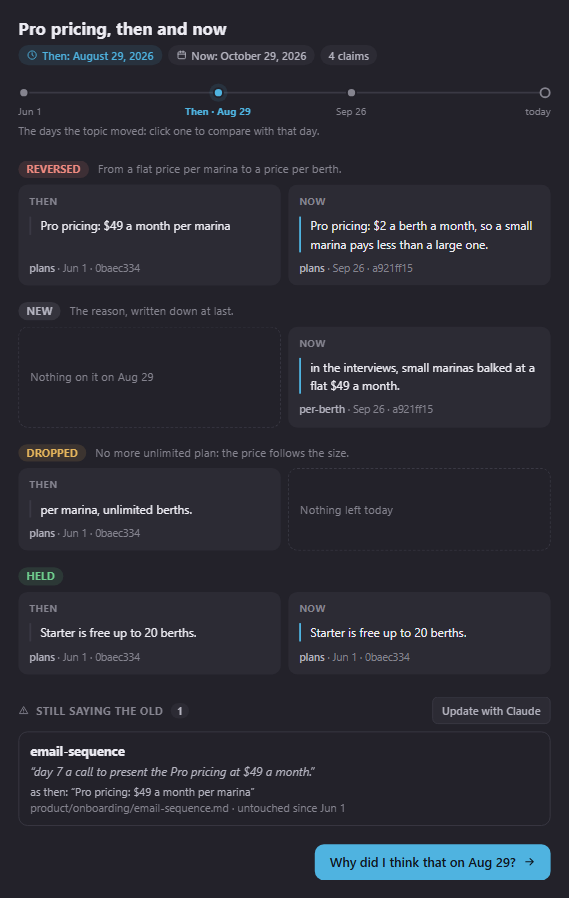
Your mind is a git repo: what a note said on any date, and what you thought then next to what you think now, claim by claim, each quote checked against the version it cites. |
| Activity | activity · agent_runs · undo_run · mind_weather · stale · confirm_doc · contradictions · judge_contradiction |
Who changed what, an agent's work undone in one commit (whole or for some notes), the folders being forgotten, the contradictions to settle. |
| Inbox | create_inbox_item |
An agent drops a ready-to-file item for you to keep, snooze or bin. |
It also serves prompts you start by name (weekly-review, triage-contradictions, new-doc, resume, and your own, one Markdown file each), and every note is a resource (doc://<path>) to attach to a conversation.
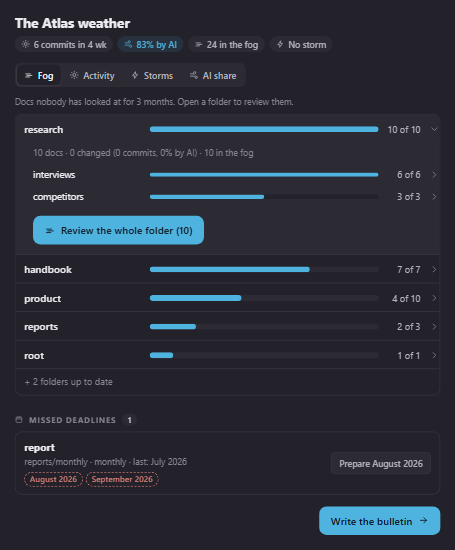
In hosts that show MCP Apps (Claude on the web and desktop, ChatGPT, VS Code), four answers come as views you work in: your recent work sessions to resume, the mind's weather folder by folder, what you thought then beside what you think now, and an agent's runs to play back commit by commit and cut. Other hosts get the same answer as text.
There is also a REST API v1 (Bearer tokens) with a published OpenAPI 3.1 spec.
In the viewer
- Read: GitHub-flavoured Markdown with a table of contents and
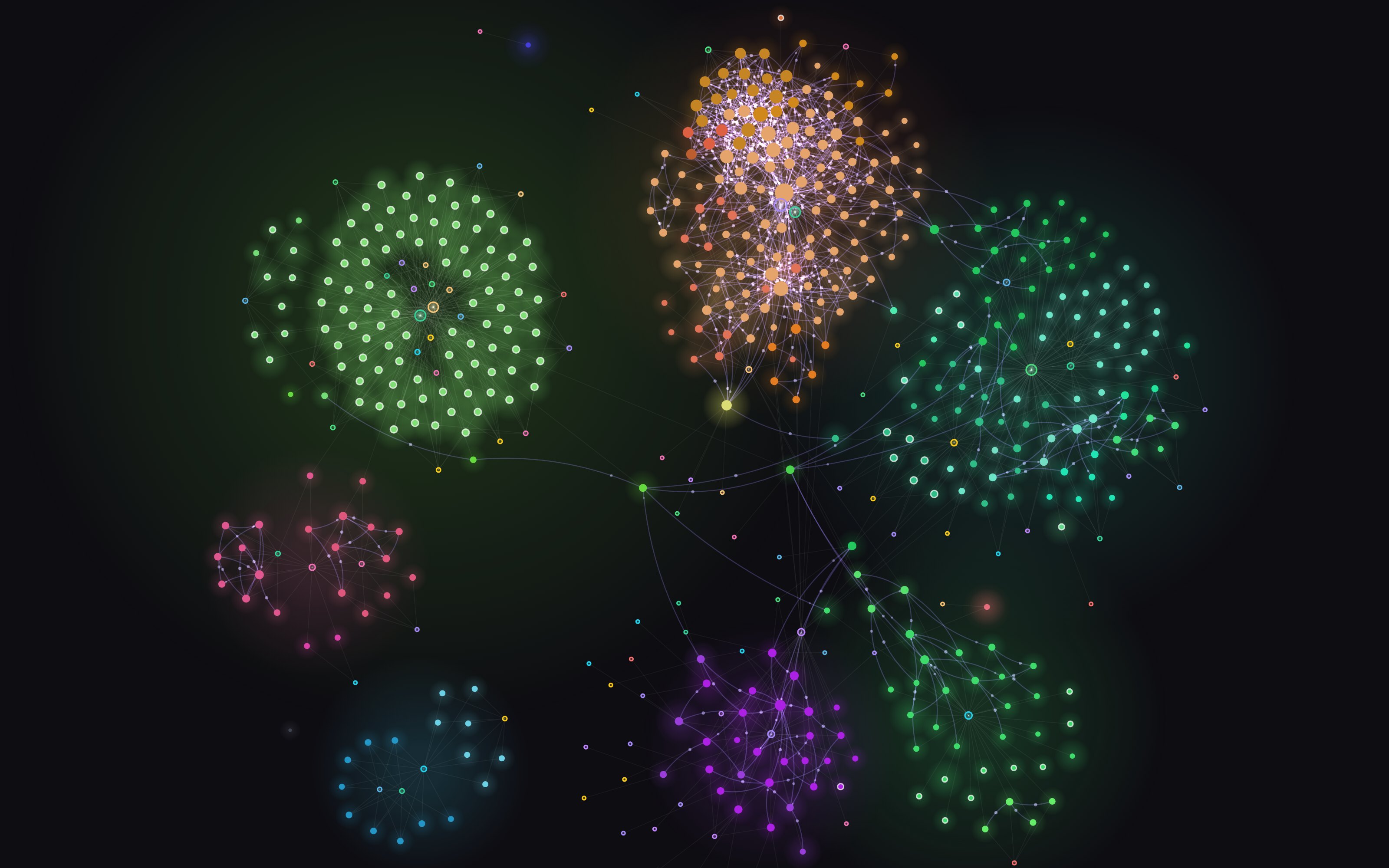
[[wikilinks]], and PDF,.docx, HTML decks, images and JSON previewed inline. A dot after each quotation tells whether the file it quotes really says it, and a click opens that file on the passage. Full-text search, a command palette (Ctrl-K), backlinks, tags, pinned notes. - The Mind: every note and tag a node, every folder a region, recent notes glowing, orphans dimmed. Above: a real mind, some 460 notes.
- Write and organise: create, edit, rename and move notes and whole folders (links follow), templates, drag and drop from your computer, a bin you can restore from or empty, a mind-wide task list.
- History and activity: every note versioned, with clean diffs and restore; a home with the week at a glance, a journal of who changed what with the AI's share, and an undo for what one writer did in one go.
- Inbox: what your agents staged, one card at a time: keep, snooze or bin, by click or keyboard.
- Team and sharing: accounts, groups, per-note access (private, shared, common), and public share links that can expire.
- Hive Mind: publish a folder as a node; another Atlas subscribes and keeps a read-only mirror, which its AI reads like any other note.
- Copies: a copy on your own GitHub, updated at every change; a copy on your computer (
atlas sync); a full backup to download, and Restore on a new instance. - Everywhere: an installable app on your phone (scan the code in Settings), offline reading, light and dark themes.
- Settings: a page with your account (name, password, recovery codes, 2FA, sessions), your AI's accesses, the team, the look (language, accent, the name and line under the logo) and About, with the update button.
Run it
- Security: admin and member accounts, per-note access, optional TOTP 2FA, recovery codes for a forgotten password, per-account lockout and per-IP rate limits, full CSRF defence.
- Network: by default Atlas only reaches out to read an MCP client's public metadata when you connect that client over OAuth (
[oauth] client_metadata_fetch = falseturns it off), and to ask PyPI for the latest version when an admin opens About (and at most once a day for the admin's update banner with[server] update_check = true, which the alwaysdata install turns on). - Configuration: one small
atlas.toml: the name and line under the logo, the language, the port, accounts, the sub-path. - Updates: from Settings › About on a pip install (alwaysdata),
atlas update --target …for a deployment,uv tool upgrade atlas-mindon your computer. The engine and your notes update separately: upgrading never touches a note. - Commands:
atlas --helplists them:init,serve,mcp,build,deploy,update,user,token,share,inbox,import,export,sync,backup,restore,hook,setup-code,doctor.
Documentation
The documentation is itself an Atlas mind: browse it in the live demo → (the guides/ and features/ folders).
Support
Atlas is free and open source. To help keep it going: sponsor it on GitHub. Bugs and ideas go to the issues.
Licence
AGPL v3, see LICENSE. The "Atlas" + "Mind" branding in the viewer and on the sign-in page is a fixed part of the project.
1 maintainer

Metadata
1 maintainer
Release files for atlas-mind 2.9.3
For a detailed explanation of source distributions (sdists) and built distributions (wheels), please see the package formats documentation.
Source distribution (sdist)
| File | Size | Uploaded | Provenance | Actions |
|---|---|---|---|---|
| atlas_mind-2.9.3.tar.gz | 1.9 MB | Without provenance | Details for atlas_mind-2.9.3.tar.gz |
Built distribution (wheel)
| File | Interpreter | ABI | Platform | Actions Reset |
|---|---|---|---|---|
| atlas_mind-2.9.3-py3-none-any.whl | Python 3 | none | any | Details for atlas_mind-2.9.3-py3-none-any.whl |
Total release size: 3.6 MB
Release files / atlas_mind-2.9.3.tar.gz
| Download URL | atlas_mind-2.9.3.tar.gz |
|---|---|
| Size | 1.9 MB |
| Tags | Source |
|
SHA-256 checksum How to use checksums |
2e031c0aa31877fd4090aae1b25160a86b88b6690a0b54829a8137d8a785ad82
|
|
BLAKE2b-256 checksum How to use checksums |
0c12902c55eca3c1d89d0ef628b1b3878b668207a9d847273a19be13258d52cc
|
| Upload date | |
|
Uploaded using Trusted Publishing? What is trusted publishing? |
No |
| Uploaded via |
twine/6.2.0 CPython/3.14.0
|
Release files / atlas_mind-2.9.3-py3-none-any.whl
| Download URL | atlas_mind-2.9.3-py3-none-any.whl |
|---|---|
| Size | 1.7 MB |
| Tags | Python 3 |
|
SHA-256 checksum How to use checksums |
d8323d9f0b70e4f55b07ff8399e03b74e94cd3b339f7bb0948b00b94bb4c8bf0
|
|
BLAKE2b-256 checksum How to use checksums |
b5b785b03f45ad11861353149d96f820ceb1872a63758bfe817dbb5e268903e6
|
| Upload date | |
|
Uploaded using Trusted Publishing? What is trusted publishing? |
No |
| Uploaded via |
twine/6.2.0 CPython/3.14.0
|
Security for atlas-mind 2.9.3
Provenance
Provenance describes where a file came from. On PyPI, provenance is shared via attestations, which provide a verifiable record of the build or publishing details. View details, limitations and caveats.
No provenance found
None of the files in this release were uploaded with provenance metadata.
A note on package security
PyPI is a repository for distributing packages, not a service for auditing them. While third-party security researchers and our staff do their best to detect and remove malicious packages, PyPI cannot guarantee the quality, security or suitability of any given package.
To learn more about protecting yourself from malicious actors, visit our package security documentation.














