
Aye Chat: Terminal-first AI Code Generator
Project description



Aye Chat: AI-First development in your terminal
If you ever try it - you are never going to go back to other tools. (That is, if your native environment is a terminal 🙂)
It's not just another AI Slop, it's an ecosystem. Give it a try.
Quick Start
-
Install the tool:
pip install ayechat
-
Start interactive chat in your source code folder:
aye chat -
Start asking questions. That's it!
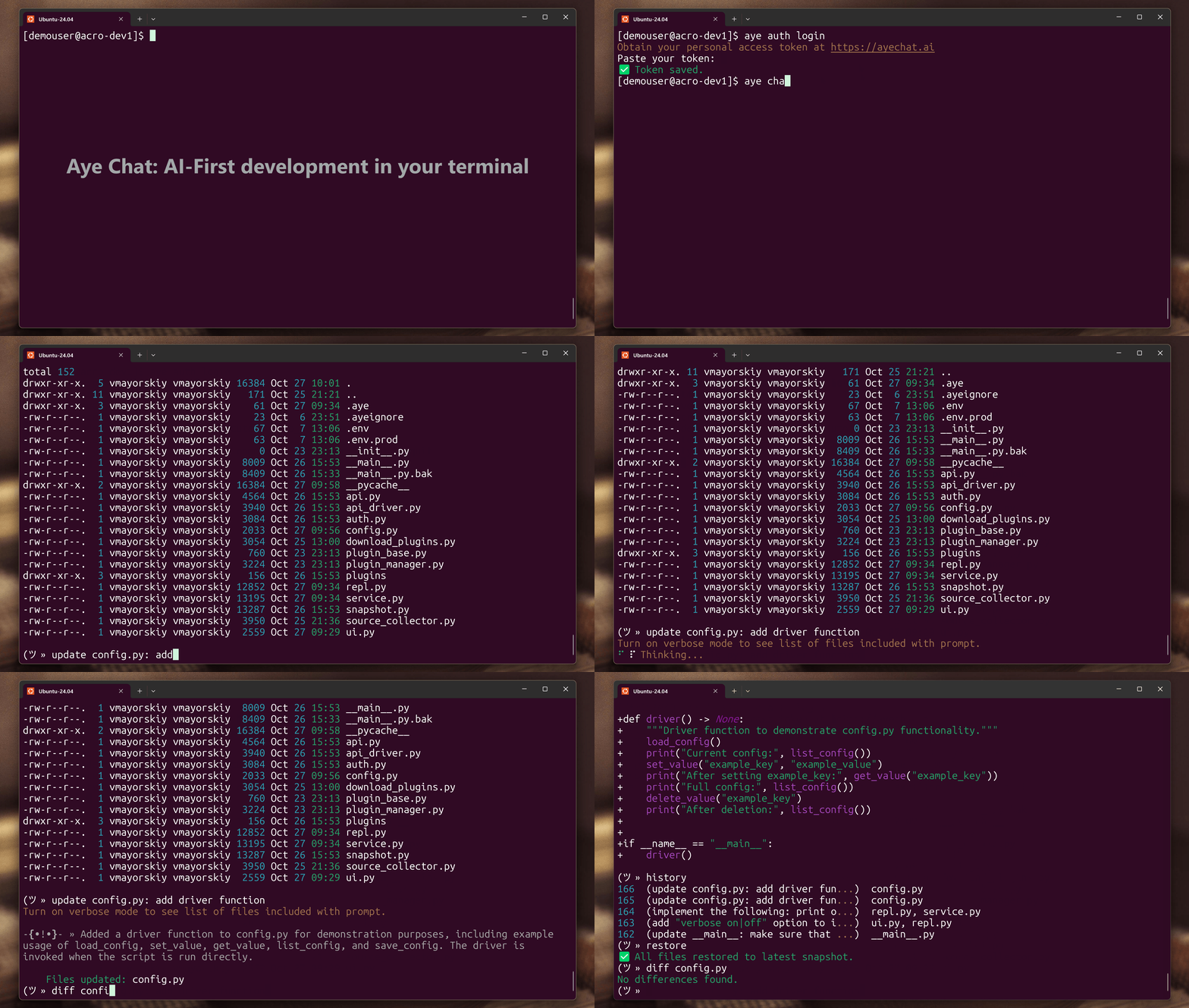
Key Features
- 🖥️ Terminal-native experience — built for developers who live in the CLI.
- 📁 Full-file generation and modification — no copy-pasting between tools.
- 🔁 Automatic snapshots, diff, and restore — iterate safely, without Git overhead.
- 🔒 Privacy-aware design: developer-defined boundaries with .gitignore and .ayeignore.
- 💡 Smart file awareness — Aye Chat includes relevant project files automatically.
- 🧩 Plugin architecture — extend Aye Chat with your own commands.
Core Commands
Authentication
aye auth login    # Configure your token
aye auth logout   # Remove stored credentials
Interactive Chat
aye chat                          # Start chat with auto-detected files
aye chat --root ./src             # Specify project root directory
aye chat --inclue "*.js"          # Work with JavaScript files
aye chat --include "*.py,*.js"    # Work with multiple file types
In chat mode, you can use these built-in commands:
new- Start a new chat.- Tip: Start a new chat when you move on to a new feature. Also, start a new chat if LLM starts going in circles.
history- Show snapshot historydiff <file> [snapshot]- Show diff of file with the latest snapshot, or a specified snapshotrestore [snapshot_id] [file]- Restore all files from the latest snapshot or a specified snapshot; optionally for a specific filekeep [N]- Keep only N most recent snapshots (10 by default)model- Select a different model. Selection will persist between sessions.verbose [on|off]- Toggle verbose mode to print out list of files included with user prompt (on/off, persists between sessions)exit,quit,Ctrl+D- Exit the chat sessionhelp- Show available commands
Any other command is treated as a shell command or AI prompt depending on context. Note that for the shell commands, you do not need to add '/' or any other special indicators: just type your command (e.g., "ls -la"). Some shell commands cannot be executed and will return an error or fail silently: these include those that alter terminal view (e.g., text editors) or attempt to switch shell context (e.g., "sudo su - ").
Except for Aye Chat own commands, which are matched and executed first, for each prompt, the tool attempts to find a shell command for the first token, and if successful - execute it, if not - the prompt is treated as a message to AI.
Philosophy
Aye Chat reimagines coding as a conversation, not a sequence of commands.
Built for the terminal, it trusts AI to act — not wait for approval, while every change remains safe, transparent, and reversible.
By removing friction from creation, Aye Chat turns natural language into direct action, enabling developers to build software at the speed of thought.
Configuration & Privacy
- Aye Chat respects
.gitignoreand.ayeignore— no unwanted file access. - Snapshots are stored locally in
.aye/folder whereaye chatcommand is executed.
🤝 Contributing
Aye Chat is open-source — we welcome contributions!
- Fork the repo and submit PRs.
- Open issues for bugs or ideas.
- Join our discussions on Discord AyeChat server.
🔥 Ready to code with AI — without leaving your terminal?
Project details
Release history Release notifications | RSS feed


Download files
Download the file for your platform. If you're not sure which to choose, learn more about installing packages.
Source Distribution
Built Distribution
Filter files by name, interpreter, ABI, and platform.
If you're not sure about the file name format, learn more about wheel file names.
Copy a direct link to the current filters
File details
Details for the file ayechat-0.19.0.tar.gz.
File metadata
- Download URL: ayechat-0.19.0.tar.gz
- Upload date:
- Size: 62.8 kB
- Tags: Source
- Uploaded using Trusted Publishing? Yes
- Uploaded via: twine/6.1.0 CPython/3.13.7
File hashes
| Algorithm | Hash digest | |
|---|---|---|
| SHA256 |
d66b7756d5e87da68e5bd9e9b235943c8b4f29850d6a5937ff4f563878d08349
|
|
| MD5 |
aa7e9b9f48b5ba7ca89da8f790e669c9
|
|
| BLAKE2b-256 |
bae7c9bf19b1e29aa5c16323ce1b3dbe2227d7771ef7567a6da8111d9121ebed
|
Provenance
The following attestation bundles were made for ayechat-0.19.0.tar.gz:
Publisher:
python-publish.yml on acrotron/aye-chat
-
Statement:
-
Statement type:
https://in-toto.io/Statement/v1 -
Predicate type:
https://docs.pypi.org/attestations/publish/v1 -
Subject name:
ayechat-0.19.0.tar.gz -
Subject digest:
d66b7756d5e87da68e5bd9e9b235943c8b4f29850d6a5937ff4f563878d08349 - Sigstore transparency entry: 658546413
- Sigstore integration time:
-
Permalink:
acrotron/aye-chat@d620022abc1aa504c0f31ede3e22ea79ddd8adb0 -
Branch / Tag:
refs/tags/v0.19.0 - Owner: https://github.com/acrotron
-
Access:
public
-
Token Issuer:
https://token.actions.githubusercontent.com -
Runner Environment:
github-hosted -
Publication workflow:
python-publish.yml@d620022abc1aa504c0f31ede3e22ea79ddd8adb0 -
Trigger Event:
release
-
Statement type:
File details
Details for the file ayechat-0.19.0-py3-none-any.whl.
File metadata
- Download URL: ayechat-0.19.0-py3-none-any.whl
- Upload date:
- Size: 37.4 kB
- Tags: Python 3
- Uploaded using Trusted Publishing? Yes
- Uploaded via: twine/6.1.0 CPython/3.13.7
File hashes
| Algorithm | Hash digest | |
|---|---|---|
| SHA256 |
75b06eaf695bf8a56e3a37ceca3cec93cec067dbb54556c01b73954e8a50a06a
|
|
| MD5 |
d54a29254d936b112f34ebe6d4080cf4
|
|
| BLAKE2b-256 |
994a0456b1d1290ab480580b622863f9d85aa5e4c4c6483ba47935f8b92b6a96
|
Provenance
The following attestation bundles were made for ayechat-0.19.0-py3-none-any.whl:
Publisher:
python-publish.yml on acrotron/aye-chat
-
Statement:
-
Statement type:
https://in-toto.io/Statement/v1 -
Predicate type:
https://docs.pypi.org/attestations/publish/v1 -
Subject name:
ayechat-0.19.0-py3-none-any.whl -
Subject digest:
75b06eaf695bf8a56e3a37ceca3cec93cec067dbb54556c01b73954e8a50a06a - Sigstore transparency entry: 658546429
- Sigstore integration time:
-
Permalink:
acrotron/aye-chat@d620022abc1aa504c0f31ede3e22ea79ddd8adb0 -
Branch / Tag:
refs/tags/v0.19.0 - Owner: https://github.com/acrotron
-
Access:
public
-
Token Issuer:
https://token.actions.githubusercontent.com -
Runner Environment:
github-hosted -
Publication workflow:
python-publish.yml@d620022abc1aa504c0f31ede3e22ea79ddd8adb0 -
Trigger Event:
release
-
Statement type:






