
Aye Chat: Terminal-first AI Code Generator
Reason this release was yanked:
Unknown defect introduced: it crashes now
Project description
Aye Chat: AI-powered shell for Linux
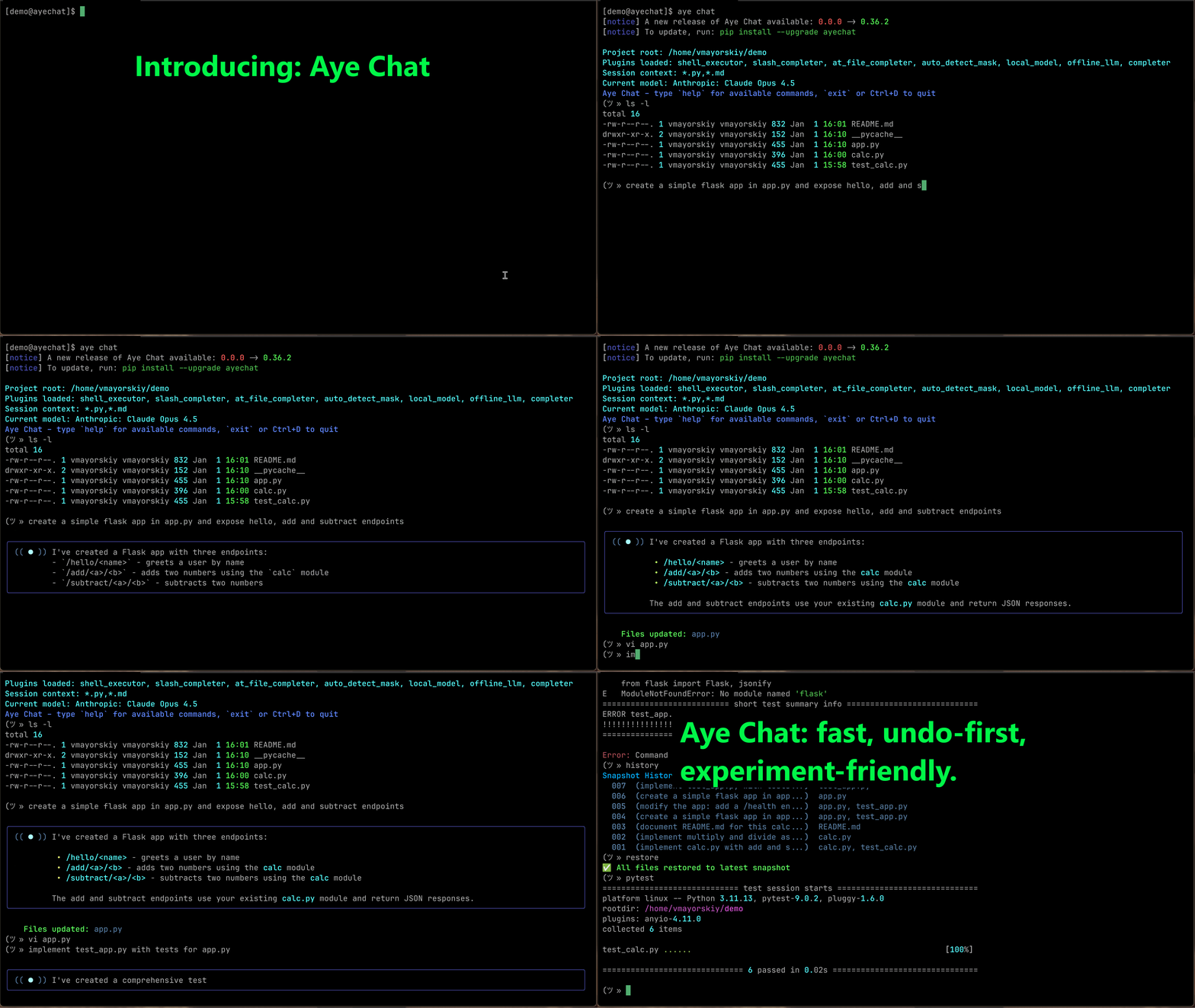
An AI assistant integrated into your shell: execute commands, edit files, and prompt AI, all in one seamless session.
Key Features
- 🚀 Seamless Shell Integration - Your shell, super-powered. Run
ls,git, and evenvimin the same session you chat with AI. No prefixes, no context switching. - 🧠 Zero-Config Context - Aye Chat automatically detects your project's files, respecting your
.gitignore, so you can start coding immediately. - ✍️ Direct File Editing - The AI directly edits and creates files in your project. No more copy-pasting code from a chat window.
- ⏪ Instant Undo - AI made a mistake? A single
restorecommand instantly reverts the last set of changes. Your work is always safe. - 🖥️ Terminal-Native Experience - A rich, responsive UI built for developers who live in the command line.
- 🧩 Extensible via Plugins - The core experience is enhanced by plugins for shell execution, autocompletion, and more.
Quick Start
-
Install the tool:
pip install ayechat
-
Start interactive chat in your source code folder:
aye chat -
Start talking to your shell. That's it!
Core Commands
Authentication
aye auth login    # Configure your access token
aye auth logout   # Remove stored credentials
Starting a Session
aye chat                          # Start chat with auto-detected files
aye chat --root ./src             # Specify a different project root
aye chat --include "*.js,*.css"   # Manually specify which files to include
In-Chat Commands
In chat mode, your input is handled in a specific order:
- Built-in Commands (like
restoreormodel). - Shell Commands (like
ls -laorgit status). - AI Prompt (everything else is sent to the LLM).
Session & Model Control
new- Start a fresh chat session.model- Select a different AI model.verbose [on|off]- Toggle printing the list of files sent to the AI.exit,quit,Ctrl+D- Exit the chat.help- Show available commands.
Reviewing & Undoing AI Changes
restore- Instantly undo the last set of changes made by the AI.history- Show the history of changes made by the AI.diff <file>- Compare the current version of a file against the last change.
Shell Commands Any command that is not a built-in is treated as a shell command.
- You can run standard commands like
ls -la,git status, ordocker ps. - Interactive commands like
vim,nano, andlesswork seamlessly, handing control over to the editor and returning you to the chat when you're done.
Philosophy
Aye Chat reimagines coding as a fluid conversation with an AI-powered shell.
Built for the terminal, it trusts the AI to act directly on your files—no approval diffs, no friction. This high-velocity workflow is made safe by a simple, instant undo command that keeps you in complete control.
By removing the barriers between thought, command, and code, Aye Chat lets you build software at the speed of your ideas.
Configuration & Privacy
- Aye Chat respects
.gitignoreand.ayeignore—your private files are never touched. - Change history and backups are stored locally in the
.aye/folder within your project.
🤝 Contributing
Aye Chat is open-source — we welcome contributions!
- Fork the repo and submit PRs.
- Open issues for bugs or ideas.
- Join our discussions on our Discord Server.
🔥 Ready to code with AI — without leaving your terminal?
Project details
Release history Release notifications | RSS feed


Download files
Download the file for your platform. If you're not sure which to choose, learn more about installing packages.
Source Distribution
Built Distribution
Filter files by name, interpreter, ABI, and platform.
If you're not sure about the file name format, learn more about wheel file names.
Copy a direct link to the current filters
File details
Details for the file ayechat-0.20.0.tar.gz.
File metadata
- Download URL: ayechat-0.20.0.tar.gz
- Upload date:
- Size: 448.0 kB
- Tags: Source
- Uploaded using Trusted Publishing? Yes
- Uploaded via: twine/6.1.0 CPython/3.13.7
File hashes
| Algorithm | Hash digest | |
|---|---|---|
| SHA256 |
3f56a52bbe738802c506b12d6a8f2486525623a9ba52c6c596ad9f47ff4dd61c
|
|
| MD5 |
86459aedda944a1759827e5ad8c509d8
|
|
| BLAKE2b-256 |
8e0881729b62cc28860e2c14de57f9de808caabf0be72b4e88737b8ff43cd15c
|
Provenance
The following attestation bundles were made for ayechat-0.20.0.tar.gz:
Publisher:
python-publish.yml on acrotron/aye-chat
-
Statement:
-
Statement type:
https://in-toto.io/Statement/v1 -
Predicate type:
https://docs.pypi.org/attestations/publish/v1 -
Subject name:
ayechat-0.20.0.tar.gz -
Subject digest:
3f56a52bbe738802c506b12d6a8f2486525623a9ba52c6c596ad9f47ff4dd61c - Sigstore transparency entry: 664419231
- Sigstore integration time:
-
Permalink:
acrotron/aye-chat@2ebaa37342058ab40de8f8eb232cffe4c88471c9 -
Branch / Tag:
refs/tags/v0.20.0 - Owner: https://github.com/acrotron
-
Access:
public
-
Token Issuer:
https://token.actions.githubusercontent.com -
Runner Environment:
github-hosted -
Publication workflow:
python-publish.yml@2ebaa37342058ab40de8f8eb232cffe4c88471c9 -
Trigger Event:
release
-
Statement type:
File details
Details for the file ayechat-0.20.0-py3-none-any.whl.
File metadata
- Download URL: ayechat-0.20.0-py3-none-any.whl
- Upload date:
- Size: 39.5 kB
- Tags: Python 3
- Uploaded using Trusted Publishing? Yes
- Uploaded via: twine/6.1.0 CPython/3.13.7
File hashes
| Algorithm | Hash digest | |
|---|---|---|
| SHA256 |
190d8c02842e30e9e401384c4d3a274f4166c94fa92329b8e69f32b3328c7dc8
|
|
| MD5 |
698bb19bf245bc791b69413cf117f48c
|
|
| BLAKE2b-256 |
26fc43ca5b25dd57aa8a83d70fa6bfd7b19024d47544070c8ce7cd469f6f6931
|
Provenance
The following attestation bundles were made for ayechat-0.20.0-py3-none-any.whl:
Publisher:
python-publish.yml on acrotron/aye-chat
-
Statement:
-
Statement type:
https://in-toto.io/Statement/v1 -
Predicate type:
https://docs.pypi.org/attestations/publish/v1 -
Subject name:
ayechat-0.20.0-py3-none-any.whl -
Subject digest:
190d8c02842e30e9e401384c4d3a274f4166c94fa92329b8e69f32b3328c7dc8 - Sigstore transparency entry: 664419232
- Sigstore integration time:
-
Permalink:
acrotron/aye-chat@2ebaa37342058ab40de8f8eb232cffe4c88471c9 -
Branch / Tag:
refs/tags/v0.20.0 - Owner: https://github.com/acrotron
-
Access:
public
-
Token Issuer:
https://token.actions.githubusercontent.com -
Runner Environment:
github-hosted -
Publication workflow:
python-publish.yml@2ebaa37342058ab40de8f8eb232cffe4c88471c9 -
Trigger Event:
release
-
Statement type:






