
This release is a pre-release and may not be stable for production use.
Aye Chat: AI-powered terminal workspace
Your terminal, but with AI. Edit files, run commands, chat with AI - all in one session.
Install in 30 seconds
$ pip install ayechat
$ aye chat          # Start in any project
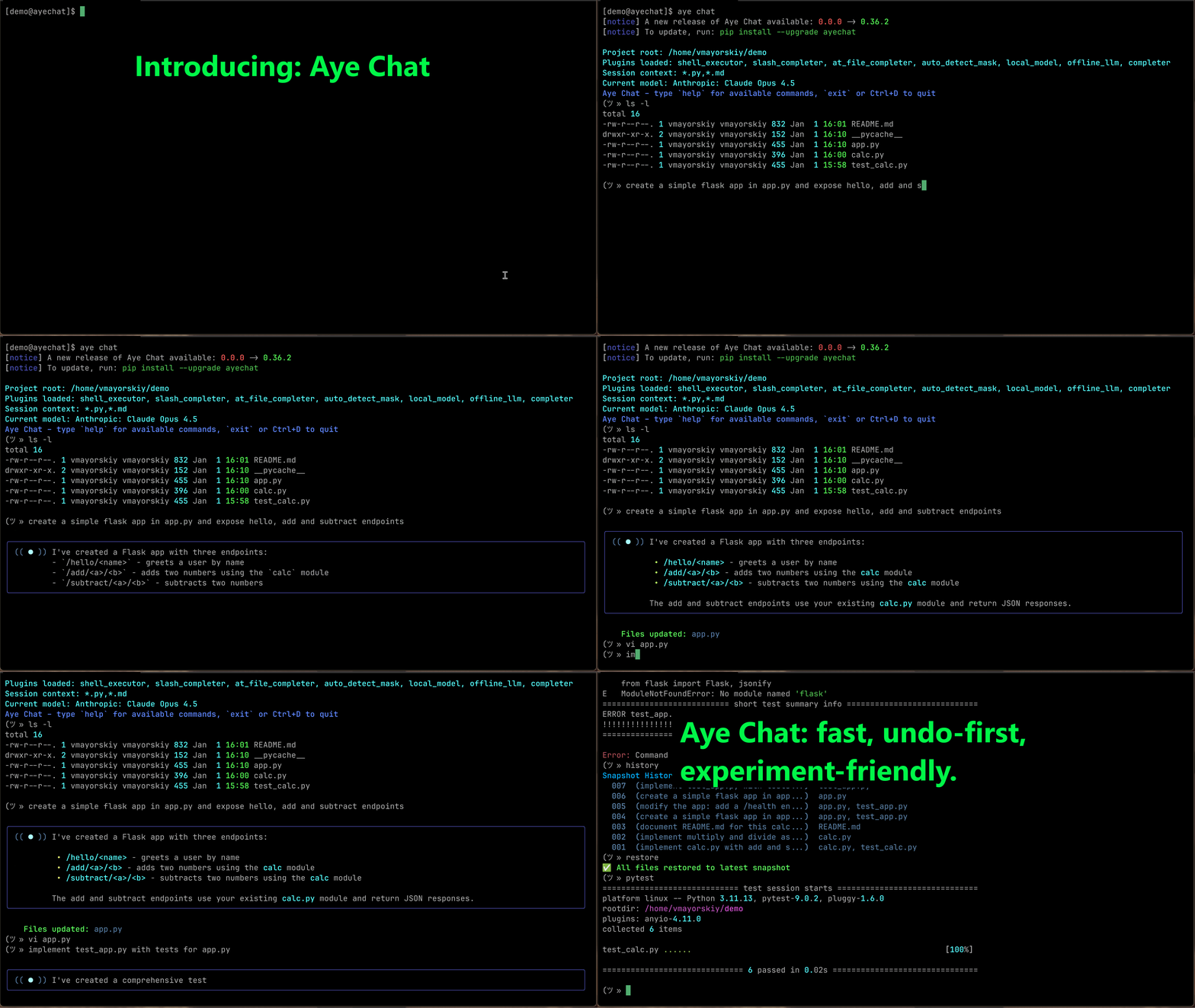
What it does
$ aye chat
> fix the bug in server.py
✓ Fixed undefined variable on line 42

> vim server.py
[opens real vim, returns to chat after]

> refactor: make it async
✓ Updated server.py with async/await

> pytest
✗ Tests fail

> restore
✓ Reverted last changes
No copy-pasting. No context switching. AI edits your files directly.
Why developers love it
- Zero config - Automatically reads your project files (respects .gitignore)
- Instant undo -
restorecommand reverts any AI changes immediately - Real shell - Run
git,pytest, evenvimwithout leaving the chat - 100% local backups - Your code is safe, changes stored in
.aye/ - No prefixes - Just type. Commands run, everything else goes to AI
Quick examples
# In your project directory:
aye chat

> refactor this to use dependency injection
> pytest
> fix what broke
> git commit -m "refactored DI"
Get started
- Install:
pip install ayechat - Start chatting:
aye chatin any project folder
📚 Full command reference
Core Commands
Authentication
Does not require authentication
Starting a Session
aye chat                          # Start chat with auto-detected files
aye chat --root ./src             # Specify a different project root
aye chat --include "*.js,*.css"   # Manually specify which files to include
In-Chat Commands
Your input is handled in this order:
- Built-in Commands (like
restoreormodel) - Shell Commands (like
ls -laorgit status) - AI Prompt (everything else)
Session & Model Control
new- Start a fresh chat sessionmodel- Select a different AI modelverbose [on|off]- Toggle verbose output on or offexit,quit,Ctrl+D- Exit the chathelp- Show available commands
Reviewing & Undoing AI Changes
restore,undo- Instantly undo the last set of changes made by AIhistory- Show the history of changes made by AIdiff <file>- Compare current version against last change
Shell Commands
- Run any command:
ls -la,git status,docker ps - Interactive programs work:
vim,nano,less,top
⚙️ Configuration & Privacy
Configuration
- Aye Chat respects
.gitignoreand.ayeignore- private files are never touched - Change history and backups stored locally in
.aye/folder - Configure default model and preferences in
~/.aye/config.yaml
Privacy & Security
- All file backups are local only
- API calls only include files you explicitly work with
- No telemetry or usage tracking
- Open source - audit the code yourself
🧩 Plugins & Extensions
Extensible via Plugins
The core experience is enhanced by plugins:
- Shell execution plugin
- Autocompletion plugin
- Custom command plugins
- Model provider plugins
🪟 Windows install notes
On some Windows setups, pip install puts console scripts (like aye.exe) in a directory that is not on your PATH by default. If, after installing, aye is not recognized, you have a few options:
-
Run via Python directly (works immediately):
python -m aye chat
-
Add the Python Scripts folder to
PATHsoayeis found directly. For a typical user install this is something like:C:\Users\<you>\AppData\Roaming\Python\PythonXX\Scripts(Replace
PythonXXwith your actual Python version directory.) -
Use
pipxfor a smoother global install (recommended on Windows):pip install pipx pipx ensurepath pipx install ayechat aye chat
pipx installs Python CLI tools into an isolated environment and puts the entry points on your PATH automatically.
🪟 Windows install notes
On some Windows setups, pip install puts console scripts (like aye.exe) in a directory that is not on your PATH by default. If, after installing, aye is not recognized, you have a few options:
-
Run via Python directly (works immediately):
python -m aye chat
-
Add the Python Scripts folder to
PATHsoayeis found directly. For a typical user install this is something like:C:\Users\<you>\AppData\Roaming\Python\PythonXX\Scripts(Replace
PythonXXwith your actual Python version directory.) -
Use
pipxfor a smoother global install (recommended on Windows):pip install pipx pipx ensurepath pipx install ayechat aye chat
pipx installs Python CLI tools into an isolated environment and puts the entry points on your PATH automatically.
Contributing
Aye Chat is open source! We welcome contributions.
- Report bugs: GitHub Issues
- Submit PRs: Fork and contribute
- Get help: Discord Community
License
MIT License - see LICENSE file
Ready to code with AI without leaving your terminal?
pip install ayechat && aye chat
Metadata
Release files for ayechat 0.28.3.dev20251128083652
For a detailed explanation of source distributions (sdists) and built distributions (wheels), please see the package formats documentation.
Source distribution (sdist)
| File | Size | Uploaded | |
|---|---|---|---|
| ayechat-0.28.3.dev20251128083652.tar.gz | 539.5 kB | Details |
Built distribution (wheel)
| File | Interpreter | ABI | Platform | Reset |
|---|---|---|---|---|
| ayechat-0.28.3.dev20251128083652-py3-none-any.whl | Python 3 | none | any | Details |
Total release size: 616.3 kB
Release files / ayechat-0.28.3.dev20251128083652.tar.gz
| Download URL | ayechat-0.28.3.dev20251128083652.tar.gz |
|---|---|
| Size | 539.5 kB |
| Tags | Source |
|
SHA-256 checksum How to use checksums |
e64ec16e8a02a4b96ccda32cd6144ba1d4c3496d707dc4e7cf64ec582a13eb0f
|
|
BLAKE2b-256 checksum How to use checksums |
6a6dd964d8e21b9ded7cabd46e946b0e25a9124f5aa7191c91e4e0a6bffc9069
|
| Upload date | |
|
Uploaded using Trusted Publishing? What is trusted publishing? |
Yes |
| Uploaded via |
twine/6.1.0 CPython/3.13.7
|
Provenance
Provenance describes where a file came from. On PyPI, provenance is shared via attestations, which provide a verifiable record of the build or publishing details. View details, limitations and caveats.


PyPI Publish Attestation
PyPI verified that this artifact, at this checksum, originated from the publisher listed below.
Signed by GitHub Actions, verified by PyPI on Nov 28, 2025.
Transparency logRelease files / ayechat-0.28.3.dev20251128083652-py3-none-any.whl
| Download URL | ayechat-0.28.3.dev20251128083652-py3-none-any.whl |
|---|---|
| Size | 76.8 kB |
| Tags | Python 3 |
|
SHA-256 checksum How to use checksums |
19144c9cb1228287c28a66ba6251d9705c1161f462e66919e3973da718c0d341
|
|
BLAKE2b-256 checksum How to use checksums |
e69b3b65ed94aa490822f5ca4b19b1238cf641396fee86d3feade2fe1fa7b129
|
| Upload date | |
|
Uploaded using Trusted Publishing? What is trusted publishing? |
Yes |
| Uploaded via |
twine/6.1.0 CPython/3.13.7
|
Provenance
Provenance describes where a file came from. On PyPI, provenance is shared via attestations, which provide a verifiable record of the build or publishing details. View details, limitations and caveats.
PyPI Publish Attestation
PyPI verified that this artifact, at this checksum, originated from the publisher listed below.
Signed by GitHub Actions, verified by PyPI on Nov 28, 2025.
Transparency log













