
This release is a pre-release and may not be stable for production use.
Aye Chat: AI-powered shell for Linux
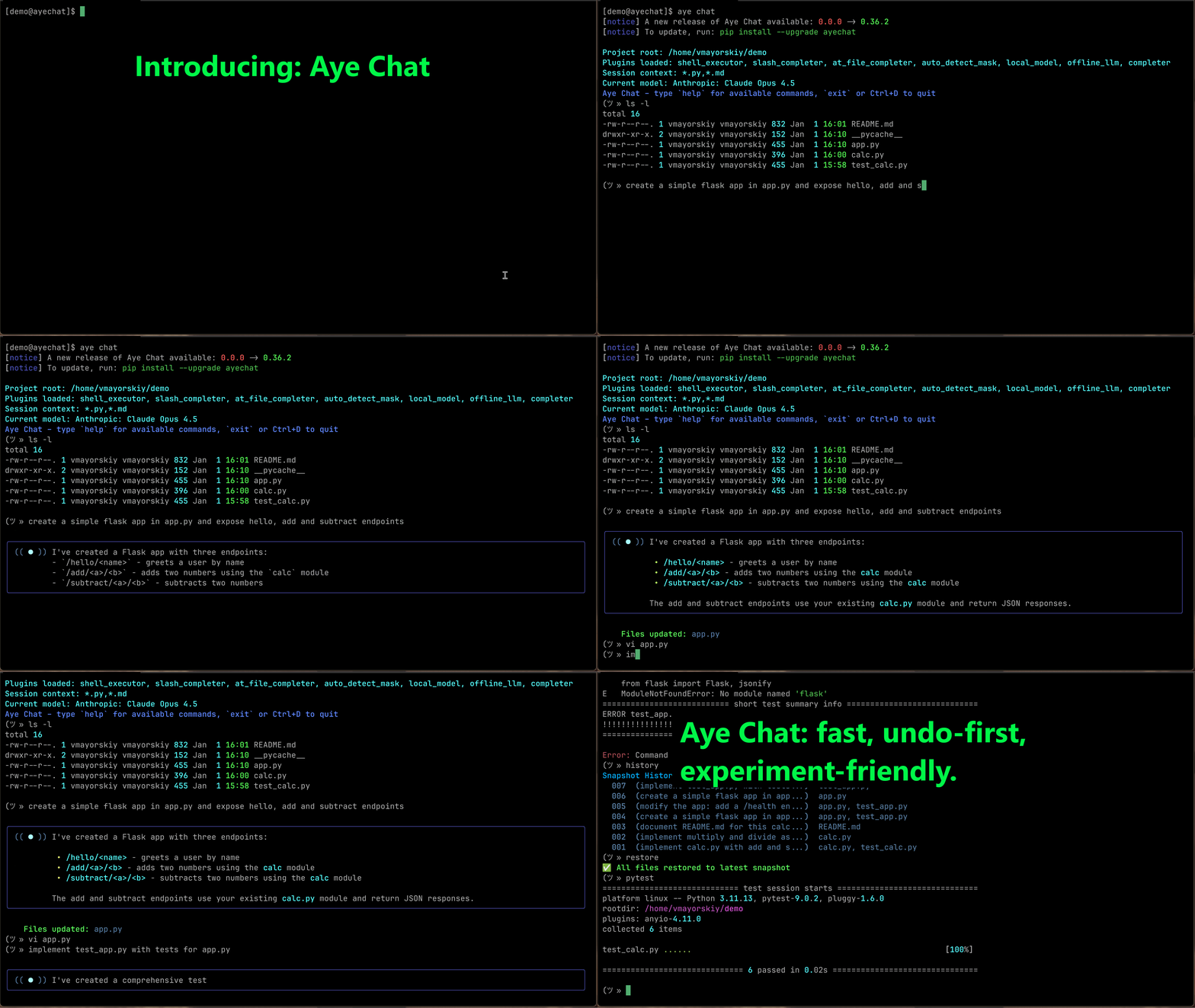
An AI assistant integrated into your shell: execute commands, edit files, and prompt AI, all in one seamless session.
Key Features
- 🚀 Seamless Shell Integration — Your shell, super-powered. Run
ls,git, and evenvimin the same session you chat with AI. No prefixes, no context switching. - 🧠 Zero-Config Context — Aye Chat automatically detects your project's files, respecting your
.gitignore, so you can start coding immediately. - ✍️ Direct File Editing — The AI directly edits and creates files in your project. No more copy-pasting code from a chat window.
- ⏪ Instant Undo — AI made a mistake? A single
restorecommand instantly reverts the last set of changes. Your work is always safe. - 🖥️ Terminal-Native Experience — A rich, responsive UI built for developers who live in the command line.
- 🧩 Extensible via Plugins — The core experience is enhanced by plugins for shell execution, autocompletion, and more.
Quick Start
-
Install the tool:
pip install ayechat
-
Start interactive chat in your source code folder:
aye chat -
Start talking to your shell. That's it!
Core Commands
Authentication
aye auth login    # Configure your access token
aye auth logout   # Remove stored credentials
Starting a Session
aye chat                          # Start chat with auto-detected files
aye chat --root ./src             # Specify a different project root
aye chat --include "*.js,*.css"   # Manually specify which files to include
In-Chat Commands
In chat mode, your input is handled in a specific order:
- Built-in Commands (like
restoreormodel). - Shell Commands (like
ls -laorgit status). - AI Prompt (everything else is sent to the LLM).
Session & Model Control
new- Start a fresh chat session.model- Select a different AI model.verbose [on|off]- Toggle printing the list of files sent to the AI.exit,quit,Ctrl+D- Exit the chat.help- Show available commands.
Reviewing & Undoing AI Changes
restore- Instantly undo the last set of changes made by the AI.history- Show the history of changes made by the AI.diff <file>- Compare the current version of a file against the last change.
Shell Commands Any command that is not a built-in is treated as a shell command.
- You can run standard commands like
ls -la,git status, ordocker ps. - Interactive commands like
vim,nano, andlesswork seamlessly, handing control over to the editor and returning you to the chat when you're done.
Philosophy
Aye Chat reimagines coding as a fluid conversation with an AI-powered shell.
Built for the terminal, it trusts the AI to act directly on your files—no approval diffs, no friction. This high-velocity workflow is made safe by a simple, instant undo command that keeps you in complete control.
By removing the barriers between thought, command, and code, Aye Chat lets you build software at the speed of your ideas.
Configuration & Privacy
- Aye Chat respects
.gitignoreand.ayeignore—your private files are never touched. - Change history and backups are stored locally in the
.aye/folder within your project.
🤝 Contributing
Aye Chat is open-source — we welcome contributions!
- Fork the repo and submit PRs.
- Open issues for bugs or ideas.
- Join our discussions on our Discord Server.
🔥 Ready to code with AI — without leaving your terminal?
Metadata
Release files for ayechat 0.19.2.dev20251104222648
For a detailed explanation of source distributions (sdists) and built distributions (wheels), please see the package formats documentation.
Source distribution (sdist)
| File | Size | Uploaded | |
|---|---|---|---|
| ayechat-0.19.2.dev20251104222648.tar.gz | 448.6 kB | Details |
Built distribution (wheel)
| File | Interpreter | ABI | Platform | Reset |
|---|---|---|---|---|
| ayechat-0.19.2.dev20251104222648-py3-none-any.whl | Python 3 | none | any | Details |
Total release size: 488.3 kB
Release files / ayechat-0.19.2.dev20251104222648.tar.gz
| Download URL | ayechat-0.19.2.dev20251104222648.tar.gz |
|---|---|
| Size | 448.6 kB |
| Tags | Source |
|
SHA-256 checksum How to use checksums |
07ec1292c589f62105eb95b04b3b89d3b11bdb6604ace497cfbc2b21924dc9d2
|
|
BLAKE2b-256 checksum How to use checksums |
56f95265802e75a1ce39939799cf736df1091aac0a923bf08fb873ffecd675b2
|
| Upload date | |
|
Uploaded using Trusted Publishing? What is trusted publishing? |
Yes |
| Uploaded via |
twine/6.1.0 CPython/3.13.7
|
Provenance
Provenance describes where a file came from. On PyPI, provenance is shared via attestations, which provide a verifiable record of the build or publishing details. View details, limitations and caveats.


PyPI Publish Attestation
PyPI verified that this artifact, at this checksum, originated from the publisher listed below.
Signed by GitHub Actions, verified by PyPI on Nov 4, 2025.
Transparency logRelease files / ayechat-0.19.2.dev20251104222648-py3-none-any.whl
| Download URL | ayechat-0.19.2.dev20251104222648-py3-none-any.whl |
|---|---|
| Size | 39.8 kB |
| Tags | Python 3 |
|
SHA-256 checksum How to use checksums |
04848525bf0ab7863579ffb9640385774068859417dab8b24fb6a5f317aed703
|
|
BLAKE2b-256 checksum How to use checksums |
b7d8587130166fa16322c598737c1653c8866345aec6de239e070dda4036e252
|
| Upload date | |
|
Uploaded using Trusted Publishing? What is trusted publishing? |
Yes |
| Uploaded via |
twine/6.1.0 CPython/3.13.7
|
Provenance
Provenance describes where a file came from. On PyPI, provenance is shared via attestations, which provide a verifiable record of the build or publishing details. View details, limitations and caveats.
PyPI Publish Attestation
PyPI verified that this artifact, at this checksum, originated from the publisher listed below.
Signed by GitHub Actions, verified by PyPI on Nov 4, 2025.
Transparency log













