
Agentic AI banking assistant with LangGraph multi-agent workflows, CockroachDB vector search (langchain-cockroachdb), durable checkpointing, receipt OCR, fraud detection, and multi-provider support (OpenAI, AWS Bedrock, IBM watsonx, Google Gemini)
Verified details
These details have been verified by PyPIProject links
GitHub Statistics
Maintainers

Project description




Banko AI Assistant
A demo banking assistant that combines vector RAG, a LangGraph multi-agent pipeline, and runtime-switchable LLM providers — all backed by a single CockroachDB cluster.
What it can do
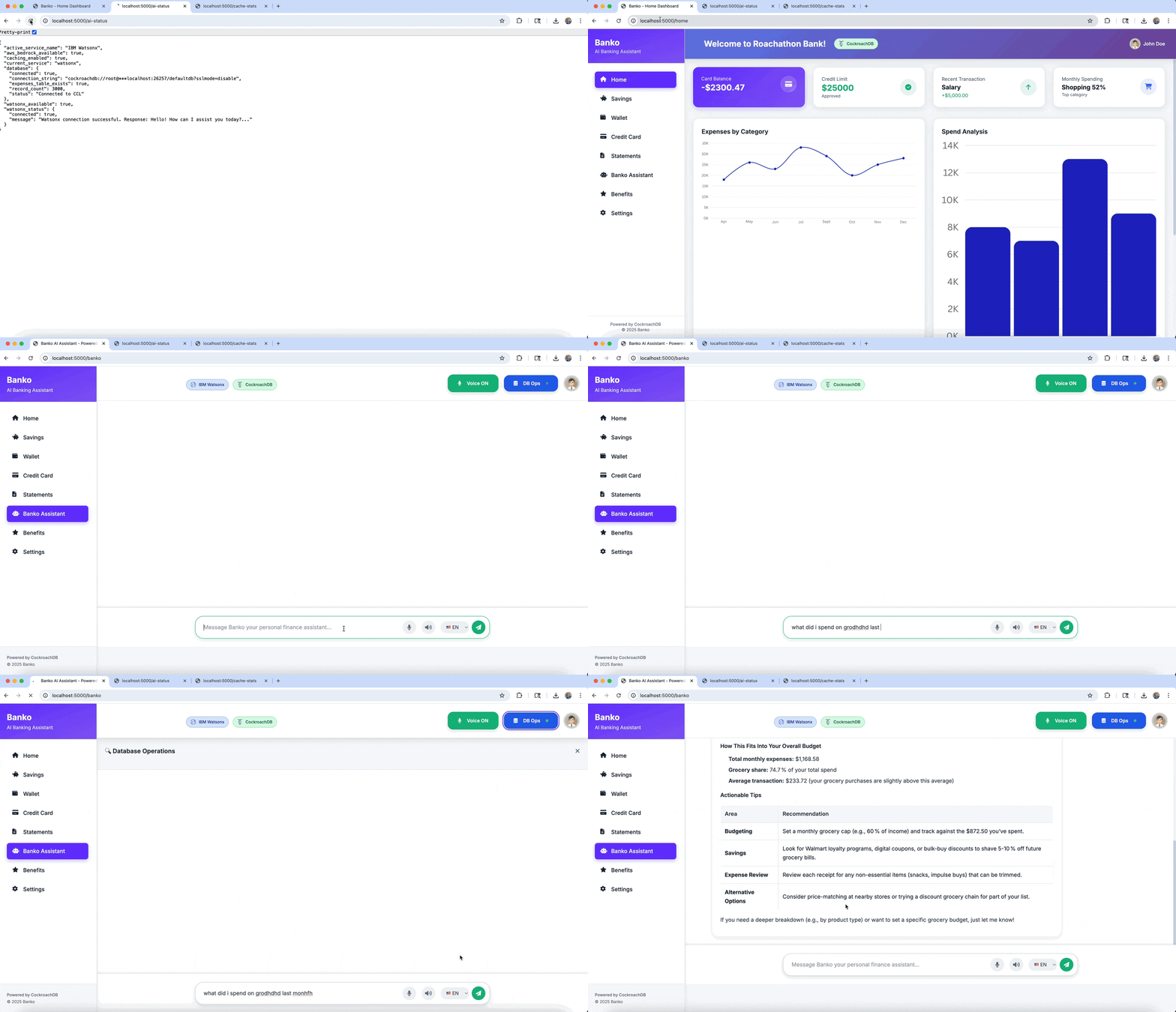
- Ask in natural language — "what did I spend on dining last month?", "show me anything unusual" — answers come from vector search over your expenses plus an LLM-generated summary.
- Upload a receipt — image or PDF goes through an OCR + agent pipeline
(
Receipt → Fraud → Budget) that extracts items, flags duplicates, and reports budget impact, with each agent step durably checkpointed. - Multi-provider LLM — watsonx (default), OpenAI, AWS Bedrock, or
Google Gemini. The provider is chosen at startup via
AI_SERVICE; within a running app you can swap models inside the active provider from Settings (model lists come from each provider's API, not a hardcoded enum). Switching providers requires a restart with the new env value. - See agents work in real time — the dashboard streams actual agent state from the backend (no canned activity).
- Persistent chat — conversations survive restarts via
CockroachDBChatMessageHistory. - Three-layer semantic cache — query / embedding / vector-search caches with tunable similarity thresholds.
How it works
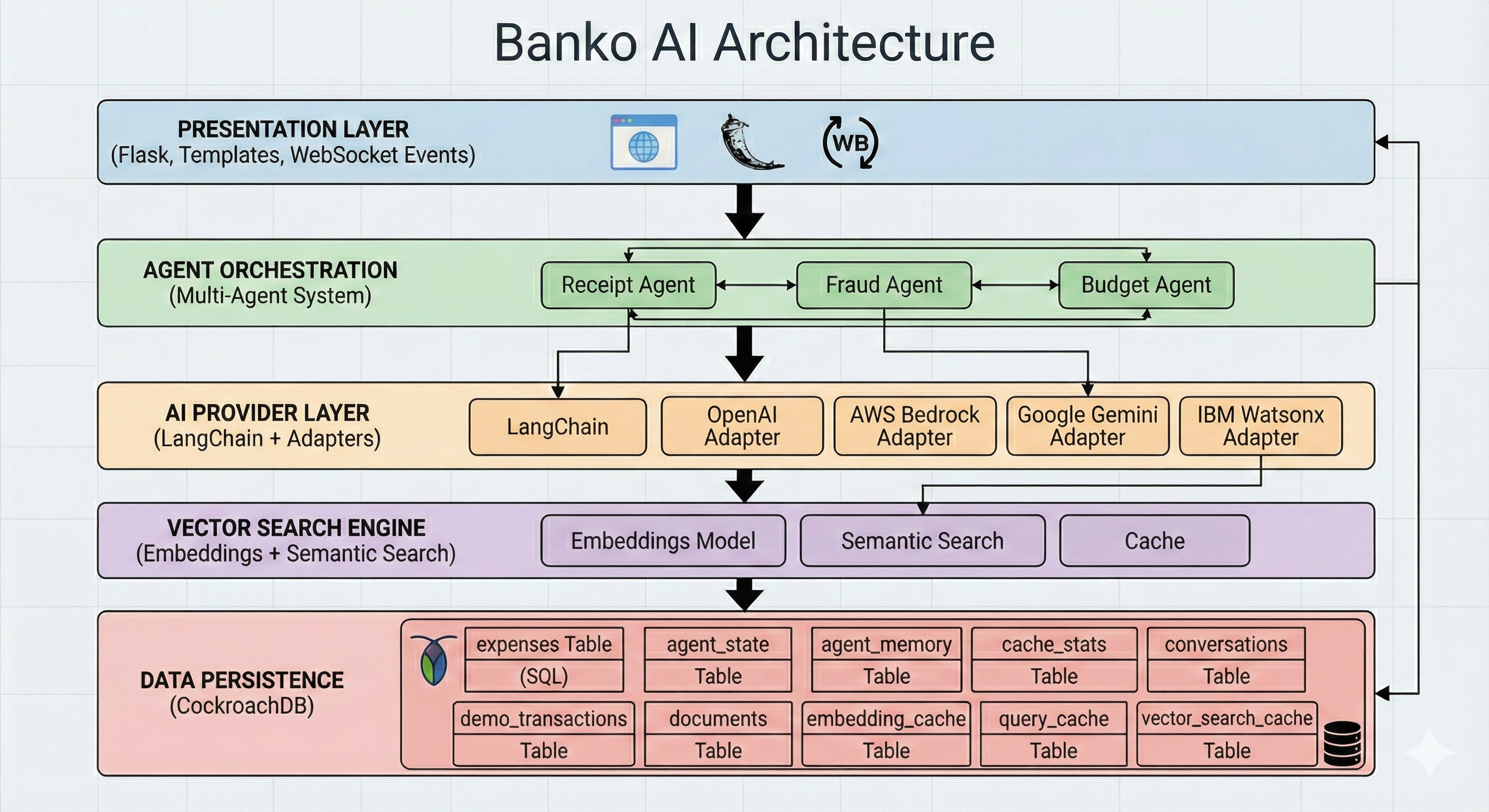
Five layers, one database:
| Layer | What it does | Where |
|---|---|---|
| Web | Flask + SocketIO UI, REST API, real-time agent status | banko_ai/web/ |
| Agents | LangGraph pipeline (Receipt → Fraud → Budget), checkpointed by CockroachDBSaver for crash recovery and replay |
banko_ai/agents/ |
| AI providers | One abstraction over watsonx, OpenAI, Bedrock, Gemini — all LLM calls go through it | banko_ai/ai_providers/ |
| Vector search | CockroachDBVectorStore with C-SPANN cosine indexes, 384-dim all-MiniLM-L6-v2 embeddings (local, no API key) |
banko_ai/vector_search/ |
| Persistence | CockroachDB stores SQL rows, vectors, and agent state in one cluster | banko_ai/utils/ |
All CockroachDB-specific pieces come from
langchain-cockroachdb:
CockroachDBEngine (psycopg3 pool), CockroachDBVectorStore,
CockroachDBChatMessageHistory, and CockroachDBSaver.
Run it
Prerequisites
- Python 3.10+ (3.12 recommended)
- CockroachDB v25.4.0+ (vector indexes are GA)
- An API key for at least one provider (watsonx, OpenAI, AWS, or Gemini), or a local model through Ollama (no key, no internet)
Install
pip install banko-ai-assistant            # PyPI
# or
docker-compose up -d                      # Docker
# or
git clone https://github.com/cockroachlabs-field/banko-ai-assistant
cd banko-ai-assistant
uv pip install -e ".[dev]"                # local development
Start CockroachDB
brew install cockroachdb/tap/cockroach    # macOS
cockroach start-single-node --insecure \
  --store=./cockroach-data \
  --listen-addr=localhost:26257 \
  --http-addr=localhost:8080 --background
Start the app
export AI_SERVICE=watsonx                 # or openai, aws, gemini
export WATSONX_API_KEY=...
export WATSONX_PROJECT_ID=...
export DATABASE_URL="cockroachdb://root@localhost:26257/defaultdb?sslmode=disable"

banko-ai run                              # port 5000, generates 5000 sample records on first start
banko-ai run --port 5001                  # custom port (macOS AirPlay grabs 5000)
banko-ai run --no-data                    # skip the sample-data generator
Open http://localhost:5000.
banko-ai --help lists the rest (generate-data, clear-data, status,
search, etc.). The first run creates the schema (expense, agent, cache,
checkpoint tables), generates sample data with embeddings, and initializes
the selected provider.
Run it offline (airgap)
The whole stack runs without internet: embeddings are computed locally, and the LLM can be a local model served by Ollama. Cache the model once while online, then start the stack with the network off:
scripts/airgap/preload-models.sh                    # once, while online
docker compose -f docker-compose.airgap.yml up -d   # works offline
Default model is granite3.3:8b (override with OLLAMA_MODEL). For a
non-Docker setup, ollama serve plus AI_SERVICE=ollama banko-ai run
does the same thing. Any OpenAI-compatible endpoint also works via
OPENAI_BASE_URL with AI_SERVICE=openai.
Configuration
The important knobs:
| Variable | Description | Default |
|---|---|---|
DATABASE_URL |
CockroachDB connection string | cockroachdb://root@localhost:26257/defaultdb?sslmode=disable |
AI_SERVICE |
watsonx, openai, aws, or gemini |
watsonx |
SECRET_KEY |
Flask session key (auto-generated in dev) | random |
Provider keys depend on what you pick:
# IBM watsonx (default)
WATSONX_API_KEY=...   WATSONX_PROJECT_ID=...

# OpenAI
OPENAI_API_KEY=...

# AWS Bedrock — note AI_SERVICE=aws, not bedrock
AWS_ACCESS_KEY_ID=... AWS_SECRET_ACCESS_KEY=... AWS_REGION=us-east-1

# Google Gemini (Vertex AI)
GOOGLE_APPLICATION_CREDENTIALS=path/to/sa.json   GOOGLE_PROJECT_ID=...
# or the Generative AI API
GOOGLE_API_KEY=...
Override model lists with WATSONX_MODELS, OPENAI_MODELS, AWS_MODELS,
GEMINI_MODELS (comma-separated). Cache, fraud, and pool tuning live in
banko_ai/config/ (CACHE_SIMILARITY_THRESHOLD, CACHE_TTL_HOURS,
FRAUD_DUPLICATE_WINDOW_DAYS, DB_POOL_SIZE, …).
API
| Endpoint | Method | Purpose |
|---|---|---|
/api/health |
GET | DB + AI status |
/api/ai-providers |
GET | List providers |
/api/models |
GET / POST | List or switch models |
/api/search |
POST | Vector search |
/api/rag |
POST | RAG-based Q&A |
/api/upload-receipt |
POST | Run a receipt through the agent pipeline |
/api/agents/status |
GET | Agent dashboard data |
/api/chat-history/<id> |
GET / DELETE | Persistent chat per session |
Full list with examples in docs/API.md. Quick check:
curl -X POST http://localhost:5000/api/rag \
  -H "Content-Type: application/json" \
  -d '{"query": "What are my biggest expenses this month?"}'
Where the data plane comes from
This repo is the agent side. A companion repo,
cockroachlabs-field/cockroachdb-watsonx-data-pipeline,
streams CockroachDB CDC events into Apache Iceberg on IBM watsonx.data
(both via webhook and Debezium → Kafka). Neither repo requires the other —
this app works against a local CockroachDB with its own sample data — but
the two together demo the end-to-end transactional + lakehouse path.
Testing
python -m pytest tests/ -v                # all tests
ruff check banko_ai/                      # lint
Integration tests need a populated CockroachDB; they're skipped in CI when the DB isn't available.
Troubleshooting
- CockroachDB version — must be v25.4.0+ for vector indexes
(
cockroach version). - DB connection error — confirm the single-node command above is
running, then
cockroach sql --insecure --execute "SHOW TABLES;". - AI provider issues — confirm keys are exported, then hit
/api/health. For watsonx,/diagnostics/watsonxhas connection details. - Port 5000 in use (macOS) — AirPlay Receiver claims port 5000.
Either disable it in System Settings → AirDrop & Handoff, or run
banko-ai run --port 5001.
License
MIT
Project details
Verified details
These details have been verified by PyPIProject links
GitHub Statistics
Maintainers
Release history Release notifications | RSS feed


Download files
Download the file for your platform. If you're not sure which to choose, learn more about installing packages.
Source Distribution
Built Distribution
Filter files by name, interpreter, ABI, and platform.
If you're not sure about the file name format, learn more about wheel file names.
Copy a direct link to the current filters
File details
Details for the file banko_ai_assistant-1.2.0.tar.gz.
File metadata
- Download URL: banko_ai_assistant-1.2.0.tar.gz
- Upload date:
- Size: 14.8 MB
- Tags: Source
- Uploaded using Trusted Publishing? Yes
- Uploaded via: twine/6.1.0 CPython/3.13.14
File hashes
| Algorithm | Hash digest | |
|---|---|---|
| SHA256 |
194bffffcb6e7c723d2dc43e8715aec99a9f561c35fb513a5bff627b20aae8df
|
|
| MD5 |
fe3a1b4612749fac19b4af8266e1d508
|
|
| BLAKE2b-256 |
718f581ae63bd6a54a8fa5d77941d3f26d012fd3d963e6e4d0c4df05d9d950d1
|
Provenance
The following attestation bundles were made for banko_ai_assistant-1.2.0.tar.gz:
Publisher:
release.yml on cockroachlabs-field/banko-ai-assistant
-
Statement:
-
Statement type:
https://in-toto.io/Statement/v1 -
Predicate type:
https://docs.pypi.org/attestations/publish/v1 -
Subject name:
banko_ai_assistant-1.2.0.tar.gz -
Subject digest:
194bffffcb6e7c723d2dc43e8715aec99a9f561c35fb513a5bff627b20aae8df - Sigstore transparency entry: 2241905717
- Sigstore integration time:
-
Permalink:
cockroachlabs-field/banko-ai-assistant@55cb6d608932d0158ad1b494c25ed0d7d08a7dc8 -
Branch / Tag:
refs/heads/main - Owner: https://github.com/cockroachlabs-field
-
Access:
public
-
Token Issuer:
https://token.actions.githubusercontent.com -
Runner Environment:
github-hosted -
Publication workflow:
release.yml@55cb6d608932d0158ad1b494c25ed0d7d08a7dc8 -
Trigger Event:
workflow_dispatch
-
Statement type:
File details
Details for the file banko_ai_assistant-1.2.0-py3-none-any.whl.
File metadata
- Download URL: banko_ai_assistant-1.2.0-py3-none-any.whl
- Upload date:
- Size: 14.8 MB
- Tags: Python 3
- Uploaded using Trusted Publishing? Yes
- Uploaded via: twine/6.1.0 CPython/3.13.14
File hashes
| Algorithm | Hash digest | |
|---|---|---|
| SHA256 |
bc8c25968a81e7b545855148c65d63c7df07a4d31c82dd6d4d3b1694974642b2
|
|
| MD5 |
5eddf8baed358aebd2c7dbe7823ac0a2
|
|
| BLAKE2b-256 |
504510bf2f900785bd7b50c02f779302fb21b01fc6d67b4c979b4ef1874420a2
|
Provenance
The following attestation bundles were made for banko_ai_assistant-1.2.0-py3-none-any.whl:
Publisher:
release.yml on cockroachlabs-field/banko-ai-assistant
-
Statement:
-
Statement type:
https://in-toto.io/Statement/v1 -
Predicate type:
https://docs.pypi.org/attestations/publish/v1 -
Subject name:
banko_ai_assistant-1.2.0-py3-none-any.whl -
Subject digest:
bc8c25968a81e7b545855148c65d63c7df07a4d31c82dd6d4d3b1694974642b2 - Sigstore transparency entry: 2241905845
- Sigstore integration time:
-
Permalink:
cockroachlabs-field/banko-ai-assistant@55cb6d608932d0158ad1b494c25ed0d7d08a7dc8 -
Branch / Tag:
refs/heads/main - Owner: https://github.com/cockroachlabs-field
-
Access:
public
-
Token Issuer:
https://token.actions.githubusercontent.com -
Runner Environment:
github-hosted -
Publication workflow:
release.yml@55cb6d608932d0158ad1b494c25ed0d7d08a7dc8 -
Trigger Event:
workflow_dispatch
-
Statement type:






