
OSINT automation for hackers.

Project description








BEE·bot is a multipurpose scanner inspired by Spiderfoot, built to automate your Recon, Bug Bounties, and ASM!
https://github.com/blacklanternsecurity/bbot/assets/20261699/e539e89b-92ea-46fa-b893-9cde94eebf81
A BBOT scan in real-time - visualization with VivaGraphJS
Installation
# stable version
pipx install bbot

# bleeding edge (dev branch)
pipx install --pip-args '\--pre' bbot
For more installation methods, including Docker, see Getting Started
Example Commands
1) Subdomain Finder
Passive API sources plus a recursive DNS brute-force with target-specific subdomain mutations.
# find subdomains of evilcorp.com
bbot -t evilcorp.com -p subdomain-enum

# passive sources only
bbot -t evilcorp.com -p subdomain-enum -rf passive
subdomain-enum.yml
description: Enumerate subdomains via APIs, brute-force

flags:
  # enable every module with the subdomain-enum flag
  - subdomain-enum

output_modules:
  # output unique subdomains to TXT file
  - subdomains

config:
  dns:
    threads: 25
    brute_threads: 1000
  # put your API keys here
  # modules:
  #   github:
  #     api_key: ""
  #   chaos:
  #     api_key: ""
  #   securitytrails:
  #     api_key: ""
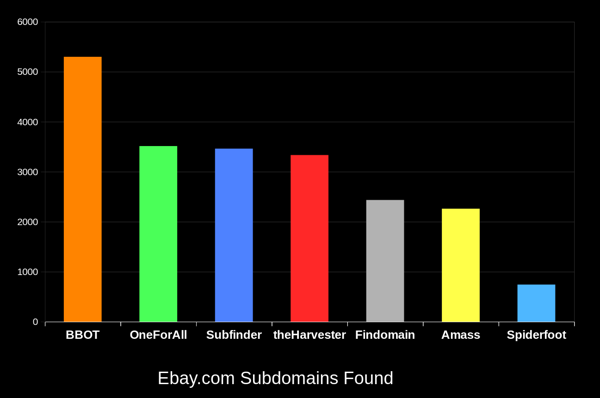
BBOT consistently finds 20-50% more subdomains than other tools. The bigger the domain, the bigger the difference. To learn how this is possible, see How It Works.
2) Web Spider
# crawl evilcorp.com, extracting emails and other goodies
bbot -t evilcorp.com -p spider
spider.yml
description: Recursive web spider

modules:
  - httpx

blacklist:
  # Prevent spider from invalidating sessions by logging out
  - "RE:/.*(sign|log)[_-]?out"

config:
  web:
    # how many links to follow in a row
    spider_distance: 2
    # don't follow links whose directory depth is higher than 4
    spider_depth: 4
    # maximum number of links to follow per page
    spider_links_per_page: 25
3) Email Gatherer
# quick email enum with free APIs + scraping
bbot -t evilcorp.com -p email-enum

# pair with subdomain enum + web spider for maximum yield
bbot -t evilcorp.com -p email-enum subdomain-enum spider
email-enum.yml
description: Enumerate email addresses from APIs, web crawling, etc.

flags:
  - email-enum

output_modules:
  - emails
4) Web Scanner
# run a light web scan against www.evilcorp.com
bbot -t www.evilcorp.com -p web-basic

# run a heavy web scan against www.evilcorp.com
bbot -t www.evilcorp.com -p web-thorough
web-basic.yml
description: Quick web scan

include:
  - iis-shortnames

flags:
  - web-basic
web-thorough.yml
description: Aggressive web scan

include:
  # include the web-basic preset
  - web-basic

flags:
  - web-thorough
5) Everything Everywhere All at Once
# everything everywhere all at once
bbot -t evilcorp.com -p kitchen-sink --allow-deadly

# roughly equivalent to:
bbot -t evilcorp.com -p subdomain-enum cloud-enum code-enum email-enum spider web-basic paramminer dirbust-light web-screenshots --allow-deadly
kitchen-sink.yml
description: Everything everywhere all at once

include:
  - subdomain-enum
  - cloud-enum
  - code-enum
  - email-enum
  - spider
  - web-basic
  - paramminer
  - dirbust-light
  - web-screenshots
  - baddns-intense

config:
  modules:
    baddns:
      enable_references: True
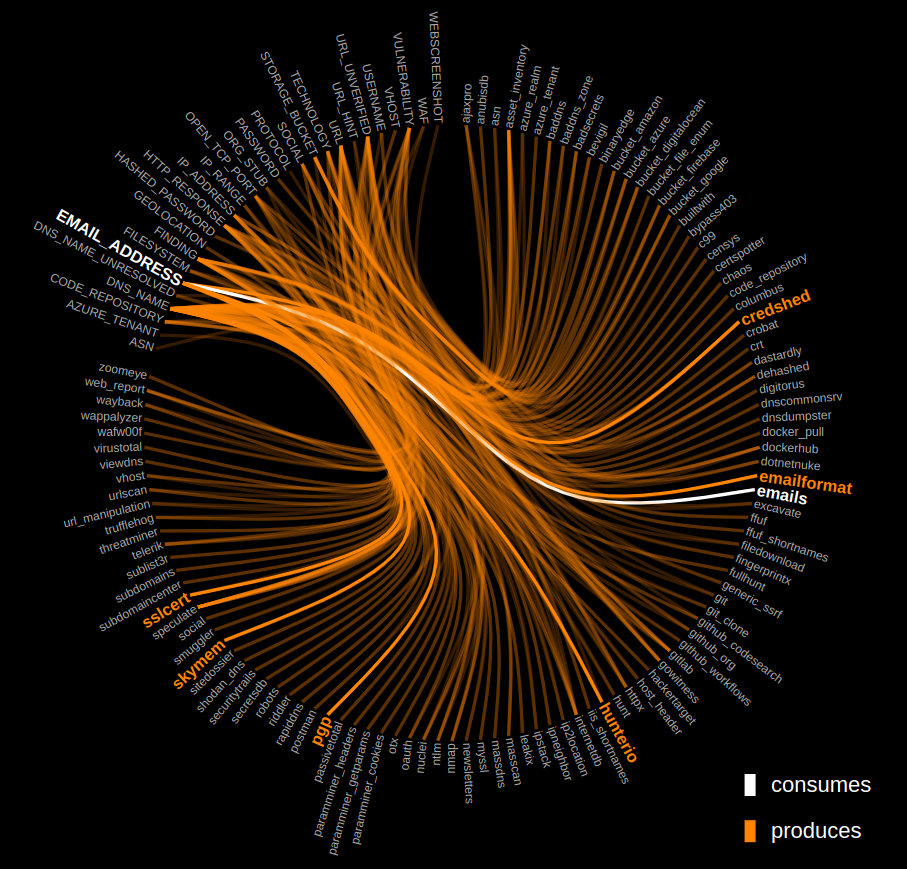
How it Works
Click the graph below to explore the inner workings of BBOT.
Output Modules
...and more!
BBOT as a Python Library
Synchronous
from bbot.scanner import Scanner

if __name__ == "__main__":
    scan = Scanner("evilcorp.com", presets=["subdomain-enum"])
    for event in scan.start():
        print(event)
Asynchronous
from bbot.scanner import Scanner

async def main():
    scan = Scanner("evilcorp.com", presets=["subdomain-enum"])
    async for event in scan.async_start():
        print(event.json())

if __name__ == "__main__":
    import asyncio
    asyncio.run(main())
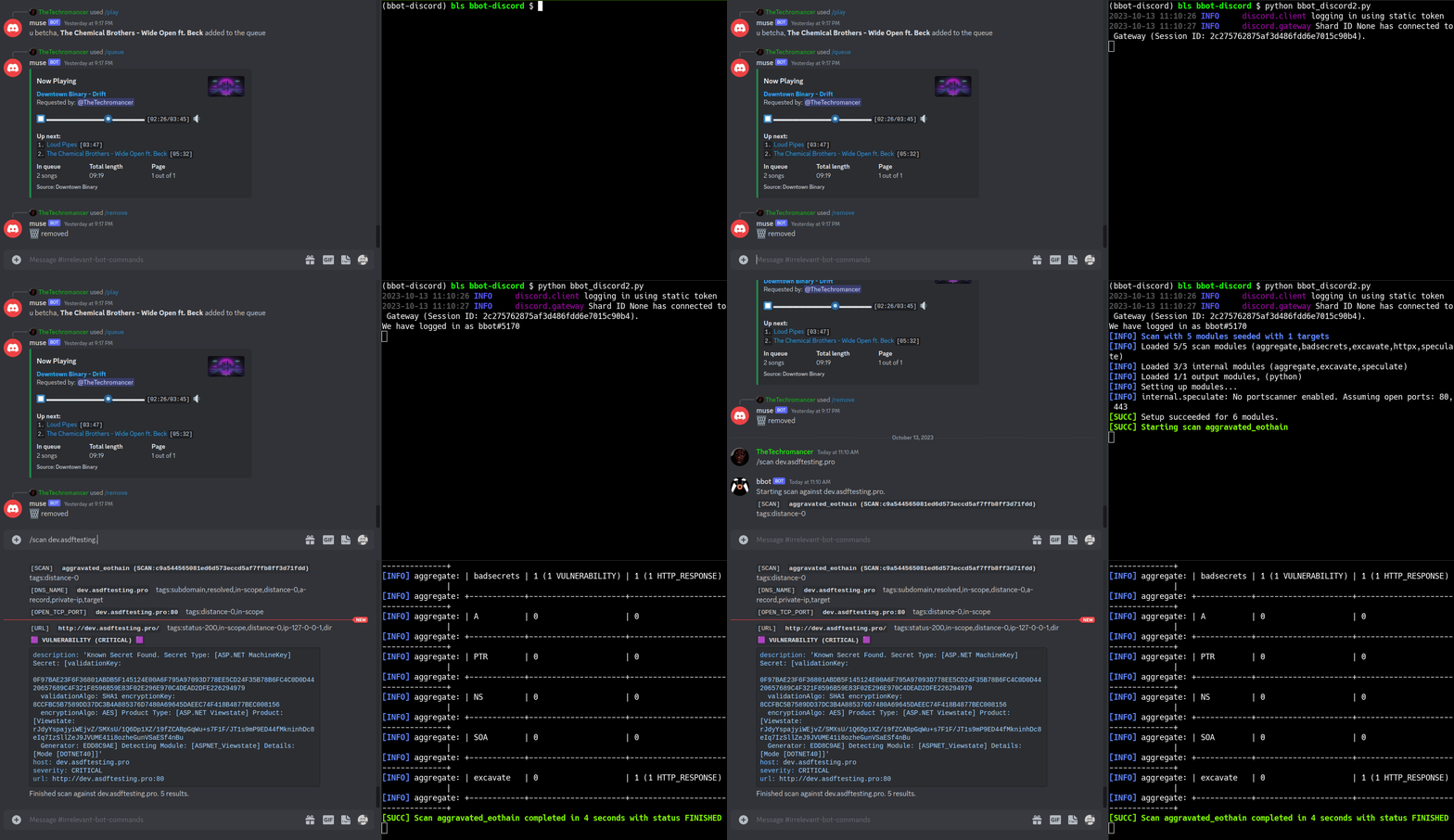
SEE: This Nefarious Discord Bot
A BBOT Discord Bot that responds to the /scan command. Scan the internet from the comfort of your discord server!
Feature Overview
- Support for Multiple Targets
- Web Screenshots
- Suite of Offensive Web Modules
- NLP-powered Subdomain Mutations
- Native Output to Neo4j (and more)
- Automatic dependency install with Ansible
- Search entire attack surface with custom YARA rules
- Python API + Developer Documentation
Targets
BBOT accepts an unlimited number of targets via -t. You can specify targets either directly on the command line or in files (or both!):
bbot -t evilcorp.com evilcorp.org 1.2.3.0/24 -p subdomain-enum
Targets can be any of the following:
- DNS Name (
evilcorp.com) - IP Address (
1.2.3.4) - IP Range (
1.2.3.0/24) - Open TCP Port (
192.168.0.1:80) - URL (
https://www.evilcorp.com) - Email Address (
bob@evilcorp.com) - Organization (
ORG:evilcorp) - Username (
USER:bobsmith) - Filesystem (
FILESYSTEM:/tmp/asdf) - Mobile App (
MOBILE_APP:https://play.google.com/store/apps/details?id=com.evilcorp.app)
For more information, see Targets. To learn how BBOT handles scope, see Scope.
API Keys
Similar to Amass or Subfinder, BBOT supports API keys for various third-party services such as SecurityTrails, etc.
The standard way to do this is to enter your API keys in ~/.config/bbot/bbot.yml. Note that multiple API keys are allowed:
modules:
  shodan_dns:
    api_key: 4f41243847da693a4f356c0486114bc6
  c99:
    # multiple API keys
    api_key:
      - 21a270d5f59c9b05813a72bb41707266
      - ea8f243d9885cf8ce9876a580224fd3c
      - 5bc6ed268ab6488270e496d3183a1a27
  virustotal:
    api_key: dd5f0eee2e4a99b71a939bded450b246
  securitytrails:
    api_key: d9a05c3fd9a514497713c54b4455d0b0
If you like, you can also specify them on the command line:
bbot -c modules.virustotal.api_key=dd5f0eee2e4a99b71a939bded450b246
For details, see Configuration.
Complete Lists of Modules, Flags, etc.
- Complete list of Modules.
- Complete list of Flags.
- Complete list of Presets.
- Complete list of Global Config Options.
- Complete list of Module Config Options.
Documentation
- User Manual
- Developer Manual
Contribution
Some of the best BBOT modules were written by the community. BBOT is being constantly improved; every day it grows more powerful!
We welcome contributions. Not just code, but ideas too! If you have an idea for a new feature, please let us know in Discussions. If you want to get your hands dirty, see Contribution. There you can find setup instructions and a simple tutorial on how to write a BBOT module. We also have extensive Developer Documentation.
Thanks to these amazing people for contributing to BBOT! :heart:

Special thanks to:
- @TheTechromancer for creating BBOT
- @liquidsec for his extensive work on BBOT's web hacking features, including badsecrets and baddns
- Steve Micallef (@smicallef) for creating Spiderfoot
- @kerrymilan for his Neo4j and Ansible expertise
- @domwhewell-sage for his family of badass code-looting modules
- @aconite33 and @amiremami for their ruthless testing
- Aleksei Kornev (@alekseiko) for granting us ownership of the bbot Pypi repository <3
Release history Release notifications | RSS feed


Download files
Download the file for your platform. If you're not sure which to choose, learn more about installing packages.
Source Distribution
Built Distribution
Filter files by name, interpreter, ABI, and platform.
If you're not sure about the file name format, learn more about wheel file names.
Copy a direct link to the current filters
File details
Details for the file bbot-2.8.2.tar.gz.
File metadata
- Download URL: bbot-2.8.2.tar.gz
- Upload date:
- Size: 1.4 MB
- Tags: Source
- Uploaded using Trusted Publishing? No
- Uploaded via: twine/6.1.0 CPython/3.13.7
File hashes
| Algorithm | Hash digest | |
|---|---|---|
| SHA256 |
4a518440637614daccd056468fa4828dcc8f83cdb7f36391471dfa592c9ad8b3
|
|
| MD5 |
245de85a6b19040160c0fdbe426a1d82
|
|
| BLAKE2b-256 |
72711e19d9be6e6ad7aa52fe466efbf1063a5c43303a579cd34538a5e96052ac
|
File details
Details for the file bbot-2.8.2-py3-none-any.whl.
File metadata
- Download URL: bbot-2.8.2-py3-none-any.whl
- Upload date:
- Size: 1.6 MB
- Tags: Python 3
- Uploaded using Trusted Publishing? No
- Uploaded via: twine/6.1.0 CPython/3.13.7
File hashes
| Algorithm | Hash digest | |
|---|---|---|
| SHA256 |
7e50e8194273d9fff72f4be6c52c96f9978e65ef6b35aa735982f8eb4192137e
|
|
| MD5 |
44c08e12d4ee972334429f9196c1336e
|
|
| BLAKE2b-256 |
8623b57d84f0e3d7fdb58c3df6035a1f2b9167e53bb40b9de12bb9f4b5e9901e
|






