
This release is a pre-release and may not be stable for production use.
BEE·bot
OSINT automation for hackers.







BBOT is a modular, recursive OSINT framework that can execute the entire OSINT workflow in a single command.
BBOT is inspired by Spiderfoot but takes it to the next level with features like multi-target scans, lightning-fast asyncio performance, and NLP-powered subdomain mutations. It offers a wide range of functionality, including subdomain enumeration, port scanning, web screenshots, vulnerability scanning, and much more.
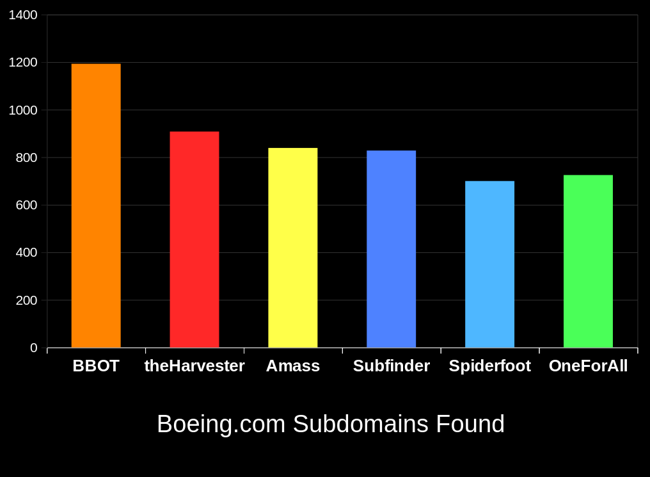
BBOT typically outperforms other subdomain enumeration tools by 20-25%. To learn how this is possible, see How It Works.
Full Documentation Here.
Installation (pip)
For more installation methods including Docker, see Installation.
# Prerequisites:
# - Linux (Windows and macOS are *not* supported)
# - Python 3.9 or newer

# stable version
pipx install bbot

# bleeding edge (dev branch)
pipx install --pip-args '\--pre' bbot

bbot --help
Example Commands
Scan output, logs, etc. are saved to ~/.bbot. For more detailed examples and explanations, see Scanning.
Subdomains:
# Perform a full subdomain enumeration on evilcorp.com
bbot -t evilcorp.com -f subdomain-enum
Subdomains (passive only):
# Perform a passive-only subdomain enumeration on evilcorp.com
bbot -t evilcorp.com -f subdomain-enum -rf passive
Subdomains + port scan + web screenshots:
# Port-scan every subdomain, screenshot every webpage, output to current directory
bbot -t evilcorp.com -f subdomain-enum -m nmap gowitness -n my_scan -o .
Subdomains + basic web scan:
# A basic web scan includes wappalyzer, robots.txt, and other non-intrusive web modules
bbot -t evilcorp.com -f subdomain-enum web-basic
Web spider:
# Crawl www.evilcorp.com up to a max depth of 2, automatically extracting emails, secrets, etc.
bbot -t www.evilcorp.com -m httpx robots badsecrets secretsdb -c web_spider_distance=2 web_spider_depth=2
Everything everywhere all at once:
# Subdomains, emails, cloud buckets, port scan, basic web, web screenshots, nuclei
bbot -t evilcorp.com -f subdomain-enum email-enum cloud-enum web-basic -m nmap gowitness nuclei --allow-deadly
Targets
BBOT accepts an unlimited number of targets. You can specify targets either directly on the command line or in files (or both!). Targets can be any of the following:
- DNS_NAME (
evilcorp.com) - IP_ADDRESS (
1.2.3.4) - IP_RANGE (
1.2.3.0/24) - URL (
https://www.evilcorp.com)
For more information, see Targets. To learn how BBOT handles scope, see Scope.
BBOT as a Python library
Synchronous
from bbot.scanner import Scanner

# any number of targets can be specified
scan = Scanner("example.com", "scanme.nmap.org", modules=["nmap", "sslcert"])
for event in scan.start():
    print(event.json())
Asynchronous
from bbot.scanner import Scanner

async def main():
    scan = Scanner("example.com", "scanme.nmap.org", modules=["nmap", "sslcert"])
    async for event in scan.async_start():
        print(event.json())

import asyncio
asyncio.run(main())
Documentation
- Basics
- Scanning
- Contribution
- Misc
Acknowledgements
Thanks to these amazing people for contributing to BBOT! :heart:
If you're interested in contributing to BBOT, or just curious how it works under the hood, see Contribution.

Special thanks to the following people who made BBOT possible:
- @TheTechromancer for creating BBOT
- @liquidsec for his extensive work on BBOT's web hacking features
- Steve Micallef (@smicallef) for creating Spiderfoot
- @kerrymilan for his Neo4j and Ansible expertise
- Aleksei Kornev (@alekseiko) for allowing us ownership of the bbot Pypi repository <3
1 maintainer

Release files for bbot 1.1.0.2034rc0
For a detailed explanation of source distributions (sdists) and built distributions (wheels), please see the package formats documentation.
Source distribution (sdist)
| File | Size | Uploaded | |
|---|---|---|---|
| bbot-1.1.0.2034rc0.tar.gz | 1.3 MB | Details |
Built distribution (wheel)
| File | Interpreter | ABI | Platform | Reset |
|---|---|---|---|---|
| bbot-1.1.0.2034rc0-py3-none-any.whl | Python 3 | none | any | Details |
Total release size: 2.6 MB
Release files / bbot-1.1.0.2034rc0.tar.gz
| Download URL | bbot-1.1.0.2034rc0.tar.gz |
|---|---|
| Size | 1.3 MB |
| Tags | Source |
|
SHA-256 checksum How to use checksums |
1b068c4053da5d6c78af55e92b035d28ee6bb4ee1333f3a242106e867cb667a3
|
|
BLAKE2b-256 checksum How to use checksums |
9ee3ac79e870aea73beee8e763f0ea1d64cc4b7f406107b943bbb6017ad44538
|
| Upload date | |
|
Uploaded using Trusted Publishing? What is trusted publishing? |
No |
| Uploaded via |
twine/4.0.1 CPython/3.9.17
|
Release files / bbot-1.1.0.2034rc0-py3-none-any.whl
| Download URL | bbot-1.1.0.2034rc0-py3-none-any.whl |
|---|---|
| Size | 1.4 MB |
| Tags | Python 3 |
|
SHA-256 checksum How to use checksums |
85e3b46f2bacaa28040cc23833b1423efa259a07c3d65754f6bee8aa4c19afd6
|
|
BLAKE2b-256 checksum How to use checksums |
6238659afdb03747afbc35079c9e73ac26391951888eaf4b9d720905696cb448
|
| Upload date | |
|
Uploaded using Trusted Publishing? What is trusted publishing? |
No |
| Uploaded via |
twine/4.0.1 CPython/3.9.17
|














