
This release is a pre-release and may not be stable for production use.








BEE·bot is a multipurpose scanner inspired by Spiderfoot, built to automate your Recon, Bug Bounties, and ASM!
https://github.com/blacklanternsecurity/bbot/assets/20261699/e539e89b-92ea-46fa-b893-9cde94eebf81
A BBOT scan in real-time - visualization with VivaGraphJS
Installation
# stable version
pipx install bbot

# bleeding edge (dev branch)
pipx install --pip-args '\--pre' bbot
For more installation methods, including Docker, see Getting Started
Speed tip: BBOT's DNS engine spins up ten workers per resolver in
/etc/resolv.conf. Adding more unfiltered resolvers dramatically speeds up scans. See the sample resolv.conf and Tips and Tricks for details.
Example Commands
1) Subdomain Finder
Passive API sources plus a recursive DNS brute-force with target-specific subdomain mutations.
# find subdomains of evilcorp.com
bbot -t evilcorp.com -p subdomain-enum

# passive sources only
bbot -t evilcorp.com -p subdomain-enum -rf passive
subdomain-enum.yml
description: Enumerate subdomains via APIs, brute-force

flags:
  # enable every module with the subdomain-enum flag
  - subdomain-enum

output_modules:
  # output unique subdomains to TXT file
  - subdomains

config:
  dns:
    threads: 25
    brute_threads: 1000
  # put your API keys here
  # modules:
  #   github:
  #     api_key: ""
  #   chaos:
  #     api_key: ""
  #   securitytrails:
  #     api_key: ""
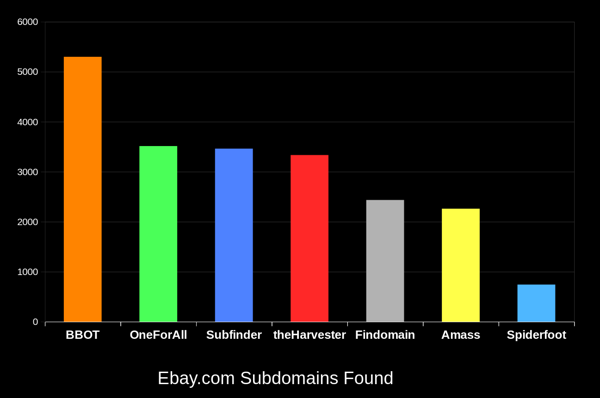
BBOT consistently finds 20-50% more subdomains than other tools. The bigger the domain, the bigger the difference. To learn how this is possible, see How It Works.
2) Web Spider
# crawl evilcorp.com, extracting emails and other goodies
bbot -t evilcorp.com -p spider
spider.yml
description: Recursive web spider

modules:
  - http

blacklist:
  # Prevent spider from invalidating sessions by logging out
  - "RE:/.*(sign|log)[_-]?out"

config:
  web:
    # how many links to follow in a row
    spider_distance: 2
    # don't follow links whose directory depth is higher than 4
    spider_depth: 4
    # maximum number of links to follow per page
    spider_links_per_page: 25
3) Email Gatherer
# quick email enum with free APIs + scraping
bbot -t evilcorp.com -p email-enum

# pair with subdomain enum + web spider for maximum yield
bbot -t evilcorp.com -p email-enum subdomain-enum spider
email-enum.yml
description: Enumerate email addresses from APIs, web crawling, etc.

flags:
  - email-enum

output_modules:
  - emails
4) Web Scanner
# run a light web scan against www.evilcorp.com
bbot -t www.evilcorp.com -p web

# run a heavy web scan against www.evilcorp.com
bbot -t www.evilcorp.com -p web-heavy
web.yml
description: Quick web scan

include:
  - iis-shortnames

flags:
  - web
web-heavy.yml
description: Aggressive web scan

include:
  # include the web preset
  - web

flags:
  - web-heavy
5) Everything Everywhere All at Once
# everything everywhere all at once
bbot -t evilcorp.com -p kitchen-sink

# roughly equivalent to:
bbot -t evilcorp.com -p subdomain-enum cloud-enum code-enum email-enum spider web paramminer dirbust-light web-screenshots
kitchen-sink.yml
description: Everything everywhere all at once

include:
  - subdomain-enum
  - cloud-enum
  - code-enum
  - email-enum
  - spider
  - web
  - paramminer
  - dirbust-light
  - web-screenshots
  - baddns-heavy

config:
  modules:
    dnsbrute:
      recursive_mutations: true
    dnscommonsrv:
      recursive_mutations: true
How it Works
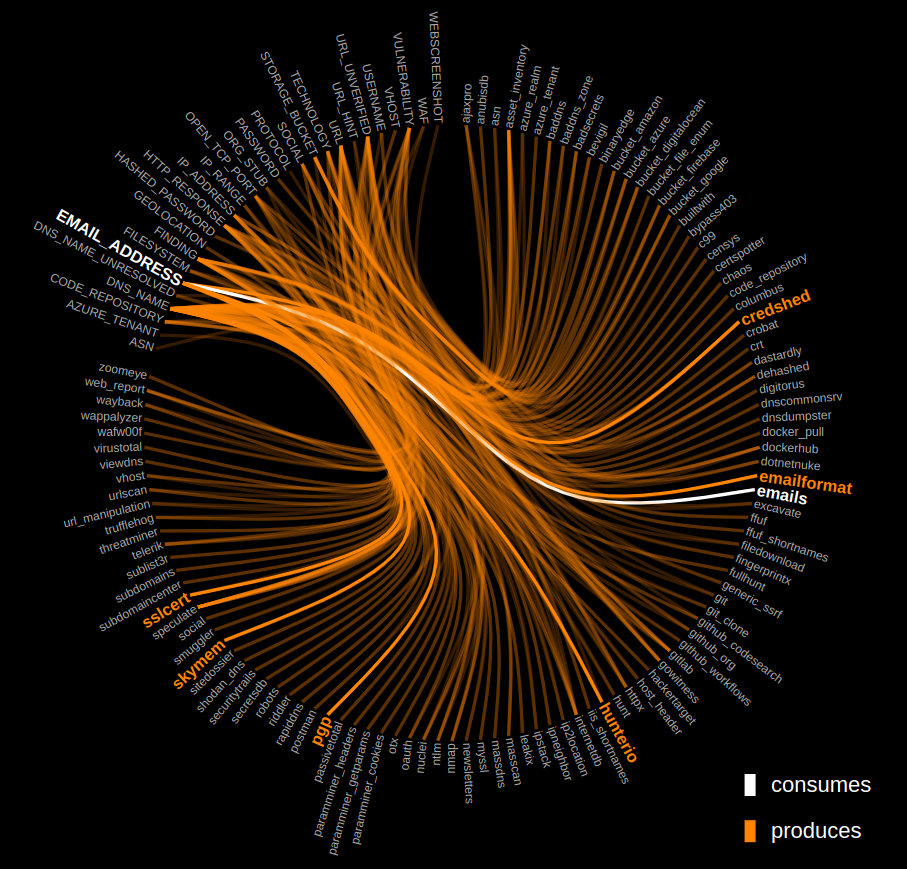
Click the graph below to explore the inner workings of BBOT.
Output Modules
...and more!
BBOT as a Python Library
Synchronous
from bbot.scanner import Scanner

if __name__ == "__main__":
    scan = Scanner("evilcorp.com", presets=["subdomain-enum"])
    for event in scan.start():
        print(event)
Asynchronous
from bbot.scanner import Scanner

async def main():
    scan = Scanner("evilcorp.com", presets=["subdomain-enum"])
    async for event in scan.async_start():
        print(event.json())

if __name__ == "__main__":
    import asyncio
    asyncio.run(main())
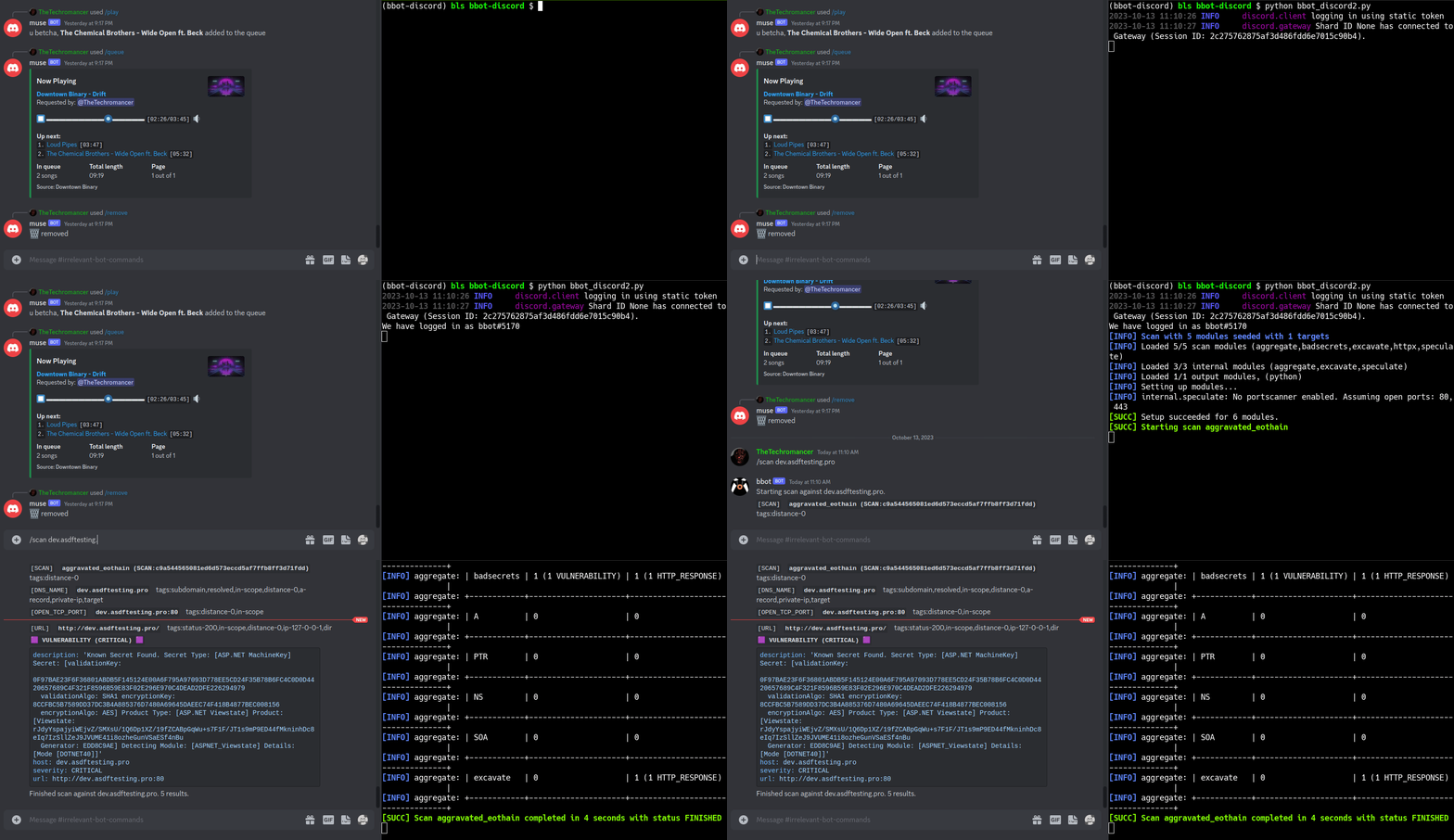
SEE: This Nefarious Discord Bot
A BBOT Discord Bot that responds to the /scan command. Scan the internet from the comfort of your discord server!
Feature Overview
- Support for Multiple Targets
- Web Screenshots
- Suite of Offensive Web Modules
- NLP-powered Subdomain Mutations
- Native Output to Neo4j (and more)
- Automatic dependency install with Ansible
- Search entire attack surface with custom YARA rules
- Python API + Developer Documentation
Targets
BBOT accepts an unlimited number of targets via -t. You can specify targets either directly on the command line or in files (or both!):
bbot -t evilcorp.com evilcorp.org 1.2.3.0/24 -p subdomain-enum
Targets can be any of the following:
- DNS Name (
evilcorp.com) - IP Address (
1.2.3.4) - IP Range (
1.2.3.0/24) - Open TCP Port (
192.168.0.1:80) - URL (
https://www.evilcorp.com) - Email Address (
bob@evilcorp.com) - Organization (
ORG:evilcorp) - Username (
USER:bobsmith) - Filesystem (
FILESYSTEM:/tmp/asdf) - Mobile App (
MOBILE_APP:https://play.google.com/store/apps/details?id=com.evilcorp.app)
For more information, see Targets. To learn how BBOT handles scope, see Scope.
API Keys
Similar to Amass or Subfinder, BBOT supports API keys for various third-party services such as SecurityTrails, etc.
The standard way to do this is to enter your API keys in ~/.config/bbot/bbot.yml. Note that multiple API keys are allowed:
modules:
  shodan_dns:
    api_key: 4f41243847da693a4f356c0486114bc6
  c99:
    # multiple API keys
    api_key:
      - 21a270d5f59c9b05813a72bb41707266
      - ea8f243d9885cf8ce9876a580224fd3c
      - 5bc6ed268ab6488270e496d3183a1a27
  virustotal:
    api_key: dd5f0eee2e4a99b71a939bded450b246
  securitytrails:
    api_key: d9a05c3fd9a514497713c54b4455d0b0
If you like, you can also specify them on the command line:
bbot -c modules.virustotal.api_key=dd5f0eee2e4a99b71a939bded450b246
For details, see Configuration.
Complete Lists of Modules, Flags, etc.
- Complete list of Modules.
- Complete list of Flags.
- Complete list of Presets.
- Complete list of Global Config Options.
- Complete list of Module Config Options.
Documentation
- User Manual
- Developer Manual
Contribution
Some of the best BBOT modules were written by the community. BBOT is being constantly improved; every day it grows more powerful!
We welcome contributions. Not just code, but ideas too! If you have an idea for a new feature, please let us know in Discussions. If you want to get your hands dirty, see Contribution. There you can find setup instructions and a simple tutorial on how to write a BBOT module. We also have extensive Developer Documentation.
Thanks to these amazing people for contributing to BBOT! :heart:

Special thanks to:
- @TheTechromancer for creating BBOT
- @liquidsec for his extensive work on BBOT's web hacking features, including badsecrets and baddns
- Steve Micallef (@smicallef) for creating Spiderfoot
- @kerrymilan for his Neo4j and Ansible expertise
- @domwhewell-sage for his family of badass code-looting modules
- @aconite33 and @amiremami for their ruthless testing
- Aleksei Kornev (@alekseiko) for granting us ownership of the bbot Pypi repository <3
1 maintainer

Release files for bbot 3.0.0.1079rc0
For a detailed explanation of source distributions (sdists) and built distributions (wheels), please see the package formats documentation.
Source distribution (sdist)
| File | Size | Uploaded | |
|---|---|---|---|
| bbot-3.0.0.1079rc0.tar.gz | 4.3 MB | Details |
Built distribution (wheel)
| File | Interpreter | ABI | Platform | Reset |
|---|---|---|---|---|
| bbot-3.0.0.1079rc0-py3-none-any.whl | Python 3 | none | any | Details |
Total release size: 6.0 MB
Release files / bbot-3.0.0.1079rc0.tar.gz
| Download URL | bbot-3.0.0.1079rc0.tar.gz |
|---|---|
| Size | 4.3 MB |
| Tags | Source |
|
SHA-256 checksum How to use checksums |
352938e55058ef11a5a166f2b071ff807ecdb808362ec5f88cd4e3132d227645
|
|
BLAKE2b-256 checksum How to use checksums |
b6f83dc6e1b6debc721fa3a82eb9680d2fa3878ca072f2404e16b8145ed1cf09
|
| Upload date | |
|
Uploaded using Trusted Publishing? What is trusted publishing? |
No |
| Uploaded via |
twine/6.1.0 CPython/3.13.12
|
Release files / bbot-3.0.0.1079rc0-py3-none-any.whl
| Download URL | bbot-3.0.0.1079rc0-py3-none-any.whl |
|---|---|
| Size | 1.8 MB |
| Tags | Python 3 |
|
SHA-256 checksum How to use checksums |
600c6daafd641ece4400824f94b39151181f8346c4648b7b3d5526f81bb166ca
|
|
BLAKE2b-256 checksum How to use checksums |
e04777229d4f93aa2dc15e4072ee8765e7d14ecb9dab997872611ab8bcb42b2f
|
| Upload date | |
|
Uploaded using Trusted Publishing? What is trusted publishing? |
No |
| Uploaded via |
twine/6.1.0 CPython/3.13.12
|














