
This release is a pre-release and may not be stable for production use.
BEE·bot
OSINT automation for hackers.








BBOT (Bighuge BLS OSINT Tool) is a modular, recursive OSINT framework that can execute the entire OSINT workflow in a single command.
BBOT is inspired by Spiderfoot but takes it to the next level with features like multi-target scans, lightning-fast asyncio performance, and NLP-powered subdomain mutations. It offers a wide range of functionality, including subdomain enumeration, port scanning, web screenshots, vulnerability scanning, and much more.
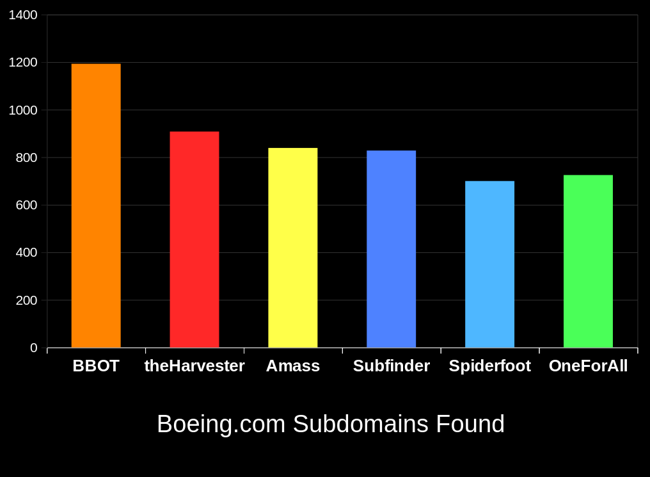
BBOT typically outperforms other subdomain enumeration tools by 20-25%. To learn how this is possible, see How It Works.
Full Documentation Here.
Installation (pip)
Note: Requires Linux and Python 3.9+. For more installation methods including Docker, see Installation.
# stable version
pipx install bbot

# bleeding edge (dev branch)
pipx install --pip-args '\--pre' bbot

bbot --help
Example Commands
Scan output, logs, etc. are saved to ~/.bbot. For more detailed examples and explanations, see Scanning.
Subdomains:
# Perform a full subdomain enumeration on evilcorp.com
bbot -t evilcorp.com -f subdomain-enum
Subdomains (passive only):
# Perform a passive-only subdomain enumeration on evilcorp.com
bbot -t evilcorp.com -f subdomain-enum -rf passive
Subdomains + port scan + web screenshots:
# Port-scan every subdomain, screenshot every webpage, output to current directory
bbot -t evilcorp.com -f subdomain-enum -m nmap gowitness -n my_scan -o .
Subdomains + basic web scan:
# A basic web scan includes wappalyzer, robots.txt, and other non-intrusive web modules
bbot -t evilcorp.com -f subdomain-enum web-basic
Web spider:
# Crawl www.evilcorp.com up to a max depth of 2, automatically extracting emails, secrets, etc.
bbot -t www.evilcorp.com -m httpx robots badsecrets secretsdb -c web_spider_distance=2 web_spider_depth=2
Everything everywhere all at once:
# Subdomains, emails, cloud buckets, port scan, basic web, web screenshots, nuclei
bbot -t evilcorp.com -f subdomain-enum email-enum cloud-enum web-basic -m nmap gowitness nuclei --allow-deadly
Targets
BBOT accepts an unlimited number of targets via -t. You can specify targets either directly on the command line or in files (or both!). Targets can be any of the following:
DNS_NAME(evilcorp.com)IP_ADDRESS(1.2.3.4)IP_RANGE(1.2.3.0/24)OPEN_TCP_PORT(192.168.0.1:80)URL(https://www.evilcorp.com)
For more information, see Targets. To learn how BBOT handles scope, see Scope.
API Keys
Similar to Amass or Subfinder, BBOT supports API keys for various third-party services such as SecurityTrails, etc.
The standard way to do this is to enter your API keys in ~/.config/bbot/secrets.yml:
modules:
  shodan_dns:
    api_key: 4f41243847da693a4f356c0486114bc6
  c99:
    api_key: 21a270d5f59c9b05813a72bb41707266
  virustotal:
    api_key: dd5f0eee2e4a99b71a939bded450b246
  securitytrails:
    api_key: d9a05c3fd9a514497713c54b4455d0b0
If you like, you can also specify them on the command line:
bbot -c modules.virustotal.api_key=dd5f0eee2e4a99b71a939bded450b246
For details, see Configuration
BBOT as a Python library
BBOT exposes a Python API that allows it to be used for all kinds of fun and nefarious purposes, like a Discord Bot that responds to /scan evilcorp.com.
Synchronous
from bbot.scanner import Scanner

# any number of targets can be specified
scan = Scanner("example.com", "scanme.nmap.org", modules=["nmap", "sslcert"])
for event in scan.start():
    print(event.json())
Asynchronous
from bbot.scanner import Scanner

async def main():
    scan = Scanner("example.com", "scanme.nmap.org", modules=["nmap", "sslcert"])
    async for event in scan.async_start():
        print(event.json())

import asyncio
asyncio.run(main())
Documentation
- Basics
- Scanning
- Modules
- Contribution
- Misc
Acknowledgements
Thanks to these amazing people for contributing to BBOT! ❤️
If you're interested in contributing to BBOT, or just curious how it works under the hood, see Contribution.

Special thanks to the following people who made BBOT possible:
- @TheTechromancer for creating BBOT
- @liquidsec for his extensive work on BBOT's web hacking features, including badsecrets
- Steve Micallef (@smicallef) for creating Spiderfoot
- @kerrymilan for his Neo4j and Ansible expertise
- Aleksei Kornev (@alekseiko) for allowing us ownership of the bbot Pypi repository <3
1 maintainer

Release files for bbot 1.1.1.2265rc0
For a detailed explanation of source distributions (sdists) and built distributions (wheels), please see the package formats documentation.
Source distribution (sdist)
| File | Size | Uploaded | |
|---|---|---|---|
| bbot-1.1.1.2265rc0.tar.gz | 1.3 MB | Details |
Built distribution (wheel)
| File | Interpreter | ABI | Platform | Reset |
|---|---|---|---|---|
| bbot-1.1.1.2265rc0-py3-none-any.whl | Python 3 | none | any | Details |
Total release size: 2.7 MB
Release files / bbot-1.1.1.2265rc0.tar.gz
| Download URL | bbot-1.1.1.2265rc0.tar.gz |
|---|---|
| Size | 1.3 MB |
| Tags | Source |
|
SHA-256 checksum How to use checksums |
24a067ae936c0128658e22d952f0b818681f6021d111e5bebda61292b54cdebc
|
|
BLAKE2b-256 checksum How to use checksums |
e7ebd39f7f211420bc22155f4e7a32bcedc516230b33483d28f966c2236a6b17
|
| Upload date | |
|
Uploaded using Trusted Publishing? What is trusted publishing? |
No |
| Uploaded via |
twine/4.0.1 CPython/3.9.18
|
Release files / bbot-1.1.1.2265rc0-py3-none-any.whl
| Download URL | bbot-1.1.1.2265rc0-py3-none-any.whl |
|---|---|
| Size | 1.4 MB |
| Tags | Python 3 |
|
SHA-256 checksum How to use checksums |
53be9969ab008570cc9d191af5f2b430b7631b41db20d0e80a33b6810be0ad07
|
|
BLAKE2b-256 checksum How to use checksums |
99466c0baab8ceeabccbd699cad8d7b7b78f3950b78da7b1f5997dd23a58675a
|
| Upload date | |
|
Uploaded using Trusted Publishing? What is trusted publishing? |
No |
| Uploaded via |
twine/4.0.1 CPython/3.9.18
|














