
Linter and SBOM generator for binary files.
Project description
BLint
![blint logo] BLint is a Binary Linter that checks the security properties and capabilities of your executables. It is powered by lief. Since version 2, blint can also generate Software Bill-of-Materials (SBOM) for supported binaries.
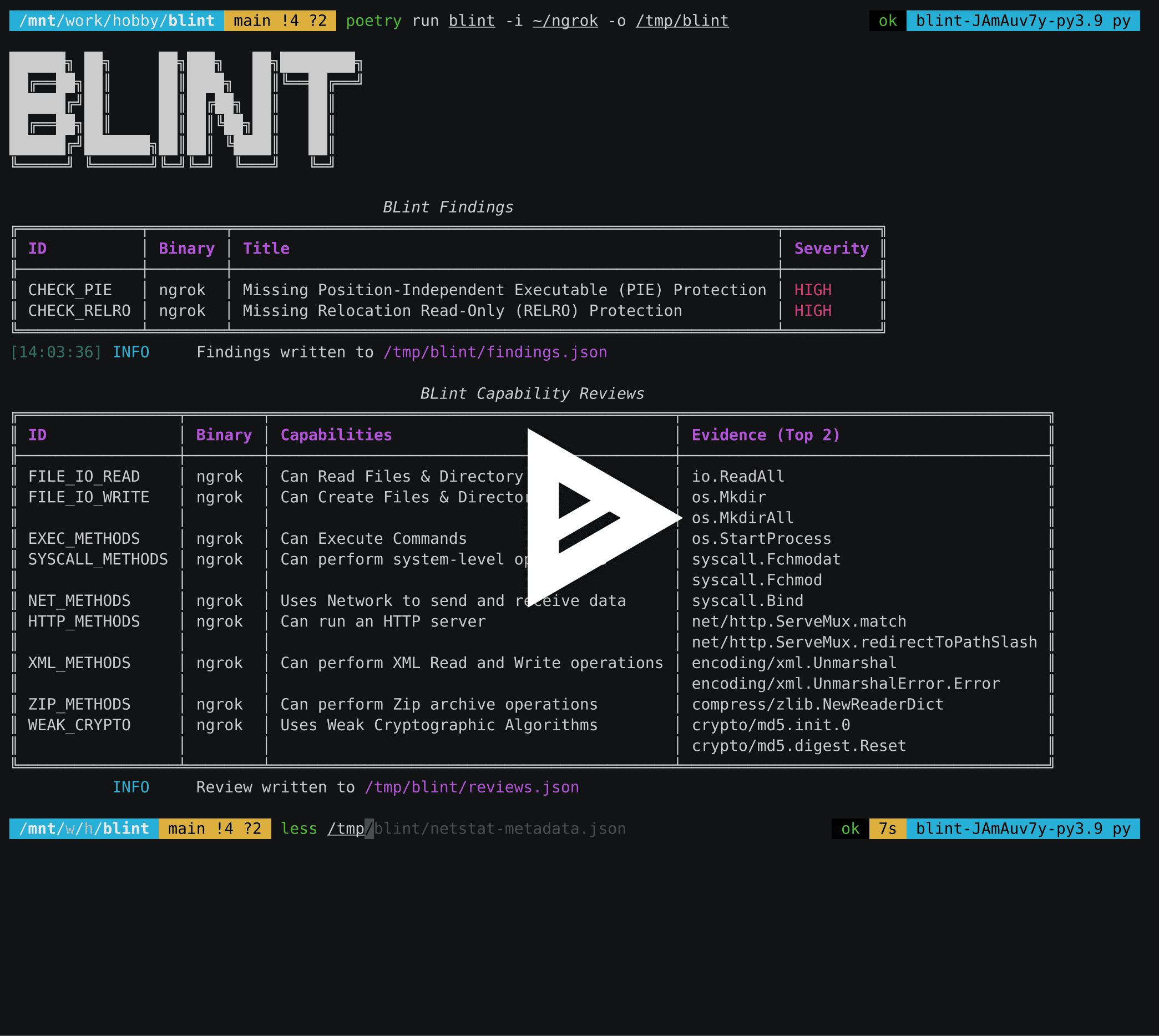
Supported binary formats:
- Android (apk, aab)
- ELF (GNU, musl)
- PE (exe, dll)
- Mach-O (x64, arm64)
You can run blint on Linux, Windows, and Mac against any of these binary formats.
Motivation
Nowadays, vendors distribute statically linked binaries produced by Golang, Rust, or Dotnet tooling. Users are used to running antivirus and anti-malware scans while using these binaries in their local devices. Blint augments these scans by listing the technical capabilities of a binary. For example, whether the binary could use network connections or can perform file system operations and so on. The binary is first parsed using the lief framework to identify the various properties, such as functions and the presence of symtab and dynamic symbols. Thanks to YAML-based annotation data, this information can be matched against capabilities and presented visually using a rich table. NOTE: The presence of capabilities doesn't imply that the binary always performs the operations. Use the output of this tool to get an idea about a binary. Also, this tool is not suitable for reviewing malware and other heavily obfuscated binaries for obvious reasons.
Use cases
- Quickly identify malicious binaries by looking at their capabilities (Ability to manipulate networks or drivers or kernels etc)
- Add blint to CI/CD to inspect the final binaries to ensure code signing or authenticode is applied correctly
- Identify interesting functions and symbols for fuzzing
Installation
- Install python 3.10, 3.11, or 3.12
pip install blint
Single binary releases
You can download single binary builds from the blint-bin releases. These executables should work without requiring python to be installed. The macOS .pkg file is signed with a valid developer account.
Usage
usage: blint [-h] [-i SRC_DIR_IMAGE [SRC_DIR_IMAGE ...]] [-o REPORTS_DIR] [--no-error] [--no-banner]
             [--no-reviews] [--suggest-fuzzable]
             {sbom} ...

Binary linter and SBOM generator.

options:
  -h, --help            show this help message and exit
  -i SRC_DIR_IMAGE [SRC_DIR_IMAGE ...], --src SRC_DIR_IMAGE [SRC_DIR_IMAGE ...]
                        Source directories, container images or binary files. Defaults to current directory.
  -o REPORTS_DIR, --reports REPORTS_DIR
                        Reports directory. Defaults to reports.
  --no-error            Continue on error to prevent build from breaking.
  --no-banner           Do not display banner.
  --no-reviews          Do not perform method reviews.
  --suggest-fuzzable    Suggest functions and symbols for fuzzing based on a dictionary.

sub-commands:
  Additional sub-commands

  {sbom}
    sbom                Command to generate SBOM for supported binaries.
SBOM sub-command
usage: blint sbom [-h] [-i SRC_DIR_IMAGE [SRC_DIR_IMAGE ...]] [-o SBOM_OUTPUT] [--deep]

options:
  -h, --help            show this help message and exit
  -i SRC_DIR_IMAGE [SRC_DIR_IMAGE ...], --src SRC_DIR_IMAGE [SRC_DIR_IMAGE ...]
                        Source directories, container images or binary files. Defaults to current directory.
  -o SBOM_OUTPUT, --output-file SBOM_OUTPUT
                        SBOM output file. Defaults to bom.json in current directory.
  --deep                Enable deep mode to collect more used symbols and modules aggressively. Slow
                        operation.
  --stdout              Print the SBOM to stdout instead of a file.
To test any binary, including default commands
blint -i /bin/netstat -o /tmp/blint
Use -i to check any other binary. For eg: to check ngrok
blint -i ~/ngrok -o /tmp/blint
Pass --suggest-fuzzable to get suggestions for fuzzing. A dictionary containing "common verbs" is used to identify these functions.
blint -i ~/ngrok -o /tmp/blint --suggest-fuzzable
To generate SBOM in CycloneDX format for supported binaries, use the sbom sub-command.
blint sbom -i /path/to/apk -o bom.json
blint sbom -i /directory/with/apk/aab -o bom.json
To parse all files, including .dex files, pass --deep argument.
blint sbom -i /path/to/apk -o bom.json --deep
The following binaries are supported:
- Android (apk/aab)
- Dotnet executable binaries
- Go binaries
blint sbom -i /path/to/go-binaries -o bom.json --deep
For all other binaries, the symbols will be collected and represented as properties with internal prefixes for the parent component. Child components and dependencies would be missing.
PowerShell example

Reports
Blint produces the following json artifacts in the reports directory:
- blint-output.html - HTML output from the console logs
- exename-metadata.json - Raw metadata about the parsed binary. Includes symbols, functions, and signature information
- findings.json - Contains information from the security properties audit. Useful for CI/CD integrations
- reviews.json - Contains information from the capability reviews. Useful for further analysis
- fuzzables.json - Contains a suggested list of methods for fuzzing
sbom command generates CycloneDX json.
References
Discord support
The developers can be reached via the Discord channel.
Sponsorship wishlist
If you love blint, you should consider donating to our project. In addition, consider donating to the below projects, which make blint possible.
Project details
Release history Release notifications | RSS feed


Download files
Download the file for your platform. If you're not sure which to choose, learn more about installing packages.
Source Distribution
Built Distribution
Filter files by name, interpreter, ABI, and platform.
If you're not sure about the file name format, learn more about wheel file names.
Copy a direct link to the current filters
File details
Details for the file blint-2.0.7.tar.gz.
File metadata
- Download URL: blint-2.0.7.tar.gz
- Upload date:
- Size: 129.3 kB
- Tags: Source
- Uploaded using Trusted Publishing? Yes
- Uploaded via: twine/5.0.0 CPython/3.12.2
File hashes
| Algorithm | Hash digest | |
|---|---|---|
| SHA256 |
7ea89b75c55721baa0db8995b9f58697bcd74c8f8185e9161ed1f39915c6236c
|
|
| MD5 |
15ad6cccf0d6e74ecccd705819914ae3
|
|
| BLAKE2b-256 |
7808bdcaf0092e8e33959c8941947698cd563fe12fba1cd7708041619adece21
|
File details
Details for the file blint-2.0.7-py3-none-any.whl.
File metadata
- Download URL: blint-2.0.7-py3-none-any.whl
- Upload date:
- Size: 138.0 kB
- Tags: Python 3
- Uploaded using Trusted Publishing? Yes
- Uploaded via: twine/5.0.0 CPython/3.12.2
File hashes
| Algorithm | Hash digest | |
|---|---|---|
| SHA256 |
dce89140361f9e0868a5f340e640e4cca7c1e4e3d86be7be3d78d03053c28eb7
|
|
| MD5 |
510a7a4c441db38f295c752d92ed6325
|
|
| BLAKE2b-256 |
62c83c74c1b204f71b2c92bb13908acbcb306a9edd351a9480df7eb226579059
|






