

Documentation | Tutorials | Discussions
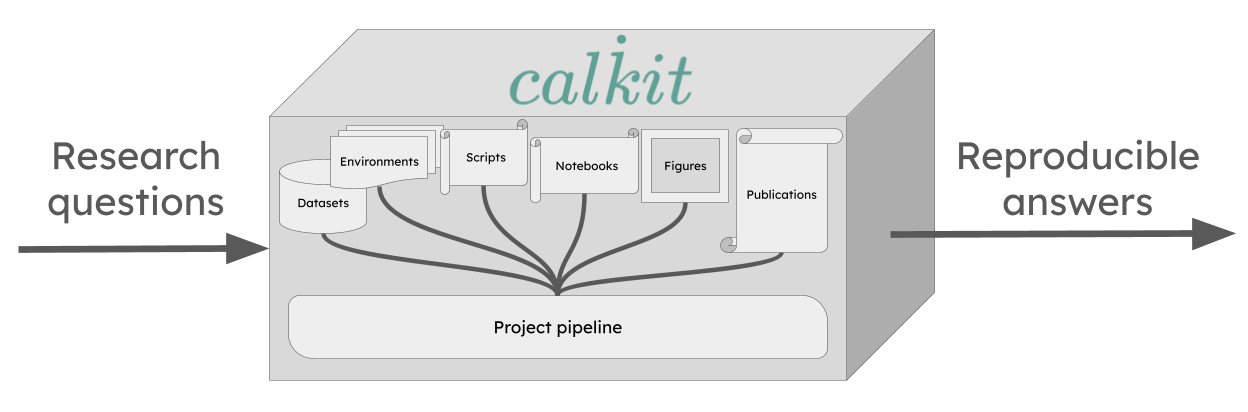
Calkit makes it easy to create single-button reproducible research projects. Instead of a loosely related collection of files split across multiple systems or apps, "integrated" via manual steps, your project becomes a version-controlled, self-contained "calculation kit" tying together literature review, planning, data collection, analysis, and writing, so you, your collaborators, and your readers can verify the full chain from raw data to research article with a single command. This enables faster, more confident, and more frequent iteration, which in turn produces higher quality results. It also makes it easy to check the work of an AI agent, i.e., that the outputs it produced as evidence to answer research questions came from a transparent, deterministic pipeline, not hallucinations.
Calkit also makes it natural to keep all stages of a research project together in the same repository, providing full context to both humans and AI agents. This is important because the stages are tightly coupled. A change in a dataset requires reanalyzing, which creates a change in a figure, which creates a change in a research article. Coupled components belong close together and connected, and cross-stage iteration is enabled by integration.
Software teams learned the importance of integration long ago, unifying design, development, testing, deployment, and infrastructure in the same repo, often within the same team, with automation across the entire lifecycle. Research can benefit in similar ways.
Why Calkit?
The tools to create single-button reproducible research projects already exist, e.g., version control with Git, environment management with uv, Make for a build system or pipeline, and LaTeX for document compilation. If you and your team can work effectively with a system like that, there's no need for any additional complexity.
However, these practices are still not common, resulting in most compendiums failing to reproduce. Many still silo the code away from the data, and the analysis from the writing. Many are instead "multi-button" and irreproducible because their stages are not connected and important setup or execution information is omitted.
There are additional challenges:
- Computationally expensive steps may need to be run on a high-performance computing (HPC) cluster. Automating the transfer of data to and from there requires additional work, and it becomes important to use a content-aware pipeline system, otherwise steps are inefficiently repeated or mistakenly skipped.
- Large data files need to be kept in version control along with the rest. A typical solution may involve siloing data files away on a shared cloud or physical hard drive, requiring custom syncing scripts to avoid manual uploads and downloads.
Again, the tools to solve these problems do exist: Snakemake, Nextflow, or DVC for pipelines; Git LFS, git-annex, or DVC for data version control, but they all require significant setup and training. At this point, you're looking at half a dozen subsystems to integrate and upskill the team to use, essentially requiring many to become de facto software engineers to contribute. What happens in reality is that the costs are deemed too high and the benefit too low, so workflows remain manual and fragmented, and many team members are not able to contribute to their full potential.
Calkit solves these by providing a fully integrated experience built from the open source components that would typically comprise such a workflow. Everything is connected right out of the box, with a command line interface (CLI), web app, and more to reduce friction for every task and team member involved. The integration is transparent without lock-in, so the underlying software engineering-oriented tools can be used directly by team members more comfortable with them, and others can contribute at a higher level while maintaining single-button reproducibility and frictionless, seamless iteration.
Additionally, the Calkit project information format,
saved in calkit.yaml,
gives a full picture of the project:
its research questions, artifacts
generated as evidence to answer them,
and a way to fully verify everything back to its origin.
There's no mystery about where a certain figure or table came from,
and whether or not it's stale with respect to its input data,
which is a critical feature to have when using generative AI.
Features
- A simplified version control interface that unifies Git and DVC (Data Version Control), so everything can be kept in the same project repository. This way, code doesn't need to be siloed away from other important artifacts like datasets, models, figures, or article PDFs, allowing you to work on all parts of a project without hopping around to different tools.
- Computational environment management with support for many languages and environment managers: Conda, Docker, uv, Julia, Renv, and more. No need to create and update environments on your own. Calkit will handle them as needed.
- An environment-aware build system or pipeline with
a simple declarative syntax and
output caching so you don't need to think about which steps or stages
need to be rerun after changing any part of the project.
Simply call
calkit run. Compose your pipeline from many different kinds of stages, including simple scripts, commands, Jupyter Notebooks, LaTeX, and more. - Tools to automatically build a reproducible pipeline from work you're
already doing.
Run a script, notebook, or LaTeX document with
calkit xrand it will be added as a pipeline stage, with its environment, inputs, and outputs detected automatically. This way, an existing project can be made reproducible one step at a time. - A complementary self-hostable and GitHub-integrated hub web app to facilitate backup, collaboration, and sharing throughout the entire research lifecycle.
- Overleaf integration, so analysis, visualization, and writing can all stay in sync (no more manual uploads!).
- Support for running on high performance computing (HPC) systems that use PBS or SLURM schedulers.
- Support for automated running with GitHub Actions.
- Extensions for doing all of the above graphically in JupyterLab and VS Code.
- A browser extension for collecting references directly to BibTeX (optionally synced with Zotero), viewing DVC-stored files on GitHub, and syncing figures and results with Overleaf directly in Chrome, Microsoft Edge, and more.
Installation
On Linux, macOS, or Windows Git Bash, install Calkit and uv (if not already installed) with:
curl -LsSf install.calkit.org | sh
Or with Windows Command Prompt or PowerShell:
powershell -ExecutionPolicy ByPass -c "irm install-ps1.calkit.org | iex"
If you already have uv installed, install Calkit with:
uv tool install calkit-python
You can also install with your system Python:
pip install calkit-python
To effectively use Calkit, you'll want to ensure Git is installed and properly configured. You may also want to install Docker, since that is the default method by which LaTeX environments are created. If you want to use a Calkit hub for collaboration and backup as a DVC remote, you can connect to the hub with:
calkit hub login
If you use AI agents like Claude, Copilot, or Codex, see AI tools to learn how to install agent skills for working with Calkit.
Use without installing
If you want to use Calkit without installing it,
you can use uv's uvx command to run it directly:
uvx ck9 --help
Nix
Calkit ships a flake at the root of its repo, so Nix users can pull the CLI into their environments alongside their other tools.
Run it ad hoc without installing:
nix run github:calkit/calkit -- --help
Drop into a shell that has calkit, git, and uv on PATH:
nix shell github:calkit/calkit
Add it to your own flake.nix as an input:
{
  inputs.calkit.url = "github:calkit/calkit";
  inputs.nixpkgs.url = "github:NixOS/nixpkgs/nixos-unstable";

  outputs = { self, nixpkgs, calkit }: {
    devShells.x86_64-linux.default =
      nixpkgs.legacyPackages.x86_64-linux.mkShell {
        packages = [ calkit.packages.x86_64-linux.default ];
      };
  };
}
Then nix develop will give you a shell with the Calkit CLI ready to
use. To pin a specific Calkit release inside the shell, set the
CALKIT_VERSION environment variable (e.g. CALKIT_VERSION=0.41.0)
before invoking calkit.
The flake is currently a thin wrapper around uvx --from calkit-python calkit. It depends on uv from nixpkgs and fetches the published
wheel from PyPI on first use. This trades a fully Nix-native build for
zero version-drift maintenance, and avoids the macOS docx2pdf /
appscript and JupyterLab labextension build issues that block a pure
nixpkgs derivation today. If you want a fully nixpkgs-native build,
see the community calkit-nix
flake.
Nix isn't supported natively on Windows; run Calkit inside WSL2 and use the flake there.
Running against a specific version
If a project requires a Calkit version other than the one you have
installed, use the top-level --use-version flag to re-invoke the CLI
under that release without changing your installation:
calkit --use-version 0.38 run
This re-execs the CLI via uvx --from calkit-python@<version> calkit,
so it requires uv on PATH.
You can also declare a minimum version in calkit.yaml;
see
Pinning the Calkit CLI version.
Calkit Assistant
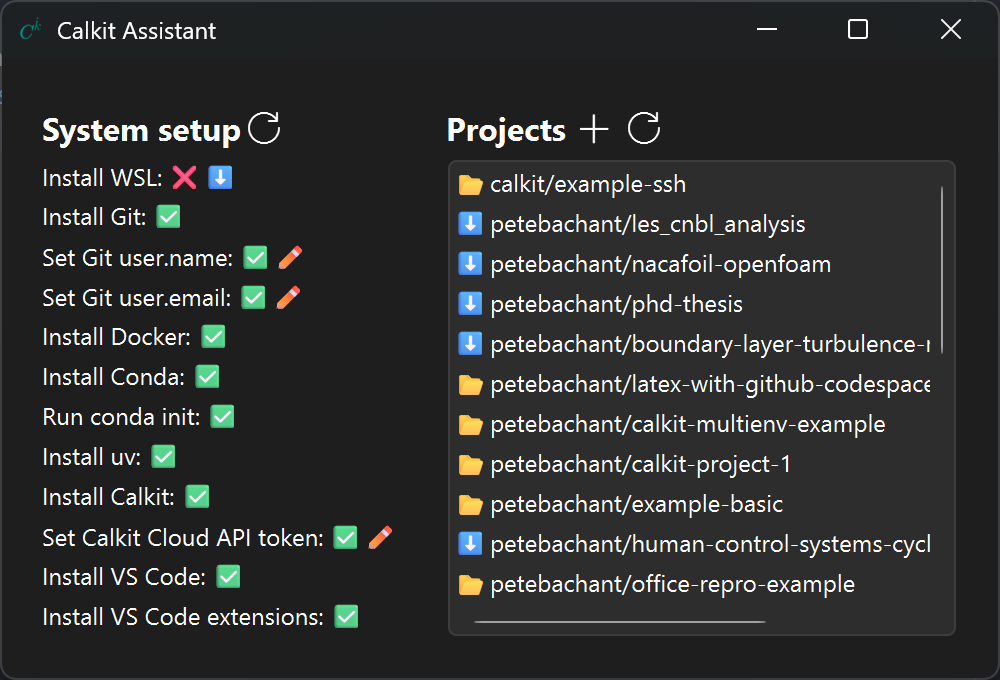
For Windows users, the Calkit Assistant app is the easiest way to get everything set up and ready to work in VS Code, which can then be used as the primary app for working on all scientific or analytical computing projects. Download the executable from the latest assistant release.
Quickstart
Research projects exist to answer questions. They involve collecting data, analyzing it, creating figures and calculating numbers, and finally writing about the answers and why they make sense. Here we'll see what's involved in setting that up.
Create a project
First, create a project from a template:
calkit new project phd \
    --title "PhD research" \
    --template calkit/example-basic
The title can be changed later, but the name is more difficult to change, so it's a good idea to keep the name general. A single project can hold multiple investigations, e.g., a grad student might use one project for their entire PhD, with a question and a paper for each study.
Add the --hub flag to create the project on
a Calkit hub for backup and sharing.
This requires an account,
but can be set up later,
so we'll leave it off for now.
Look at the question
Open up calkit.yaml.
Near the top you'll see the project's research question:
questions:
  - question: How does the system respond to increasing $x$?
    hypothesis: The value of $y$ increases linearly with $x$.
    answer: $y$ increases quadratically with $x$, not linearly
      ($R^2 = {r2:.3f}$ for the quadratic fit).
    evidence:
      - kind: figure
        path: figures/x-vs-y.png
      - kind: value
        path: results/summary.json
        key: r_squared_quadratic
        name: r2
The answer lists the evidence that supports it,
and {r2} is read from one of those files rather than typed in by hand.
We can see the rendered answer with:
calkit list questions
1. question: How does the system respond to increasing $x$?
    hypothesis: The value of $y$ increases linearly with $x$.
    answer: $y$ increases quadratically with $x$, not linearly ($R^2 = 0.985$ for the quadratic fit).
    evidence:
      - kind: figure
        path: figures/x-vs-y.png
      - kind: value
        path: results/summary.json
        key: r_squared_quadratic
        name: r2
The evidence files are produced by the pipeline, so if the data changes, the figure and number become stale, and so does the answer that depends on them.
We recommend writing questions down first in your own projects as well. It makes clear what evidence you need to produce, and everything else in the project exists to produce it.
Run the pipeline
cd phd
calkit run
💻 Getting system information
🔗 Checking system-level requirements
📦 Checking environments
🔀 Compiling DVC pipeline
Running stage 'collect-data':
Running stage 'analyze':
Running stage 'figs-to-paper':
Running stage 'results-to-tex':
Running stage 'build-paper':
Pipeline completed successfully ✅
The pipeline has five stages:
collect the data,
analyze it to produce a figure and a results file,
copy the figure into the paper folder,
convert the results to LaTeX,
and compile the paper.
You should now have a paper/main.pdf file.
Calkit created the Python environment and pulled the LaTeX Docker image automatically. If something it needs isn't installed, e.g., Docker, it will show you the command to install it and offer to run it:
App 'docker' is not installed.
  brew install --cask docker
Run this to install 'docker'? [Y/n]
You can also run this check on its own with calkit check reqs.
Make a change
Next, make an edit to scripts/analyze.py and check the project status:
calkit status
--------------------------- Questions ----------------------------
1 question, 1 with stale evidence
Run 'calkit check questions' for detail.

---------------------------- Pipeline ----------------------------
Stale stages:
        analyze:
          stale outputs:
            figures/x-vs-y.png
            results/summary.json
          modified inputs:
            scripts/analyze.py
The figure and results file are stale because the script that produces them changed, and the answer is stale because its evidence is. We can see more detail with:
calkit check questions
1. [stale] How does the system respond to increasing $x$?
     figure figures/x-vs-y.png [stale] -- stage 'analyze' is out of date; run the pipeline
     value results/summary.json:r_squared_quadratic [stale] -- stage 'analyze' is out of date; run the pipeline

Questions answered: 1/1
Answers backed by current evidence: 0/1 ❌
So, editing the script made the project's answer stale, and we were able to verify this from the CLI. To bring everything back up to date, run the pipeline again:
calkit run
Only the stages affected by the change will rerun. The paper is rebuilt with the new figure and numbers, and the answer is backed by current evidence again. This edit-and-run loop is the main way of working in a Calkit project, and it keeps the paper in sync with the analysis.
Save the project
calkit save -am "Tweak the fit"
This adds and commits all changes in one step, putting code in Git and data and outputs in DVC, so you don't need to decide which goes where.
At this point the project only exists on your machine, so there's nowhere to push to. Calkit will offer to set that up:
This project isn't connected to a hub, so there's nowhere to push its
code and data.
Connect it now? [Y/n]
Answering yes creates the project on a hub,
which backs it up,
stores data and outputs that are too big for Git,
and makes it available to collaborators,
if you choose to add them.
After that, calkit save will push everything to the right place,
and a collaborator can clone the project and reproduce it with
calkit run.
Answering no is fine too.
The commit has already been made,
and the project can be connected later with calkit update hub.
Next steps
Add your own data and a script to process it with
calkit xr,
which executes a command and records it as a pipeline stage.
To use Calkit with an existing project rather than a template, see
the tutorial on existing projects.
As the research goes on, add more questions.
Each entry in questions lists its own evidence,
so a new study can be a new question and the stages that answer it,
rather than a new project.
With an AI coding agent
Simply tell the AI agent:
Turn this folder into a Calkit project
or
Create me a new Calkit project that answers the question: ...
Get involved
We welcome all kinds of contributions! See CONTRIBUTING.md to learn how to get involved.
Acknowledgements
Calkit is supported by the Caltech Schmidt Academy of Software Engineering.


1 maintainer

Release files for calkit-python 0.47.9
For a detailed explanation of source distributions (sdists) and built distributions (wheels), please see the package formats documentation.
Source distribution (sdist)
| File | Size | Uploaded | |
|---|---|---|---|
| calkit_python-0.47.9.tar.gz | 25.6 MB | Details |
Built distribution (wheel)
| File | Interpreter | ABI | Platform | Reset |
|---|---|---|---|---|
| calkit_python-0.47.9-py3-none-any.whl | Python 3 | none | any | Details |
Total release size: 26.7 MB
Release files / calkit_python-0.47.9.tar.gz
| Download URL | calkit_python-0.47.9.tar.gz |
|---|---|
| Size | 25.6 MB |
| Tags | Source |
|
SHA-256 checksum How to use checksums |
f792449d55088b2dc6fd73441ed796032a1a3eb14cd1e0feb3d7174ff99e805a
|
|
BLAKE2b-256 checksum How to use checksums |
97600b98c18dd42ef84d61774371760364c34a26cbc8609a3dc436c4324093ce
|
| Upload date | |
|
Uploaded using Trusted Publishing? What is trusted publishing? |
Yes |
| Uploaded via |
twine/7.0.0 CPython/3.13.14
|
Provenance
Provenance describes where a file came from. On PyPI, provenance is shared via attestations, which provide a verifiable record of the build or publishing details. View details, limitations and caveats.


PyPI Publish Attestation
PyPI verified that this artifact, at this checksum, originated from the publisher listed below.
Signed by GitHub Actions, verified by PyPI on Sep 26, 2026.
Transparency logRelease files / calkit_python-0.47.9-py3-none-any.whl
| Download URL | calkit_python-0.47.9-py3-none-any.whl |
|---|---|
| Size | 1.1 MB |
| Tags | Python 3 |
|
SHA-256 checksum How to use checksums |
c0ce24b2b40cf50a53504842f0a221b8fe1c6a78a29d9aaa1261500ef1017115
|
|
BLAKE2b-256 checksum How to use checksums |
7651020c74c3b01064b6c39a5a0c32383d1b88fa97845dc7bfbfc5d79eebccc8
|
| Upload date | |
|
Uploaded using Trusted Publishing? What is trusted publishing? |
Yes |
| Uploaded via |
twine/7.0.0 CPython/3.13.14
|
Provenance
Provenance describes where a file came from. On PyPI, provenance is shared via attestations, which provide a verifiable record of the build or publishing details. View details, limitations and caveats.
PyPI Publish Attestation
PyPI verified that this artifact, at this checksum, originated from the publisher listed below.
Signed by GitHub Actions, verified by PyPI on Sep 26, 2026.
Transparency log













