
Bolts nickname autocomplete onto CLICK Programming Software. Includes Address Editor & Navigation Dock.
Verified details
These details have been verified by PyPIProject links
GitHub Statistics
Maintainers

Project description
ClickNick
Enhanced Productivity for CLICK PLC Programming
Bolts nickname autocomplete onto CLICK Programming Software. Additional tools include a standalone Address Editor and Navigation Dock.
Features
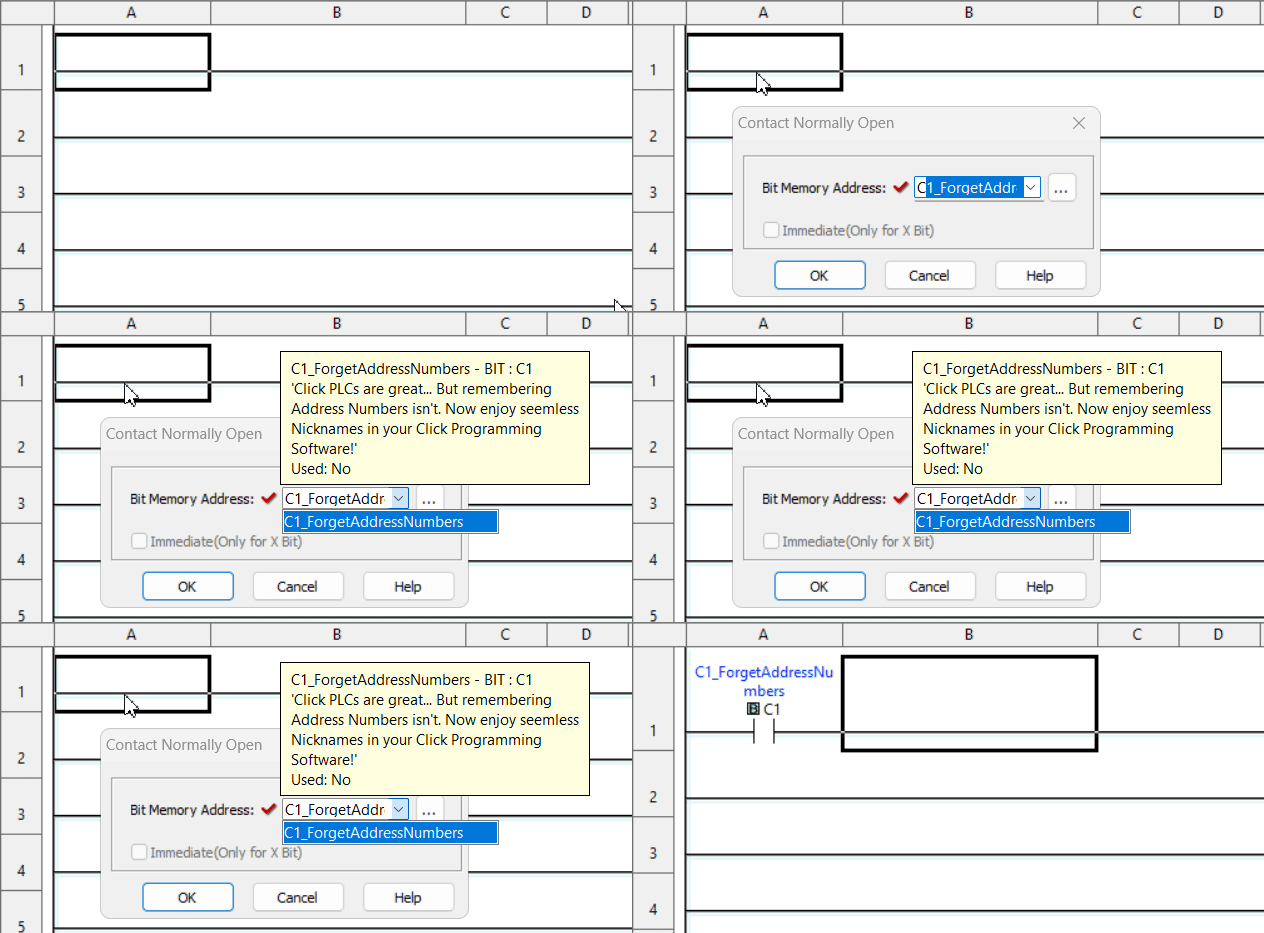
✨ Nickname Autocomplete
- Skip the addresses – Select
Valve5instead of typingC123 - Flexible filters – Prefix, partial match/contains, or abbreviation (e.g.,
Motor Speed↔Mtr_Spd) - Hover tooltips – View address comments at a glance
- Exclusion filters – Hide system or internal addresses (e.g.,
SC/SD,__private__)
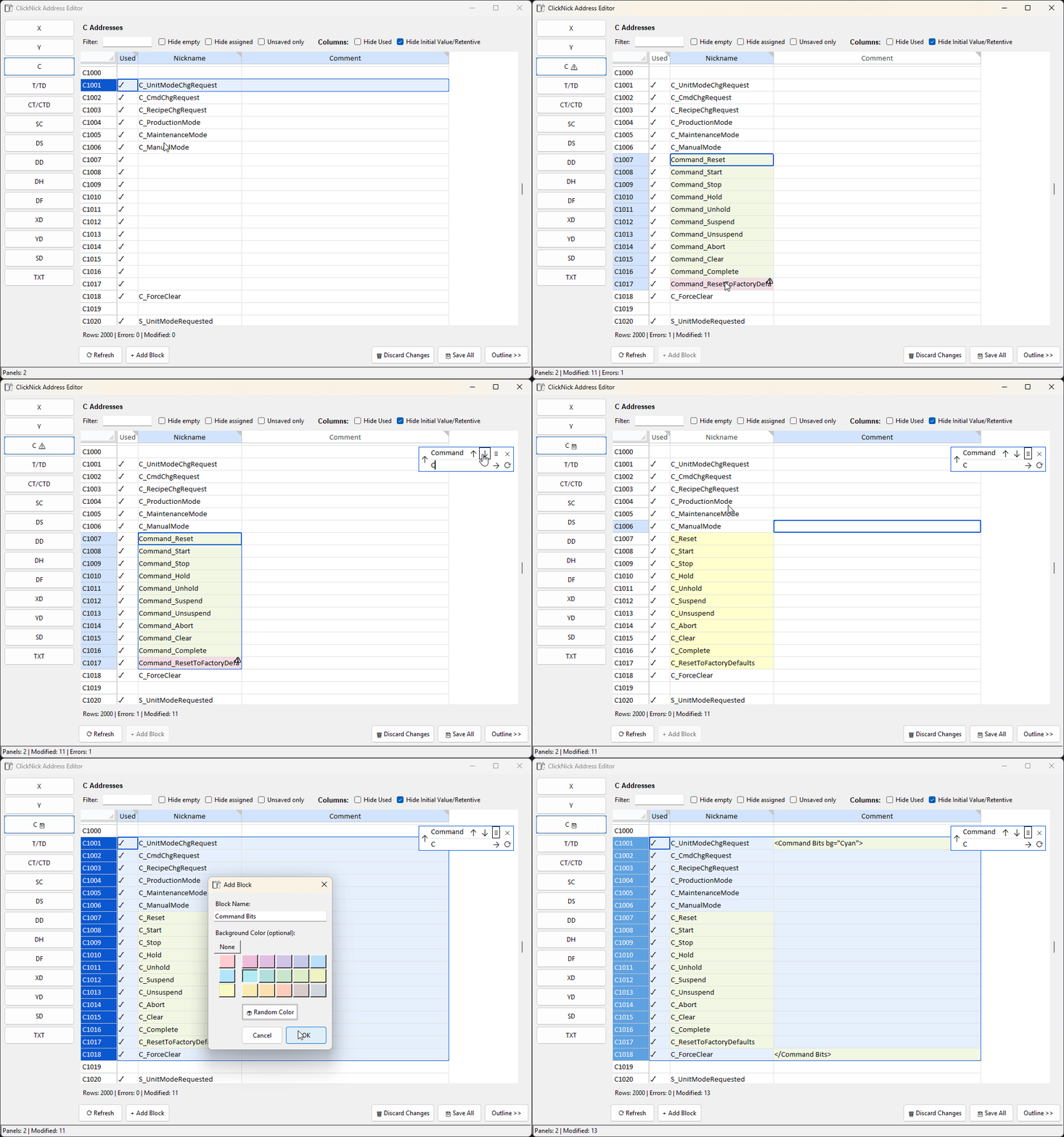
🛠️ Modern Address Editor
- Multi-window – Edit different address sections simultaneously
- Bulk editing – Edit before saving, copy/paste multiple cells, live duplicate detection and validation
- Search & Replace (Ctrl+F / Ctrl+R) - With
Find in Selectiontoggle - Custom blocks – Drag to create color-coded groups for organization and quick navigation
[!NOTE]
Nicknames edited in the Address Editor appear immediately in autocomplete. Existing ladder logic refreshes after editing via the built-in Address Picker (Ctrl+T) or reopening the project.
See issue https://github.com/ssweber/clicknick/issues/36
[!IMPORTANT]
Replace works on all visible editable columns. Hidden columns (like Initial Value and Retentive) can be shown, but watch out for numerical replacements—changing 1→2 (e.g., Alm1→Alm2) would also change 101 to 202. Use 'Find in Selection' to limit changes and avoid surprises.
📑 Navigation Dock
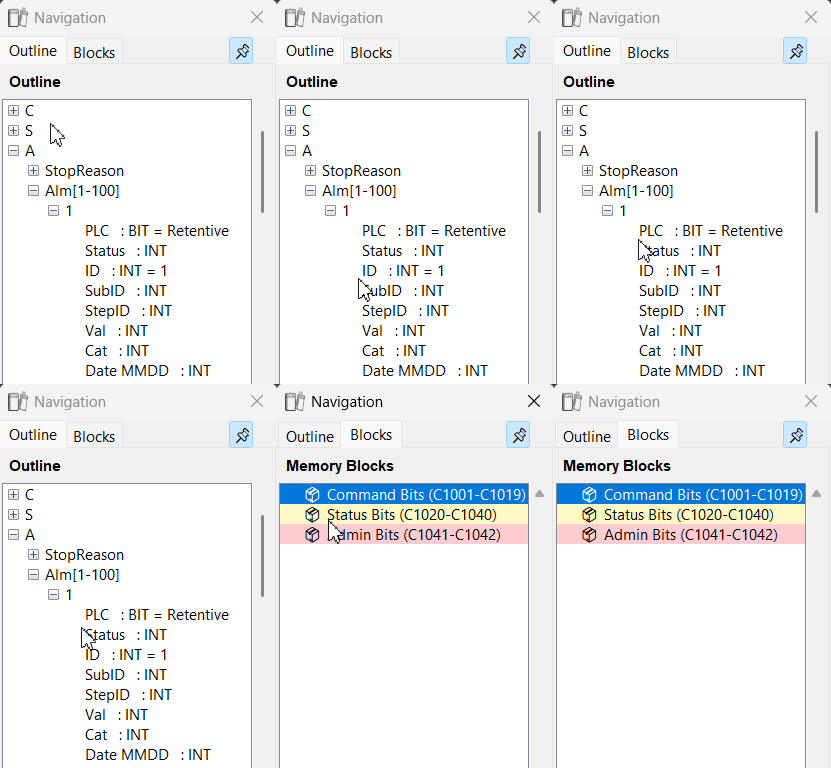
- Navigate large projects – See all your nicknames in an organized tree view
- Spot patterns – Arrays and related items grouped automatically
- Single underscores create hierarchy.
SupplyTank_Pump_StatusbecomesSupplyTank └── Pump └── Status - Trailing numbers create arrays.
Alm1_id,Alm1_value,Alm2_id,Alm2_valuebecomes:Alm[1-2] 1 ├── id └── value 2 ├── id └── value
- Single underscores create hierarchy.
- One-click access – Double-click to edit any address
Connectivity
- 🔌 Live ODBC database connection
- 📄 CSV nickname import
Why ClickNick?
✔ Work faster – Less time on manual address lookup
✔ Fewer mistakes – Autocomplete reduces typos
✔ Stay organized – Better tag management for complex projects
[!IMPORTANT]
Beta Disclaimer
ClickNick is beta software. Use at your own risk. The developers aren't liable for data loss, corruption, or process interruptions. Always back up your
.ckpfiles.
Installation
[!NOTE]
Live database connectivity requires Microsoft Access ODBC drivers. See our installation guide if you encounter driver issues. CSV import works without additional drivers.
Option 1: uv (recommended)
Try it:
uvx clicknick@latest
Install for offline use:
uv tool install clicknick
Run: clicknick (command line or Start Menu)
Upgrade: uv tool upgrade clicknick
Uninstall: uv tool uninstall clicknick
New to uv? See installation instructions.
Option 2: pip
pip install clicknick
python -m clicknick
Requirements
- Windows 10/11
- CLICK Programming Software (v2.60–v3.71)
- Microsoft Access ODBC drivers (for Address Editor)
Supported Windows
Autocomplete works in:
| Instructions | Dialogs & Tools |
|---|---|
| Contact (NO/NC) | Search & Replace |
| Edge Contact | Data Views |
| Out, Set, Reset | Address Picker Find |
| Compare (A with B) | |
| Timer, Counter | |
| Math | |
| Shift Register | |
| Copy | |
| Search | |
| Modbus Send/Receive |
Block Tag Specification
Syntax - Put in Comment Field
<BlockName>- Opening tag for a range</BlockName>- Closing tag for a range<BlockName />- Self-closing tag for a singular point<BlockName bg="#color">- Adds background color (works in opening or self-closing tags)
Replace BlockName with your desired identifier (e.g., <Reserved>, <Alm Bits>).
Recognized Color Keywords
The following words can be used as color values (or any valid HEX code):
Red, Pink, Purple, Deep Purple, Indigo, Blue, Light Blue, Cyan, Teal, Green, Light Green, Lime, Yellow, Amber, Orange, Deep Orange, Brown, Blue Grey
(Each corresponds to a predefined HEX value.)
Documentation
- Installation Guide – Python and uv setup
- Development – Contributing workflows
- Publishing – PyPI release instructions
Motivation
CLICK PLCs were my first controller, and I've built numerous projects with them. But as projects grew, remembering memory addresses instead of nicknames added overhead. Productivity and Do-More autocompleted nicknames as I type, why can't CLICK? ClickNick was born.
The built-in Address Picker was equally frustrating: either edit one at a time or export to Excel and re-import. Project templates required me to remember where I could add custom tags versus reserved areas. The Address Editor solves this—plus adds Custom Blocks to define distinct memory regions visually. See high-level project structure with the Outline dock.
I hope ClickNick helps new programmers choosing CLICK for its simplicity, as well as those maintaining legacy equipment—and serves as an example of how CLICK software can be extended.
This project was built from simple-modern-uv.
Project details
Verified details
These details have been verified by PyPIProject links
GitHub Statistics
Maintainers
Release history Release notifications | RSS feed


Download files
Download the file for your platform. If you're not sure which to choose, learn more about installing packages.
Source Distribution
Built Distribution
Filter files by name, interpreter, ABI, and platform.
If you're not sure about the file name format, learn more about wheel file names.
Copy a direct link to the current filters
File details
Details for the file clicknick-0.10.2.tar.gz.
File metadata
- Download URL: clicknick-0.10.2.tar.gz
- Upload date:
- Size: 168.4 kB
- Tags: Source
- Uploaded using Trusted Publishing? Yes
- Uploaded via: twine/6.1.0 CPython/3.13.7
File hashes
| Algorithm | Hash digest | |
|---|---|---|
| SHA256 |
8e68dfafefb6d65f6ef46ea97a9b9ec59dc61fd00d21664731a9a575e8a1e098
|
|
| MD5 |
0deb7499ebc3e35304a1ad873b0e7beb
|
|
| BLAKE2b-256 |
17b71bba86a80d8358bdbccf1f8fc97e6799c9060d030663d0dcd2c876d19cac
|
Provenance
The following attestation bundles were made for clicknick-0.10.2.tar.gz:
Publisher:
publish.yml on ssweber/clicknick
-
Statement:
-
Statement type:
https://in-toto.io/Statement/v1 -
Predicate type:
https://docs.pypi.org/attestations/publish/v1 -
Subject name:
clicknick-0.10.2.tar.gz -
Subject digest:
8e68dfafefb6d65f6ef46ea97a9b9ec59dc61fd00d21664731a9a575e8a1e098 - Sigstore transparency entry: 773446386
- Sigstore integration time:
-
Permalink:
ssweber/clicknick@72e865a5e610f008b230df3d50e01a8aebfcb2fb -
Branch / Tag:
refs/tags/v0.10.2 - Owner: https://github.com/ssweber
-
Access:
public
-
Token Issuer:
https://token.actions.githubusercontent.com -
Runner Environment:
github-hosted -
Publication workflow:
publish.yml@72e865a5e610f008b230df3d50e01a8aebfcb2fb -
Trigger Event:
release
-
Statement type:
File details
Details for the file clicknick-0.10.2-py3-none-any.whl.
File metadata
- Download URL: clicknick-0.10.2-py3-none-any.whl
- Upload date:
- Size: 108.5 kB
- Tags: Python 3
- Uploaded using Trusted Publishing? Yes
- Uploaded via: twine/6.1.0 CPython/3.13.7
File hashes
| Algorithm | Hash digest | |
|---|---|---|
| SHA256 |
7ce5d3a92da29a4d9ce364aedd174a62a0e7daf584ffbedb70f56e146dc57d10
|
|
| MD5 |
642b6198f73ad9bddc2a2d0de463db17
|
|
| BLAKE2b-256 |
f53606212a9fdc6f05fdfe14f7b415893445ca0dc0b82673021dd6d14cfbd2cc
|
Provenance
The following attestation bundles were made for clicknick-0.10.2-py3-none-any.whl:
Publisher:
publish.yml on ssweber/clicknick
-
Statement:
-
Statement type:
https://in-toto.io/Statement/v1 -
Predicate type:
https://docs.pypi.org/attestations/publish/v1 -
Subject name:
clicknick-0.10.2-py3-none-any.whl -
Subject digest:
7ce5d3a92da29a4d9ce364aedd174a62a0e7daf584ffbedb70f56e146dc57d10 - Sigstore transparency entry: 773446415
- Sigstore integration time:
-
Permalink:
ssweber/clicknick@72e865a5e610f008b230df3d50e01a8aebfcb2fb -
Branch / Tag:
refs/tags/v0.10.2 - Owner: https://github.com/ssweber
-
Access:
public
-
Token Issuer:
https://token.actions.githubusercontent.com -
Runner Environment:
github-hosted -
Publication workflow:
publish.yml@72e865a5e610f008b230df3d50e01a8aebfcb2fb -
Trigger Event:
release
-
Statement type:






