
Context-aware nickname autocomplete for ClickPLC instruction windows.
Verified details
These details have been verified by PyPIProject links
GitHub Statistics
Maintainers

Project description
clicknick
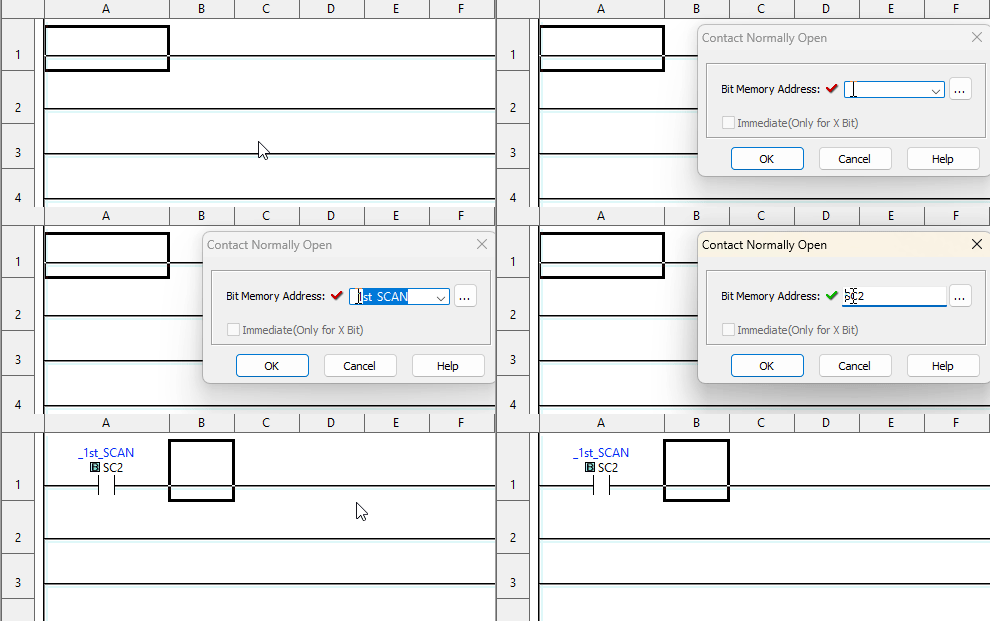
Context-aware nickname autocomplete for ClickPLC instruction windows.
Features
- Smart Autocomplete: Shows only relevant nicknames based on instruction type
- Multiple Filter Modes: Prefix, Contains, and Fuzzy matching
- Exclude: SC/SD addresses or your own
- Non-Intrusive: Works alongside Click PLC without modifications
How to Run
Option 1: Using uv (recommended)
uvx clicknick
If you don't have uv installed, you can get it from: https://github.com/astral-sh/uv#installation
[!NOTE] For live nickname database functionality, you'll need Microsoft Access ODBC drivers installed. If you see an "ODBC drivers not found" warning, see our installation guide for help. CSV nickname file loading works without these drivers.
Option 2: Using pip
pip install clicknick
python -m clicknick
Usage
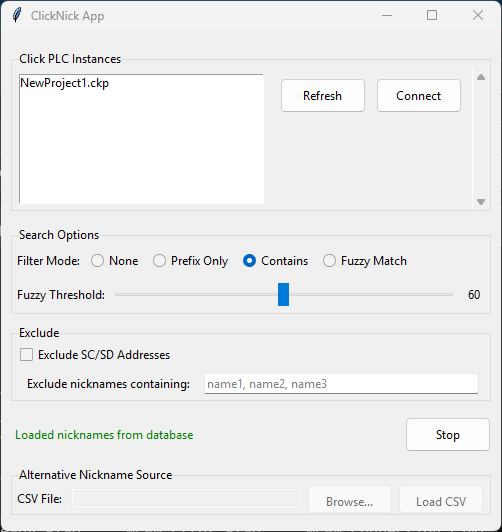
- Select your ClickPLC nickname CSV file
- Connect to your Click PLC instance
- Start monitoring
- Open ClickPLC Instruction window and Type in added Combobox-Input to see autocomplete suggestions
Supported Windows
- Contact Normally Open/Closed
- Edge Contact
- Out, Set, Reset
- Compare (A with B)
- Timer, Counter
- Math instructions
- Shift Register
- Copy instruction
- Search instruction
- Search & Replace dialog
Requirements
- Windows 10/11
- Click PLC Software
Roadmap
- Add support for inserting Nickname/Address into Math equation
Project Docs
For how to install uv and Python, see installation.md.
For development workflows, see development.md.
For instructions on publishing to PyPI, see publishing.md.
This project was built from simple-modern-uv.
Project details
Verified details
These details have been verified by PyPIProject links
GitHub Statistics
Maintainers
Release history Release notifications | RSS feed


Download files
Download the file for your platform. If you're not sure which to choose, learn more about installing packages.
Source Distribution
Built Distribution
Filter files by name, interpreter, ABI, and platform.
If you're not sure about the file name format, learn more about wheel file names.
Copy a direct link to the current filters
File details
Details for the file clicknick-0.5.0.tar.gz.
File metadata
- Download URL: clicknick-0.5.0.tar.gz
- Upload date:
- Size: 75.8 kB
- Tags: Source
- Uploaded using Trusted Publishing? Yes
- Uploaded via: twine/6.1.0 CPython/3.12.9
File hashes
| Algorithm | Hash digest | |
|---|---|---|
| SHA256 |
154f01a8dd17846b616f02fc45d15a4b17316c35fc5ec02daab10dc5bb0a6c2e
|
|
| MD5 |
2fac44a306d1a05dab9ec68d781c1350
|
|
| BLAKE2b-256 |
58c643e77102500b1f16263ee8bb3994476e443e95b3963b7ea118a5eedd83ae
|
Provenance
The following attestation bundles were made for clicknick-0.5.0.tar.gz:
Publisher:
publish.yml on ssweber/clicknick
-
Statement:
-
Statement type:
https://in-toto.io/Statement/v1 -
Predicate type:
https://docs.pypi.org/attestations/publish/v1 -
Subject name:
clicknick-0.5.0.tar.gz -
Subject digest:
154f01a8dd17846b616f02fc45d15a4b17316c35fc5ec02daab10dc5bb0a6c2e - Sigstore transparency entry: 220567711
- Sigstore integration time:
-
Permalink:
ssweber/clicknick@ffd567004d0d9bb1c867c2713d5730d70e670125 -
Branch / Tag:
refs/tags/v0.5.0 - Owner: https://github.com/ssweber
-
Access:
public
-
Token Issuer:
https://token.actions.githubusercontent.com -
Runner Environment:
github-hosted -
Publication workflow:
publish.yml@ffd567004d0d9bb1c867c2713d5730d70e670125 -
Trigger Event:
release
-
Statement type:
File details
Details for the file clicknick-0.5.0-py3-none-any.whl.
File metadata
- Download URL: clicknick-0.5.0-py3-none-any.whl
- Upload date:
- Size: 40.7 kB
- Tags: Python 3
- Uploaded using Trusted Publishing? Yes
- Uploaded via: twine/6.1.0 CPython/3.12.9
File hashes
| Algorithm | Hash digest | |
|---|---|---|
| SHA256 |
01f356116c1aec08151d5d8bc145d683acaa627068df561c118bda715a2f918e
|
|
| MD5 |
0bf6892a5e483fddf2e0d8314d1b01a4
|
|
| BLAKE2b-256 |
e58c47e4621b03249366aba2b56dbea5dc64bb537841da3880c87db7e47faef7
|
Provenance
The following attestation bundles were made for clicknick-0.5.0-py3-none-any.whl:
Publisher:
publish.yml on ssweber/clicknick
-
Statement:
-
Statement type:
https://in-toto.io/Statement/v1 -
Predicate type:
https://docs.pypi.org/attestations/publish/v1 -
Subject name:
clicknick-0.5.0-py3-none-any.whl -
Subject digest:
01f356116c1aec08151d5d8bc145d683acaa627068df561c118bda715a2f918e - Sigstore transparency entry: 220567712
- Sigstore integration time:
-
Permalink:
ssweber/clicknick@ffd567004d0d9bb1c867c2713d5730d70e670125 -
Branch / Tag:
refs/tags/v0.5.0 - Owner: https://github.com/ssweber
-
Access:
public
-
Token Issuer:
https://token.actions.githubusercontent.com -
Runner Environment:
github-hosted -
Publication workflow:
publish.yml@ffd567004d0d9bb1c867c2713d5730d70e670125 -
Trigger Event:
release
-
Statement type:






