
cmdbox (Command Development Application)
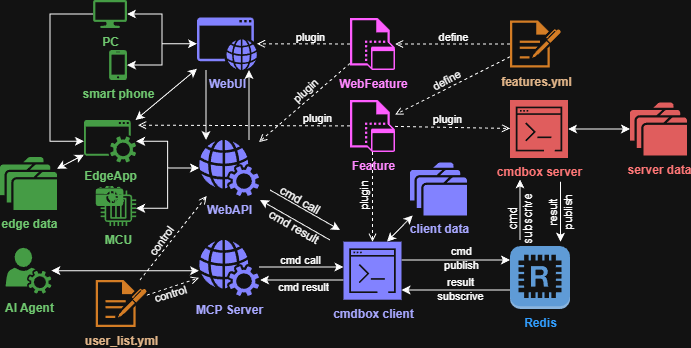
- It is a command development application with a plugin mechanism.
- Documentation is here.
- With cmdbox, you can easily implement commands with complex options.
- The implemented commands can be called from the CLI / RESTAPI / Web / Edge screen.
- The implemented commands can be executed on a remote server via redis.
Install
- Install cmdbox with the following command.
pip install cmdbox
cmdbox -v
How to Set Up the Docker Version
- cmdbox requires a Redis server.
- You can install the Docker version using the following command.
cmdbox -m cmdbox -c redis_install
cmdbox -m cmdbox -c up -C redis
- PostgreSQL is also supported by some cmdbox commands.
- You can install the Docker version using the following command.
cmdbox -m cmdbox -c pgsql_install
cmdbox -m cmdbox -c up -C pgsql
- You can also build the entire cmdbox suite.
- Use the following command to build the Docker version.
cmdbox -m cmdbox -c server_install
cmdbox -m cmdbox -c up -C cmdbox
How to Install Expansion Modules
- When using SAML in web mode, install the modules with dependencies.
pip install cmdbox[saml]
apt-get install -y pkg-config libxml2-dev libxmlsec1-dev libxmlsec1-openssl build-essential
- When using agent mode, install the modules with dependencies.
pip install cmdbox[app]
Run
- Run the cmdbox server.
cmdbox -m server -c start &
- Run the cmdbox web.
cmdbox -m web -c start --signin_file .cmdbox/user_list.yml &
- Run the cmdbox mcpsv.
cmdbox -m mcpsv -c start --signin_file .cmdbox/user_list.yml &
- Run the cmdbox a2asv.
cmdbox -m a2a -c start --signin_file .cmdbox/user_list.yml &
Tutorial
- Open the
.sample/sample_projectfolder in the current directory with VSCode.
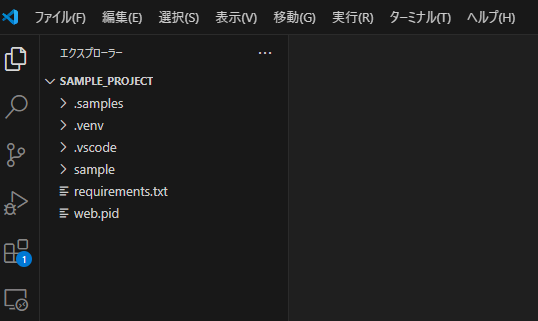
- Install dependent libraries.
python -m venv .venv
. .venv/bin/activate
pip install -e .[dev]
pip install -e .[agent_mcp]
pip install -e .[agent_adk]
pip install -e .[agent_mem]
pip install -e .[rag]
#pip install -e .[omni]
pip uninstall -y cmdbox
- Run the project.
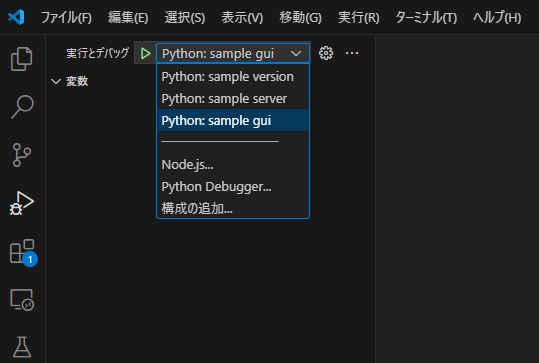
- The localhost web screen will open.
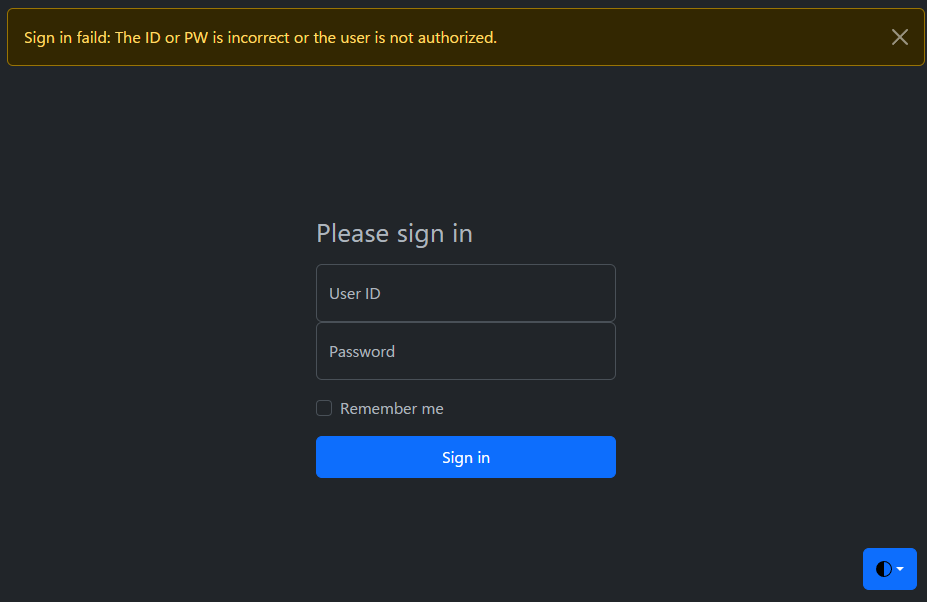
- Enter
user01 / user01for the initial ID and PW to sign in. - Using this web screen, you can easily execute the commands implemented in cmdbox.
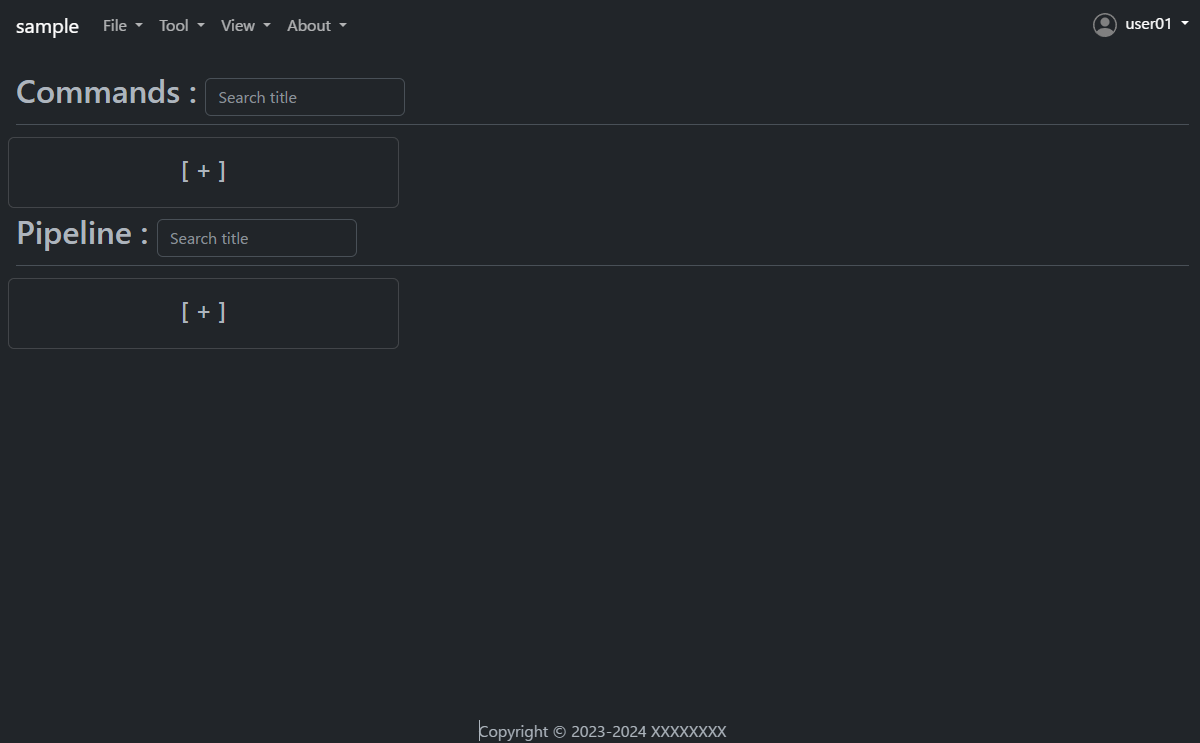
- Let's look at the command to get a list of files as an example.
- Press the plus button under Commands to open the Add dialog.
- Then enter the following.
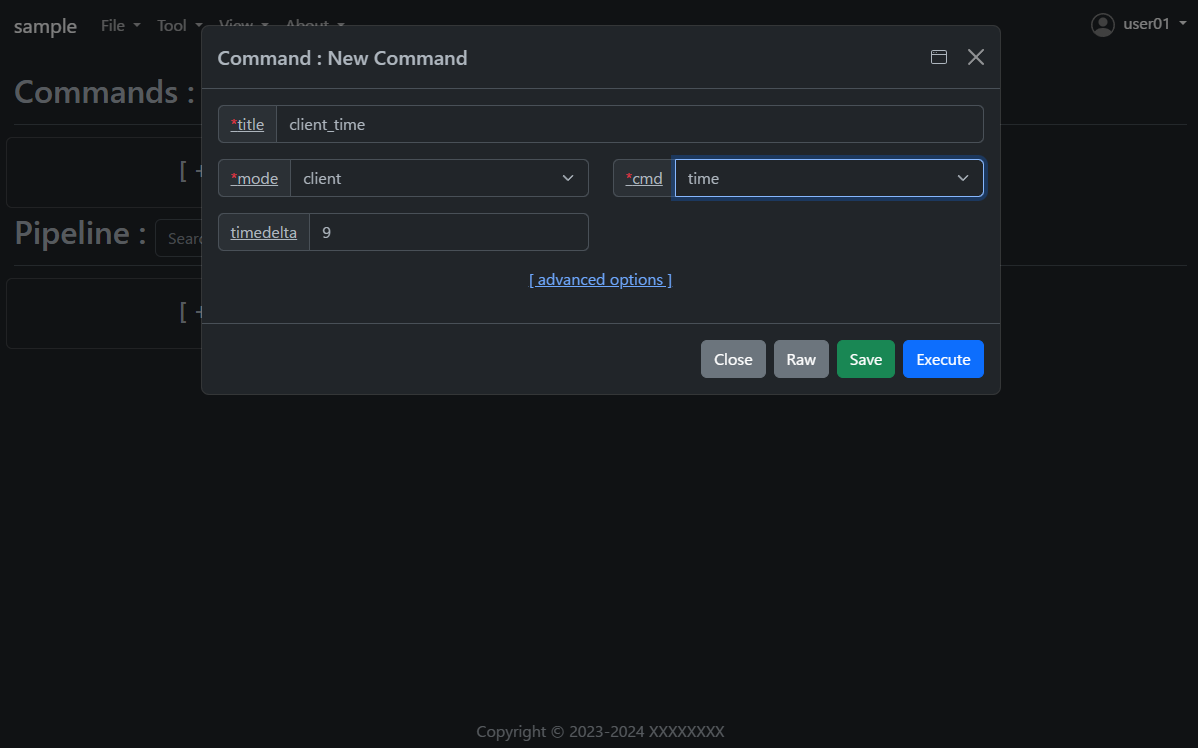
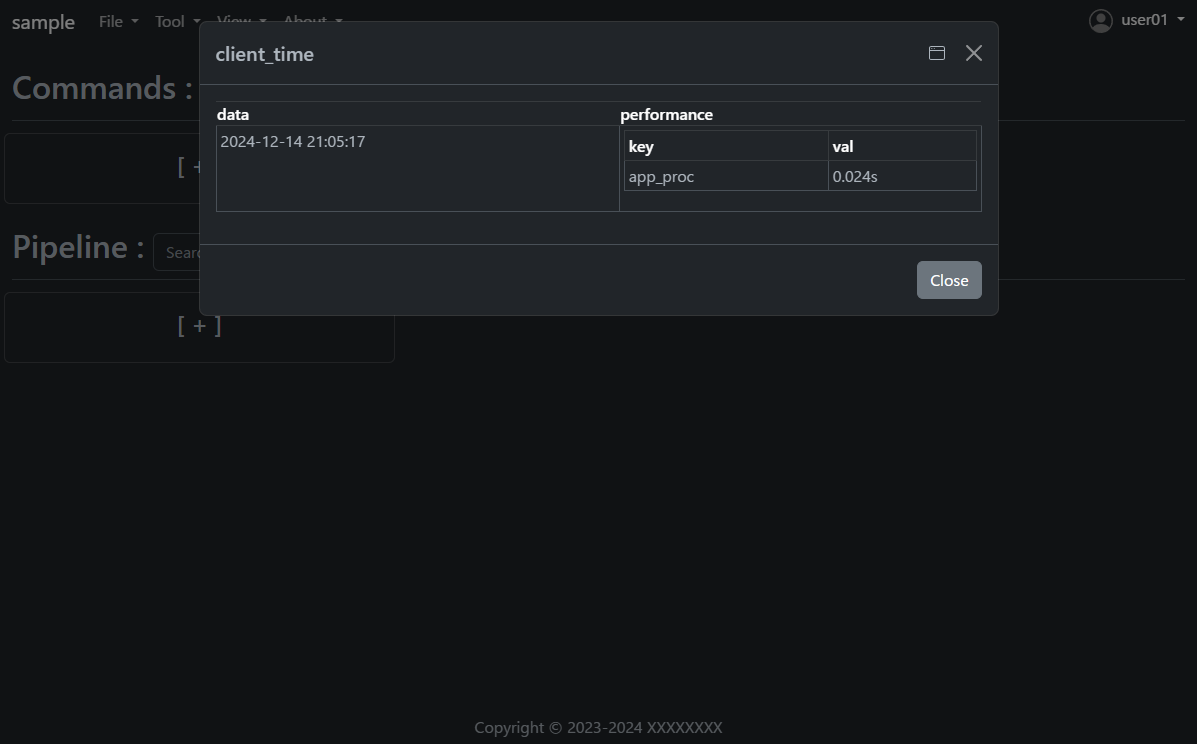
- Press the
Savebutton once and then press theExecutebutton. - The results of the command execution are displayed.
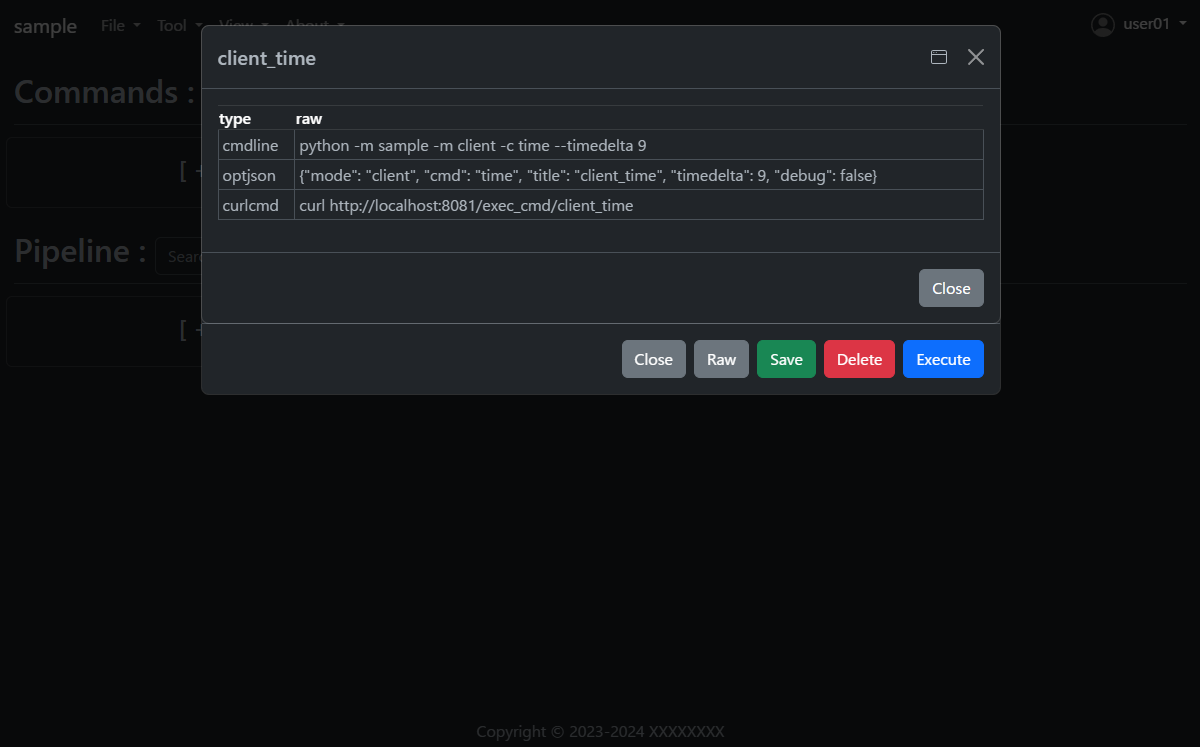
- Open the saved
client_timeand press theRawbutton. - You will see how to execute the same command on the command line; the RESTAPI URL is also displayed.
How to implement a new command using cmdbox
- Under the
sample/app/features/clifolder, you will find an implementation of thesample_client_timementioned earlier. - The implementation is as follows. (Slightly abbreviated display)
- Create the following code and save it in the
sample/app/features/clifolder.
from cmdbox.app import common, feature
from cmdbox.app.commons import validator
from cmdbox.app.options import Options
from typing import Dict, Any, Tuple, Union, List
import argparse
import datetime
import logging


class ClientTime(feature.Feature, validator.Validator):
    def get_mode(self) -> Union[str, List[str]]:
        return "client"

    def get_cmd(self):
        return 'time'

    def get_option(self):
        return dict(
            use_redis=self.USE_REDIS_FALSE, nouse_webmode=False, use_agent=False,
            description_ja="クライアント側の現在時刻を表示します。",
            description_en="Displays the current time at the client side.",
            choice=[
                dict(opt="timedelta", type=Options.T_INT, default=9, required=False, multi=False, hide=False, choice=None,
                        description_ja="時差の時間数を指定します。",
                        description_en="Specify the number of hours of time difference."),
            ])

    @validator.apprun_check
    def apprun(self, logger:logging.Logger, args:argparse.Namespace, tm:float, pf:List[Dict[str, float]]=[]) -> Tuple[int, Dict[str, Any], Any]:
        tz = datetime.timezone(datetime.timedelta(hours=args.timedelta))
        dt = datetime.datetime.now(tz)
        ret = dict(success=dict(data=dt.strftime('%Y-%m-%d %H:%M:%S')))
        common.print_format(ret, args.format, tm, args.output_json, args.output_json_append, pf=pf)
        if 'success' not in ret:
            return self.RESP_WARN, ret, None
        return self.RESP_SUCCESS, ret, None

    def edgerun(self, opt, tool, logger, timeout, prevres = None):
        status, res = tool.exec_cmd(opt, logger, timeout, prevres)
        tool.notify(res)
        yield 1, res
- If you want to implement server-side processing, please refer to
sample_server_time.
from cmdbox.app import common, client, feature
from cmdbox.app.commons import redis_client, validator
from cmdbox.app.options import Options
from pathlib import Path
from typing import Dict, Any, Tuple, Union, List
import argparse
import datetime
import logging


class ServerTime(feature.Feature, validator.Validator):
    def get_mode(self) -> Union[str, List[str]]:
        return "server"

    def get_cmd(self):
        return 'time'

    def get_option(self):
        return dict(
            use_redis=self.USE_REDIS_TRUE, nouse_webmode=False, use_agent=False,
            description_ja="サーバー側の現在時刻を表示します。",
            description_en="Displays the current time at the server side.",
            choice=[
                dict(opt="host", type=Options.T_STR, default=self.default_host, required=True, multi=False, hide=True, choice=None,
                        description_ja="Redisサーバーのサービスホストを指定します。",
                        description_en="Specify the service host of the Redis server."),
                dict(opt="port", type=Options.T_INT, default=self.default_port, required=True, multi=False, hide=True, choice=None,
                        description_ja="Redisサーバーのサービスポートを指定します。",
                        description_en="Specify the service port of the Redis server."),
                dict(opt="password", type=Options.T_PASSWD, default=self.default_pass, required=True, multi=False, hide=True, choice=None,
                        description_ja="Redisサーバーのアクセスパスワード(任意)を指定します。省略時は `password` を使用します。",
                        description_en="Specify the access password of the Redis server (optional). If omitted, `password` is used."),
                dict(opt="svname", type=Options.T_STR, default=self.default_svname, required=True, multi=False, hide=True, choice=None,
                        description_ja="サーバーのサービス名を指定します。省略時は `server` を使用します。",
                        description_en="Specify the service name of the inference server. If omitted, `server` is used."),
                dict(opt="timedelta", type=Options.T_INT, default=9, required=False, multi=False, hide=False, choice=None,
                        description_ja="時差の時間数を指定します。",
                        description_en="Specify the number of hours of time difference."),
                dict(opt="retry_count", type=Options.T_INT, default=3, required=False, multi=False, hide=True, choice=None,
                        description_ja="Redisサーバーへの再接続回数を指定します。0以下を指定すると永遠に再接続を行います。",
                        description_en="Specifies the number of reconnections to the Redis server.If less than 0 is specified, reconnection is forever."),
                dict(opt="retry_interval", type=Options.T_INT, default=5, required=False, multi=False, hide=True, choice=None,
                        description_ja="Redisサーバーに再接続までの秒数を指定します。",
                        description_en="Specifies the number of seconds before reconnecting to the Redis server."),
                dict(opt="timeout", type=Options.T_INT, default="15", required=False, multi=False, hide=True, choice=None,
                        description_ja="サーバーの応答が返ってくるまでの最大待ち時間を指定。",
                        description_en="Specify the maximum waiting time until the server responds."),
            ])

    @validator.apprun_check
    def apprun(self, logger:logging.Logger, args:argparse.Namespace, tm:float, pf:List[Dict[str, float]]=[]) -> Tuple[int, Dict[str, Any], Any]:
        cl = client.Client(logger, redis_host=args.host, redis_port=args.port, redis_password=args.password, svname=args.svname)
        ret = cl.redis_cli.send_cmd(self.get_svcmd(), [str(args.timedelta)],
                                    retry_count=args.retry_count, retry_interval=args.retry_interval, timeout=args.timeout)
        common.print_format(ret, args.format, tm, args.output_json, args.output_json_append, pf=pf)
        if 'success' not in ret:
            return self.RESP_WARN, ret, None
        return self.RESP_SUCCESS, ret, None

    def is_cluster_redirect(self):
        return False

    def svrun(self, data_dir:Path, logger:logging.Logger, redis_cli:redis_client.RedisClient, msg:List[str],
              sessions:Dict[str, Dict[str, Any]]) -> int:
        td = 9 if msg[2] == None else int(msg[2])
        tz = datetime.timezone(datetime.timedelta(hours=td))
        dt = datetime.datetime.now(tz)
        ret = dict(success=dict(data=dt.strftime('%Y-%m-%d %H:%M:%S')))
        redis_cli.rpush(msg[1], ret)
        return self.RESP_SUCCESS

    def edgerun(self, opt, tool, logger, timeout, prevres = None):
        status, res = tool.exec_cmd(opt, logger, timeout, prevres)
        tool.notify(res)
        yield 1, res
- Open the file
sample/extensions/features.yml. The file should look something like this. - This file specifies where new commands are to be read.
- For example, if you want to add a package to read, add a new
packageandprefixtofeatures.cli. - Note that
features.webcan be used to add a new web screen. - If you only want to call commands added in
features.clivia RESTAPI, no additional implementation is needed infeatures.web.
features:
  cli:                                  # Specify a list of package names in which the module implementing the command is located.
    - package: cmdbox.app.features.cli  # Package Name. Classes inheriting from cmdbox.app.feature.Feature.
      prefix: cmdbox_                   # Module name prefix. Modules that begin with this letter are eligible.
      exclude_modules: []               # Specify the module name to exclude from the list of modules to be loaded.
  web:                                  # Specify a list of package names with modules that implement web screens and RESTAPIs.
    - package: cmdbox.app.features.web  # Package Name. Classes inheriting from cmdbox.app.feature.WebFeature .
      prefix: cmdbox_web_               # Module name prefix. Modules that begin with this letter are eligible.
args:                                   # Specifies default or forced arguments for the specified command.
  cli:                                  # Specify rules to apply default values or force arguments.
    - rule:                             # Specify the rules for applying default values and forced arguments for each command line option.
                                        #   e.g. mode: web
      default:                          # Specify a default value for each item to be set when a rule is matched.
                                        #   e.g. doc_root: f"{Path(self.ver.__file__).parent / 'web'}"
      coercion:                         # Specify a coercion value for each item to be set when a rule is matched.
                                        #   e.g. doc_root: f"{Path(self.ver.__file__).parent / 'web'}"
aliases:                                # Specify the alias for the specified command.
  cli:                                  # Specify the alias for the command line.
    - source:                           # Specifies the command from which the alias originates.
        mode:                           # Specify the mode of the source command. The exact match "mode" is selected.
                                        #   e.g. client
        cmd:                            # Specify the source command to be aliased. The regex match "cmd" is selected.
                                        #   e.g. (.+)_(.+)
      target:                           # Specifies the command to be aliased to.
        mode:                           # Specify the mode of the target command. Create an alias for this “mode”.
                                        #   e.g. CLIENT
        cmd:                            # Specify the target command to be aliased. Create an alias for this “cmd”, referring to the regular expression group of source by "{n}".
                                        #   e.g. {2}_{1}
        move:                           # Specify whether to move the regular expression group of the source to the target.
                                        #   e.g. true
  web:                                  # Specify the alias for the RESTAPI.
    - source:                           # Specifies the RESTAPI from which the alias originates.
        path:                           # Specify the path of the source RESTAPI. The regex match "path" is selected.
                                        #   e.g. /exec_(.+)
      target:                           # Specifies the RESTAPI to be aliased to.
        path:                           # Specify the path of the target RESTAPI. Create an alias for this “path”, referring to the regular expression group of source by "{n}".
                                        #   e.g. /{1}_exec
        move:                           # Specify whether to move the regular expression group of the source to the target.
                                        #   e.g. true
agentrule:                              # Specifies a list of rules that determine which commands the agent can execute.
  policy: default                       # Specify the default policy for the rule. The value can be allow or deny or default.
  rules:                                # Specify the rules for the commands that the agent can execute according to the group to which the user belongs.
  - mode: cmd                           # Specify the "mode" as the condition for applying the rule.
    cmds: [list, load]                  # Specify the "cmd" to which the rule applies. Multiple items can be specified in a list.
    rule: allow                         # Specifies whether the specified command is allowed or not. Values are allow or deny.
audit:
  enabled: true                         # Specify whether to enable the audit function.
  write:
    mode: audit                         # Specify the mode of the feature to be writed.
    cmd: write                          # Specify the command to be writed.
  search:
    mode: audit                         # Specify the mode of the feature to be searched.
    cmd: search                         # Specify the command to be searched.
  options:                              # Specify the options for the audit function.
    host: localhost                     # Specify the service host of the audit Redis server.However, if it is specified as a command line argument, it is ignored.
    port: 6379                          # Specify the service port of the audit Redis server.However, if it is specified as a command line argument, it is ignored.
    password: password                  # Specify the access password of the audit Redis server.However, if it is specified as a command line argument, it is ignored.
    svname: cmdbox                      # Specify the audit service name of the inference server.However, if it is specified as a command line argument, it is ignored.
    retry_count: 3                      # Specifies the number of reconnections to the audit Redis server.If less than 0 is specified, reconnection is forever.
    retry_interval: 1                   # Specifies the number of seconds before reconnecting to the audit Redis server.
    timeout: 15                         # Specify the maximum waiting time until the server responds.
    pg_enabled: False                   # Specify True if using the postgresql database server.
    pg_host: pgsql                      # Specify the postgresql host.
    pg_port: 5432                       # Specify the postgresql port.
    pg_user: pgsql                      # Specify the postgresql user name.
    pg_password: pgsql                  # Specify the postgresql password.
    pg_dbname: audit                    # Specify the postgresql database name.
    retention_period_days: 365          # Specify the number of days to retain audit logs.
- The following files should also be known when using commands on the web screen or RESTAPI.
- Open the file
sample/extensions/user_list.yml. The file should look something like this. - This file manages the users and groups that are allowed Web access and their rules.
- The rule of the previous command is
allowfor users in theusergroup incmdrule.rules.
users:                         # A list of users, each of which is a map that contains the following fields.
- uid: 1                       # An ID that identifies a user. No two users can have the same ID.
  name: admin                  # A name that identifies the user. No two users can have the same name.
  password: XXXXXXXXXXXXXX     # The user's password. The value is hashed with the hash function specified in the next hash field.
  hash: plain                  # The hash function used to hash the password, which can be plain, md5, sha1, or sha256, or oauth2, or saml.
  groups: [admin]              # A list of groups to which the user belongs, as specified in the groups field.
  email: admin@aaa.bbb.jp      # The email address of the user, used when authenticating using the provider specified in the oauth2 or saml field.
  home: /.users/admin          # The home directory of the user, used for file operations.
- uid: 2
  name: develop
  password: XXXXXXXXXXXXXX
  hash: plain
  groups: [develop]
  email: develop@aaa.bbb.jp
  home: /.users/develop
  buildin: true                # Whether the user is a built-in user. Built-in users cannot be deleted.
- uid: 3
  name: master
  password: XXXXXXXXXXXXXX
  hash: plain
  groups: [master]
  email: master@aaa.bbb.jp
  home: /.users/master
  buildin: true
- uid: 101
  name: user01
  password: b75705d7e35e7014521a46b532236ec3
  hash: md5
  groups: [user]
  email: user01@aaa.bbb.jp
  home: /.users/user01
- uid: 102
  name: user02
  password: XXXXXXXXXXXXXX
  hash: sha1
  groups: [readonly]
  email: user02@aaa.bbb.jp
  home: /.users/user02
- uid: 103
  name: user03
  password: XXXXXXXXXXXXXX
  hash: sha256
  groups: [editor]
  email: user03@aaa.bbb.jp
  home: /.users/user03
groups:                        # A list of groups, each of which is a map that contains the following fields.
- gid: 1                       # An ID that identifies a group. No two groups can have the same ID.
  name: admin                  # A name that identifies the group. No two groups can have the same name.
  home: /.groups/admin         # The home directory of the group, used for file operations.
  startpage: /gui              # The group's start page.
                               # This is the page to which users belonging to the group are redirected when they access the “/” path.
- gid: 2
  name: develop
  home: /.groups/develop
  startpage: /gui
  buildin: true                # Whether the group is a built-in group. Built-in groups cannot be deleted.
- gid: 3
  name: master
  home: /.groups/master
  startpage: /gui
  buildin: true
- gid: 4
  name: guest
  home: /.groups/guest
  startpage: /agent
- gid: 101
  name: user
  home: /.groups/user
  startpage: /agent
- gid: 102
  name: readonly
  parent: user                 # The parent group of the group. If the parent group is not specified, the group is a top-level group.
  home: /.groups/readonly
- gid: 103
  name: editor
  parent: user
  home: /.groups/editor
cmdrule:                       # A list of command rules, Specify a rule that determines whether or not a command is executable when executed by a user in web mode.
  policy: deny                 # Specify the default policy for the rule. The value can be allow or deny.
  rules:                       # Specify rules to allow or deny execution of the command, depending on the group the user belongs to.
  - groups: [develop, master]
    coercion:                  # Specify a coercion value for each item to be set when a rule is matched.
                               # e.g. wpath: f"/users/{user_name}"
      fwpath: "['/']"
      rjpath: "[]"
      from_fwpath: "['/']"
      to_fwpath: "['/']"
      from_rjpath: '[]'
      to_rjpath: '[]'
    rule: allow
  - groups: [admin]
    coercion:
      fwpath: "['/.users','/.groups']"
      rjpath: '[f''^/.(users|groups)/develop'', f''^/.(users|groups)/master'']'
      from_fwpath: "['/.users','/.groups']"
      to_fwpath: "['/.users','/.groups']"
      from_rjpath: '[f''^/.(users|groups)/develop'', f''^/.(users|groups)/master'']'
      to_rjpath: '[f''^/.(users|groups)/develop'', f''^/.(users|groups)/master'']'
    rule: allow
  - groups: [guest, user, readonly, editor]
    coercion:
      fwpath: "[f'/.users/{user_name}']+[f'/.groups/{g}' for g in groups]"
      rjpath: '[f''^/.(users|groups)/develop'', f''^/.(users|groups)/master'']'
      from_fwpath: "[f'/.users/{user_name}']+[f'/.groups/{g}' for g in groups]"
      to_fwpath: "[f'/.users/{user_name}']+[f'/.groups/{g}' for g in groups]"
      from_rjpath: '[f''^/.(users|groups)/develop'', f''^/.(users|groups)/master'']'
      to_rjpath: '[f''^/.(users|groups)/develop'', f''^/.(users|groups)/master'']'
    rule: deny
  - groups: [master, admin]
    mode: test
    rule: deny
  - groups: [admin]
    mode: tts
    cmds: [install, uninstall]
    rule: deny
  - groups: [admin]
    mode: datasource
    cmds: [save, load, del, tbl_create, tbl_drop, idx_create, idx_drop]
    rule: deny
  - groups: [guest, user, readonly, editor]
    mode: llm
    cmds: [list, chat, translation]
    rule: allow
  - groups: [user]             # Specify the groups to which the rule applies.
    mode: client               # Specify the "mode" as the condition for applying the rule.
    cmds: [file_download, file_list, server_info, time] # Specify the "cmd" to which the rule applies. Multiple items can be specified in a list.
    rule: allow                # Specifies whether or not the specified command is allowed for the specified group. The value can be allow or deny.
  - groups: [user]
    mode: agent
    cmds: [chat, agent_list, mcp_client, mcpsv_list, runner_list, runner_load,
           session_list, session_del, start, stop]
    rule: allow
  - groups: [user]
    mode: cmd
    cmds: [list, load, check]
    rule: allow
  - groups: [user]
    mode: extract
    cmds: [list, pdfplumber, chunklet]
    coercion:
      fwpath: "[f'/.users/{user_name}']+[f'/.groups/{g}' for g in groups]"
    rule: allow
  - groups: [user]
    mode: rag
    cmds: [list]
    rule: allow
  - groups: [user]
    mode: server
    cmds: [list]
    rule: allow
  - groups: [user, guest]
    mode: audit
    cmds: [write]
    rule: allow
  - groups: [user, guest]
    mode: web
    cmds: [genpass]
    rule: allow
  - groups: [user]
    mode: client
    cmds: [file_copy, file_mkdir, file_move, file_remove, file_rmdir, file_upload]
    rule: allow
  - groups: [editor]
    mode: agent
    cmds: [agent_del, mcpsv_del, runner_del,
           agent_load, mcpsv_load, runner_load,
           agent_save, mcpsv_save, runner_save,]
    rule: allow
  - groups: [editor]
    mode: extract
    cmds: [del, load, save]
    rule: allow
  - groups: [editor]
    mode: llm
    cmds: [del, load, save]
    rule: allow
pathrule:                      # List of RESTAPI rules, rules that determine whether or not a RESTAPI can be executed when a user in web mode accesses it.
  policy: deny                 # Specify the default policy for the rule. The value can be allow or deny.
  rules:                       # Specify rules to allow or deny execution of the RESTAPI, depending on the group the user belongs to.
  - groups:                    # Specify the groups to which the rule applies.
    - admin
    - develop
    - master
    paths: [/]                 # Specify the "path" to which the rule applies. Multiple items can be specified in a list.
    rule: allow                # Specifies whether or not the specified RESTAPI is allowed for the specified group. The value can be allow or deny.
  - groups: [guest]
    paths: [/signin, /assets, /copyright, /dosignin, /dosignout, /password/change,
            /gui, /get_server_opt, /usesignout,
            /versions, /versions_cmdbox, /versions_used]
    rule: allow
  - groups: [user]
    paths: [/signin, /assets, /bbforce_cmd, /copyright, /dosignin, /dosignout, /password/change,
            /gui/user_data/load, /gui/user_data/save, /gui/user_data/delete,
            /agent, /a2a, /a2a_reload, /mcp,
            /exec_cmd, /exec_pipe, /filer, /result, /gui, /get_server_opt, /usesignout,
            /versions, /versions_cmdbox, /versions_used]
    rule: allow
  - groups: [readonly]
    paths: [/gui/del_cmd, /gui/del_pipe, /gui/save_cmd, /gui/save_pipe]
    rule: deny
  - groups: [editor]
    paths: [/gui/del_cmd, /gui/del_pipe, /gui/save_cmd, /gui/save_pipe]
    rule: allow
password:                       # Password settings.
  policy:                       # Password policy settings.
    enabled: true               # Specify whether or not to enable password policy.
    not_same_before: true       # Specify whether or not to allow the same password as the previous one.
    min_length: 8               # Specify the minimum length of the password.
    max_length: 64              # Specify the maximum length of the password.
    min_lowercase: 1            # Specify the minimum number of lowercase letters in the password.
    min_uppercase: 1            # Specify the minimum number of uppercase letters in the password.
    min_digit: 1                # Specify the minimum number of digits in the password.
    min_symbol: 1               # Specify the minimum number of symbol characters in the password.
    not_contain_username: true  # Specify whether or not to include the username in the password.
  expiration:                   # Password expiration settings.
    enabled: true               # Specify whether or not to enable password expiration.
    period: 90                  # Specify the number of days after which the password will expire.
    notify: 7                   # Specify the number of days before the password expires that a notification will be sent.
  lockout:                      # Account lockout settings.
    enabled: true               # Specify whether or not to enable account lockout.
    threshold: 5                # Specify the number of failed login attempts before the account is locked.
    reset: 30                   # Specify the number of minutes after which the failed login count will be reset.
apikey:
  gen_cert:                         # Specify whether to generate a certificate for API key.
    enabled: true                   # Specify whether to enable certificate generation for API key.
    privatekey: idp_private.pem     # Specify the destination file for the generated private key.
    certificate: idp_cert.pem       # Specify the destination file for the generated certificate.
    publickey: idp_public.pem       # Specify the destination file for the generated public key.
  gen_jwt:                          # Specify whether to generate JWT for API key.
    enabled: true                   # Specify whether to enable JWT generation for API key.
    privatekey: idp_private.pem     # Specify the private key file for JWT generation.
    privatekey_passphrase:          # Specify the passphrase for the private key file.
                                    # If the private key is encrypted, specify the passphrase here.
    algorithm: RS256                # Specify the algorithm used to generate the JWT. The value can be RS256, PS256, or ES256.
    claims:                         # Specify the claims to be included in the JWT.
      iss: identity_provider        # Specify the issuer of the JWT. This is usually the name of the identity provider.
      sub: app_user                 # Specify the subject of the JWT. This is usually the name of the application.
      aud: app_organization         # Specify the audience of the JWT. This is usually the name of the organization that will use the application.
      exp: 31536000                 # Specify the expiration time of the JWT in seconds. The default is 31536000 seconds (1 year).
  verify_jwt:                       # Specify whether to verify JWT for API key.
    enabled: true                   # Specify whether to enable JWT verification for API key.
    certificate: idp_cert.pem       # Specify the certificate file for JWT verification.
    publickey: idp_public.pem       # Specify the public key file for JWT verification. Not required if certificate exists.
    issuer: identity_provider       # Specify the issuer of the JWT. This is usually the name of the identity provider. (If not specified, no verification)
    audience: app_organization      # Specify the audience of the JWT. This is usually the name of the organization that will use the application. (If not specified, no verification)
    algorithm: RS256                # Specify the algorithm used to verify the JWT. The value can be RS256, PS256, or ES256.
signin:                             # Sign-in settings.
  signin_module:                    # Specify the module name that implements the sign-in for the authentication provider.
    cmdbox.app.auth.signin
oauth2:                             # OAuth2 settings.
  providers:                        # This is a per-provider setting for OAuth2.
    google:                         # Google's OAuth2 configuration.
      enabled: false                # Specify whether to enable Google's OAuth2.
      client_id: XXXXXXXXXXX        # Specify Google's OAuth2 client ID.
      client_secret: XXXXXXXXXXX    # Specify Google's OAuth2 client secret.
      redirect_uri: https://localhost:8443/oauth2/google/callback # Specify Google's OAuth2 redirect URI.
      scope: ['email']              # Specify the scope you want to retrieve with Google's OAuth2. Usually, just reading the email is sufficient.
      signin_module:                # Specify the module name that implements the sign-in.
        cmdbox.app.auth.google_signin
      note:                         # Specify a description such as Google's OAuth2 reference site.
      - https://developers.google.com/identity/protocols/oauth2/web-server?hl=ja#httprest
    github:                         # OAuth2 settings for GitHub.
      enabled: false                # Specify whether to enable OAuth2 for GitHub.
      client_id: XXXXXXXXXXX        # Specify the OAuth2 client ID for GitHub.
      client_secret: XXXXXXXXXXX    # Specify the GitHub OAuth2 client secret.
      redirect_uri: https://localhost:8443/oauth2/github/callback # Specify the OAuth2 redirect URI for GitHub.
      scope: ['user:email']         # Specify the scope you want to get from GitHub's OAuth2. Usually, just reading the email is sufficient.
      signin_module:                # Specify the module name that implements the sign-in.
        cmdbox.app.auth.github_signin
      note:                         # Specify a description, such as a reference site for OAuth2 on GitHub.
      - https://docs.github.com/ja/apps/oauth-apps/building-oauth-apps/authorizing-oauth-apps#scopes
    azure:                          # OAuth2 settings for Azure AD.
      enabled: false                # Specify whether to enable OAuth2 for Azure AD.
      tenant_id: XXXXXXXXXXX        # Specify the tenant ID for Azure AD.
      client_id: XXXXXXXXXXX        # Specify the OAuth2 client ID for Azure AD.
      client_secret: XXXXXXXXXXX    # Specify the Azure AD OAuth2 client secret.
      redirect_uri: https://localhost:8443/oauth2/azure/callback # Specify the OAuth2 redirect URI for Azure AD.
      scope: ['openid', 'profile', 'email', 'https://graph.microsoft.com/mail.read']
      signin_module:                # Specify the module name that implements the sign-in.
        cmdbox.app.auth.azure_signin
      note:                         # Specify a description, such as a reference site for Azure AD's OAuth2.
      - https://learn.microsoft.com/ja-jp/entra/identity-platform/v2-oauth2-auth-code-flow
saml:                               # SAML settings.
  providers:                        # This is a per-provider setting for OAuth2.
    azure:                          # SAML settings for Azure AD.
      enabled: false                # Specify whether to enable SAML authentication for Azure AD.
      signin_module:                # Specify the module name that implements the sign-in.
        cmdbox.app.auth.azure_signin_saml # Specify the python3-saml configuration.
                                    # see) https://github.com/SAML-Toolkits/python3-saml
      sp:
        entityId: https://localhost:8443/
        assertionConsumerService:
          url: https://localhost:8443/saml/azure/callback
          binding: urn:oasis:names:tc:SAML:2.0:bindings:HTTP-POST
        attributeConsumingService: {}
        singleLogoutService:
          binding: urn:oasis:names:tc:SAML:2.0:bindings:HTTP-Redirect
        NameIDFormat: urn:oasis:names:tc:SAML:1.1:nameid-format:unspecified
        x509cert: ''
        privateKey: ''
      idp:
        entityId: https://sts.windows.net/{tenant-id}/
        singleSignOnService:
          url: https://login.microsoftonline.com/{tenant-id}/saml2
          binding: urn:oasis:names:tc:SAML:2.0:bindings:HTTP-Redirect
        x509cert: XXXXXXXXXXX
        singleLogoutService: {}
        certFingerprint: ''
        certFingerprintAlgorithm: sha1
- See the documentation for references to each file.
- Documentation is here.
Lisence
This project is licensed under the MIT License, see the LICENSE file for details
1 maintainer

Download files
Download the file for your platform. If you're not sure which to choose, learn more about installing packages.
Source Distribution
cmdbox-0.8.1.3.tar.gz
(2.3 MB
view details)
Built Distribution
Filter files by name, interpreter, ABI, and platform.
If you're not sure about the file name format, learn more about wheel file names.
Copy a direct link to the current filters
File details
Details for the file cmdbox-0.8.1.3.tar.gz.
File metadata
- Download URL: cmdbox-0.8.1.3.tar.gz
- Upload date:
- Size: 2.3 MB
- Tags: Source
- Uploaded using Trusted Publishing? No
- Uploaded via:
twine/6.2.0 CPython/3.11.8
File hashes
| Algorithm | Hash digest | |
|---|---|---|
| SHA256 |
b4638722a931f28eeebbf93c9a70e10a674e2eb7bd3506a608c47cb6cb2d0bdc
|
|
| MD5 |
316da7b3a3510288fecc4c9bab5cc505
|
|
| BLAKE2b-256 |
27f8dd5abe65f8c3e433c1e68a5ffff73aa11ba92668f70b7021e7d0a801bd11
|
File details
Details for the file cmdbox-0.8.1.3-py3-none-any.whl.
File metadata
- Download URL: cmdbox-0.8.1.3-py3-none-any.whl
- Upload date:
- Size: 2.9 MB
- Tags: Python 3
- Uploaded using Trusted Publishing? No
- Uploaded via:
twine/6.2.0 CPython/3.11.8
File hashes
| Algorithm | Hash digest | |
|---|---|---|
| SHA256 |
56ceb5cd547c5d5248c8add0149c0f4a8551520b38d459645fca9e620f1e48ad
|
|
| MD5 |
e5cd518c3e04d19e62ae3b7c276a67ed
|
|
| BLAKE2b-256 |
7ee80eb18393b662c564c0542d9030dbaa0096f41d0bcf2aa7ee81e3f69d224d
|














