
cmdbox
cmdbox is a command foundation for AI system development that lets you launch with minimal implementation. A single feature implementation can be exposed through CLI / REST API / MCP SV / Web UI / Edge UI / remote execution.
- Documentation: https://hamacom2004jp.github.io/cmdbox/
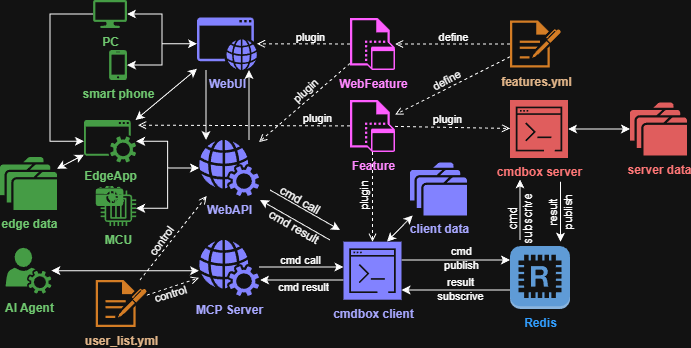
Why cmdbox for AI System Developers
- No repeated reimplementation
- Implement a
Featurecommand once, then use the same capability via CLI, Web UI, and REST API. - It is easy to promote a PoC CLI workflow into operational Web/API interfaces without rewriting business logic.
- Implement a
- AI-ready components out of the box
- Modes such as
agent,llm,mcpsv, anda2asvlet you manage agent execution, model operations, MCP exposure, and A2A integration on one platform. - You can separate tool execution, inference, knowledge retrieval, and external integration while keeping a consistent operational model.
- Modes such as
- Rich Web UI for daily operations
- Beyond APIs and CLI, cmdbox provides operational screens for commandlets, agents, filer, limiter, audit, and user management.
- Teams can run, monitor, and control workflows from a browser without building a separate admin console.
- Designed for remote execution
- Server-side commands can run through Redis, which fits node separation and scale-out architectures.
- Heavy workloads can be offloaded to servers while keeping client components lightweight.
- Fast, configuration-driven extensibility
features.ymldefines command discovery, aliases, argument rules, and agent execution rules, separating implementation from operations policy.- You can adjust exposed commands and execution policies without code changes, which is useful for environment-specific control.
- Built-in governance capabilities
- You can combine audit logging, authentication/authorization (signin / oauth2 / saml / rule settings), and limiter controls.
- It is easier to trace who executed which command under which conditions, enabling enterprise-grade operational control.
Problems It Solves Well
- You need to launch internal AI tools quickly
- Start with CLI features, then expose the same capabilities internally via Web and REST API.
- Multiple teams/environments need one shared foundation
- Run the same codebase across dev/stg/prod while switching execution policies through configuration.
- You need safe integration between agents and existing systems
- Combine MCP/A2A integration with authorization rules to control the scope of agent actions.
- You need usage control and cost governance for AI operations
- Use Limiter settings to enforce quotas/rate rules, prevent abuse, and keep usage and billing behavior predictable.
- Define reusable plans and billing policies (period-based or metered) to align access control with commercial and internal chargeback models.
What You Can Build
- Custom command development
- Support complex option definitions, client/server execution, and Web execution.
- Organize functionality by
mode/cmdand standardize execution through a shared option model.
- LLM integration
- Chat, embedding, and configuration save/load/list workflows.
- Manage model configurations and treat inference calls as operational commands.
- Agent integration
- Save/load agent settings, integrate MCP servers, and connect A2A servers.
- Expand agent capabilities in phases while keeping clear boundaries on exposed tools.
- Web UI operations
- Use built-in screens for commandlets, agents, filer, limiter, audit, and user management.
- Manage day-to-day operations from the browser while keeping the same backend command model.
- Operational controls
- Audit logs, authentication, command execution policy, and REST API controls.
- Publish safely with permissions segmented by organization or user group and full traceability.
- Configure plan and billing operations to support subscription-style access windows and metered charging models.
Typical Use Cases
- Internal knowledge search combining document processing + LLM
- Converting routine operations into commands and running them from Web UI with no-code interaction
- Letting agents call internal tools safely within controlled boundaries
- Running operational administration (filer, limiter, audit, and user control) from the built-in Web UI
Installation
pip install cmdbox[app]
cmdbox -v
Docker Environment Setup
- Redis
cmdbox -m cmdbox -c redis_install
cmdbox -m cmdbox -c up -C redis
- PostgreSQL (used by some commands)
cmdbox -m cmdbox -c pgsql_install
cmdbox -m cmdbox -c up -C pgsql
- Full cmdbox suite
cmdbox -m cmdbox -c server_install
cmdbox -m cmdbox -c up -C cmdbox
Quick Start
cmdbox -m server -c start
cmdbox -m web -c start --signin_file .cmdbox/user_list.yml
cmdbox -m mcpsv -c start --signin_file .cmdbox/user_list.yml
cmdbox -m a2asv -c start --signin_file .cmdbox/user_list.yml
Tutorial
The tutorial content has moved to the following documentation:
docs_src/docs/tutorial.rst- Published tutorial: https://hamacom2004jp.github.io/cmdbox/docs/tutorial.html
- Full documentation: https://hamacom2004jp.github.io/cmdbox/
License
This project is licensed under the MIT License, see the LICENSE file for details
1 maintainer

Download files
Download the file for your platform. If you're not sure which to choose, learn more about installing packages.
Source Distribution
Built Distribution
Filter files by name, interpreter, ABI, and platform.
If you're not sure about the file name format, learn more about wheel file names.
Copy a direct link to the current filters
File details
Details for the file cmdbox-0.8.4.1.tar.gz.
File metadata
- Download URL: cmdbox-0.8.4.1.tar.gz
- Upload date:
- Size: 2.3 MB
- Tags: Source
- Uploaded using Trusted Publishing? No
- Uploaded via:
twine/7.0.0 CPython/3.11.8
File hashes
| Algorithm | Hash digest | |
|---|---|---|
| SHA256 |
3e772325cbc123dddc4fd8a41a3395006d2cf601c8dbae389cfef1b407bdf7ad
|
|
| MD5 |
041e890bdb19e708276b5491c4cd3a0f
|
|
| BLAKE2b-256 |
d69162544132a3355c9a3d1c43481f0990623612635ddc42bf76689ce0ddd020
|
File details
Details for the file cmdbox-0.8.4.1-py3-none-any.whl.
File metadata
- Download URL: cmdbox-0.8.4.1-py3-none-any.whl
- Upload date:
- Size: 2.9 MB
- Tags: Python 3
- Uploaded using Trusted Publishing? No
- Uploaded via:
twine/7.0.0 CPython/3.11.8
File hashes
| Algorithm | Hash digest | |
|---|---|---|
| SHA256 |
0af1ab8fd7ce952ab848c9316f11a27f5de045bd3b139e6d135c3cf8f3432857
|
|
| MD5 |
e15a6d104df546f28891c9df0e642766
|
|
| BLAKE2b-256 |
6abf649491c72e810d606ec9797c1b92359215ae4317d20a8f541d0e580738cc
|














